

Sring和Mybatis的整合-实现对数据库的增、删、改、查,以及查询指定数量的数据,批量添加多条数据等
Sring和Mybatis的整合
1.操作步骤:
1.创建项目,引入jar包:
2.编写db.properties
3.编写String的配置文件applicationContext.xml
4.编写Mybatis的配置文件mybatis-config.xml
5.引入log4j.properties
1.1创建项目,引入jar包:
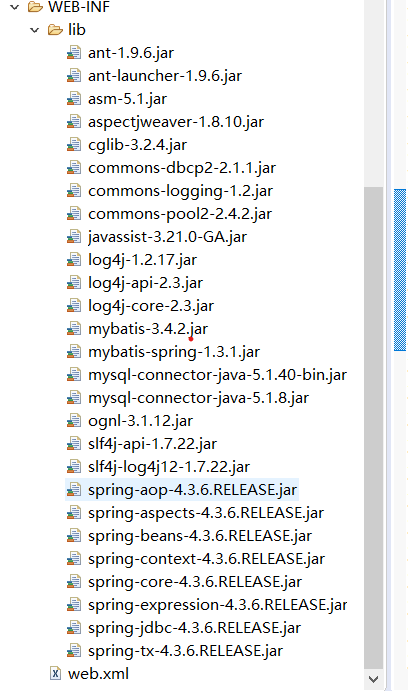
该jar包包含Spring和Mybatis框架所需的部分jar包,和Spring和Mybatis整合的jar包,以及数据库驱动的jar包等。
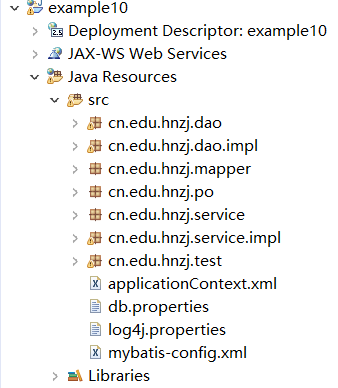
项目开发包的结构
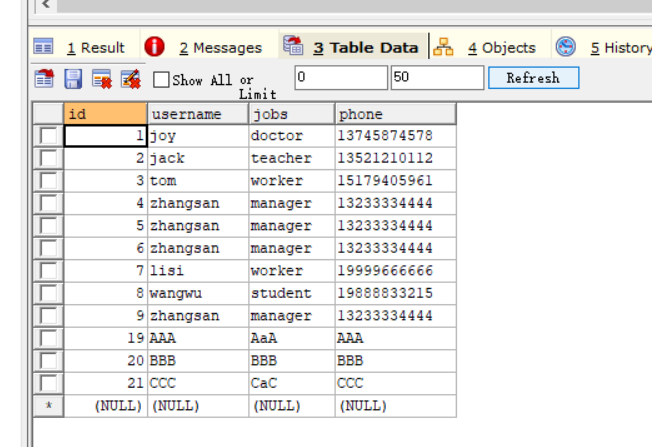
对应的sql文件
 1 # 使用mybatis数据库
 2 USE mybatis;
 3 # 创建一个名称为t_customer的表
 4 CREATE TABLE t_customer (
 5     id int(32) PRIMARY KEY AUTO_INCREMENT,
 6     username varchar(50),
 7     jobs varchar(50),
 8     phone varchar(16)
 9 );
10 # 插入3条数据
11 INSERT INTO t_customer VALUES ('1', 'joy', 'doctor', '13745874578');
12 INSERT INTO t_customer VALUES ('2', 'jack', 'teacher', '13521210112');
13 INSERT INTO t_customer VALUES ('3', 'tom', 'worker', '15179405961');
1.2.编写db.properties
jdbc.driver=com.mysql.jdbc.Driver
jdbc.url=jdbc:mysql://localhost:3306/mybatis
jdbc.username=root
jdbc.password=123456
jdbc.maxTotal=30
jdbc.maxIdle=10
jdbc.initialSize=5
1.3.编写Spring的配置文件applicationContext.xml
 1 <?xml version="1.0" encoding="UTF-8"?>
 2 <beans xmlns="http://www.springframework.org/schema/beans"
 3     xmlns:xsi="http://www.w3.org/2001/XMLSchema-instance"
 4     xmlns:aop="http://www.springframework.org/schema/aop"
 5     xmlns:tx="http://www.springframework.org/schema/tx"
 6     xmlns:context="http://www.springframework.org/schema/context"
 7     xsi:schemaLocation="http://www.springframework.org/schema/beans
 8     http://www.springframework.org/schema/beans/spring-beans-4.3.xsd
 9     http://www.springframework.org/schema/tx
10     http://www.springframework.org/schema/tx/spring-tx-4.3.xsd
11     http://www.springframework.org/schema/context
12     http://www.springframework.org/schema/context/spring-context-4.3.xsd
13     http://www.springframework.org/schema/aop
14     http://www.springframework.org/schema/aop/spring-aop-4.3.xsd">
15     <!--读取db.properties -->
16     <context:property-placeholder location="classpath:db.properties"/>
17     <!-- 配置数据源 -->
18     <bean id="dataSource"
19             class="org.apache.commons.dbcp2.BasicDataSource">
20         <!--数据库驱动 -->
21         <property name="driverClassName" value="${jdbc.driver}" />
22         <!--连接数据库的url -->
23         <property name="url" value="${jdbc.url}" />
24         <!--连接数据库的用户名 -->
25         <property name="username" value="${jdbc.username}" />
26         <!--连接数据库的密码 -->
27         <property name="password" value="${jdbc.password}" />
28         <!--最大连接数 -->
29         <property name="maxTotal" value="${jdbc.maxTotal}" />
30         <!--最大空闲连接  -->
31         <property name="maxIdle" value="${jdbc.maxIdle}" />
32         <!--初始化连接数  -->
33         <property name="initialSize" value="${jdbc.initialSize}" />
34     </bean>
35     <!-- 事务管理器,依赖于数据源 -->
36     <bean id="transactionManager" class=
37      "org.springframework.jdbc.datasource.DataSourceTransactionManager">
38         <property name="dataSource" ref="dataSource" />
39     </bean>
40     <!--开启事务注解 -->
41     <tx:annotation-driven transaction-manager="transactionManager"/>
42     <!--配置MyBatis工厂 -->
43     <bean id="sqlSessionFactory"
44             class="org.mybatis.spring.SqlSessionFactoryBean">
45          <!--注入数据源 -->
46          <property name="dataSource" ref="dataSource" />
47          <!--指定核心配置文件位置 -->
48            <property name="configLocation" value="classpath:mybatis-config.xml"/>
49    </bean>
50
51    <!--实例化Dao -->
52     <bean id="customerDao" class="cn.edu.hnzj.dao.impl.CustomerDaoImpl">
53     <!-- 注入SqlSessionFactory对象实例-->
54          <property name="sqlSessionFactory" ref="sqlSessionFactory" />
55     </bean>
56
57     <!-- Mapper代理开发(基于MapperFactoryBean) -->
58     <bean id="customerMapper" class="org.mybatis.spring.mapper.MapperFactoryBean">
59         <property name="mapperInterface" value="cn.edu.hnzj.mapper.CustomerMapper" />
60         <property name="sqlSessionFactory" ref="sqlSessionFactory" />
61     </bean>
62
63     <!-- Mapper代理开发(基于MapperScannerConfigurer) -->
64     <!-- <bean class="org.mybatis.spring.mapper.MapperScannerConfigurer">
65          <property name="basePackage" value="com.itheima.mapper" />
66     </bean> -->
67
68     <!-- 开启扫描 -->
69      <context:component-scan base-package="cn.edu.hnzj.service" />
70
71 </beans>
1.4.编写Mybatis的配置文件mybatis-config.xml
 1 <?xml version="1.0" encoding="UTF-8" ?>
 2 <!DOCTYPE configuration PUBLIC "-//mybatis.org//DTD Config 3.0//EN"
 3     "http://mybatis.org/dtd/mybatis-3-config.dtd">
 4 <configuration>
 5     <!--配置别名 -->
 6     <typeAliases>
 7         <package name="cn.edu.hnzj.po" />
 8     </typeAliases>
 9     <!--配置Mapper的位置 -->
10     <mappers>
11         <mapper resource="cn/edu/hnzj/po/CustomerMapper.xml" />
12        <!-- Mapper接口开发方式 -->
13        <mapper resource="cn/edu/hnzj/mapper/CustomerMapper.xml" />
14
15     </mappers>
16 </configuration>
1.5.引入log4j.properties
# Global logging configuration
log4j.rootLogger=ERROR, stdout
# MyBatis logging configuration...
log4j.logger.cn.edu.hnzj=DEBUG
# Console output...
log4j.appender.stdout=org.apache.log4j.ConsoleAppender
log4j.appender.stdout.layout=org.apache.log4j.PatternLayout
log4j.appender.stdout.layout.ConversionPattern=%5p [%t] - %m%n
2.传统Dao开发整合方式
2.1.在cn.edu.hnzj.po包下面定义一个类 Customer
package cn.edu.hnzj.po;

public class Customer {

    private Integer id; //主键id
    private String username;//客户名称
    private String jobs; //职业
    private String phone;//电话

    public Integer getId() {
        return id;
    }
    public void setId(Integer id) {
        this.id = id;
    }
    public String getUsername() {
        return username;
    }
    public void setUsername(String username) {
        this.username = username;
    }
    public String getJobs() {
        return jobs;
    }
    public void setJobs(String jobs) {
        this.jobs = jobs;
    }
    public String getPhone() {
        return phone;
    }
    public void setPhone(String phone) {
        this.phone = phone;
    }

    @Override
    public String toString() {
        return "Customer [id=" + id + ", username=" + username + ", jobs=" + jobs + ", phone=" + phone + "]";
    }

}
2.2.在cn.edu.hnzj.po包下面定义一个类 CustomerMapper.xml
<?xml version="1.0" encoding="UTF-8"?>
<!DOCTYPE mapper PUBLIC "-//mybatis.org//DTD Mapper 3.0//EN"
    "http://mybatis.org/dtd/mybatis-3-mapper.dtd">
    <mapper namespace="cn.edu.hnzj.po.CustomerMapper">

        <!-- 根据id查询客户信息 -->
        <select id="findCustomerById" parameterType="Integer" resultType="customer">
            select * from t_customer where id=#{id}
        </select>

        <!-- 根据名称模糊查询 -->
         <select id="findCustomerByName" parameterType="String" resultType="customer">

             <!-- select * from t_customer where username like '%${value}%' -->
             select * from t_customer where username like concat('%',#{value},'%')
         </select>

         <!-- 添加一条记录 -->
         <insert id="insertCustomer" parameterType="customer" keyProperty="id" useGeneratedKeys="true">
             insert into t_customer(username,jobs,phone) values(#{username},#{jobs},#{phone})
         </insert>

        <!-- 更新一条数据 -->
        <update id="updateCustomer" parameterType="customer">
            update t_customer set
            username=#{username},jobs=#{jobs},phone=#{phone}
            where id=#{id}
        </update>

        <!-- 删除一条数据 -->
        <delete id="deleteCustomer" parameterType="Integer">
            delete from t_customer where id=#{id}
        </delete>

        <!-- 以下内容为拓展!!! -->

        <!-- 添加多条记录 -->
        <insert id="insertAll" parameterType="list">
            insert into t_customer(username,jobs,phone) values(#{username},#{jobs},#{phone})
        </insert>

        <!-- 查询指定数量的记录 -->
        <select id="findCustomerByNameNum" parameterType="Integer" resultType="customer">
            select * from t_customer limit 0,#{value}
        </select>

        <!-- 查询指定数量的记录 -->
         <select id="findCustomerByNames" parameterType="map" resultType="list">
            select * from t_customer where username like concat('%',#{name},'%') limit 0,#{pagesize}
        </select>
    </mapper>
2.3.在cn.edu.hnzj.dao包下面定义一个接口 CustomerDao
package cn.edu.hnzj.dao;
import java.util.List;
import java.util.Map;

import cn.edu.hnzj.po.Customer;

public interface CustomerDao {

    // 通过id查询客户
    public Customer findCustomerById(Integer id);
    /***
     * 通过 名称模糊查询
     * @param name
     * @return
     */
    public List<Customer> findCustomerByName(String name);

    /***
     * 添加指定的数量的记录
     * @param num
     * @return
     */
    public List<Customer> selectCustomerByNameNum(Integer num);
    /***
     * 添加一条记录
     * @param customer
     * @return
     */
    public int insert(Customer customer);
    /**
     * 更新
     * @param customer
     * @return
     */
    public int update(Customer customer);

    /***
     * 通过id删除
     * @param id
     * @return
     */
    public int delete(int id);

    /***
     * 添加多条记录
     * @param customer
     * @return
     */
    public int insert(List<Customer> customerList);

    /***
     * 通过名称查询指定数量的客户信息
     * @param name
     * @param pagesize
     * @return
     */
    public List<Customer> findCustomerByNames(String name,Integer pagesize);

    //public List<Customer> findCustomerByNames(Map param);


//    /***
//     *
//     * @param deleteList
//     * @param saveList
//     * @param updateList
//     */
//    public void deleteCustomersAndSaveCustomersAndUpdateCustomers(List deleteList,List saveList, List updateList);
//
}
2.4.在cn.edu.hnzj.dao.Impl包下面定义一个类 CustomerDaoImpl
package cn.edu.hnzj.dao.impl;

import java.util.ArrayList;
import java.util.HashMap;
import java.util.List;
import java.util.Map;

import org.mybatis.spring.support.SqlSessionDaoSupport;
import org.springframework.transaction.annotation.Transactional;

import cn.edu.hnzj.dao.CustomerDao;
import cn.edu.hnzj.po.Customer;

public class CustomerDaoImpl extends SqlSessionDaoSupport implements CustomerDao {

    /**
     * 根据id查询
     */
    public Customer findCustomerById(Integer id) {

        return this.getSqlSession().selectOne("cn.edu.hnzj.po.CustomerMapper.findCustomerById", id);
    }

    /**
     * 根据名称模糊查询
     */
    public List<Customer> findCustomerByName(String name) {

        return this.getSqlSession().selectList("cn.edu.hnzj.po.CustomerMapper.findCustomerByName", name);
    }
    /**
     * 查询指定数量的记录
     */
    public List<Customer> selectCustomerByNameNum(Integer num) {
        return this.getSqlSession().selectList("cn.edu.hnzj.po.CustomerMapper.findCustomerByNameNum", num);

    }
    /**
     * 添加一条记录
     */
    public int insert(Customer customer) {

        return this.getSqlSession().insert("cn.edu.hnzj.po.CustomerMapper.insertCustomer", customer);
    }

    /**
     * 更新一条记录
     */
    public int update(Customer customer) {

        return this.getSqlSession().update("cn.edu.hnzj.po.CustomerMapper.updateCustomer", customer);
    }
    /**
     * 删除一条数据
     */
    public int delete(int id) {

        return this.getSqlSession().delete("cn.edu.hnzj.po.CustomerMapper.deleteCustomer", id);
    }

    public int insert(List<Customer> customerList) {

        return this.getSqlSession().insert("cn.edu.hnzj.po.CustomerMapper.insertAll", customerList);
    }

    /**
     * 查询指定数量的记录
     */
    public List<Customer> findCustomerByNames(String name, Integer pagesize) {
        Map map = new HashMap();
        map.put(name, name);
        map.put(pagesize, pagesize);


        return this.getSqlSession().selectList("cn.edu.hnzj.po.CustomerMapper.findCustomerByNames", map);
    }

    /**
     * 查询指定数量的记录-->Map
     */
//    public List<Customer> findCustomerByNames(Map param) {
//
//        return this.getSqlSession().selectList("cn.edu.hnzj.po.CustomerMapper.findCustomerByNames", param);
//    }

    public void deleteCustomersAndSaveCustomersAndUpdateCustomers(List deleteList, List saveList, List updateList) {


    }


}
2.5.在cn.edu.hnzj.test包下面定义一个类DaoTest
package cn.edu.hnzj.test;

import java.util.ArrayList;
import java.util.List;

import org.junit.Test;
import org.springframework.context.ApplicationContext;
import org.springframework.context.support.ClassPathXmlApplicationContext;

import cn.edu.hnzj.dao.CustomerDao;
import cn.edu.hnzj.po.Customer;

public class DaoTest {

    /**
     * 根据id查询t_customer表
     */
    @Test
    public void findCustomerById() {
        ApplicationContext act = new ClassPathXmlApplicationContext("applicationContext.xml");
        CustomerDao customerDao = (CustomerDao) act.getBean("customerDao");
        Customer customer = customerDao.findCustomerById(1);
        System.out.println(customer);

    }

    /**
     * 根据名称模糊查询t_customer表
     */
    @Test
    public void findCustomerByName() {
        ApplicationContext act = new ClassPathXmlApplicationContext("applicationContext.xml");
        CustomerDao customerDao = (CustomerDao) act.getBean("customerDao");
        List<Customer> list = customerDao.findCustomerByName("a");

        for(Customer lists:list) {
            System.out.println(lists);
        }

    }

    /**
     * 在t_customer添加一条记录
     */
    @Test
    public void insertCustomer() {
        ApplicationContext act = new ClassPathXmlApplicationContext("applicationContext.xml");
        CustomerDao customerDao = (CustomerDao) act.getBean("customerDao");
        Customer customer = new Customer();
        customer.setJobs("AAA");
        customer.setPhone("BBB");
        customer.setUsername("CCC");
        int row = customerDao.insert(customer );
        if(row >0) {
            System.out.println("恭喜您,添加了"+row+"数据");
            System.out.println(customer.getId());
        }else {
            System.out.println("添加操作失败!");
        }

    }

    /**
     * 修改一条记录
     */
    @Test
    public void updateCustomer() {
        ApplicationContext act = new ClassPathXmlApplicationContext("applicationContext.xml");
        CustomerDao customerDao = (CustomerDao) act.getBean("customerDao");
        Customer customer = new Customer();
        customer.setId(10);
        customer.setUsername("zzz");
        customer.setJobs("zzz");
        customer.setPhone("zzz");
        int row = customerDao.update(customer );
        if(row >0) {
            System.out.println("恭喜您,修改了"+row+"数据");
        }else {
            System.out.println("修改操作失败!");
        }

    }
    /**
     * 删除一条记录
     */
    @Test
    public void deleteCustomer() {
        ApplicationContext act = new ClassPathXmlApplicationContext("applicationContext.xml");
        CustomerDao customerDao = (CustomerDao) act.getBean("customerDao");
        int row = customerDao.delete(10);
        if(row > 0) {
            System.out.println("恭喜您,删除了"+row+"数据");
        }else {
            System.out.println("删除操作失败!");
        }
    }


    /**
     * 添加多条记录
     */
    @Test
    public void insertCustomerAll() {
        ApplicationContext act = new ClassPathXmlApplicationContext("applicationContext.xml");
        CustomerDao customerDao = (CustomerDao) act.getBean("customerDao");

        Customer customer1 = new Customer();
        Customer customer2 = new Customer();
        Customer customer3 = new Customer();
        List<Customer> list = new ArrayList<Customer>();
        customer1.setJobs("AaA");
        customer1.setPhone("AAA");
        customer1.setUsername("AAA");

        customer2.setJobs("BBB");
        customer2.setPhone("BBB");
        customer2.setUsername("BBB");

        customer3.setJobs("CaC");
        customer3.setPhone("CCC");
        customer3.setUsername("CCC");

        list.add(customer1);
        list.add(customer2);
        list.add(customer3);

        for(Customer lists :list) {
            customerDao.insert(lists );
        }

        int row = list.size();

        if(row > 0) {
            System.out.println("恭喜您,添加了"+row+"数据");
        }else {
            System.out.println("添加操作失败!");
        }

    }


    /**
     * 查询指定数量的记录
     */
    @Test
    public void findCustomerByNameNum() {
        ApplicationContext act = new ClassPathXmlApplicationContext("applicationContext.xml");
        CustomerDao customerDao = (CustomerDao) act.getBean("customerDao");
        List<Customer> list = customerDao.selectCustomerByNameNum(5);

        for(Customer lists:list) {
            System.out.println(lists);
        }
    }

    /**
     * 查询指定数量的记录
     */

      @Test
      public void findCustomerByNames() {
          ApplicationContext act = new ClassPathXmlApplicationContext("applicationContext.xml");
          CustomerDao customerDao = (CustomerDao) act.getBean("customerDao");

         List<Customer> list = customerDao.findCustomerByNames("a",5);

         for(Customer lists:list) {
          System.out.println(lists);
           }
      }

}
3.mapper接口开发方式的整合
3.1在cn.edu.hnzj.mapper包下面定义一个接口 CustomerMapper
package cn.edu.hnzj.mapper;

import java.util.List;

import cn.edu.hnzj.po.Customer;

public interface CustomerMapper {
        // 通过id查询客户
        public Customer findCustomerById(Integer id);
        /***
         * 通过 名称模糊查询
         * @param name
         * @return
         */
        public List<Customer> findCustomerByName(String name);

        /***
         * 查询指定数量的记录
         * @param deleteList
         * @param saveList
         * @param updateList
         */
        public List<Customer> selectCustomerByNameNum(Integer num);

        /***
         * 添加一条记录
         * @param customer
         * @return
         */
        public int insert(Customer customer);
        /**
         * 更新一条数据
         * @param customer
         * @return
         */
        public int update(Customer customer);

        /***
         * 通过id删除
         * @param id
         * @return
         */
        public int delete(int id);

        /***
         * 添加多条记录
         * @param customer
         * @return
         */
        public int insertAll(Customer customer);

        /***
         * 通过名称查询指定数量的客户信息
         * @param name
         * @param pagesize
         * @return
         */
        public List<Customer> findCustomerByNames(String name,Integer pagesize);


//        public void deleteCustomersAndSaveCustomersAndUpdateCustomers(List deleteList,List saveList, List updateList);

        public void addCustomer(Customer customer);
}
3.2在cn.edu.hnzj.mapper包下面定义一个 CustomerMapper.xml
<?xml version="1.0" encoding="UTF-8"?>
<!DOCTYPE mapper PUBLIC "-//mybatis.org//DTD Mapper 3.0//EN"
    "http://mybatis.org/dtd/mybatis-3-mapper.dtd">
    <mapper namespace="cn.edu.hnzj.mapper.CustomerMapper">
        <!-- 根据id查询 -->
        <select id="findCustomerById" parameterType="Integer" resultType="customer">
            select * from t_customer where id=#{id}
        </select>

        <!-- 根据名称模糊查询 -->
        <select id="findCustomerByName" parameterType="String" resultType="customer">
            select * from t_customer where username like concat ('%',#{value},'%')
        </select>

        <!-- 添加一条记录 -->
        <insert id="insert" parameterType="customer">
            insert into t_customer(username,jobs,phone) values(#{username},#{jobs},#{phone})
        </insert>

        <!--添加客户信息 -->
        <insert id="addCustomer" parameterType="customer">
            insert into t_customer(username,jobs,phone)
            values(#{username},#{jobs},#{phone})
        </insert>

        <!-- 更新一条数据 -->
        <update id="update" parameterType="customer">
            update t_customer set
            username=#{username},
            jobs=#{jobs},
            phone=#{phone}
            where id=#{id}
        </update>

        <!-- 删除一条数据 -->
        <delete id="delete" parameterType="Integer">
            delete from t_customer where id=#{id}
        </delete>

        <!-- 添加多条记录 -->
        <insert id="insertAll" parameterType="list">
            insert into t_customer(username,jobs,phone)
            values(#{username},#{jobs},#{phone})
        </insert>

        <!-- 查询指定数量的记录 -->
        <select id="selectCustomerByNameNum" parameterType="Integer" resultType="customer" >
            select * from t_customer limit 0,#{value}
        </select>

        <!-- 通过名称查询指定数量的客户信息 -->
        <select id="findCustomerByNames" parameterType="map" resultType="Customer">
        select * from t_customer where username like concat('%',#{username},'%') limit 0,#{pagesize}
        </select>
    </mapper>
3.3在cn.edu.hnzj.test包下面定义一个 mapperTest
package cn.edu.hnzj.test;

import java.util.ArrayList;
import java.util.List;

import org.junit.Test;
import org.springframework.context.ApplicationContext;
import org.springframework.context.support.ClassPathXmlApplicationContext;

import cn.edu.hnzj.mapper.CustomerMapper;
import cn.edu.hnzj.po.Customer;

public class MapperTest {
    /**
     * 根据id查询
     */
    @Test
    public void findCustomerById() {
        ApplicationContext act = new ClassPathXmlApplicationContext("applicationContext.xml");
        CustomerMapper customerMapper = (CustomerMapper) act.getBean("customerMapper");
        Customer customer = customerMapper.findCustomerById(1);
        System.out.println(customer);
    }

    /**
     * 根据名称模糊查询
     */
    @Test
    public void findCustomerByName() {
        ApplicationContext act = new ClassPathXmlApplicationContext("applicationContext.xml");
        CustomerMapper customerMapper = (CustomerMapper) act.getBean("customerMapper");
        List<Customer> list = customerMapper.findCustomerByName("a");
        for(Customer lists :list) {
            System.out.println(lists);
        }
    }

    /**
     * 查询指定数量的记录
     */
    @Test
    public void selectCustomerByNameNum() {
        ApplicationContext act = new ClassPathXmlApplicationContext("applicationContext.xml");
        CustomerMapper customerMapper = (CustomerMapper) act.getBean("customerMapper");
         List<Customer> list = customerMapper.selectCustomerByNameNum(5);

         for(Customer lists :list) {
                System.out.println(lists);
            }
    }

    /**
     * 添加一条记录
     */
    @Test
    public void insert() {
        ApplicationContext act = new ClassPathXmlApplicationContext("applicationContext.xml");
        CustomerMapper customerMapper = (CustomerMapper) act.getBean("customerMapper");
         Customer customer = new Customer();
         customer.setJobs("AAA");
         customer.setUsername("AAA");
         customer.setPhone("AAA");
        int row = customerMapper.insert(customer );
        if(row > 0) {
            System.out.println("恭喜您,成功添加了"+row+"数据。");
        }else {
            System.out.println("添加操作失败");
        }
    }

    /**
     * 修改一条记录
     */
    @Test
    public void update() {
        ApplicationContext act = new ClassPathXmlApplicationContext("applicationContext.xml");
        CustomerMapper customerMapper = (CustomerMapper) act.getBean("customerMapper");
         Customer customer = new Customer();
         customer.setId(14);
         customer.setJobs("BBB");
         customer.setUsername("BBB");
         customer.setPhone("AAA");
        int row = customerMapper.update(customer );
        if(row > 0) {
            System.out.println("恭喜您,成功修改了"+row+"数据。");
        }else {
            System.out.println("修改操作失败");
        }

    }

    /**
     * 根据id删除一条记录
     */
    @Test
    public void delete() {
        ApplicationContext act = new ClassPathXmlApplicationContext("applicationContext.xml");
        CustomerMapper customerMapper = (CustomerMapper) act.getBean("customerMapper");
        int row = customerMapper.delete(14);
        if(row > 0) {
            System.out.println("恭喜您,成功删除了"+row+"数据。");
        }else {
            System.out.println("删除操作失败");
        }

    }

    /**
     * 添加多条记录
     */
    @Test
    public void insertAll() {
        ApplicationContext act = new ClassPathXmlApplicationContext("applicationContext.xml");
        CustomerMapper customerMapper = (CustomerMapper) act.getBean("customerMapper");
         Customer customer1 = new Customer();
         Customer customer2 = new Customer();
         Customer customer3 = new Customer();
         List<Customer> list = new ArrayList<Customer>();

         customer1.setUsername("AAA");
         customer1.setJobs("AAA");
         customer1.setPhone("AAA");

         customer2.setUsername("BBB");
         customer2.setJobs("BBB");
         customer2.setPhone("BBB");

         customer3.setUsername("CCC");
         customer3.setJobs("CCC");
         customer3.setPhone("CCC");

         list.add(customer1);
         list.add(customer2);
         list.add(customer3);

         for(Customer lists :list) {
                customerMapper.insertAll(lists );
            }

            int row = list.size();

        if(row > 0) {
            System.out.println("恭喜您,成功添加了"+row+"数据。");
        }else {
            System.out.println("删除操作失败");
        }

    }


    /**
     * 通过名称查询指定数量的客户信息
     */

    @Test
    public void findCustomerByNames() {
        ApplicationContext act = new ClassPathXmlApplicationContext("applicationContext.xml");
         CustomerMapper customerMapper = (CustomerMapper) act.getBean("customerMapper");
          List<Customer> list = customerMapper.findCustomerByNames("a", 5);

          for(Customer lists:list) {
          System.out.println(lists);
          }
    }
}
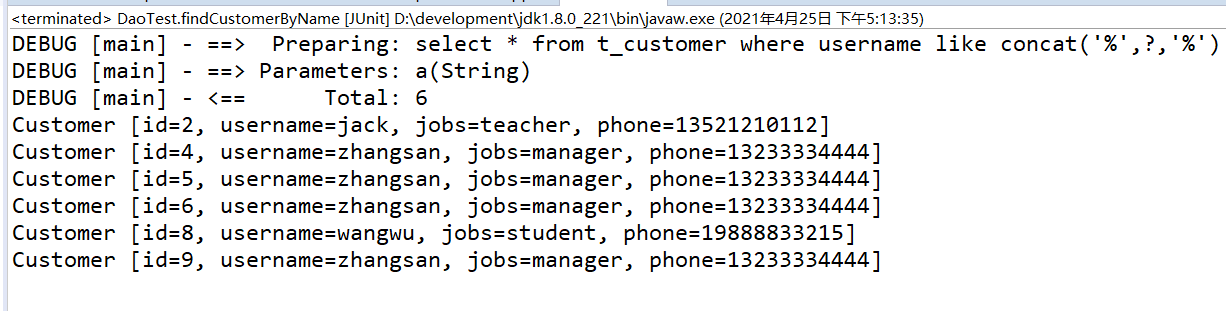
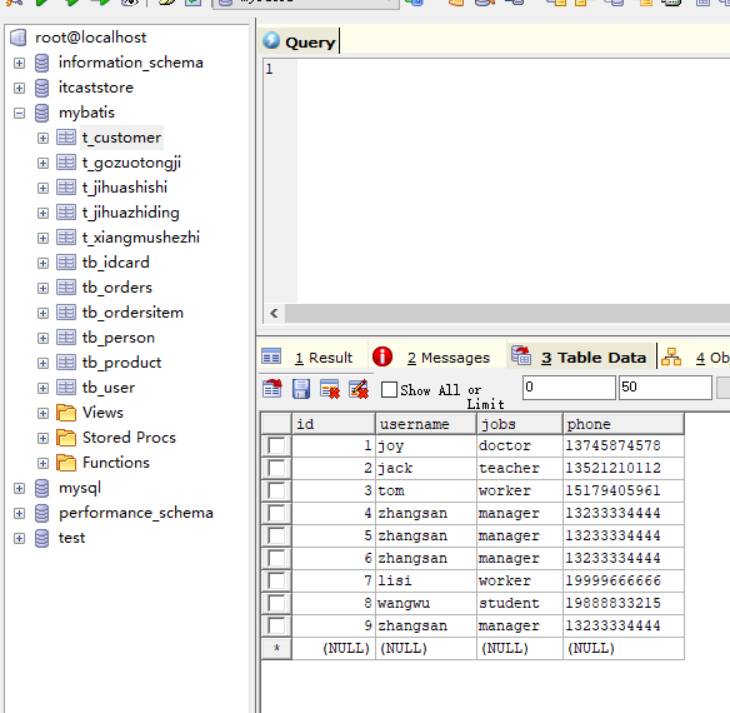
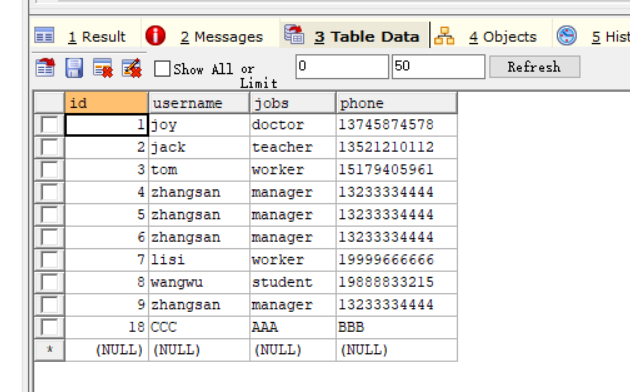
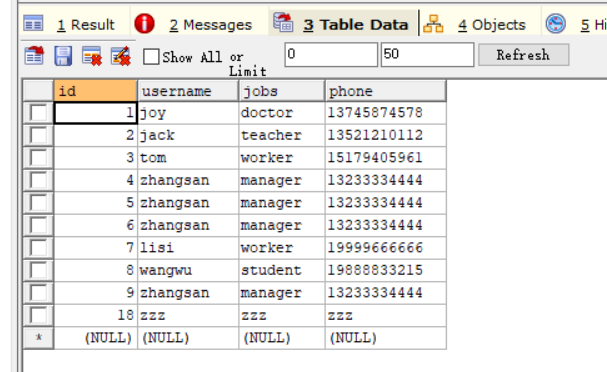
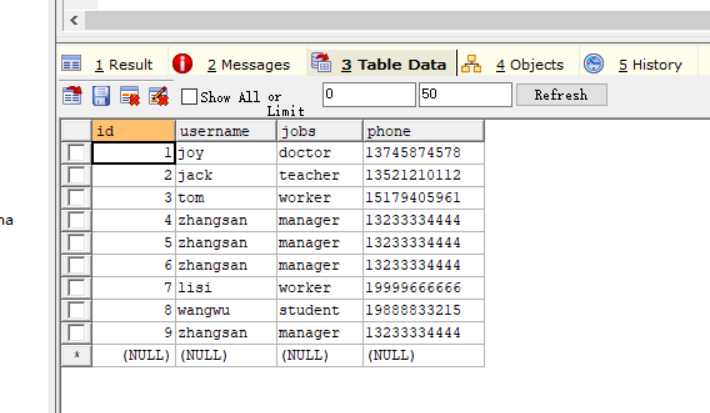
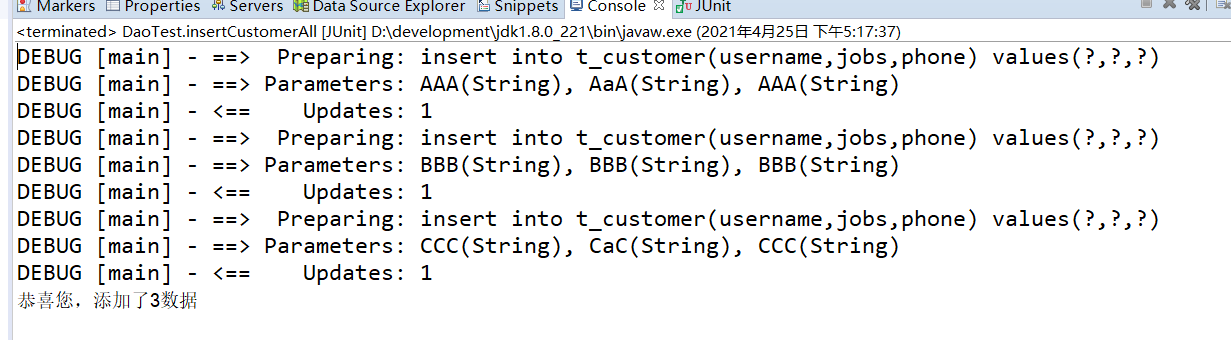
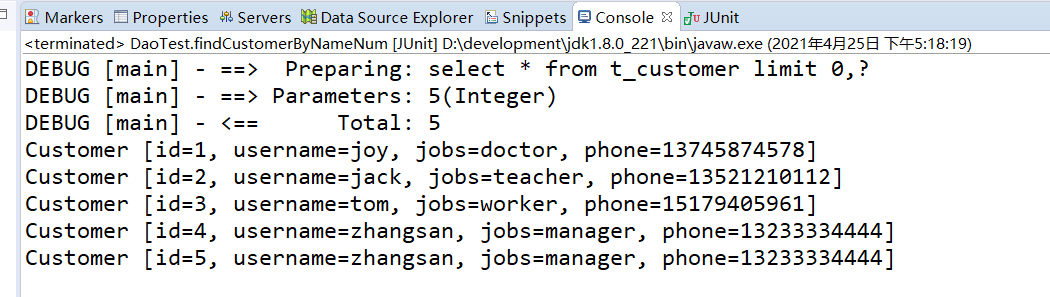
最后提交运行结果的截图






 浙公网安备 33010602011771号