

安卓主界面一种布局
安卓主界面一种布局
先来张效果图:
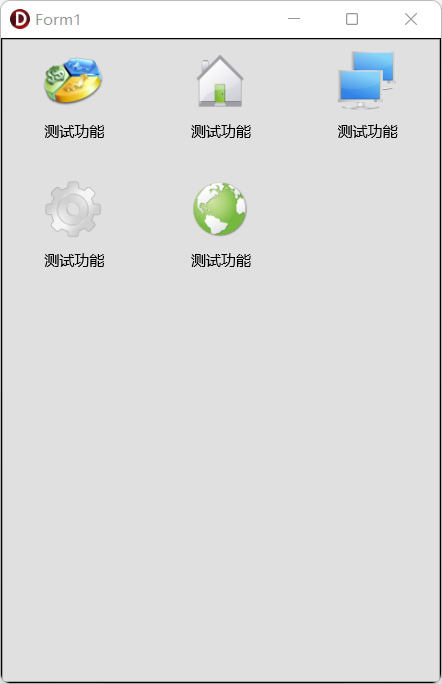
  object Rectangle1: TRectangle
    Align = Client
    Size.Width = 352.000000000000000000
    Size.Height = 516.000000000000000000
    Size.PlatformDefault = False
    object GridPanelLayout1: TGridPanelLayout
      Align = Client
      Size.Width = 352.000000000000000000
      Size.Height = 516.000000000000000000
      Size.PlatformDefault = False
      TabOrder = 0
      ColumnCollection = <
        item
          SizeStyle = Weight
          Value = 100.000000000000000000
        end
        item
          SizeStyle = Weight
          Value = 100.000000000000000000
        end
        item
          SizeStyle = Weight
          Value = 100.000000000000000000
        end>
      ControlCollection = <>
      RowCollection = <
        item
          SizeStyle = Weight
          Value = 100.000000000000000000
        end
        item
          SizeStyle = Weight
          Value = 100.000000000000000000
        end
        item
          SizeStyle = Weight
          Value = 100.000000000000000000
        end
        item
          SizeStyle = Weight
          Value = 100.000000000000000000
        end
        item
          SizeStyle = Weight
          Value = 100.000000000000000000
        end>
    end
  end
unit Unit1;

interface

uses
  System.SysUtils, System.Types, System.UITypes, System.Classes, System.Variants,
  FMX.Types, FMX.Controls, FMX.Forms, FMX.Graphics, FMX.Dialogs, FMX.Layouts,
  FMX.Objects, FMX.Controls.Presentation, FMX.StdCtrls, System.ImageList,
  FMX.ImgList;

type
  TForm1 = class(TForm)
    ImageList1: TImageList;
    Rectangle1: TRectangle;
    GridPanelLayout1: TGridPanelLayout;
    procedure FormShow(Sender: TObject);
  private
    { Private declarations }
    procedure ShowGrid(Grid: TGridPanelLayout; idtag: string;
    num, index: Integer);
    procedure ImageClick(Sender: TObject);
  public
    { Public declarations }
  end;

var
  Form1: TForm1;

implementation

{$R *.fmx}

// 处理显示主要过程
// Grid: 需要显示的Grid控件; idtag:该控件的特定标志,用于区别其他Grid;
// num:生成图标个数  index 从第几个图标开始生成
// 这里生成图标都来自于ilMainImage,所有图标需要先载入到ilMainImage。
procedure TForm1.FormShow(Sender: TObject);
begin
  ShowGrid(GridPanelLayout1, 'test', 5, 1);
end;

procedure TForm1.ImageClick(Sender: TObject);
begin
  ShowMessage('点我');
end;

procedure TForm1.ShowGrid(Grid: TGridPanelLayout; idtag: string;
    num, index: Integer);
var
    i: Integer;
    Image: TImage;
    s: TSizeF;
    Layout: TLayout;
    lbl: TLabel;
    TS: TMemoryStream;
begin
    Grid.BeginUpdate;
    try
        // android下需要调用,自己清理上次建的对象.Win32则不用自己清理,
        // Win32下,Grid.ControlCollection.Clear自动清理了自己建的对象.
{$IFDEF ANDROID}
        while Grid.ControlCollection.Count > 0 do
            Grid.ControlCollection.Items[0].Control.DisposeOf;
{$ENDIF}
        Grid.Height := 0;
        for i := index to num + index - 1 do
        begin
            // 动态生成 Layout
            Layout := TLayout.Create(Self);
            Layout.Name := 'Lay' + idtag + i.ToString;
            Layout.Align := TAlignLayout.Client;
            Layout.Padding.Left := 10;
            Layout.Padding.Bottom := 10;
            Layout.Padding.Top := 10;
            Layout.Padding.Right := 10;
            Layout.Parent := Grid; // Layout父级指向Grid。

            // 动态生成 Image
            Image := TImage.Create(Layout);
            Image.Name := 'Image' + idtag + i.ToString;
            Image.Width := 48;
            Image.Height := 48;
            Image.Align := TAlignLayout.Center;
            Image.Margins.Bottom := 10;
            Image.HitTest := True;
            Image.Touch.InteractiveGestures := [TInteractiveGesture.LongTap];
            Image.TagString := 'Image' + idtag + i.ToString; // 这里用于区分不同点击内容
            Image.Tag := i;
            s.cx := 64;
            s.cy := 64;
            Image.Bitmap.Clear(TAlphaColorRec.White);
            // 创建流,用流来转换图片,实际应用时可直接将图片处理成流来应用
            TS := TMemoryStream.Create;
            ImageList1.Bitmap(s, i).SaveToStream(TS); // 生成流数据
            TS.Position := 0;
            Image.Bitmap.LoadFromStream(TS); // 流数据载入  Image
            TS.Free;

{$IFDEF MSWINDOWS}
            Image.OnClick := ImageClick; // 点击事件指向
{$ELSE}
        //    Image.OnTap := ImageTak; // 点击事件指向
{$ENDIF}
            Image.Parent := Layout; // 父级的控件指向Layout

            // 创建文本标题
            lbl := TLabel.Create(Layout);
            lbl.Parent := Layout;
            lbl.Name := 'lbl' + idtag + i.ToString;
            lbl.Text := '测试功能'; // 标题显示内容
            lbl.Align := TAlignLayout.Bottom;
            lbl.Margins.Bottom := 10;
            lbl.TextAlign := TTextalign.Center;
            lbl.StyledSettings := [];

        end;

        // 计算  Grid与Rectangle整体高度
        Grid.Height := Grid.RowCollection.Count * 100;
          (Grid.Parent as TRectangle).Height := Grid.Height + 30;
        // 计算每行的高度.
        for i := 0 to Grid.RowCollection.Count - 1 do
        begin
            Grid.RowCollection.Items[i].SizeStyle :=
                TGridPanelLayout.TSizeStyle.Percent;
            Grid.RowCollection.Items[i].Value := 100 / Grid.RowCollection.Count;
        end;

    finally
        Grid.EndUpdate;
    end;
end;


end.
本文来自博客园,作者:{咏南中间件},转载请注明原文链接:https://www.cnblogs.com/hnxxcxg/p/18883227

 浙公网安备 33010602011771号