
HBase_API_(HBaseDML,对数据的api)
对表中数据进行以下操作:
静态属性
1.插入数据
2.读取数据
3.扫描数据
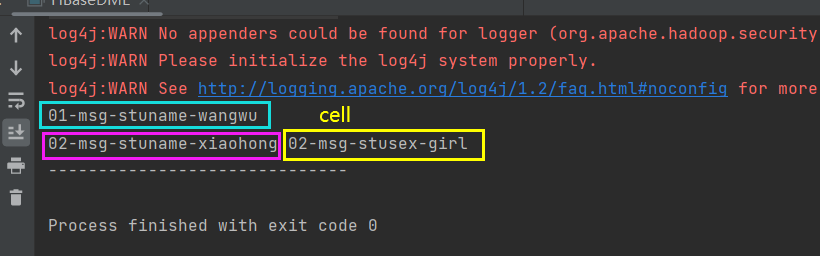
4.带有过滤器的扫描
(1)结果保留列的过滤器
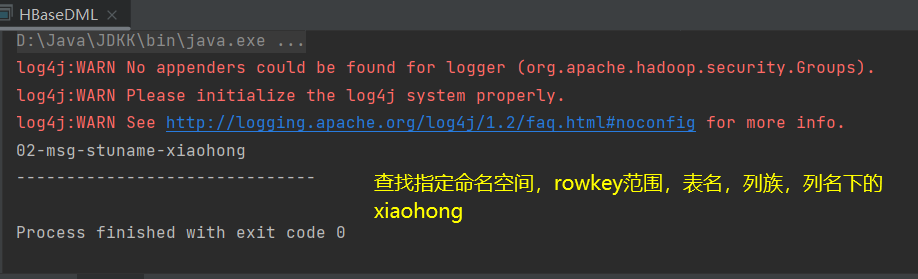
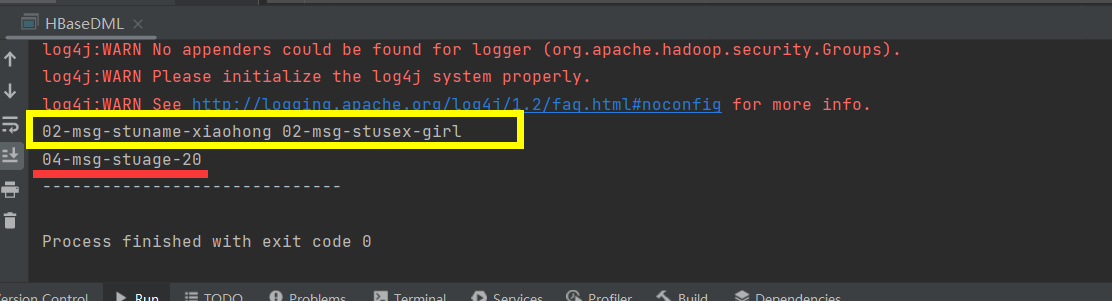
(2)结果保留整行的过滤器
注意:结果也会保留没有当前列的数据
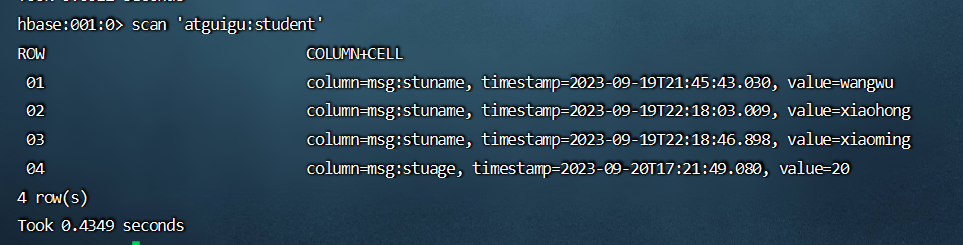
例如我的表中数据如下:符合要求的应该只有02,但是结果会把04的也给输出出来。

5.删除数据
HBaseConnection.java(提供connection连接)


package com.atguigu;


import org.apache.hadoop.conf.Configuration;
import org.apache.hadoop.hbase.client.Connection;
import org.apache.hadoop.hbase.client.ConnectionFactory;

import java.io.IOException;

/**
 * HBase多线程连接
 */
public class HBaseConnection {

    //声明静态属性
    public static Connection connection=null;
    static {

//        //1.创建配置对象
//        Configuration configuration = new Configuration();
//
//        //2.设置配置参数
//        configuration.set("hbase.zookeeper.quorum","node1,node2,node3");

        //直接使用读取本地文件的形式添加参数
        //3.建立hbase连接
        try {
            connection = ConnectionFactory.createConnection();
        } catch (IOException e) {
//            throw new RuntimeException(e);
            e.printStackTrace();
        }
    }


    public static void closeConnection() throws IOException {
        //判断连接是否为空
        if(connection!=null){
            connection.close();
        }
    }


    public static void main(String[] args) throws IOException {

        //不再main线程中单独创建连接,而是直接使用
        System.out.println(HBaseConnection.connection);

        //用完记得关闭连接
        HBaseConnection.closeConnection();;

    }

}
全部代码
package com.atguigu;

import org.apache.hadoop.hbase.Cell;
import org.apache.hadoop.hbase.CellUtil;
import org.apache.hadoop.hbase.CompareOperator;
import org.apache.hadoop.hbase.TableName;
import org.apache.hadoop.hbase.client.*;
import org.apache.hadoop.hbase.filter.ColumnValueFilter;
import org.apache.hadoop.hbase.filter.FilterList;
import org.apache.hadoop.hbase.filter.SingleColumnValueFilter;
import org.apache.hadoop.hbase.util.Bytes;

import java.io.FileFilter;
import java.io.IOException;

public class HBaseDML {

    //添加静态属性
    public static Connection connection = HBaseConnection.connection;

    /**
     * 插入数据
     * @param namespace 命名空间名称
     * @param tableName 表格名称
     * @param rowKey    主键
     * @param columnFamily  列族
     * @param columnName    列名
     * @param value         值
     */
    public static void putCell(String namespace, String tableName, String rowKey, String columnFamily, String columnName, String value) throws IOException {
        //1.获取table(对数据进行操作要获取table,对表格进行操作要获取admin)
        Table table = connection.getTable(TableName.valueOf(namespace, tableName));

        //2.调用方法插入数据
        Put put = new Put(Bytes.toBytes(rowKey));

        //3.给put对象添加数据
        put.addColumn(Bytes.toBytes(columnFamily),Bytes.toBytes(columnName),Bytes.toBytes(value));

        //4.将对象写入对应方法
        try {
            table.put(put);
        } catch (IOException e) {
//            throw new RuntimeException(e);
            e.printStackTrace();
        }

        //关闭table
        table.close();

    }


    /**
     * 读取数据  读取对应的某一列
     * @param namespace 命名空间
     * @param tableName 表格名称
     * @param rowKey    主键
     * @param columnFamily  列族
     * @param columnName    列名
     */
    public static void getCells(String namespace,String tableName,String rowKey,String columnFamily,String columnName) throws IOException {
        //1.获取table对象
        Table table = connection.getTable(TableName.valueOf(namespace,tableName));

        //2.创建get对象
        Get get = new Get(Bytes.toBytes(rowKey));

        //读取某一列的数据:添加属性
        get.addColumn(Bytes.toBytes(columnFamily),Bytes.toBytes(columnName));

        //也可以设置读取版本
        get.readAllVersions();

        try {

            //获取读取对象
            Result result = null;
            result = table.get(get);


            //处理数据
            Cell[] cells = result.rawCells();

            //
            for (Cell cell : cells) {
                //cell
                String value = new String(CellUtil.cloneValue(cell));
                System.out.println(value);

            }
        } catch (IOException e) {
//            throw new RuntimeException(e);
            e.printStackTrace();
        }


        //关闭table
        table.close();

    }


    /**
     * 扫描数据
     * @param namespace 命名空间
     * @param tableName 表格名称
     * @param startRow  开始row   包含的
     * @param stopRow   暂停row   不包含
     */
    public static void scanRows(String namespace,String tableName, String startRow, String stopRow) throws IOException {

        //1.获取table
        Table table = connection.getTable(TableName.valueOf(namespace, tableName));

        //调用对应方法
        Scan scan = new Scan();

        //添加参数控制扫描数据
        scan.withStartRow(Bytes.toBytes(startRow)); //包含
        scan.withStopRow(Bytes.toBytes(stopRow));   //不包含

        try {
            //读取数据,获得scanner对象
            ResultScanner scanner = null;
            scanner = table.getScanner(scan);

            //result记录一行数据,cell数据
            //Resultscanner记录多行数据,result数组
            for (Result result : scanner) {

                Cell[] cells = result.rawCells();

                for (Cell cell : cells) {
                    System.out.print(new String(CellUtil.cloneRow(cell))+"-"+
                            new String(CellUtil.cloneFamily(cell))+"-"+
                            new String(CellUtil.cloneQualifier(cell))+"-"+
                            new String(CellUtil.cloneValue(cell))+"\t");
                }

                System.out.println();

            }


        } catch (IOException e) {
//            throw new RuntimeException(e);
            e.printStackTrace();

        }


        //关闭table
        table.close();

    }


    /**
     * 带过滤的扫描
     * @param namespace 命名空间
     * @param tableName 表格名称
     * @param startRow  开始row
     * @param stopRow   结束row
     * @param columnFamily  列族
     * @param columnName    列名
     * @param value     value值
     */
    public static void filterScan(String namespace, String tableName, String startRow,String stopRow,String columnFamily, String columnName,String value) throws IOException {

        //1.table
        Table table = connection.getTable(TableName.valueOf(namespace, tableName));

        //2.创建scan对象
        Scan scan = new Scan();

        //3.设置参数
        scan.withStartRow(Bytes.toBytes(startRow));
        scan.withStopRow(Bytes.toBytes(stopRow));

        //4.添加多个过滤
        FilterList filterList = new FilterList();

        //创建过滤器
        //(1)过滤后只保存当前列的数据
        ColumnValueFilter columnValueFilter = new ColumnValueFilter(
                //列族名称
                Bytes.toBytes(columnFamily),
                //列名
                Bytes.toBytes(columnName),
                //比较关系
                CompareOperator.EQUAL,
                //等于的值
                Bytes.toBytes(value)
        );


        //(2)结果保留整行数据的过滤器
        //注意:结果也会保留没有当前列的数据
        SingleColumnValueFilter singleColumnValueFilter = new SingleColumnValueFilter(
                //列族名称
                Bytes.toBytes(columnFamily),
                //列名
                Bytes.toBytes(columnName),
                //比较关系
                CompareOperator.EQUAL,
                //与哪个值进行比较
                Bytes.toBytes(value)

        );


        //(1)使用的代码
//        filterList.addFilter(columnValueFilter);
        //(2)使用的代码
        filterList.addFilter(singleColumnValueFilter);


        //添加过滤
        scan.setFilter(filterList);


        try {

            ResultScanner scanner = null;
            scanner = table.getScanner(scan);


            for (Result result : scanner) {
                Cell[] cells = result.rawCells();

                for (Cell cell : cells) {
                    System.out.print(new String(CellUtil.cloneRow(cell))+"-"+
                            new String(CellUtil.cloneFamily(cell))+"-"+
                            new String(CellUtil.cloneQualifier(cell))+"-"+
                            new String(CellUtil.cloneValue(cell))+"\t");
                }

                System.out.println();

            }


        } catch (IOException e) {
//            throw new RuntimeException(e);
            e.printStackTrace();
        }


        //关闭table
        table.close();


    }


    /**
     *删除某一行中的某一列的数据
     * @param namespace 命名空间
     * @param tableName 表格名字
     * @param rowKey    主键
     * @param columnFamily 列族
     * @param columnName   列名
     */
    public static void deleteColumn(String namespace,String tableName,String rowKey, String columnFamily,String columnName) throws IOException {

        //1.获取table
        Table table = connection.getTable(TableName.valueOf(namespace, tableName));

        //2.创建delete对象
        Delete delete = new Delete(Bytes.toBytes(rowKey));

        //3.添加列信息
        //删除一个版本
        delete.addColumn(Bytes.toBytes(columnFamily),Bytes.toBytes(columnName));

        //删除所有版本
//        delete.addColumns(Bytes.toBytes(columnFamily),Bytes.toBytes(columnName));

        try {
            table.delete(delete);
        } catch (IOException e) {
//            throw new RuntimeException(e);
            e.printStackTrace();
        }


        table.close();
    }


    public static void main(String[] args) throws IOException {

        //1.添加数据测试
//        putCell("atguigu","student","01","msg","stuname","*****");


        //2.测试读取数据
//        getCells("atguigu","student","01","msg","stuname");


        //3.测试扫描数据
//        scanRows("atguigu","student","01","03");


        //4.带过滤器的扫描
//        filterScan("atguigu","student","01","05","msg","stuname","xiaohong");


        //5.删除某一行某一列数据
        deleteColumn("atguigu","student","02","msg","stusex");


        System.out.println("------------------------------");

        //记得关闭hbase连接
        HBaseConnection.closeConnection();

    }
}

 浙公网安备 33010602011771号