
vue封装弹框组件
一、弹窗组件封装的构思
在跳转路由的时候,我想判断如果未登录,那么就会弹出一个弹框给用户,告知他,所以想实现这个弹框功能,事实上elementUI已经给了我们一些功能,可以做二次封装,比如:它的
Message 消息弹框
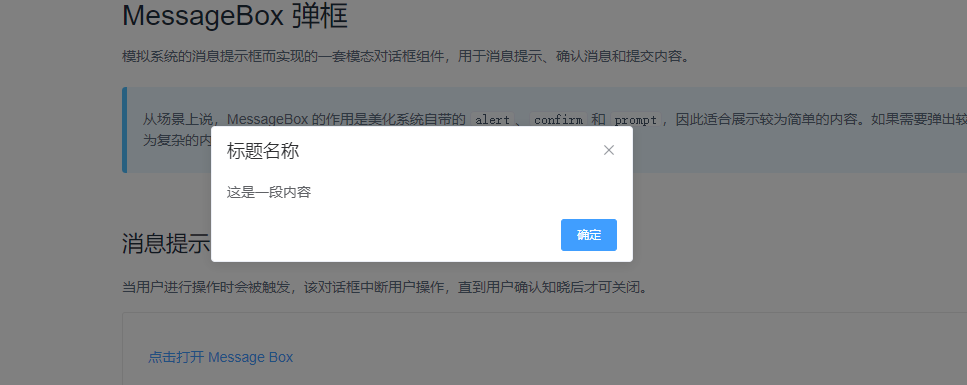
样式的确不错,就是不会响应式改变大小,所以自己决定可以做一个改变大小的组件:
结果如下:
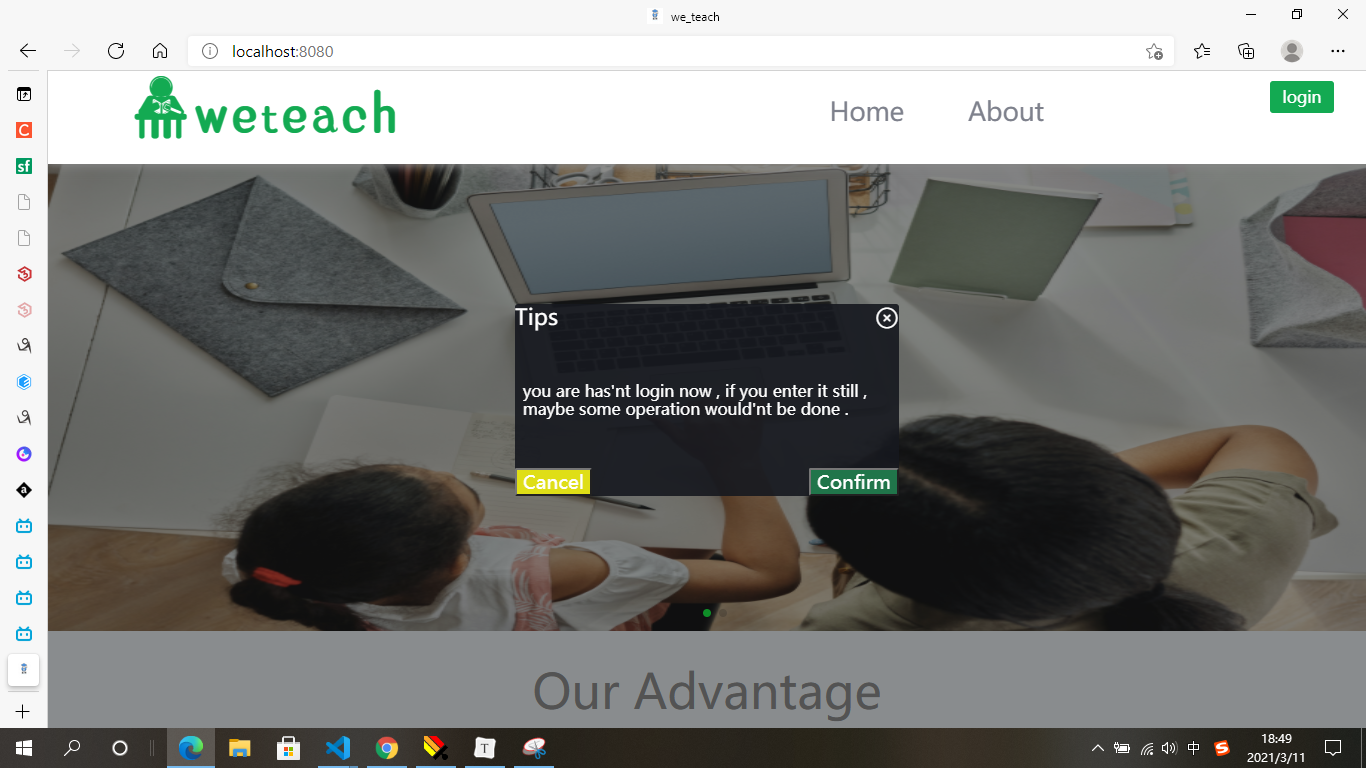
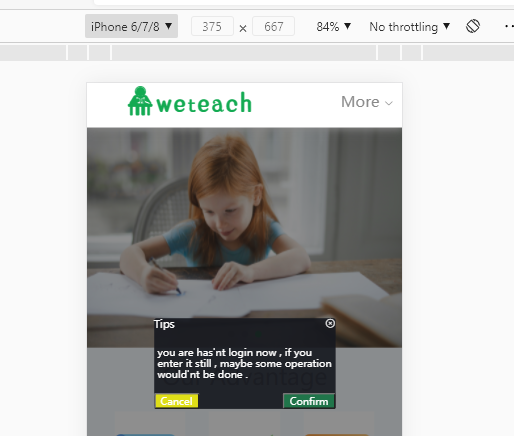
一开始想法就是说,弄一个组件,在哪里想用,哪里就引入,但是后来一想,在哪个页面想用,就要引用一次太麻烦了,不如直接写在App.vue下面,动态控制显示与否,引入一次就够了:
二、弹窗组件的实施
首先在App.vue下面引入我的封装
<div id="app">
    <myDialog ></myDialog>//弹框
    <keep-alive exclude="Brief">
      <router-view  v-if="isRouterAlive" />
    </keep-alive>
  </div>
</template>
然后开始我的封装之旅:
(1)样式布局
  <template>
    <div id="my_dialog" v-if="is_showConfirmEnterDialog">
      <div id="dialogContent">
        <div @click="close" class="cloaseDialog"><i class="el-icon-circle-close"></i></div>
        <div class="content_head">
          {{title}}
        </div>
        <div class="content_mid">
          {{content}}
        </div>
        <div class="content_foot">
          <button @click="cancel" class="dialogBtnCancel" v-if="isShowBtnCancel">{{cancelText}}</button>
          <button @click="confirm" class="dialogBtnConfrim" v-if="isShowBtnConfirm">{{confirmText}}</button>
        </div>
      </div>
      <!-- </div> -->
    </div>
  </template>
  <script>
    import {mapState,mapMutations,mapActions} from 'vuex'
    export default {
      name: 'myDialog',
      data() {
        return {
        }
      },
      props: {
        title: {
          type: String,
          default: 'Tips'
        },
        content: {
          type: String,
          default: 'you are has\'nt login now , if you enter it still , maybe some operation would\'nt be done .'
        },
        isShowBtnConfirm: {
          type: Boolean,
          default: true
        },
        isShowBtnCancel: {
          type: Boolean,
          default: true
        },
        confirmText: {
          type: String,
          default: 'Confirm'
        },
        cancelText: {
          type: String,
          default: 'Cancel'
        }
      },

      },

  </script>
  <style>
    #my_dialog {
      position: absolute;
      width: 100vw;
      height: 100vh;
      background-color: rgba(30, 30, 30, 0.5);
      z-index: 5;
    }

    #dialogContent {
      position: relative;
      height: 6rem;
      width: 12rem;
      margin: 0 auto;
      margin-top: 50vh;
      transform: translateY(-50%);
      background-color: rgba(22, 24, 31, 0.9);
      border-radius: 3px;
      z-index: 11;
    }
    .cloaseDialog{
      position: absolute;
      right: 0%;
      color: #ffffff;
      cursor: pointer;
    }
    .cloaseDialog:hover{
      color: #dfde17 ;
    }
    #dialogContent .content_head {
      font-size: 0.7rem;
      color: #ffffff;
    }

    #dialogContent .content_mid {
      position: absolute;
      top: 50%;
      left: 2%;
      transform: translateY(-50%);
      font-size: 0.5rem;
      color: #ffffff;
      /* background-color: rosybrown; */
    }

    #dialogContent .content_foot {
      position: absolute;
      width: 100%;
      bottom: 0%;
      font-size: 0.6rem;
      color: #ffffff;
    }

    .dialogBtnConfrim {
      float: right;
      background-color: #20754a;
      color: #ffffff;
      cursor: pointer;
      transition: all 0.3;
      /* border: 0;
      outline: none;可以去掉原生按钮样式 */
    }
    .dialogBtnConfrim:hover {
      background-color: #ffffff;
      color: #20754a;
    }
    .dialogBtnCancel {
      background-color: #dfde17;
      color: #ffffff;
      cursor: pointer;
      transition: all 0.3;
    }
    .dialogBtnCancel:hover {
      background-color: #ffffff;
      color: #dfde17;
    }
  </style>
样式问题三下五除二就好了。
总共有两个大盒子,第一个做mask遮罩,第二个做提示内容区域:
无非在最外面用个盒子先指定100vw,100vh的可视区域大小,然后使用绝对定位脱离文档流,再用个Z-index悬浮在所有元素之上,使用bgcolor的rgba属性把背景颜色透明化;
第二个盒子用相对定位,使它居于大盒子中间就好;情况如上面布局
(2)逻辑代码构思
样式做好后感觉挺简单的,然后去看了一下element UI的使用它的弹框盒子的参数:
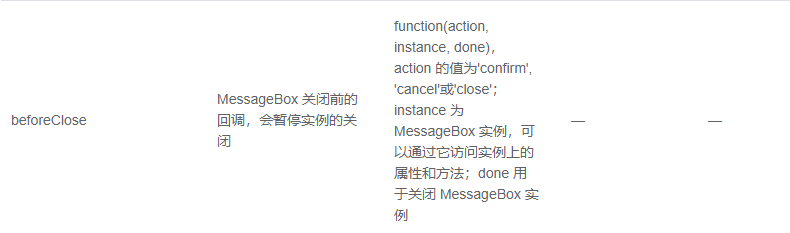
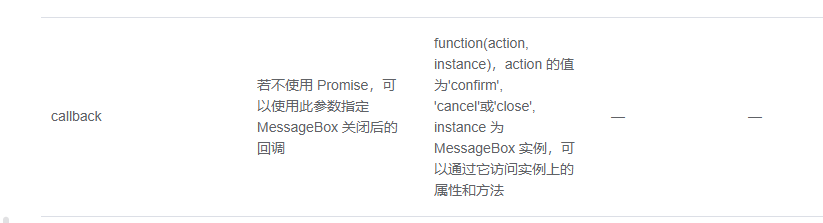
这两个玩意这么复杂吗,干嘛需要回调函数,还要使用promise处理异步操作,为什么啊,不就是一个点击打开,再点击别的地方就关闭的简单玩意,封装这么多东西干嘛?
我这个组件的由于是App.vue引入一个就够了,所以要在其他和弹框组件是兄弟关系的组件访问到,并且修改其属性,所以我直接用了Vuex来管理状态;
(注:需要了解vuex的可以看看我的另外一篇博客,可能有一点帮助:https://www.cnblogs.com/hmy-666/p/14508849.html)
我的思路就是:
1.在vuex定义好一个控制弹框显示与否的属性,然后通过两个方法去修改它的属性值,如下:
首先我的目录结构是这样的:
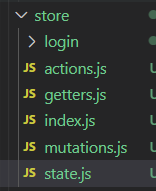
我把vuex的几个状态单独拆开便于维护:
现在state.js文件下定义:
export default{
  is_showConfirmEnterDialog:false,//默认设置未登录进入某页面的弹框转态显示状态;
}
在mutation.js下面定义两个方法,用来修改打开或者关闭弹框:
export default{
  openEnterDialog(state){
    state.is_showConfirmEnterDialog = true//控制未登录前进入某权限页面弹框是否显示
  },
  closeEnterDialog(state){
    state.is_showConfirmEnterDialog = false//控制未登录前进入某权限页面弹框是否显示
  }
}
此刻,基本打开和关闭的功能就实现了,在要使用的组件直接使用相应的语法引入,然后使用即可。
我的内心状态是这样的:

什么鬼,哪来那么难,Element 官方干嘛封装那么多属性,我直接随便写下就快完成了。
高兴不久,随即:

被打脸了。因为我想也按照官方,在vuex写个action属性,来记录用户点击了关闭按钮,还是确认按钮还是取消按钮,但是事实证明是不可以这样的,因为vuex是用来状态管理的,你点击了哪个属性,其属性值就会被记录下来,我需要的只是知道用户点击了哪个按钮而已,不需要保存值。如果是组件按需引入的情况下,我直接可以根据父子组件的属性emit或者用ref获取用户点击了哪个按钮,但是此处我是只想全局引入一个,然后在弹框的其他兄弟组件里面动态修改弹框值,其状态大概是这样的:
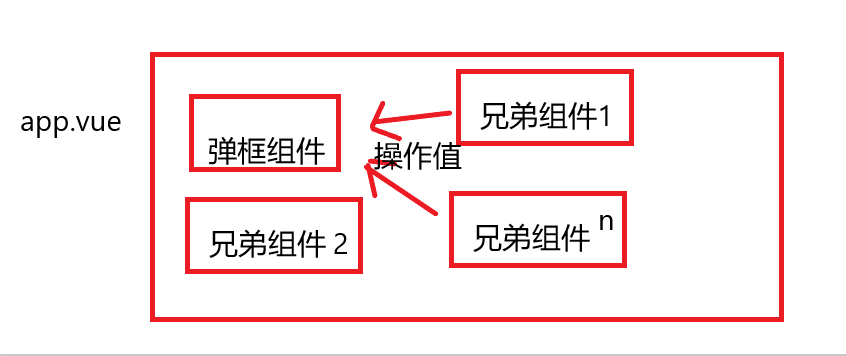
因为是不同兄弟组件,所以我想到的第一个是vuex,但是vuex是用来保存属性值的地方,我只需要用户的操作状态而已,所以我就想如果点击的时候赋予值,然后弹窗关闭我再把值删掉不就好了吗?但是我当我在弹框组件修改值,然后在想要的得弹框组件状态的组件里获取值时,取值会错误,会当第二次按弹框时才知道其值。分析如下:
弹框组件状态获知方案1:
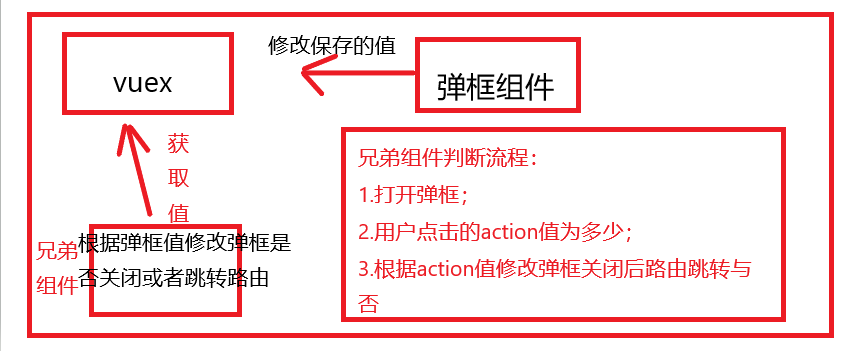
问题就出现在上面,因为兄弟组件判断流程不会等弹框组件值修改完,它才执行,因为判断流程是同步代码,而弹框组件修改自己的值属于异步行为,这样我就伤脑筋了,试图修改兄弟组件的判断流程也为异步操作,当弹框组件值操作完,兄弟组件在根据值来决定弹框关闭后是否路由跳转。
所以我想,要是在vuex的action状态返回一个promise给兄弟组件,让兄弟组件根据promise返回弹框保存的值来执行操作弹框关闭后是否路由跳转。
代码逻辑就是:function getDialogState().then((action)=>{
if(action=='confirm'){
执行跳转路由
}else if(action=='cancel'){
弹出toast,提示用户取消了操作
}
})
但是虽然promise里,可以根据resolve返回出来的值再操作,但是同样resolve发出来的还是未赋值前的值,因为promise本来就是来执行异步代码,让它变成同步逻辑的,此处似乎说不太清,因为我代码被我删除了,不能完整的贴出来我当时的错误思维。
弹框组件状态获知方案2:
所以我另辟蹊径,我想得到的只是用户的点击状态,算了不用vuex来得知组件的属性值了,得知后还要删掉,以便下次逻辑判断才不会执行错误,太麻烦了,而且我暂时也没有其他思路,所以我想出了另一个获取值的方法,事件总线,也是用来获取兄弟组件属性值的。
(1)首先还是利用vuex全局修改弹框是否显示或者隐藏
(2)事件总线向外暴露自己的点击行为,根据行为绝对路由是否要进行跳转
(注:不了解事件总线的,可以看看这一篇,里面有各种组件互相传值,其中一个传值方法就是事件总线:https://www.cnblogs.com/hmy-666/p/14517710.html)
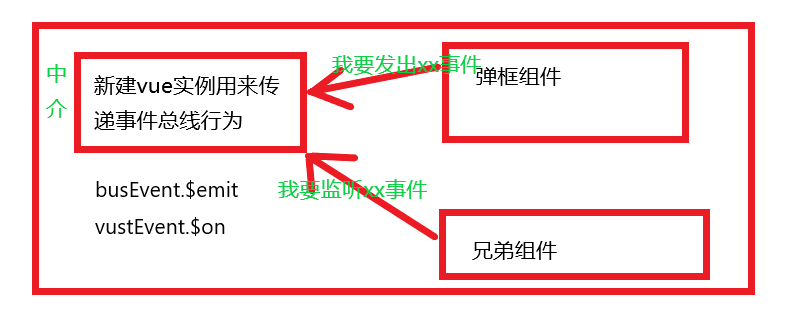
兄弟组件逻辑代码:
 beforeRouteLeave (to, from, next) {
      //如果已经登录,则直接进入首页
      if (getCookie("userstatus") != null){next()}
      else if(to.name=='Home'){
        this.openEnterDialog();//打开认用户是否进入的弹框
           // 打开弹窗后监听监听事件总线
       this.$eventBus.$on('confirm',(msg)=>{
          if(msg=='confirm'){
            this.closeEnterDialog();//关闭弹窗
            next();
          }
      });
      this.$eventBus.$on('cancel',(msg)=>{
        if(msg=='cancel'){
          this.closeEnterDialog();//关闭弹窗
          innerWidth>768 ? this.$message({message:'the operation is cancel',duration:1500}) : this.$toast.show('the operation is cancel',1500)
        }
      });
      this.$eventBus.$on('close',(msg)=>{
        if(msg=='close'){
          this.closeEnterDialog();//关闭弹窗
          innerWidth>768 ? this.$message({message:'the operation is cancel',duration:1500}) : this.$toast.show('the operation is cancel',1500)
        }
      });

      }else{
        next();
      }
  },
弹框完整代码:
<template>
    <div id="my_dialog" v-if="is_showConfirmEnterDialog">
      <div id="dialogContent">
        <div @click="close" class="cloaseDialog"><i class="el-icon-circle-close"></i></div>
        <div class="content_head">
          {{title}}
        </div>
        <div class="content_mid">
          {{content}}
        </div>
        <div class="content_foot">
          <button @click="cancel" class="dialogBtnCancel" v-if="isShowBtnCancel">{{cancelText}}</button>
          <button @click="confirm" class="dialogBtnConfrim" v-if="isShowBtnConfirm">{{confirmText}}</button>
        </div>
      </div>
      <!-- </div> -->
    </div>
  </template>
  <script>
    import {mapState,mapMutations,mapActions} from 'vuex'
    export default {
      name: 'myDialog',
      data() {
        return {
        }
      },
      props: {
        title: {
          type: String,
          default: 'Tips'
        },
        content: {
          type: String,
          default: 'you are has\'nt login now , if you enter it still , maybe some operation would\'nt be done .'
        },
        isShowBtnConfirm: {
          type: Boolean,
          default: true
        },
        isShowBtnCancel: {
          type: Boolean,
          default: true
        },
        confirmText: {
          type: String,
          default: 'Confirm'
        },
        cancelText: {
          type: String,
          default: 'Cancel'
        }
      },
      // state,getter在computed注入,现在直接this.XXX就可以了,以前要this.$store.state.XXX
      computed:{
        ...mapState(['is_showConfirmEnterDialog'])
      },
      mounted() {
        // 监听鼠标点击事件
        document.onclick = () => {
      let e = e || window.event;
      let elem = e.srcElement || e.target;// e.srcElement 是为了兼容iE8一下|| e.target;
        if (elem.id == "my_dialog") {
          console.log("666")
          console.log(elem)
          this.closeEnterDialog()//点击弹框外就关闭
        }else{

          return;
        }
    };
      },
      //mutation,actions在methods注入
      methods: {
        ...mapMutations(['openEnterDialog','closeEnterDialog']),
        // ...mapActions(['beforeCloseDialog']),
        // 关闭弹框
        close(){
          // innerWidth>768 ? this.$message({message:'the operation is cancel',duration:1500}) : this.$toast.show('the operation is cancel',1500)
          this.$eventBus.$emit('close','close')


        },
        //弹框确定
        confirm(){
          this.$eventBus.$emit('confirm','confirm')
        },
        //弹框取消
        cancel(){
          this.$eventBus.$emit('cancel','cancel')
        }
      },
      destroyed() {
      // this.$eventBus.$off('confirm')
      // this.$eventBus.$off('cancel')
      // this.$eventBus.$off('close')
      console.log("销毁")
    },
    }
  </script>
  <style>
    #my_dialog {
      position: absolute;
      width: 100vw;
      height: 100vh;
      background-color: rgba(30, 30, 30, 0.5);
      z-index: 5;
    }

    #dialogContent {
      position: relative;
      height: 6rem;
      width: 12rem;
      margin: 0 auto;
      margin-top: 50vh;
      transform: translateY(-50%);
      background-color: rgba(22, 24, 31, 0.9);
      border-radius: 3px;
      z-index: 11;
    }
    .cloaseDialog{
      position: absolute;
      right: 0%;
      color: #ffffff;
      cursor: pointer;
    }
    .cloaseDialog:hover{
      color: #dfde17 ;
    }
    #dialogContent .content_head {
      font-size: 0.7rem;
      color: #ffffff;
    }

    #dialogContent .content_mid {
      position: absolute;
      top: 50%;
      left: 2%;
      transform: translateY(-50%);
      font-size: 0.5rem;
      color: #ffffff;
      /* background-color: rosybrown; */
    }

    #dialogContent .content_foot {
      position: absolute;
      width: 100%;
      bottom: 0%;
      font-size: 0.6rem;
      color: #ffffff;
    }

    .dialogBtnConfrim {
      float: right;
      background-color: #20754a;
      color: #ffffff;
      cursor: pointer;
      transition: all 0.3;
      /* border: 0;
      outline: none;可以去掉原生按钮样式 */
    }
    .dialogBtnConfrim:hover {
      background-color: #ffffff;
      color: #20754a;
    }
    .dialogBtnCancel {
      background-color: #dfde17;
      color: #ffffff;
      cursor: pointer;
      transition: all 0.3;
    }
    .dialogBtnCancel:hover {
      background-color: #ffffff;
      color: #dfde17;
    }
  </style>
至此,解决,要是有出现了路由跳转成功后,控制台报错的,可以看看这一篇:https://www.cnblogs.com/hmy-666/p/14519856.html

 浙公网安备 33010602011771号