

python 小爬虫 DrissionPage+BeautifulSoup
哈喽,大家好, 我要开始写博客啦💪..... 文中有不当之处, 还请多多指正~谢谢
1.前言
在网上找书籍或其他资源的时候,都会看到某些资源网站上写着“信息来源互联网”。于是乎,我也开始“搭弓射箭”,找来了python老弟,帮我研究研究到底如何才能爬爬爬~。
首先, 第一版我用了requests工具, 好像是python 老弟自带的 ... 用它不是不行, 就是不行, 用各种代理, 还是拉垮... 那就over
后来又研究了selenium, 这玩意配置起来贼费劲, 必须各种浏览器驱动版本对应,最后也是over
最后最后发现还挺不拉垮的DrissionPage, 也不知道那个大牛天天没事干,搞出个这么好用的玩意 ...
废话不多说, 咱们直接开干
先看一下最后的结果截图
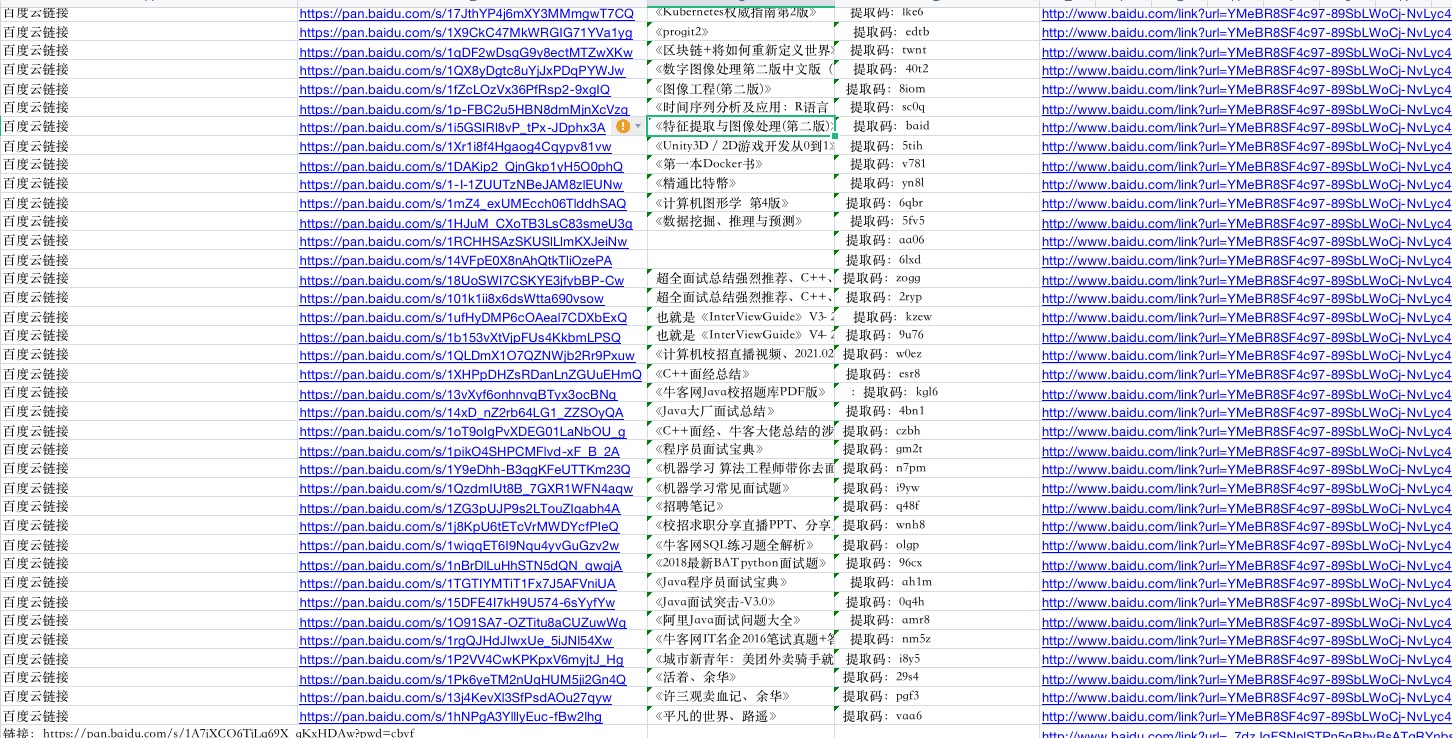
2.逻辑思路
其实逻辑非常简单:
- 打开网页
- 输入百度地址
- 查询关键字
- 获取查询到的页面地址(页码数自己设置)
- 从获取到的页面中找我想要的资源 (这里是网盘资源)
- 把结果写入到excel
- over。over
3.函数定义
先介绍一下我都“装载”了哪些函数:
#保存结果队列
data=queue.Queue()
#用它来打开浏览器,百度输入关键字,查询并返回结果(查询到的url,百度一页有10个结果)
#key 百度查询关键字
#port 端口号 这里是个坑,因为不自定义端口号, 它就会重复使用某个端口号,多线程时经常错误, 找不到元素,因为你懂的...
def baiduGetUrl(key,port):
    #return ['http://....',*,*]
    pass
#获取html内容,中间会有一些关闭按钮的使用 (打开网页, 它给你个弹窗,你说你关不关它)
#url 地址是baidu给的...
#port 端口(随机自定义 要大一些 你懂的)
def getHtml(url,port):
    #return page.html
    pass
#找到匹配的内容
def searchHtml(html,url):
    #soup.find_all(....)
    #return result
    pass
#负责“获取html”和”找到html匹配的内容“
def getHtmlProc(url,port):
    pass
#负责写入文件
def create_excel(filename):
    pass
#主程序会开启多进程,调用这个函数
#key 百度查询关键字 port端口
def eachGetData(key,port):
    #获取输入的key 查询到的地址,也就是call baiduGetUrl
    #遍历地址,开启几个线程,执行getHtmlProc
    #最后将结果写入文件 create_excel
4.核心代码演示
不知道小伙伴们有没有看懂函数定义部分, 也不知道我那么定义有没有毛病, 管他呢, 能运行就不错了...
下面简单代码演示一下, 文末会给出整个代码的链接哦~
查看代码 def baiduGetUrl(key,port):
resultUrl=[]
co = ChromiumOptions().headless()
co.auto_port()
co.set_local_port(9432+port)
page = ChromiumPage(co)
page.get("http://www.baidu.com", retry=999)
page.wait.load_start()
page('#kw').input(key)
page("#su").click()
page.wait.load_start()
for i in range(1,16):
try:
next_page = page.ele("@text()=下一页 >") # 百度的下一页
if i!=1:
if not next_page:
next_page=page.ele("@text()=下一页 >")
print(next_page)
next_page.click()
page.wait.load_start()
time.sleep(2)
divs=page.eles("t:h3")
for d in divs:
a=d.ele("t:a")
resultUrl.append(a.attrs.get("href"))
except Exception as ex:
logger.error("下一页时错误:"+str(ex))
print("下一页时错误:"+str(ex))
pass
page.close()
print("获取到的页面url=%d"%len(resultUrl))
return resultUrldef getHtml(url,port):
try:
co = ChromiumOptions().headless()#
co.auto_port()
thread_id=threading.currentThread().ident
r=random.Random()
num=r.randint(1,40000)
thisprot=9012+port+int(str(thread_id)[0:3])+num
print("端口号: %d " %(thisprot,))
co.set_local_port(thisprot)
page = ChromiumPage(co)
page.get(url, retry=999)
page.wait.load_start()
time.sleep(1)
try:
btn = page.ele("@aria-label:关闭")
# 某些网站的关闭按钮
if btn:
btn.click()
except:
pass
try:
btnimg = page.ele("@style^position: absolute;top: 16px;left: -20px;width: 16px;height: 16px")
# csdn 关闭
if btnimg:
btnimg.click()
except:
pass
try:
btnbdba = page.ele("@class=close-btn")
if btnbdba:
btnbdba.click()
except:
pass
try:
btnin=page.ele("@id=access")
if btnin:
btnin.click()
except:
pass
try:
btnClose= page.ele("@class=close")
if btnClose:
btnClose.click()
except:
pass
html=page.html
page.close()
print("获取到html 内容")
return html
except Exception as ex:
logger.error("获取html遇到错误:"+str(ex))
print("获取html遇到错误:"+str(ex))
return ""
这里的找结果的方法多少有点简陋, 会找到一些错误的结果, 也有一些结果已经过期(资源链接过期), 这有待完善哦。。
查看代码 def searchHtml(html,url):
findData = []
soup = BeautifulSoup(html, 'html.parser')
print("获取到html")
textFindEle = soup.find_all(
string=lambda text: text and (text.startswith('链接') or text.startswith(' 链接') or text.startswith(
'百度网盘地址') or text.startswith('地址') or text.startswith('网盘地址')))
hrefFindEle = soup.find_all('a', href=lambda href: href
and (href.startswith('https://pan.baidu.com/s')
or href.startswith('https://pan.baidu.com/share/init?')
or href.startswith('https://pan.quark.cn/s/')
or href.startswith('https://url98.ctfile.com/d')))
print("找到结果 text=%d ,href=%d " % (len(textFindEle), len(hrefFindEle),))
if len(textFindEle)!=0:
for textf in textFindEle:
prev = textf.previous_sibling
next = textf.next_sibling
try:
findData.append(
{"prev": prev and prev.text, 'next': next and next.text, "thist": textf and textf.text, "url": url,
"thish": textf.attrs.get('href')})
except:
findData.append(
{"prev": prev and prev.text, 'next': next and next.text, "thist": textf and textf.text, "url": url,
"thish": ''})
pass
if len(hrefFindEle)!=0:
for href in hrefFindEle:
prev = href.previous_sibling
next = href.next_sibling
try:
findData.append(
{"prev": prev and prev.text, 'next': next and next.text, "thist": href and href.text, "url": url,
"thish": href.attrs.get('href')})
except:
findData.append(
{"prev": prev and prev.text, 'next': next and next.text, "thist": href and href.text, "url": url,
"thish": ''})
pass
if len(findData)!=0:
print("结果添加到队列")
data.put(findData)5.这里就要结束了
总体来看,代码还是可以找到一些想要的结果的。
整体优缺点的话, 个人觉得代码改成多进程(multiprocessing.Process,百度说是开启子进程,不知道他有没有骗我)然后在子进程中开启了多个线程(限制3,4个同时执行)。。。 不能搞太多, 太多电脑大哥就不干了,第三方插件库也不干。。
比单线程要快很多, 但是, 也需要挺长时间查询结果的。。
还有就是结果的正确性问题, 如何更精准的找到结果? ok , 此事仍待大神...
最后
感谢阅读, 代码关注公众号回复“python小爬虫”即可收到链接哦。 有问题随时留言评论, 对了,点个赞再走呗


 浙公网安备 33010602011771号