
pip3 install django #安装django包
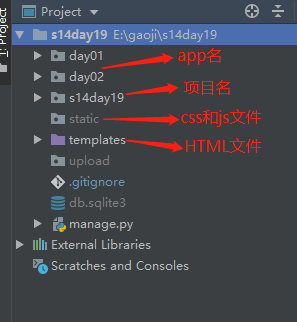
	django-admin startproject 【工程名称】

		mysite
			- mysite        # 对整个程序进行配置
				- init
				- settings  # 配置文件
				- url       # URL对应关系
				- wsgi      # 遵循WSIG规范,uwsgi + nginx
			- manage.py     # 管理Django程序:

	          app:
		          migrations     数据修改表结构
		          admin          Django为我们提供的后台管理
		          apps           配置当前app
		          models         ORM,写指定的类  通过命令可以创建数据库结构
		          tests          单元测试
		          views          业务代码
1.先配置好机器的环境变量(红框内容)
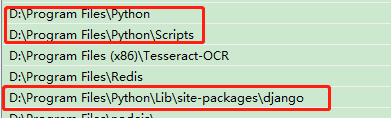
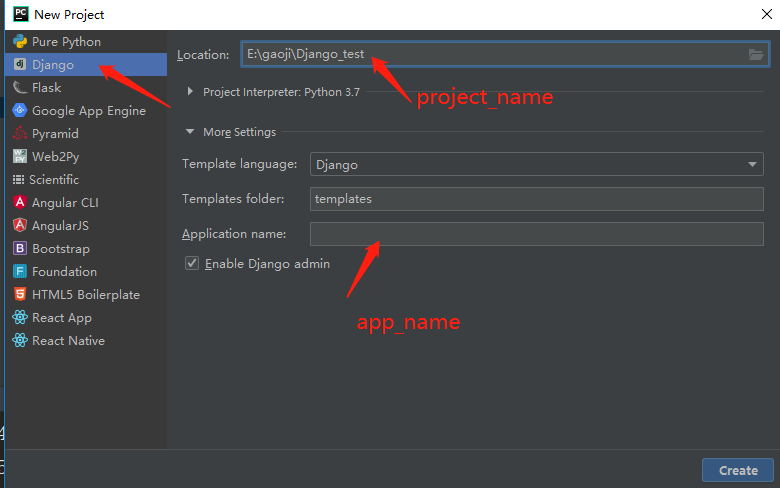
2.django-admin startproject 工程名 #创建一个Django项目
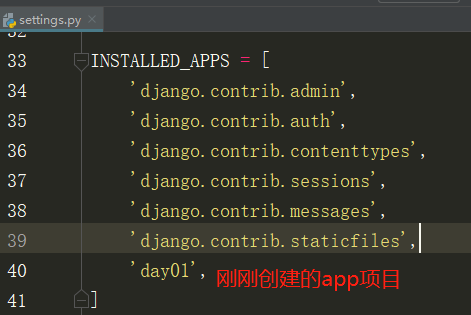
django-admin startapp app名 #创建一个APP项目。同时需要在settings.py的INSTALLED_APPS加上app项目
3.#添加数据库
python manage.py makemigrations
python manage.py migrate
4.#启动python shell,交互式控制台(实际上没有用过)
python manage.py. shell
5.创建templates文件夹用于存放模板文件,同时也需要在Setting.py中的TEMPLATES修改

'DIRS': [os.path.join(BASE_DIR, 'templates')]
6.创建static文件夹存放css和js的代码,同时也需要在Setting.py末尾处修改
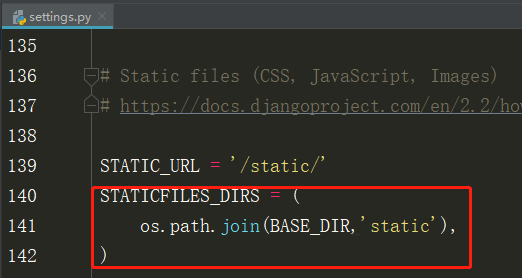
STATICFILES_DIRS=(
os.path.join(BASE_DIR,'static'), #不然static里面的css js文件中找不到.
# 注意 最后要加个逗号,,,!!
)
7.注释setting.py的CSRF中间件,否则会报错,跨站域名伪造(因为练习中不需要校验)

8.定义视图函数
app下views.py
def func(request):
#request.GET.get('',None)
#request.POST.get('',None)
#return HttpResponse("显示的字符串")
#return render(request,'HTML模板的路径',{’数据‘})
#return redirect('只能填url')
9.模板中处理循环
def func(request):
return render(request,"index.html",{'current_user':'alex','user_list':['alex','emily']}) #列表


<html>
...
<body>
  <div{{ current_user }}></div>
  <ul>
    {% for row in user_list %}
      {%if row =='alex'%}
        <li>{{ row }}</li>
      {%endif%}
    {% endfor %}
  </ul>
</body>
</html>


—————————————————索引————————————————————————
def func(request):
return render(request,"index.html",{'current_user':'alex',
                      'user_list':['alex','emily'],
                      'user_dict':{'k1':'v1','k2','v2'}})   #字典


<html>
...
<body>
  <div{{ current_user }}></div>
   <a>{{user_list.1}}
  <a>{{user_dict.k1}}</a>
  <a>{{user_dict.k2}}</a>
</body>
</html>


———————条件—————————
def func(request):
return render(request,"index.html",{'current_user':'alex',
                      'age',18,
                      'user_list':['alex','emily'],
                      'user_dict':{'k1':'v1','k2','v2'}})   #字典

<html>
...
<body>
  <div{{ current_user }}></div>
   <a>{{user_list.1}}
  <a>{{user_dict.k1}}</a>
  <a>{{user_dict.k2}}</a>
  {% if age %}
    <a>有年龄</a>
    {%if age >16%}
      <a>老男人</a>
     {% else %}
      <a>小男孩</a>
    {% endif %}
  {% else %}
   <a>无年龄</a>
 {% endif %}

</body>

</html>


 浙公网安备 33010602011771号