

flutter用showModalBottomSheet实现可变高度的底部弹窗
这几天公司要实现一个如图的功能
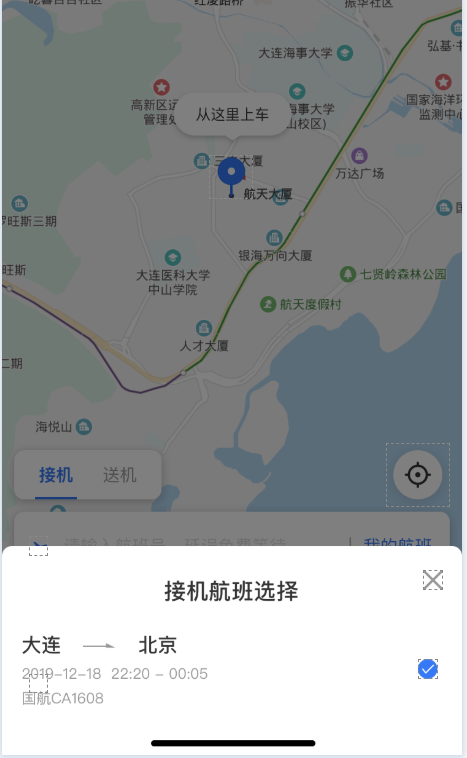
下面的弹窗,本来打算用 showModalBottomSheet加column嵌套一个listview就行了,结果发现:
1、用listview的话,listview的外面必须包裹一层expanded,否则会报错
2、只用SingleChildScrollView的话,也要包裹一层expanded,否则当内容达到showModalBottomSheet的最大高度的时候回报内容遮挡的问题
因为这两个问题最终选择了用ConstrainedBox包裹SingleChildScrollView设置最大高度实现了在内容很少时高度为内容高度,内容很多的时候让那个视图滚动起来
下面为完整代码
  1 class airLines extends StatefulWidget {
  2   @override
  3   _airLinesState createState() => _airLinesState();
  4 }
  5
  6 class _airLinesState extends State<airLines> {
  7   int _valuelist; //航班 选择
  8   @override
  9   Widget build(BuildContext context) {
 10     return Container(
 11       child: Column(mainAxisSize: MainAxisSize.min, children: <Widget>[
 12         Padding(
 13             padding: EdgeInsets.fromLTRB(10, 0, 0, 0),
 14             child: Stack(
 15                 alignment: Alignment.center,
 16                 children: <Widget>[
 17               Container(
 18                 child: Text("接机航班选择",
 19                     style: TextStyle(
 20                         fontSize: 18,
 21                         color: Color(0xff333333),
 22                         fontWeight: FontWeight.w500)),
 23               ),
 24               Align(
 25                 alignment: Alignment.topRight,
 26                 child: Container(
 27                     width: 60,
 28                     height: 50,
 29                     child: IconButton(
 30                         icon: Icon(
 31                           Icons.close,
 32                           color: Color.fromRGBO(153, 153, 153, 1),
 33                           size: 30,
 34                         ),
 35                         onPressed: () {
 36                           Navigator.pop(context);
 37                         })),
 38               )
 39             ])),
 40
 41         ///设计原型上底部弹窗是内容包裹(弹窗的高德为内容高度,当内容过多时最大高度为300)
 42         ///如果用listView实现则自动充满高度
 43         ///SingleChildScrollView的外面如果不包裹一层ConstrainedBox,当内容超出showModalBottomSheet的
 44         ///最大限度时会报内容遮挡的错误
 45         ///综上所述:采用了稍麻烦的方法实现了这个弹窗功能
 46         ConstrainedBox(
 47           constraints: BoxConstraints(maxHeight: 300),
 48           child: SingleChildScrollView(
 49             child: Column(
 50               children: List.generate(
 51                 2,
 52                 (index) => InkWell(
 53                     child: Container(
 54                         child: Column(
 55                       children: <Widget>[
 56                         SizedBox(height: 13.5),
 57                         Row(
 58                           children: <Widget>[
 59                             SizedBox(width: 16),
 60                             Text(
 61                               "大连",
 62                               style: TextStyle(
 63                                   color: Color(0xff333333), fontSize: 16),
 64                             ),
 65                             SizedBox(
 66                               width: 18,
 67                             ),
 68                             Image.asset(
 69                                 "箭头图片的路径"),
 70                             SizedBox(
 71                               width: 18,
 72                             ),
 73                             Text(
 74                               "大连",
 75                               style: TextStyle(
 76                                   color: Color.fromRGBO(51, 51, 51, 1),
 77                                   fontSize: 16),
 78                             ),
 79                           ],
 80                         ),
 81                         Row(children: <Widget>[
 82                           SizedBox(width: 16),
 83                           Text("2019-12-18  22:20 - 00:05",
 84                               style: TextStyle(
 85                                   color: Color.fromRGBO(153, 153, 153, 1),
 86                                   fontSize: 12)),
 87                           Expanded(child: SizedBox()),
 88                           Container(
 89                             width: 16,
 90                             height: 16,
 91                             child: ACECheckbox(
 92                                 type: ACECheckBoxType.circle,
 93                                 value: _valuelist == index,
 94                                 onChanged: (v) {}),
 95                           ),
 96                           SizedBox(width: 20)
 97                         ]),
 98                         Row(children: <Widget>[
 99                           SizedBox(width: 16),
100                           Text("国航CA1608",
101                               style: TextStyle(
102                                   color: Color.fromRGBO(153, 153, 153, 1),
103                                   fontSize: 12)),
104                         ]),
105                         SizedBox(height: 13),
106                         SizedBox(
107                           height: 0.5,
108                           child: Container(
109                             color: Color.fromRGBO(219, 219, 219, 1),
110                             margin: EdgeInsets.fromLTRB(15, 0, 17, 0),
111                           ),
112                         ),
113                       ],
114                     )),
115                     onTap: () {}),
116               ),
117             ),
118           ),
119         ),
120       ]),
121     );
122   }
123 }
在要弹出内容的地方写:
 1  showModalBottomSheet(
 2                 shape: RoundedRectangleBorder(
 3                     borderRadius: BorderRadius.horizontal(
 4                   left: Radius.circular(8),
 5                   right: Radius.circular(8),
 6                 )),
 7                 context: context,
 8                 builder: (ctx) {
 9                   return airLines();
10                 });
这样就实现了一定程度上可变高度的底部弹窗
没有什么内容

 浙公网安备 33010602011771号