
Netty中分隔符和定长解码器的使用
简介
分割符解码器(DelimiterBasedFrameDecoder)和定长解码器(FixedLengthFrameDecoder),前者可以自动完成以分隔符为结束标志的消息解码,后者可以自动完成对定长消息的解码,它们都能解决TCP粘包和拆包的问题。
DelimiterBasedFrameDecoder 开发
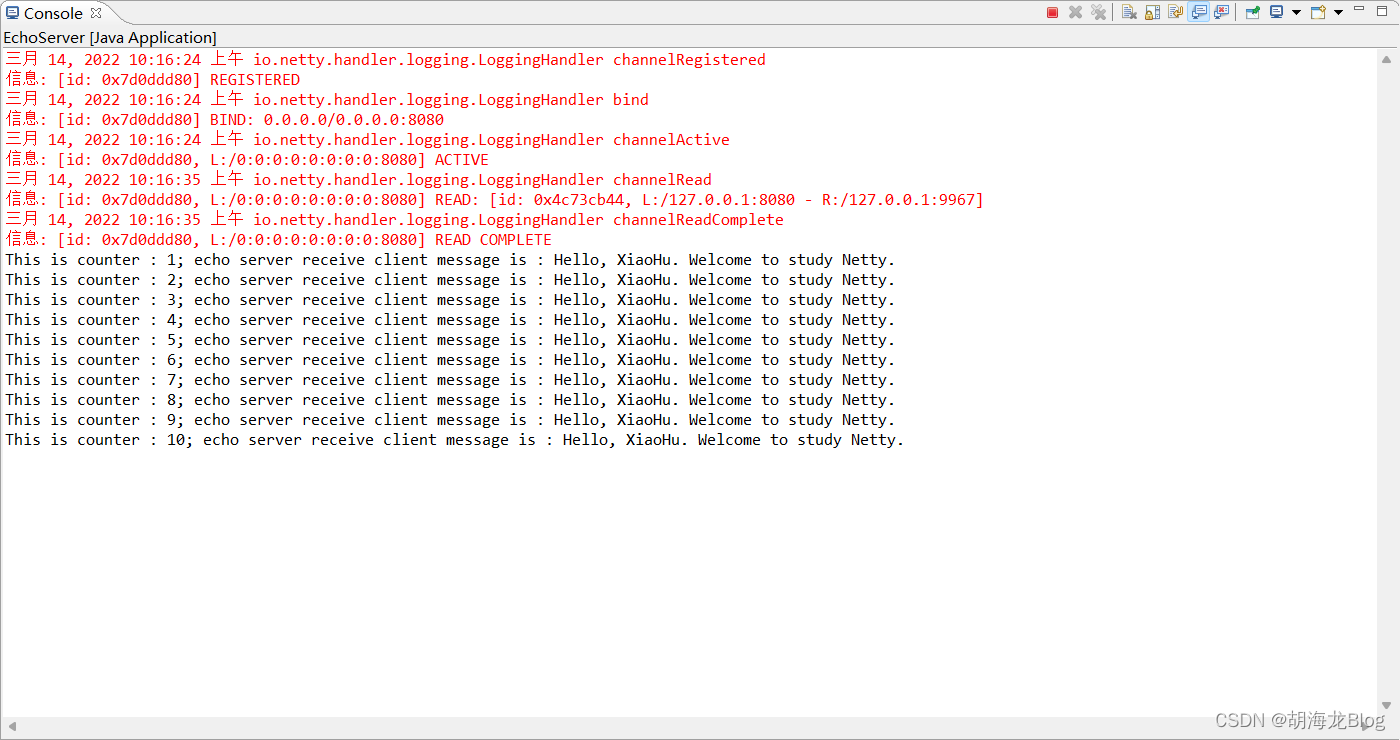
使用DelimiterBasedFrameDecoder我们可以自动完成以分隔符作为码流结束标识的信息解码,下面通过一个简单的程序作为演示,该程序为一个EchoServer,当EchoServer接收到请求消息后,将接收到的信息打印出来,然后将原始消息返回给客户端,消息中使用“$_”作为分割符。
服务端 EchoServer.java
package problem;

import io.netty.bootstrap.ServerBootstrap;
import io.netty.buffer.ByteBuf;
import io.netty.buffer.Unpooled;
import io.netty.channel.ChannelFuture;
import io.netty.channel.ChannelInitializer;
import io.netty.channel.ChannelOption;
import io.netty.channel.EventLoopGroup;
import io.netty.channel.nio.NioEventLoopGroup;
import io.netty.channel.socket.SocketChannel;
import io.netty.channel.socket.nio.NioServerSocketChannel;
import io.netty.handler.codec.DelimiterBasedFrameDecoder;
import io.netty.handler.codec.string.StringDecoder;
import io.netty.handler.logging.LogLevel;
import io.netty.handler.logging.LoggingHandler;
import problem.handler.EchoServerHandler;

/**
 * Echo 服务
 *
 * @author 胡海龙
 *
 */
public class EchoServer {

	public void run(int port) {
		EventLoopGroup bossGroup = new NioEventLoopGroup();
		EventLoopGroup workGroup = new NioEventLoopGroup();
		try {
			ServerBootstrap b = new ServerBootstrap();
			b.group(bossGroup, workGroup).channel(NioServerSocketChannel.class).option(ChannelOption.SO_BACKLOG, 100)
					.childOption(ChannelOption.SO_KEEPALIVE, true).handler(new LoggingHandler(LogLevel.INFO))
					.childHandler(new ChannelInitializer<SocketChannel>() {
						@Override
						protected void initChannel(SocketChannel ch) throws Exception {
							ByteBuf delimiter = Unpooled.copiedBuffer("$_".getBytes()); // 创建分隔ByteBuf对象
							// 参数1:单条消息最大长度,超过该长度未找到分隔符会抛出异常
							// 参数2:分割符ByteBuf对象
							ch.pipeline().addLast(new DelimiterBasedFrameDecoder(1024, delimiter));
							ch.pipeline().addLast(new StringDecoder());
							ch.pipeline().addLast(new EchoServerHandler());
						}
					});
			ChannelFuture f = b.bind(port).sync();
			f.channel().closeFuture().sync();
		} catch (InterruptedException e) {
			System.err.println(e.getLocalizedMessage());
		} finally {
			bossGroup.shutdownGracefully();
			workGroup.shutdownGracefully();
		}
	}

	public static void main(String[] args) {
		new EchoServer().run(8080);
	}
}
服务端中与其他Netty服务创建类似,唯一的区别在childHandler方法的匿名内部类中的代码,使用分割符解码器时首先需要我们定义一个ByteBuf类型的分割符对象,像上面代码中定义的就是“$_”,然后就是添加分割符解码器,解码器使用DelimiterBasedFrameDecoder的构造函数来定义,俩个参数的含义:
- 第一个:最大长度,最大长度规定了单条消息的最大长度,如果超出该长度后没有发现结束符标志则会抛出异常。
- 第二个:分割符的ByteBuf对象
服务端处理类 EchoServerHandler.java
package problem.handler;

import io.netty.buffer.ByteBuf;
import io.netty.buffer.Unpooled;
import io.netty.channel.ChannelHandlerContext;
import io.netty.channel.ChannelInboundHandlerAdapter;

/**
 * Echo Server 处理类
 *
 * @author 胡海龙
 *
 */
public class EchoServerHandler extends ChannelInboundHandlerAdapter {

	private int counter = 0; // 计数器

	@Override
	public void channelRead(ChannelHandlerContext ctx, Object msg) throws Exception {
		String message = (String) msg; // 将消息转为String类型
		System.out.println("This is counter : " + (++counter) + "; echo server receive client message is : " + message);
		// 将消息转为ByteBuf发送会客户端
		message += "$_"; // 由于分割符解码器过滤掉了我们指定的结束符,所以在返回给客户端原消息时需要加上该分割符
		ByteBuf sendMessage = Unpooled.copiedBuffer(message.getBytes());
		ctx.writeAndFlush(sendMessage);
	}

	@Override
	public void exceptionCaught(ChannelHandlerContext ctx, Throwable cause) throws Exception {
		System.err.println(cause.getLocalizedMessage()); // 打印异常信息
		ctx.close(); // 关闭当前通道
	}

}
该处理类类中定义了一个counter变量用来计数,在读取方法中直接将接收到的消息转为String类型,因为我们使用了StringDecoder解码器,此时服务端接收消息已完成,接下来是将原本的消息返回给客户端,这里因为我们的分隔符解码器已经将分割符过滤掉了,所以此时的每条消息中是没有分割符的,因此需要在每条返回的消息后面加上过滤掉的分割符。
客户端 EchoClient.java
package problem;

import io.netty.bootstrap.Bootstrap;
import io.netty.buffer.ByteBuf;
import io.netty.buffer.Unpooled;
import io.netty.channel.ChannelFuture;
import io.netty.channel.ChannelInitializer;
import io.netty.channel.ChannelOption;
import io.netty.channel.EventLoopGroup;
import io.netty.channel.nio.NioEventLoopGroup;
import io.netty.channel.socket.SocketChannel;
import io.netty.channel.socket.nio.NioSocketChannel;
import io.netty.handler.codec.DelimiterBasedFrameDecoder;
import io.netty.handler.codec.string.StringDecoder;
import problem.handler.EchoClientHandler;

/**
 * Echo 客户端
 *
 * @author 胡海龙
 *
 */
public class EchoClient {

	public void run(String post, int port) {
		EventLoopGroup group = new NioEventLoopGroup();
		try {
			Bootstrap b = new Bootstrap();
			b.group(group).channel(NioSocketChannel.class).option(ChannelOption.TCP_NODELAY, true)
					.handler(new ChannelInitializer<SocketChannel>() {
						@Override
						protected void initChannel(SocketChannel ch) throws Exception {
							ByteBuf delimiter = Unpooled.copiedBuffer("$_".getBytes());
							ch.pipeline().addLast(new DelimiterBasedFrameDecoder(1024, delimiter));
							ch.pipeline().addLast(new StringDecoder());
							ch.pipeline().addLast(new EchoClientHandler());
						}
					});
			ChannelFuture f = b.connect(post, port).sync();
			f.channel().closeFuture().sync();
		} catch (InterruptedException e) {
			System.err.println(e.getLocalizedMessage());
		} finally {
			group.shutdownGracefully();
		}
	}

	public static void main(String[] args) {
		new EchoClient().run("127.0.0.1", 8080);
	}
}
客户端处理类 EchoClientHandler.java
package problem.handler;

import io.netty.buffer.Unpooled;
import io.netty.channel.ChannelHandlerContext;
import io.netty.channel.ChannelInboundHandlerAdapter;

/**
 * Echo Client 处理类
 *
 * @author 胡海龙
 *
 */
public class EchoClientHandler extends ChannelInboundHandlerAdapter {

	private int counter;

	private final String ECHO_REQ_MESSAGE = "Hello, XiaoHu. Welcome to study Netty.$_";

	@Override
	public void channelActive(ChannelHandlerContext ctx) throws Exception {
		for (int i = 0; i < 10; i++) {
			ctx.writeAndFlush(Unpooled.copiedBuffer(ECHO_REQ_MESSAGE.getBytes()));
		}
	}

	@Override
	public void channelRead(ChannelHandlerContext ctx, Object msg) throws Exception {
		String receiveMessage = (String) msg;
		System.out.println("This is counter : " + (++counter) + "; receive server message is : " + receiveMessage);
	}

	@Override
	public void exceptionCaught(ChannelHandlerContext ctx, Throwable cause) throws Exception {
		System.err.println(cause.getLocalizedMessage());
		ctx.close();
	}

}
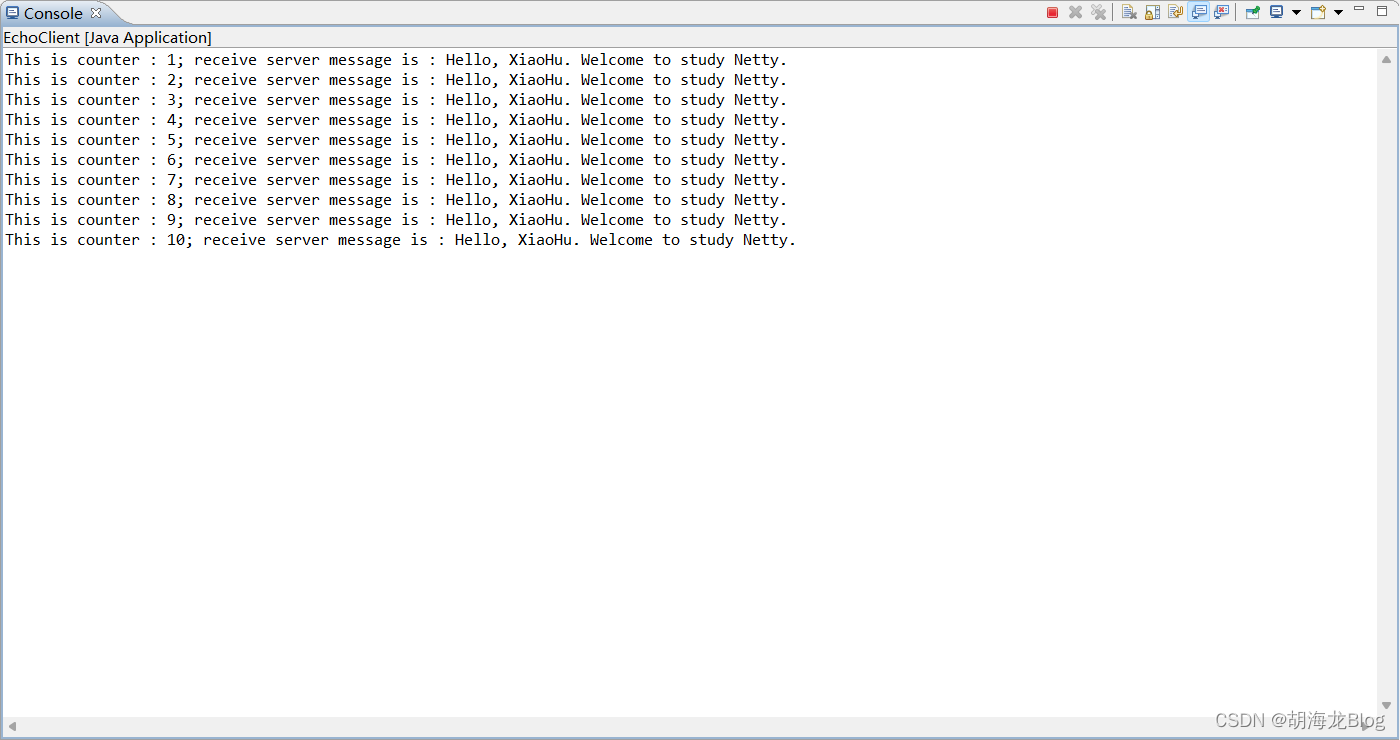
客户端这里通过channelActive方法在连接到服务端后向服务端发送10条带有分隔符的消息。然后在读取方法中打印。
最终运行效果
服务端
客户端
FixedLengthFrameDecoder 开发
FixedLengthFrameDecoder是固定长度解码器,它能够按照指定的长度对消息进行自动解码,开发者同样不需要考虑TCP粘包和拆问题。这里同样以EchoServer为例进行演示。
服务端
package problem;

import io.netty.bootstrap.ServerBootstrap;
import io.netty.channel.ChannelFuture;
import io.netty.channel.ChannelInitializer;
import io.netty.channel.ChannelOption;
import io.netty.channel.EventLoopGroup;
import io.netty.channel.nio.NioEventLoopGroup;
import io.netty.channel.socket.SocketChannel;
import io.netty.channel.socket.nio.NioServerSocketChannel;
import io.netty.handler.codec.FixedLengthFrameDecoder;
import io.netty.handler.codec.string.StringDecoder;
import io.netty.handler.logging.LogLevel;
import io.netty.handler.logging.LoggingHandler;
import problem.handler.EchoServerHandler;

/**
 * Echo 服务
 *
 * @author 胡海龙
 *
 */
public class EchoServer {

	public void run(int port) {
		EventLoopGroup bossGroup = new NioEventLoopGroup();
		EventLoopGroup workGroup = new NioEventLoopGroup();
		try {
			ServerBootstrap b = new ServerBootstrap();
			b.group(bossGroup, workGroup).channel(NioServerSocketChannel.class).option(ChannelOption.SO_BACKLOG, 100)
					.childOption(ChannelOption.SO_KEEPALIVE, true).handler(new LoggingHandler(LogLevel.INFO))
					.childHandler(new ChannelInitializer<SocketChannel>() {
						@Override
						protected void initChannel(SocketChannel ch) throws Exception {
							// ByteBuf delimiter = Unpooled.copiedBuffer("$_".getBytes()); // 创建分隔ByteBuf对象
							// 参数1:单条消息最大长度,超过该长度未找到分隔符会抛出异常
							// 参数2:分割符ByteBuf对象
							// ch.pipeline().addLast(new DelimiterBasedFrameDecoder(1024, delimiter));
							ch.pipeline().addLast(new FixedLengthFrameDecoder(20));
							ch.pipeline().addLast(new StringDecoder());
							ch.pipeline().addLast(new EchoServerFixedHandler());
						}
					});
			ChannelFuture f = b.bind(port).sync();
			f.channel().closeFuture().sync();
		} catch (InterruptedException e) {
			System.err.println(e.getLocalizedMessage());
		} finally {
			bossGroup.shutdownGracefully();
			workGroup.shutdownGracefully();
		}
	}

	public static void main(String[] args) {
		new EchoServer().run(8080);
	}
}
上面只是把分隔符解码器相关代码注释掉,然后增加了定长解码器,对应的构造函数中传入了一个长度——20,对应的处理类也改为了EchoServerFixedHandler,该处理类就是简单的接收消息,这里就不做多余的说明了。无论每次到达的消息有多少,它只会按照指定的长度解码,如果是半包,FixedLengthFrameDecoder会缓存半包消息并等待下个包进入后进行拼包,知道读取到一个完整的包。
运行演示
下面我们通过telnet命令来测试该服务。
telnet 127.0.0.1 8080
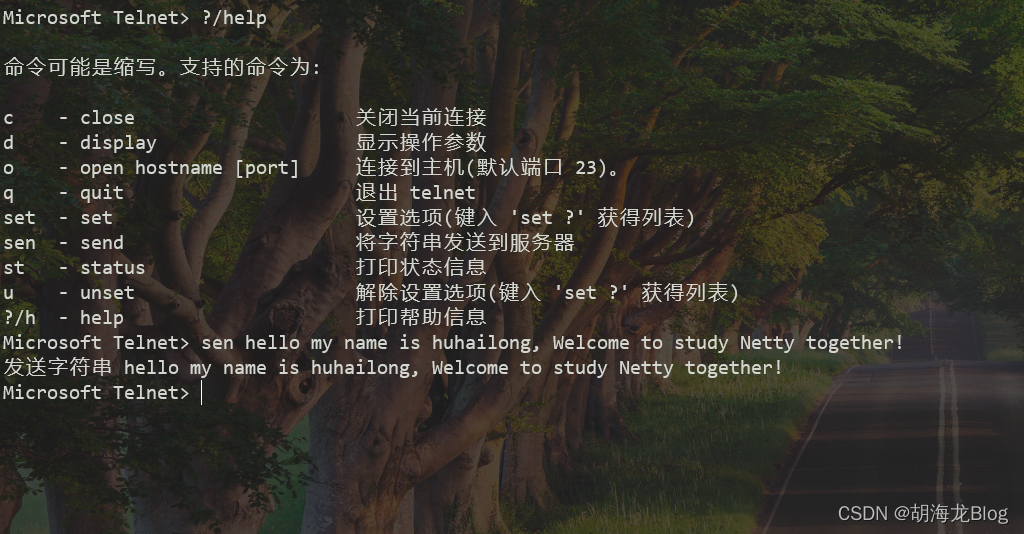
上面我们发送了如下内容:
hello my name is huhailong, Welcome to study Netty together!
下面是服务端接收到的打印:
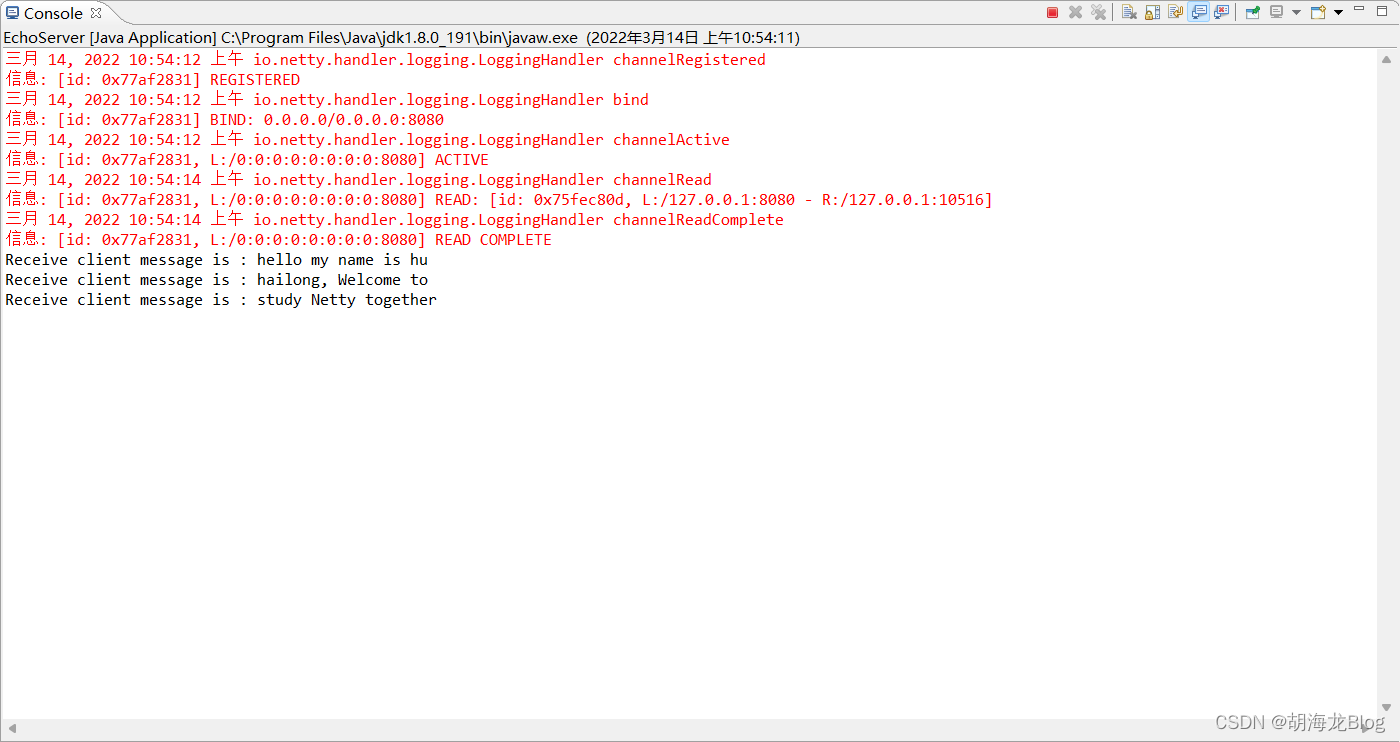
可以看到服务端每次只解码20个长度的消息,上面的内容中没有解码到together后的感叹号,但是当我们再次发送消息时,上次为解码的感叹号会拼接到新发送消息的前面,例如我们再次发送同样的消息,服务端接收到如下内容:
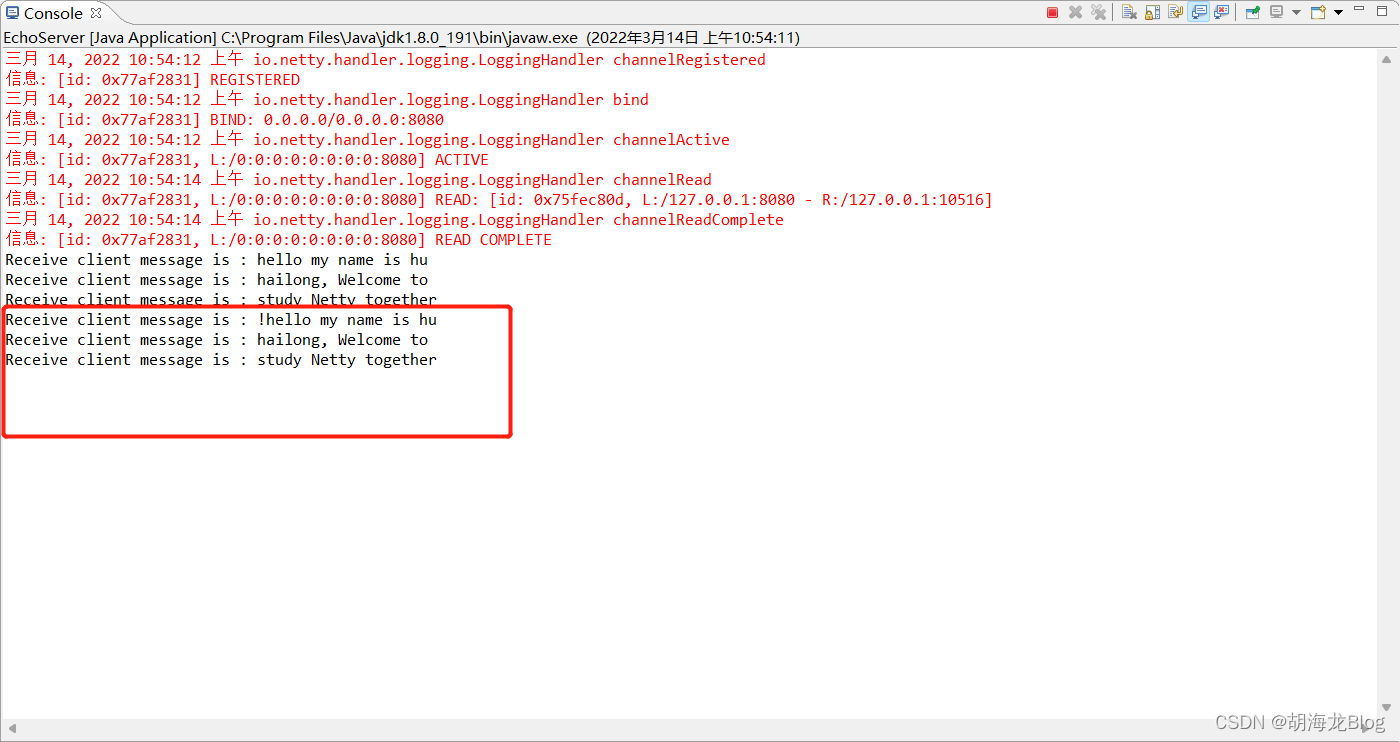
可以看到拼接的内容。
以上就是对分割符解码器和定长解码器的使用过程。

 浙公网安备 33010602011771号