

Affine And Perspective Transform(仿射变换和透视变换)
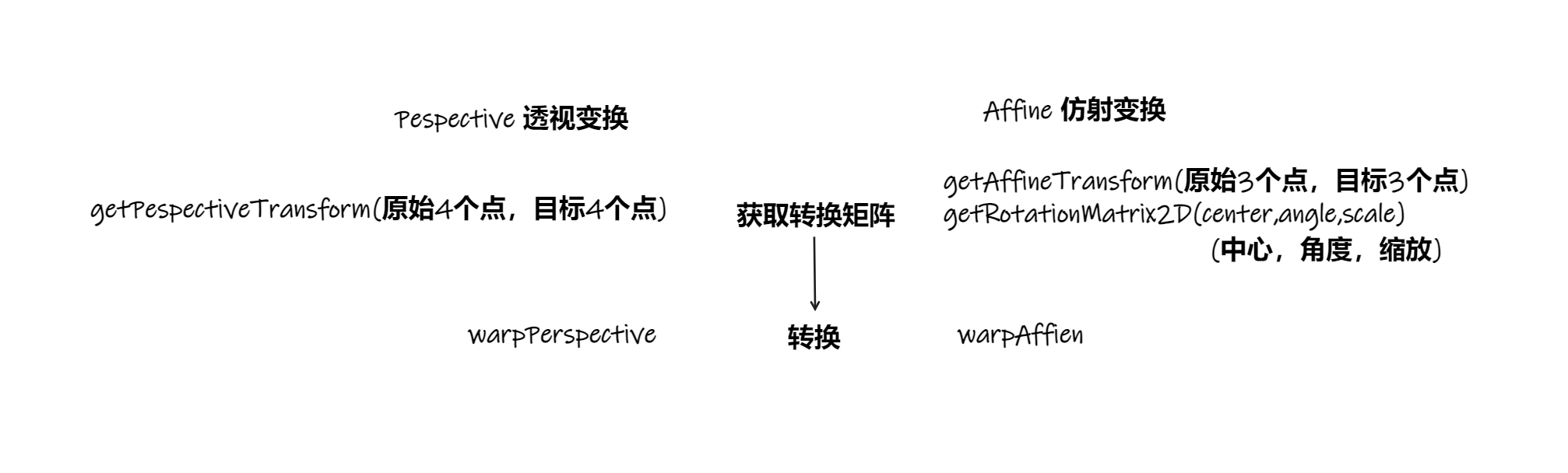
相关函数
Affine Transform 仿射变换
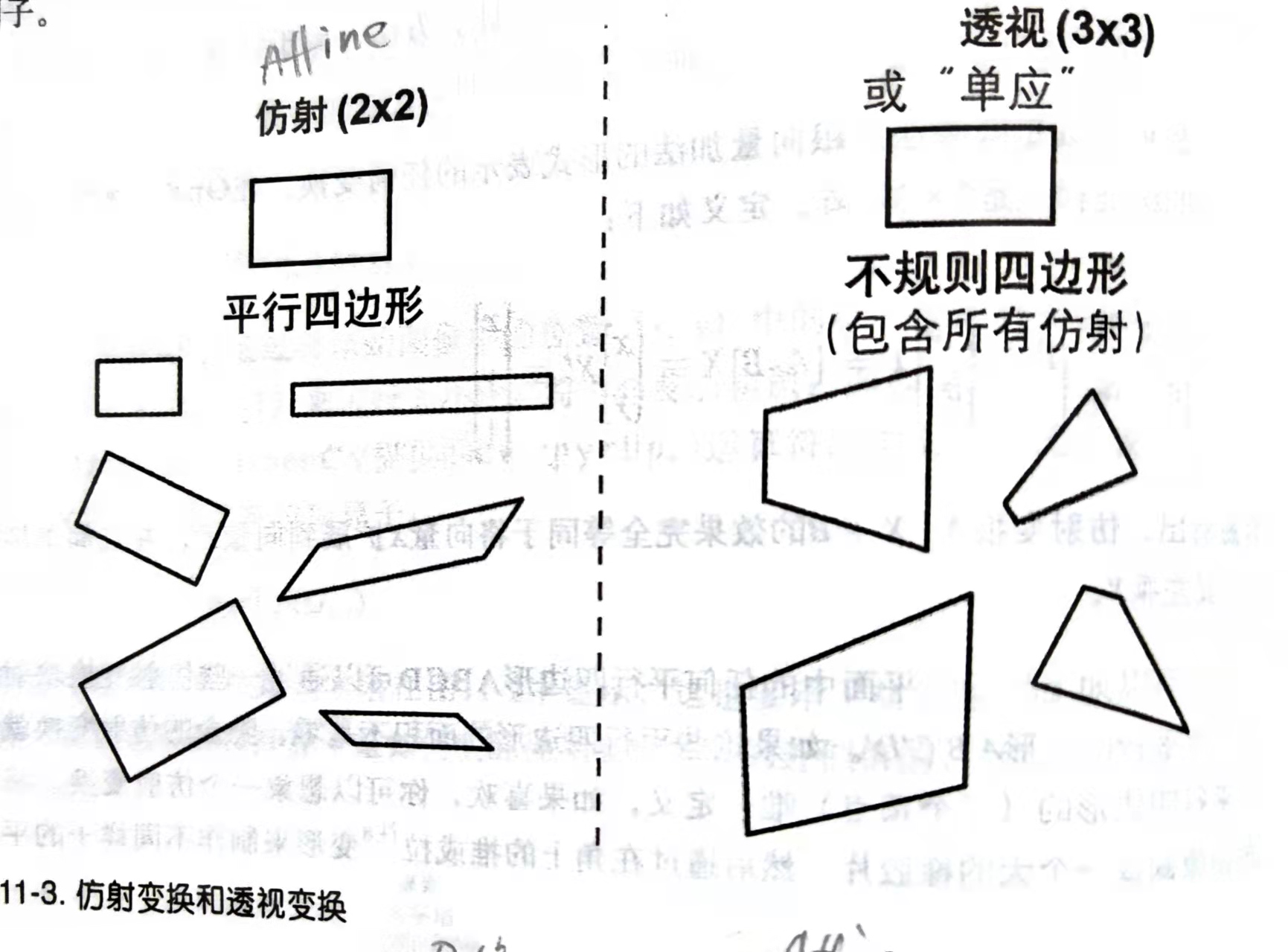
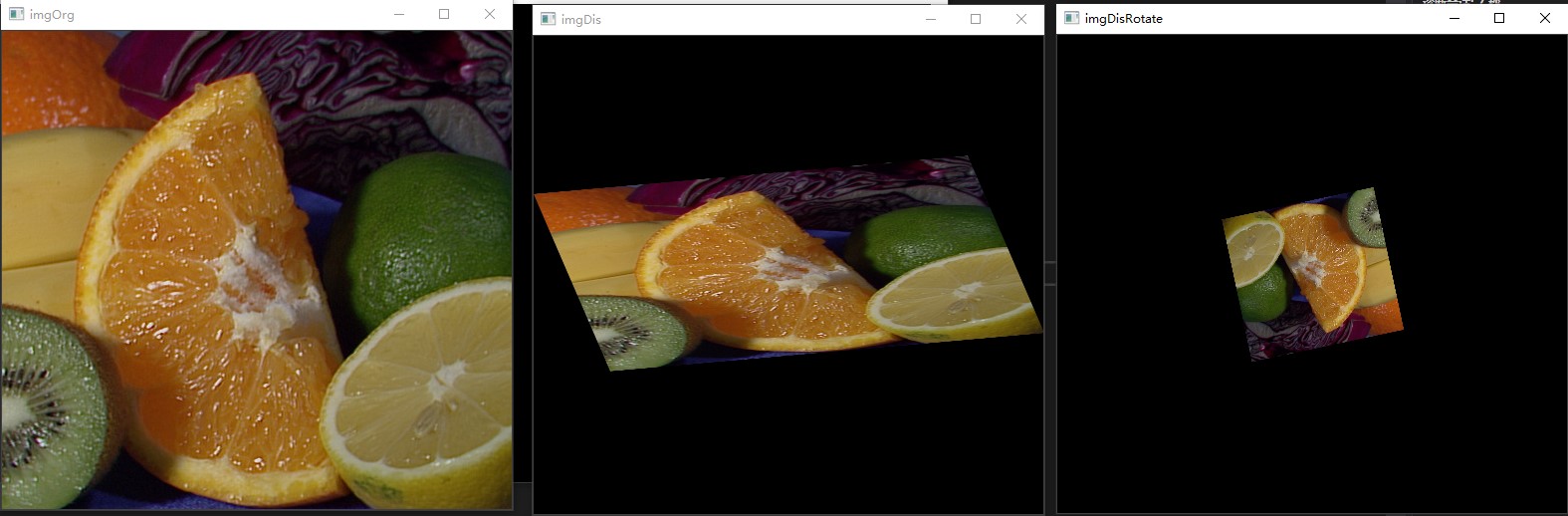
仿射变换将长方形图像转化为平行四边形。
void cv::warpAffine(
	 cv::InputArray src, // Input image
	 cv::OutputArray dst, // Result image
	 cv::InputArray M, // 2-by-3 transform mtx
	 cv::Size dsize, // Destination image size
	 int flags = cv::INTER_LINEAR, // Interpolation, inverse
	 int borderMode = cv::BORDER_CONSTANT, // Pixel extrapolation
	 const cv::Scalar& borderValue = cv::Scalar() // For constant borders
);
其中,cv::InputArray M(2x3的转换矩阵M)通过如下函数获得
// 方法1 :通过人工设定**3个**原图上的点 和 对应映射到目标图像的点,求得转换矩阵。
cv::Mat cv::getAffineTransform( // Return 2-by-3 matrix
	 const cv::Point2f* src, // Coordinates *three* of vertices
	 const cv::Point2f* dst // Target coords, three vertices
);

//方法2 :设置旋转中心,旋转角度,缩放来求转换矩阵
cv::Mat cv::getRotationMatrix2D( // Return 2-by-3 matrix
	 cv::Point2f center // Center of rotation
	 double angle, // Angle of rotation
	 double scale // Rescale after rotation
);
通过人工设定3个原图上的点 和 对应映射到目标图像的点,求得转换矩阵。该转换矩阵用以转换整幅图像。
转换公式为:
\[dst(x,y) = src(M_{00}x+M_{01}y+M_{02},M_{10}x+M_{11}y+M_{12})
\]
Perspective Transform 透视变换
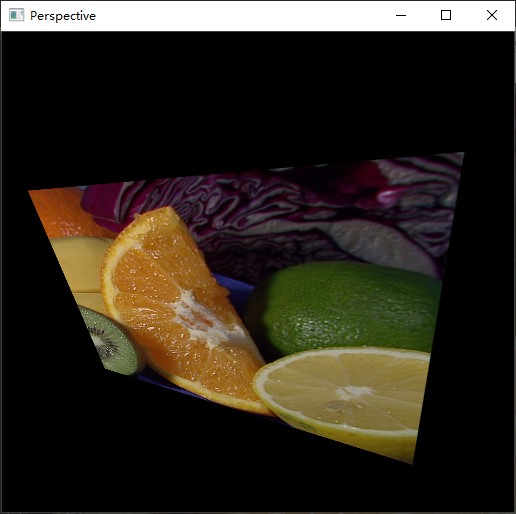
可以将长方形图像转化为任意形状。
void cv::warpPerspective(
	 cv::InputArray src, // Input image
	 cv::OutputArray dst, // Result image
	 cv::InputArray M, // 3-by-3 transform mtx
	 cv::Size dsize, // Destination image size
	 int flags = cv::INTER_LINEAR, // Interpolation, inverse
	 int borderMode = cv::BORDER_CONSTANT, // Extrapolation method
	 const cv::Scalar& borderValue = cv::Scalar() // For constant borders
);
求转化矩阵的函数,原始图像需要选4个点 映射到目标图像
cv::Mat cv::getPerspectiveTransform( // Return 3-by-3 matrix
	 const cv::Point2f* src, // Coordinates of *four* vertices
	 const cv::Point2f* dst // Target coords, four vertices
);
公式为:
\[dst(x,y) = src\big( \frac{M_{00}x+M_{01}y+M_{02}}{M_{20}x+M_{21}y+M_{22}} , \frac{M_{10}x+M_{11}y+M_{12}}{M_{20}x+M_{21}y+M_{22}}\big)
\]
仿射变换和透视变换
流程图
复现
//learning OpenCV3 11-1 / 11-2
/*
*运行首先出现的图片是仿射变换
* 按任意键运行透视变换
* 再按任意键退出
*/

#include <opencv2/imgcodecs.hpp>
#include <opencv2/imgproc.hpp>
#include <opencv2/highgui.hpp>
#include <iostream>
using namespace std;

using namespace cv;

int main(int argc,char** argv)
{
	if (argc != 2) {
		cout << "vs在调试-属性调试-调试-命令参数 输入图像路径"
			<< "Clion在编辑运行/调试对话框-配置编辑-程序实参 输入图像路径" << endl;
	}
	//1、仿射变换
	Mat imgOrg = imread(argv[1]), imgDis;

	const Point2f srcThreePoints[3] = {
		Point2f(0,0), //左上
		Point2f(imgOrg.cols-1,0), //右上
		Point2f(0,imgOrg.rows-1) //左下
	};

	const Point2f disThreePoints[3] = {
		cv::Point2f(imgOrg.cols * 0.f, imgOrg.rows * 0.33f),
		cv::Point2f(imgOrg.cols * 0.85f, imgOrg.rows * 0.25f),
		cv::Point2f(imgOrg.cols * 0.15f, imgOrg.rows * 0.7f)
	};

	Mat m = getAffineTransform(srcThreePoints, disThreePoints); // 获得仿射变换矩阵

	warpAffine(imgOrg, imgDis, m, imgOrg.size());

	imshow("imgOrg", imgOrg);
	imshow("imgDis", imgDis);


	for (int i{ 0 }; ; i++) {
		Point2f center(imgOrg.cols * 0.5, imgOrg.rows * 0.5);
		double angle = i * 3 % 360;
		double scale = (cos((angle - 60) * CV_PI / 180) + 1.05) * 0.8;

		Mat M = getRotationMatrix2D(center, angle, scale), imgDisRotate;

		warpAffine(imgOrg,imgDisRotate,M,imgOrg.size());

		imshow("imgDisRotate", imgDisRotate);
		if (waitKey(30) >= 0) { break; }
	}

	//2、透视变换
	Point2f srcFourPoints[4] = {
		cv::Point2f(0, 0),                   // src Top left
		cv::Point2f(imgOrg.cols - 1, 0),          // src Top right
		cv::Point2f(imgOrg.cols - 1, imgOrg.rows - 1), // src Bottom right
		cv::Point2f(0, imgOrg.rows - 1)           // src Bottom left
	};

	cv::Point2f dstFourQuad[] = {
		cv::Point2f(imgOrg.cols * 0.05f, imgOrg.rows * 0.33f),
		cv::Point2f(imgOrg.cols * 0.9f, imgOrg.rows * 0.25f),
		cv::Point2f(imgOrg.cols * 0.8f, imgOrg.rows * 0.9f),
		cv::Point2f(imgOrg.cols * 0.2f, imgOrg.rows * 0.7f)
	};

	Mat m1 = getPerspectiveTransform(srcFourPoints, dstFourQuad),imgPerspective;

	warpPerspective(imgOrg, imgPerspective, m1,imgOrg.size());
	imshow("Perspective", imgPerspective);
	waitKey();

	destroyAllWindows();

	return 0;
}
结果

 浙公网安备 33010602011771号