vue2与vue3的路由#的问题
vue2:
const router = new VueRouter({
mode: "history" || "hash",
routes
})
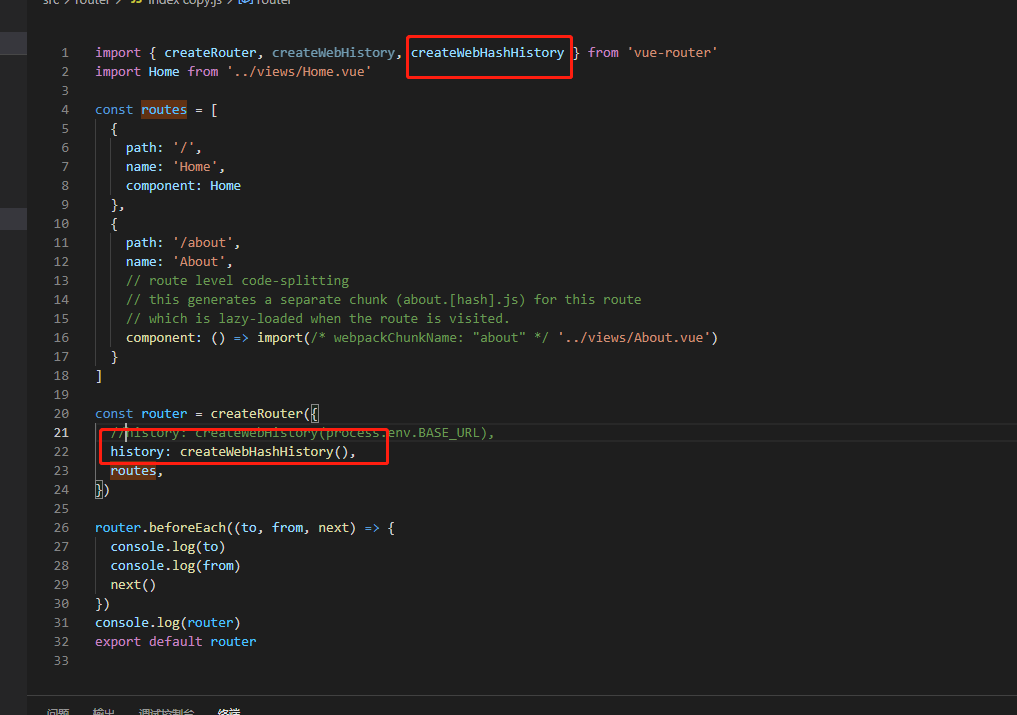
vue3是按需加载
createWebHashHistory
vue单页因微信分享和自动登录需要,对于URL中存在’#’的地址,处理起来比较坑。用history模式就不会存在这样的问题。但是换成history模式,就会有个新的问题,就是页面刷新后,页面就无法显示了(404)。对于这个问题,我们只需要在服务器配置如果URL匹配不到任何静态资源,就跳转到默认的index.html。
我这里是针对nginx的配置,总结如下:
方案一 (这种方式容易被第三方劫持)
location /{
root /data/nginx/html;
index index.html index.htm;
error_page 404 /index.html;
}
方案二
 location /{
    root /data/nginx/html;
    index  index.html index.htm;
    if (!-e $request_filename) {
        rewrite ^/(.*) /index.html last;
        break;
    }
}
方案三 (官网推荐)
 server {
        listen       8888;#默认端口是80,如果端口没被占用可以不用修改
        server_name  localhost;
        root        E:/vue/my_project/dist;#vue项目的打包后的dist
        location / {
            try_files $uri $uri/ @router;#需要指向下面的@router否则会出现vue的路由在nginx中刷新出现404
            index  index.html index.htm;
        }
        #对应上面的@router,主要原因是路由的路径资源并不是一个真实的路径,所以无法找到具体的文件
        #因此需要rewrite到index.html中,然后交给路由在处理请求资源
        location @router {
            rewrite ^.*$ /index.html last;
        }
        #.......其他部分省略
  }
 浙公网安备 33010602011771号