

这两天用到了Tree控件,发现在往树上绑定数据的时候不是特别方便,便写了一个辅助类。 在开始之前先说明一下如何使Tree控件支持有层次结构的数据源绑定,首先需要在xaml代码里为树增加HierarchicalDataTemplate模板,这样Tree就支持分层结构的数据源绑定了。
xaml代码如下:(注明:这里我还用到了一个Toolkit里的DragDrop控件,可以先忽略)
        <!--Tree-->
        <controlsToolkit:TreeViewDragDropTarget AllowDrop="true" HorizontalContentAlignment="Stretch" VerticalContentAlignment="Stretch">
            <controlsToolkit:TreeViewDragDropTarget.Resources>
                <common:HierarchicalDataTemplate x:Key="hierarchicalTemplate" ItemsSource="{Binding Children}">
                    <StackPanel Orientation="Horizontal">
                        <ContentPresenter Width="16" Height="16" Margin="0 0 4 0" Content="{Binding Icon}" />
                        <TextBlock Text="{Binding Name}"/>
                    </StackPanel>
                </common:HierarchicalDataTemplate>
            </controlsToolkit:TreeViewDragDropTarget.Resources>
            <controls:TreeView x:Name="tree1" ItemTemplate="{StaticResource hierarchicalTemplate}" AllowDrop="True"/>
        </controlsToolkit:TreeViewDragDropTarget>
辅助类的代码:
    /// <summary>
    /// Tree<T>
    /// </summary>
    public class Tree<T> where T: new()
    {
        /// <summary>
        /// 构造
        /// </summary>
        public Tree(string nodeName, string iconName = null)
        {
            this.Value = default(T);
            this.Children = new ObservableCollection<Tree<T>>();

            // 图标及名称
            this.Name = nodeName != null ? nodeName.Trim() : string.Empty;
            this.IconName = iconName != null ? iconName.Trim() : string.Empty;
        }

        /// <summary>
        /// 构造空节点
        /// </summary>
        public static Tree<T> Empty
        {
            get
            {
                return new Tree<T>(String.Empty);
            }
        }

        /// <summary>
        /// 构造实体
        /// </summary>
        public ObservableCollection<Tree<T>> Entity
        {
            get
            {
                ObservableCollection<Tree<T>> entity = new ObservableCollection<Tree<T>>();
                entity.Add(this);
                return entity;
            }
        }

        /// <summary>
        /// 子节点集合
        /// </summary>
        public ObservableCollection<Tree<T>> Children { get; set; }


        /// <summary>
        /// 节点值
        /// </summary>
        public T Value { get; set; }


        /// <summary>
        /// 图标名
        /// </summary>
        public string IconName { get; private set; }


        /// <summary>
        /// 名称
        /// </summary>
        public string Name { get; private set; }


        /// <summary>
        /// 图标
        /// </summary>
        public Image Icon
        {
            get
            {
               return ImageFactory.GetImage(this.IconName); // 加载图片的函数,这个自己根据需要实现吧。
            }
        }
    }
调用示例:
创建一个SampleDataClass类,用做附加在树结点上的数据类型,替换成自己的具体类型就可以了,这里只是一个例子。
    public class SampleDataClass
    {
        public object Property1 { get; set; }
        public string Property2 { get; set; }
    }
// 手动构造树结构
Tree<SampleDataClass> root = new Tree<SampleDataClass>("Root", "Root.png");
Tree<SampleDataClass> node1 = new Tree<SampleDataClass>("node1", "Folder.png");
Tree<SampleDataClass> node2 = new Tree<SampleDataClass>("node2", "Folder.png");
Tree<SampleDataClass> node3 = new Tree<SampleDataClass>("node3", "Folder.png");
Tree<SampleDataClass> node4 = new Tree<SampleDataClass>("node4", "Folder.png");
Tree<SampleDataClass> node5 = new Tree<SampleDataClass>("node5", "Folder.png");
// 设定关系
node1.Children.Add(node2);
node1.Children.Add(node3);
root.Children.Add(node1);
root.Children.Add(node4);
root.Children.Add(node5);
// 绑定
this.tree1.ItemsSource = root.Entity;
运行结果,如图:
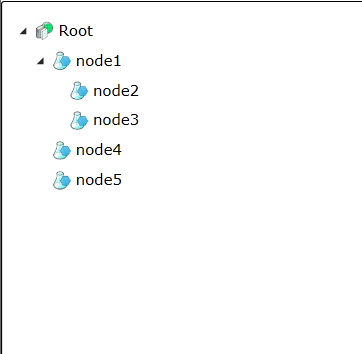
已经可以用Tree<T>来管理你的数据结构了并且可以动态组织结构,同时可以使用Tree<T>.Value接口获取你在树结点上的附加数据。呃!上面那段示例的代码看上去很复杂?呵呵,其实那是因为我们是一行行自己组织的树结构,用程序实现那些树的结构和节点关系的话就优雅多了。再帖段实际应用时代码的样子:
    // 创建目录索引
    IDictionary<Guid, Tree<AH_Catalog>> treedict = new Dictionary<Guid, Tree<AH_Catalog>>();
    foreach (AH_Catalog catalog in catalogService.AH_Catalogs) {
        treedict[catalog.CatalogId] = new Tree<AH_Catalog>(catalog.Name, catalog.Icon)
        {
            Value = catalog
        };
    }

    // 建立目录关系
    foreach (AH_CatalogInfo info in catalogService.AH_CatalogInfos) {
        treedict[info.Catalog].Children.Add(treedict[info.Children]);
    }

    // 加载根目录项
    foreach (Tree<AH_Catalog> node in treedict.Values.Where(w => w.Value.Depth == 0)) {
        treeRoot.Children.Add(node);
    }
    // 数据绑定
    this.tree1.ItemsSource = treeRoot.Entity;
运行结果:
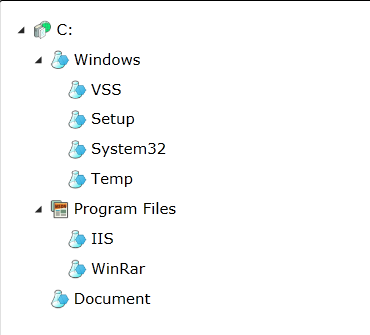
第二帖END!

 浙公网安备 33010602011771号