
构建部分
app.py
from flask import Flask
import socket
import os
import time
import random

app = Flask(__name__)
container_id = socket.gethostname()

def random_delay():
    return random.uniform(0.1, 0.5)

@app.route('/')
def hello():
    delay = random_delay()
    time.sleep(delay)

    return f'''
    <!DOCTYPE html>
    <html>
    <head>
        <title>负载均衡测试应用</title>
        <style>
            body {{ font-family: Arial, sans-serif; margin: 40px; }}
            .container {{
                background: #F5F5F5;
                padding: 20px;
                border-radius: 10px;
                border-left: 5px solid #007cbb;
            }}
            .title {{ color: #333; font-size: 160%; }}
            .container-id {{ color: #007cbb; font-weight: bold; }}
            .info {{ margin: 10px 0; }}
        </style>
    </head>
    <body>
        <div class="container">
            <h1 class="title">负载均衡测试应用</h1>
            <p class="info">当前容器ID: <span class="container-id">{container_id}</span></p>
            <p class="info">请求延迟: {delay:.2f}秒</p>
            <p class="info">当前时间: {time.strftime("%Y-%m-%d %H:%M:%S")}</p>
            <div style="margin-top: 20px;">
                <p>这是一个负载均衡测试页面</p>
                <p>刷新页面可以看到不同的容器ID</p>
            </div>
        </div>
    </body>
    </html>
    '''

@app.route('/health')
def health():
    return {'status': 'healthy', 'container_id': container_id}

if __name__ == '__main__':
    app.run(host='0.0.0.0', port=5000, debug=True)
docker-compose.yml
version: '3.8'

services:
  web:
    build: .
    ports:
      - "5000"
    networks:
      - app-network
    deploy:
      replicas: 1
    healthcheck:
      test: ["CMD", "curl", "-f", "http://localhost:5000/health"]
      interval: 30s
      timeout: 10s
      retries: 3

  load-balancer:
    image: nginx:alpine
    ports:
      - "80:80"
    volumes:
      - ./nginx.conf:/etc/nginx/nginx.conf
    depends_on:
      - web
    networks:
      - app-network

networks:
  app-network:
    driver: bridge
Dockerfile
FROM python:3.7-alpine

WORKDIR /app

COPY requirements.txt .

RUN pip install -r requirements.txt -i https://pypi.tuna.tsinghua.edu.cn/simple

COPY . .

CMD ["python", "app.py"]
nginx.conf
events {
        worker_connections 1024;
}
http {
	upstream web_server {
		server web:5000;
	}

	server {
		listen 80;
		server_name localhost;
			location / {
			proxy_pass http://web_server;
			proxy_set_header Host $host;
			proxy_set_header X-Real-IP $remote_addr;
			proxy_set_header X-Forwarded-For $proxy_add_x_forwarded_for;
			proxy_set_header X-Backend-Server $upstream_addr;
		}
		location /nginx_status {
			stub_status;
			allow all;
		}


	}
}
requirements.txt
flask
测试
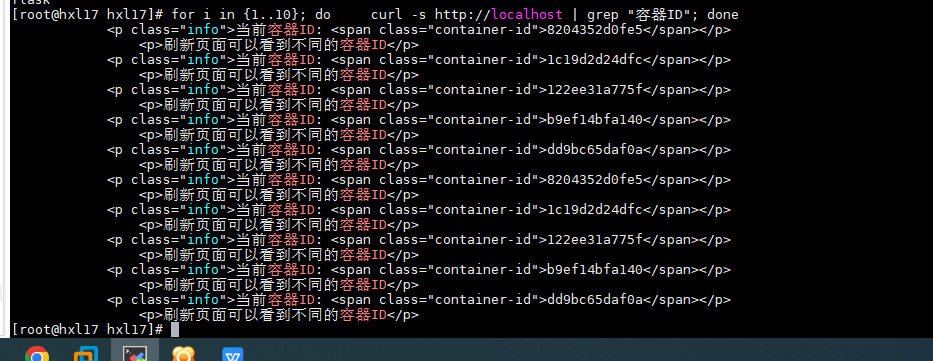
使用循环对网页实现测试,并过滤出容器id的页面
for i in {1..10};do
curl -s http://localhost | grep "容器ID"
done
效果如下

 浙公网安备 33010602011771号