
【云原生 六】K8S 集群下 kubesphere 云平台部署安装
【云原生 六】K8S 集群下 kubesphere 云平台部署安装
一、环境要求
本实例使用的版本 ubuntu22.04,k8s v1.26.1、kubesphere v3.3.2。
因为本人已经安装的k8s集群版本是 1.26.1,所以按照此版本进行部署,会存在很多兼容性问题,推荐的版本 k8s v1.24.x及以前的版本,kubesphere v3.2.x。
二、下载安装文件并安装
创建自己的文件目录,进行安装。
kubectl apply -f https://github.com/kubesphere/ks-installer/releases/download/v3.3.2/kubesphere-installer.yaml
kubectl apply -f https://github.com/kubesphere/ks-installer/releases/download/v3.3.2/cluster-configuration.yaml
或者
wget -c https://github.com/kubesphere/ks-installer/releases/download/v3.3.2/kubesphere-installer.yaml
wget -c https://github.com/kubesphere/ks-installer/releases/download/v3.3.2/cluster-configuration.yaml
kubectl apply -f kubesphere-installer.yaml
kubectl apply -f cluster-configuration.yaml
查看安装日志
kubectl logs -n kubesphere-system $(kubectl get pod -n kubesphere-system -l 'app in (ks-install, ks-installer)' -o jsonpath='{.items[0].metadata.name}') -f
查看kubesphere 控制台部署信息
kubectl get svc/ks-console -n kubesphere-system
进行访问
服务所在节点默认地址:IP或域名:30880 ,默认用户密码:admin/P@88w0rd
三、启用可插拔组件
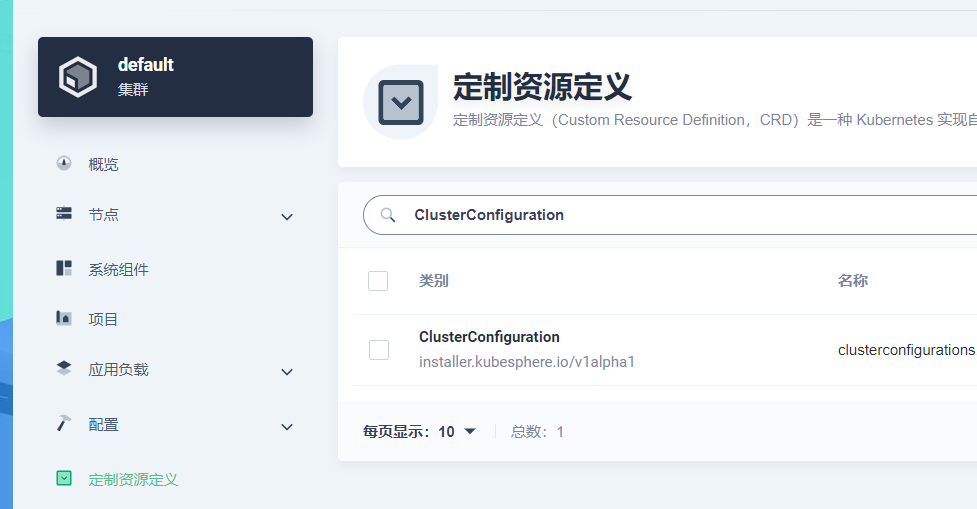
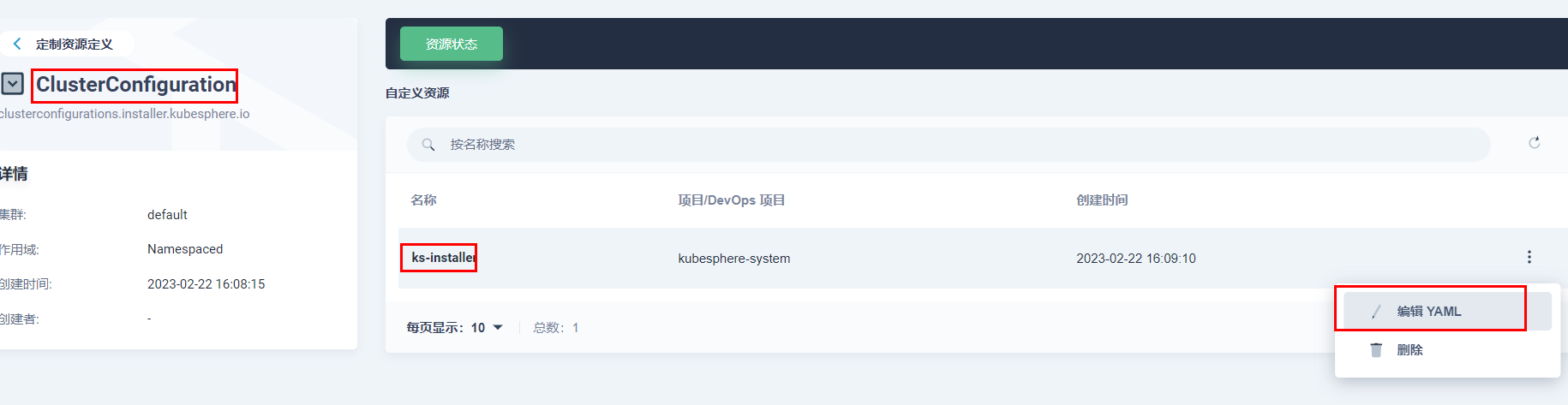
登录kubesphere的控制面板,找到左上角平台管理 -> 节点管理 -> 定制资源定义(CRD)。搜索“ClusterConfiguration”,然后点击 ks-installer 最右侧的三个点,再点击 “编辑YAML”。在编辑界面将相关组件的 enable 属性改为 true,然后保存。
通过下面的命令在master节点上或者通过Web kubectl 工具 查看安装结果。
kubectl logs -n kubesphere-system $(kubectl get pod -n kubesphere-system -l 'app in (ks-install, ks-installer)' -o jsonpath='{.items[0].metadata.name}') -f
在安装的过程中会出现 kubesphere 的版本与 k8s 的版本导致的兼容性问题,例如下面的问题:
no matches for kind "CronJob" in version "batch/v1beta1"

failed to fetch group version resources autoscaling/v2beta2
这些问题都是因为新版本的 k8s 对旧版本的 api 进行了迁移的原因。详情查看 k8s 已弃用api 迁移指南:https://kubernetes.io/zh-cn/docs/reference/using-api/deprecation-guide。
没有好的解决办法,只能将 k8s 的版本降至 v1.24 及以前版本。
四、k8s 卸载 已安装的kubesphere。
访问 https://github.com/kubesphere/ks-installer/blob/release-3.3/scripts/kubesphere-delete.sh,将 kubesphere-delete.sh 文件的内容复制到本地同名文件中,注意版本与安装的版本保持相同。
touch kubesphere-delete.sh
chmod +x kubesphere-delete.sh
gedit kubesphere-delete.sh
将内容复制到文件中后保存退出,然后执行文件。
./kubesphere-delete.sh
原创文章,引用注明出处!
原文链接:https://www.cnblogs.com/hewei-blogs/articles/17148518.html
本文来自博客园,作者:蓝迷梦,转载请注明原文链接:https://www.cnblogs.com/hewei-blogs/articles/17148518.html

 浙公网安备 33010602011771号