慕课网-Django入门到进阶-更适合Python小白的系统课程-第9章dashboard后端的搭建与开发-9-2dashboard搭建与管理员模块开发(2)
第9章 dashboard 后端的搭建与开发
9-2 dashboard 搭建与管理员模块开发(2)
1.在项目 vedio 下目录 templates/dashboard,新建文件 base.html
<!DOCTYPE html>
<html lang="en">
<head>
    <meta charset="UTF-8">
    <title>base</title>
</head>
<body>
hello muke
</body>
</html>
2.在项目 vedio 下目录 app/dashboard/views,修改文件 base.py
# coding:utf-8

from django.views.generic import View
from app.libs.base_render import render_to_response

class Base(View):
    TEMPLATE = 'dashboard/base.html'

    def get(self, request):
        return render_to_response(request, self.TEMPLATE)
3.在项目 vedio 下目录 app/dashboard,修改文件 urls.py
# coding:utf-8

from django.urls import path
from .views.base import Base

urlpatterns = [
    path('base', Base.as_view()),
]
4.测试启动服务
python manage.py runserver

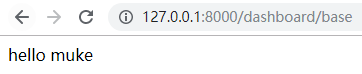
5.在项目 vedio 下目录 templates/dashboard,修改文件 base.html
<!DOCTYPE html>
<html lang="en">
<head>
    <meta charset="UTF-8">
    <title>${self.title()}</title>
    <link rel="stylesheet" href="/static/dashboard/css/bootstrap.min.css" />
    ${self.css()}
</head>
<body>
${self.content()}
</body>
<script src="/static/dashboard/js/jquery-1.12.4.min.js"></script>
<script src="/static/dashboard/js/bootstrap.min.js"></script>
${self.js()}
</html>

<%def name="title()"></%def>
<%def name="js()"></%def>
<%def name="css()"></%def>
<%def name="content()"></%def>
6.在项目 vedio 下目录 app/dashboard/views,修改文件 base.py,修改 TEMPLATE='dashboard/nav.html'
# coding:utf-8

from django.views.generic import View
from app.libs.base_render import render_to_response

class Base(View):
    TEMPLATE = 'dashboard/nav.html'

    def get(self, request):
        return render_to_response(request, self.TEMPLATE)
7.在项目 vedio 下目录 templates/dashboard,新建文件 nav.html
<nav class="navbar navbar-default">
    <div class="container-fluid">
        <!-- Brand and toggle get grouped for better mobile display -->
        <div class="navbar-header">
            <a class="navbar-brand" href="#">dashboard</a>
        </div>
        <!-- Collect the nav links, forms, and other content for toggling -->
        <div class="collapse navbar-collapse" id="bs-example-navbar-collapse-1">
            <ul class="nav navbar-nav navbar-right">
                <li class="dropdown">
                    <a href="#" class="dropdown-toggle" data-toggle="dropdown" role="button" aria-haspopup="true" aria-expanded="false">用户 <span class="caret"></span></a>
                    <ul class="dropdown-menu">
                        <li><a href="#">注销</a></li>
                    </ul>
                </li>
            </ul>
        </div><!-- /.navbar-collapse -->
    </div><!-- /.container-fluid -->
</nav>
8.在项目 vedio 下目录 templates/dashboard,修改文件 base.html,包含 nav.html
<!DOCTYPE html>
<html lang="en">
<head>
    <meta charset="UTF-8">
    <title>${self.title()}</title>
    <link rel="stylesheet" href="/static/dashboard/css/bootstrap.min.css" />
    ${self.css()}
</head>
<body>
<%include file="nav.html" />
${self.content()}
</body>
<script src="/static/dashboard/js/jquery-1.12.4.min.js"></script>
<script src="/static/dashboard/js/bootstrap.min.js"></script>
${self.js()}
</html>

<%def name="title()"></%def>
<%def name="js()"></%def>
<%def name="css()"></%def>
<%def name="content()"></%def>
posted on 2020-02-20 09:32 herisson_pan 阅读(8) 评论(0) 收藏 举报


 浙公网安备 33010602011771号