慕课网-微信小程序入门与实战-常用组件API开发技巧项目实战-第5章小程序的模板化和模块化-template模板的使用
template模板的使用
1.如何将新闻列表给多个页面使用,这里需要用到 template
2.进入目录 pages/posts/,新建目录 post-item
3.进入目录 pages/posts/post-item,新建文件 post-item-template.wxml 和 post-item-template.wxss
4.进入目录 pages/posts/post-item,修改文件 post-item-template.wxml
<template name="postItem">
    <view class="post-container">
      <view class="post-author-date">
        <image class="post-author" src="{{item.avatar}}"></image>
        <text class="post-date">{{item.date}}</text>
      </view>
      <text class="post-title">{{item.title}}</text>
      <image class="post-image" src="{{item.imgSrc}}"></image>
      <text class="post-content">{{item.content}}</text>
      <view class="post-like">
        <image class="post-like-image" src="../../images/icon/chat.png"></image>
        <text class="post-like-font">{{item.collection}}</text>
        <image class="post-like-image" src="../../images/icon/view.png"></image>
        <text class="post-like-font">{{item.reading}}</text>
      </view>
    </view>
</template>
5.进入目录 pages/posts,修改文件 posts.wxml
<import src="post-item/post-item-template.wxml">
<view>
  <swiper vertical="{{false}}" indicator-dots="true" autoplay="true" interval="5000">
    <swiper-item><image src="/images/wx.png"></image></swiper-item>
    <swiper-item><image src="/images/vr.png"></image></swiper-item>
    <swiper-item><image src="/images/iqiyi.png"></image></swiper-item>
  </swiper>
  <block wx:key="1" wx:for="{{postList}}" wx:for-item="item" wx:for-index="idx">
      <!--template-->
      <template is="postItem" data="{{item}}"/>
  </block>
</view>
6.浏览测试,发现有错误
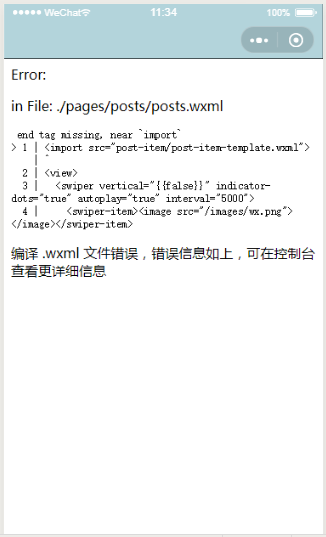
7.进入目录 pages/posts,修改文件 posts.wxml,import 缺了 一个闭合符 /
<import src="post-item/post-item-template.wxml" />
<view>
  <swiper vertical="{{false}}" indicator-dots="true" autoplay="true" interval="5000">
    <swiper-item><image src="/images/wx.png"></image></swiper-item>
    <swiper-item><image src="/images/vr.png"></image></swiper-item>
    <swiper-item><image src="/images/iqiyi.png"></image></swiper-item>
  </swiper>
  <block wx:key="1" wx:for="{{posts_key}}" wx:for-item="item" wx:for-index="idx">
      <!--//template-->
      <template is="postItem" data="{{item}}" />
  </block>
</view>
8.进入目录 pages/posts,修改文件 posts.wxss,把公用的 css 剪切到目录 pages/posts/post-item 下的文件 post-item-template.wxss
/* pages/posts/posts.wxss */
swiper {
  width:100%;
  height:600rpx;
}

swiper image {
  width:100%;
  height:600rpx;
}

.post-container {
  display:flex;
  flex-direction:column;
  margin-top:20rpx;
  margin-bottom:40rpx;
  background-color:#fff;
  border-top:1px solid #ededed;
  border-bottom:1px solid #ededed;
  padding-bottom:10rpx;
}
9.进入目录 pages/posts/post-item,修改文件 post-item-template.wxss
.post-author-date {
  margin:10rpx 0 20rpx 10rpx;
  display:flex;
  flex-direction:row;
  align-items:center;
}

.post-author {
  width:60rpx;
  height:60rpx;
  /*vertical-align:middle;*/
}

.post-date {
  margin-left:20rpx;
  /*vertical-align:middle;*/
  font-size:26rpx;
}

.post-title {
  font-size:34rpx;
  font-weight:600;
  margin-bottom:10px;
  margin-left:10px;
  color:#333;
}

.post-image {
  width:100%;
  height:340rpx;
  margin-bottom:15px;
}

.post-content {
  font-size:28rpx;
  color:#666;
  letter-spacing:2rpx;
  margin-left:20rpx;
  margin-bottom:20rpx;
}

.post-like {
  display:flex;
  flex-direction:row;
  align-items:center;
  font-size:26rpx;
  margin-left:20rpx;
}

.post-like-image {
  height:32rpx;
  width:32rpx;
  margin-right:16rpx;
}

.post-like-font {
  margin-right:40rpx;
}
10.浏览测试,css 没有渲染页面

11.进入目录 pages/posts,修改文件 posts.wxss,import 公用文件
/* pages/posts/posts.wxss */
@import "post-item/post-item-template.wxss";

swiper {
  width:100%;
  height:600rpx;
}

swiper image {
  width:100%;
  height:600rpx;
}

.post-container {
  display:flex;
  flex-direction:column;
  margin-top:20rpx;
  margin-bottom:40rpx;
  background-color:#fff;
  border-top:1px solid #ededed;
  border-bottom:1px solid #ededed;
  padding-bottom:10rpx;
}
12.测试浏览,恢复正常
posted on 2019-11-01 11:08 herisson_pan 阅读(12) 评论(0) 收藏 举报


 浙公网安备 33010602011771号