
每天一个linux命令(13):less 命令
less 工具也是对文件或其它输出进行分页显示的工具,应该说是linux正统查看文件内容的工具,功能极其强大。less 的用法比起 more 更加的有弹性。在 more 的时候,我们并没有办法向前面翻, 只能往后面看,但若使用了 less 时,就可以使用 [pageup] [pagedown] 等按键的功能来往前往后翻看文件,更容易用来查看一个文件的内容!除此之外,在 less 里头可以拥有更多的搜索功能,不止可以向下搜,也可以向上搜。
1.命令格式:
less [参数] 文件
2.命令功能:
less 与 more 类似,但使用 less 可以随意浏览文件,而 more 仅能向前移动,却不能向后移动,而且 less 在查看之前不会加载整个文件。
3.命令参数:
-b <缓冲区大小> 设置缓冲区的大小
-e 当文件显示结束后,自动离开
-f 强迫打开特殊文件,例如外围设备代号、目录和二进制文件
-g 只标志最后搜索的关键词
-i 忽略搜索时的大小写
-ppattern or --pattern=pattern
The -p option on the command line is equivalent to specifying +/pattern; that is, it tells less to start at the first occurrence of pattern in the
file.
-m 显示类似more命令的百分比
-N 显示每行的行号
-o <文件名> 将less 输出的内容在指定文件中保存起来
-Q 不使用警告音
-s 显示连续空行为一行
-S 行过长时间将超出部分舍弃
-x <数字> 将“tab”键显示为规定的数字空格
4.导航操作
f 向前翻一页(forward)
b 向后翻一页(backward)
d 向下翻半页(down)
u 向上翻半页(up)
e 向前滚动一行(同vi)
y 向后滚动一行(同vi)
j 向前移动一行(同vi)
k 向后移动一行(同vi)
G - 移动到最后一行
g - 移动到第一行
空格键 向前翻一页
回车键 向前滚动一行
[pagedown]: 向下翻动一页
[pageup]: 向上翻动一页
多文件查看,文件间切换:
n 查看下一个文件
p 查看上一个文件
5.标记导航
当使用less查看大文件时,可以在任何一个位置作标记,可以通过命令导航到标有特定标记的文本位置:
ma - 使用 a 标记文本的当前位置
'a - 导航到标记 a 处
t Go to the next tag
T Go to the previous tag
6.其它有用的命令
/pattern:向下搜索“字符串”的功能
?pattern:向上搜索“字符串”的功能
&pattern:仅显示匹配模式的行,而不是整个文件(如何退出这种模式而不是退出less呢?)
n:重复前一个搜索(与 / 或 ? 有关)
N:反向重复前一个搜索(与 / 或 ? 有关)
v - 使用配置的编辑器编辑当前文件
h - 显示 less 的帮助文档
q or Q or :q or :Q or ZZ - 退出 less 命令
= or ^G or :f
Prints some information about the file being viewed, including its name and the line number and byte offset of the bottom line being displayed. If
possible, it also prints the length of the file, the number of lines in the file and the percent of the file above the last displayed line.
7.使用实例:
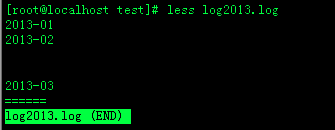
实例1:查看文件
命令:
less log2013.log
输出:
实例2:ps查看进程信息并通过less分页显示
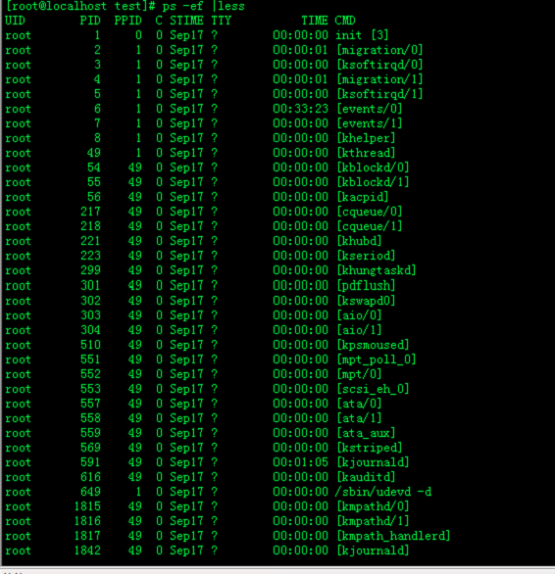
命令:
ps -ef |less
输出:
实例3:查看命令历史使用记录并通过less分页显示
命令:
history | less
输出:
[root@localhost test]# history | less
22 scp -r tomcat6.0.32 root@192.168.120.203:/opt/soft
23 cd ..
24 scp -r web root@192.168.120.203:/opt/
25 cd soft
26 ls
27 scp -r jdk1.6.0_16/ root@192.168.120.203:/opt/soft
28 clear
29 vim /etc/profile
30 vim /etc/profile
31 cd tomcat6.0.32/bin/
32 ls
33 ./shutdown.sh
34 ./startup.sh
35 vim startup.sh
36 ls
37 echo $JAVA_HOME
38 java
39 ls
40 ls
41 clear
42 cd /opt
43 ls
44 cp apache-tomcat-6.0.32.tar.gz soft/
45 ls
46 rm -f apache-tomcat-6.0.32.tar.gz
47 ls
48 cd soft
49 ls
50 tar -vzf apache-tomcat-6.0.32.tar.gz
51 tar -vzfx apache-tomcat-6.0.32.tar.gz
52 tar -zxvf apache-tomcat-6.0.32.tar.gz
53 ls
54 cd apache-tomcat-6.0.32
55 ls
56 cd ..
57 mv apache-tomcat-6.0.32 tomcat6.0.32
58 ls
59 cd tomcat6.0.32/
60 ls
实例5:浏览多个文件
命令:
Less log2013.log log2014.log
输出:

说明:
输入 :n后,切换到 log2014.log
输入 :p后,切换到log2013.log

 浙公网安备 33010602011771号