Process Scheduling [LKD 04]
前面一章讲的是process,这一章讲process schedule。
进程调度的主要工作就两个:选哪个process开始执行,以及让它执行多长时间。
Multitasking
linux是多任务操作系统,如果有SMP,就有多个process同时在执行,如果是单核,就只有一个process执行。多任务操作系统分为两类:cooperative multitasking和preemptive multitasking。大多数多任务系统都是preemptive multitasking,也就是抢占式的多任务操作系统。当一个process执行了一段时间,scheduler可能会停止它的运行,转而执行另外的process,这个过程就是抢占,而process之前执行的那段时间,就是timeslice,多数系统上,这个timeslice是动态分配的,根据process任务种类或者系统配置来设置。
Linux’s Process Scheduler
linux kernel中使用了一种O(1)的scheduler,也就是时间复杂度是常数,这种调度算法就是CFS(Completely Fair Scheduler)。
Policy
策略就是scheduler的实现,比如挑选哪个process运行多久。scheduler的实现策略会显著影响系统的performance,因此尤其重要。
I/O-Bound Versus Processor-Bound Processes
通常来说,process可以分为两类:I/O-bound和processor-bound。前者指的是大部分时间是在等待I/O的process,后者指的是大部分时间都是在使用CPU执行code。
I/O-bound process每次只执行一小段CPU时间,剩下的时间就是等待I/O,跟UI相关的process就是典型的I/O-bound的process,因为它大部分时间都是在等待鼠标或者键盘的事件。
processor-bound process则不一样,它会一直使用CPU执行code,直到它被抢占。scheduler对这种process,就会很少调度,但是一旦调度,就是让它执行比较长的时间。典型的processor-bound process,比如无限循环,或者数学计算程序等。
但是现实中的process,基本上不会有这么明显的划分,他们可能既有执行I/O的需求,也有使用CPU做大量运算的时候。但无论如何,scheduler都要尽量实现两个目标:尽可能快的CPU反应时间(low latency,低延迟),尽可能多的让CPU干活(high throughput,高吞吐)。这两个目标本身是互斥的,因此scheduler就需要复杂的算法尽可能的实现这两个目标。Linux,或者说Unix,都更偏向于调度I/O-bound process,以获得更快的系统反应时间(从UI用户角度)。
Process Priority
一个直观的process调度,就是就进程优先级来做,通过对所有的process根据价值和执行的时间排个序,从而确定优先级。在scheduler调度时,优先调度高优先级的process,而相同优先级的就使用RR(round-robin)来选择。
而Linux kernel有两种独立的优先级算法。第一个是根据nice值来算优先级,每个process都会有一个nice值,default是0,范围可以是-20 - +19. nice值越高,优先级越低。nice值这种优先级的算法在所有的Unix系统中都有使用,但是不同的系统可能有自己的实现算法,比如使用nice值计算process的timeslice就是不一样的。第二个是real-time proirity,即运行时优先级。这个值也是可以配置的,但是一般是0-99之间。和nice值相反,这个priority越高说明优先级越高,一个real-time的process就比normal process有更高的real-time priority值。nice值优先级和real-time优先级是正交的,也就说他们同时被使用。通过这个命令可以看到process的real-time priority(RTPRIO这一列):
ps -eo state,uid,pid,ppid,rtprio,time,commTimeslice
timeslice的值,决定了这个process在执行多久之后会被抢占。schedule要能够有一个合理的timeslice,否则会影响schedule的质量,如果某个process的timeslice过大,执行的时间过长,那么其他的process就会等待更久,如果是UI的proces被block,用户明显会觉得performance很差,这就会导致high latency;如果设置的timeslice过小,process执行的时间过短,那么很多时间可能就花费在了context switch上,造成很低的吞吐率,low throughput。另外,考虑到之前提高的I/O-bound和process-bound process,前者需要更少的timeslice,后者需要更多的timeslice,这些scheduler都需要考虑到。
timeslice如果设置的过长,那么系统整体的performance会很低,因此绝大多数操作系统都会把default timeslice设置的很低,比如10ms。但是Linux kernel并不会设置这样一个default timeslice,它会在运行时动态计算timeslice,并且这个timeslice也并不是时间片,而是CPU的比例。process的CPU比例,会根据当前系统的负载,以及process自己的nice值(作为权重),计算而来。nice值低的process占用比较少的CPU比例,nice值高的process占用更多的CPU比例。
Linux kernel是可抢占的,当一个新的process进入了可以运行的状态时,是否抢占当前的process是要根据新的process的优先级,以及它的timeslice来确定的。在Linux的CFS中,如果新的process的CPU比例比当前正在运行的process低,那么就抢占当前的process。
The Scheduling Policy in Action
假设现在有两个process:text editor,和video decoder。前者是明显的I/O-bound,后者是processor-bound。在Linux kernel中,假设只有这两个process,那么每个process的理想的CPU比例是各50%,在两个process实际运行时,因为text editor经常的sleep(等待用户输入),所以它真正使用的CPU比例肯定远远小于50%,而video decoder因为一直在使用CPU,所以它的CPU比例一定是高于50%的。
假如此时text editor被wake up,CFS检查发现它的CPU比例小于50%,那么就认为这个process占用CPU的时间较少,应该尽快调度,所以此时CFS就会决定抢占video decoder,让text editor执行。
The Linux Scheduling Algorithm
Scheduler Classes
Linux kernel的scheduler是分模块化的,针对不同类型的process有不同的调度算法,每种算法被称为schedule class。schedule class中,这些调度算法并存,每种算法只负责调度对应类型的process,并且每个schedule class有自己的优先级,在调度过程中,优先选择优先级高的调度算法。
之前提到的CFS算法就是schedule class中的一种,它针对的process是normal process,Linux中对应的是SCHED_NORMAL。后面讲述的调度算法就是CFS。
Process Scheduling in Unix Systems
这里讲的是别的操作系统的调度算法,涵盖了之前调度的一些问题解释,不看了。
Fair Scheduling
所谓的公平调度,基于这样一个假设:如果有n个process在运行,那么每个process都会得到1/n的运行时间,也就说CPU是理想的CPU,每个进程都完全平等的机会被调度,并且执行同样多的时间。此外,为了保证每个process能执行同样多的时间,调度的时间间隔也应该尽可能小,这样在任意的时间段内,所有的process执行的时间才能一样。
不过这样理想的调度是无法实现的,一方面因为CPU不会逐个执行所有的process,另一方面无限小的调度间隔是达不到的,而且太小的调度间隔,会导致context switch更加频繁,从而浪费了CPU时间。CFS的方式,是给每个需要执行的process分配执行时间,这个时间和当前可以运行的process有关系,而且CFS没有直接使用nice值来计算timeslice,而是把nice作为权重来计算process占用的CPU比例,nice值小的权重就小,nice值大的权重就大。
每个process分配的执行时间,和process本身的权重,以及当前所有可以运行的process的权重之和是成比例的。为了方便计算每个process的timeslice,Linux设置一个targeted latency,这个latency之内,所有的可运行的process会被调度一遍,如果这个值偏小,就会导致每个process的timeslice都会偏小,从而context switch更加频繁,由此就会导致浪费CPU。举个例子,targetd latency是20ms,如果有五个process,每个process就会执行4ms,如果有20个process,每个process就只能执行1ms,也就说要发生20次的context switch,这个时间代价是无法接受的。
当可运行的process达到无限多时,每个process能分配到的timeslice就会趋向于0,CPU的时间就都浪费在context switch上了。为了解决这个问题,Linux引入了minimum granularity,也就是每个process的最小执行时间,默认值是1ms,也就说每个process能分配到的最小timeslice是1ms。
下面考虑另外一种情况,加入仍然有两个process,但是这两个process的nice不同,一个是0,一个是5,根据上面提到的,nice值作为权重来计算每个process占用的CPU比例,而不是直接用来计算timeslice。根据计算,nice值为5的process获得1/3的CPU时间,如果targeted latency仍然是20ms,那么nice值为5的process获得5ms,nice值为0的获取10ms。如果是nice值为10和15的两个process,仍然是一个使用1/3的CPU时间,一个使用2/3的CPU时间。由此可见,nice值和timeslice并不是直接对应的关系,而是取决于其他可运行的进程的nice值,每个process的nice值都作为权重参与计算,从而按照比例来分配CPU,从而做到公平。
The Linux Scheduling Implementation
linux kernel CFS的实现位于kernel/sched/fair.c中,我们主要关注四个方面的内容:
1. 时间的计算
2. process的选择
3. scheduler的entry point
4. sleep和wake up
Time Accounting
时间的计算,主要是指process的执行时间的计算,这个时间通常用clock tick来表示,每产生一个tick,process的timeslice就会减1,当减到0,process就被停止运行,schedule会另外选择一个合适的process执行。
The Scheduler Entity Structure
CFS中没有明确的timeslice的概念,因为Linux使用CPU的比例,而不是单纯的时间片来管理process的运行时间。尽管如此,Linux kernel也需要一个能表示时间的东西,用来统计process执行多久,这个表示时间的东西是schedule entity:
struct sched_entity {
	/* For load-balancing: */
	struct load_weight		load;
	unsigned long			runnable_weight;
	struct rb_node			run_node;
	struct list_head		group_node;
	unsigned int			on_rq;

	u64				exec_start;
	u64				sum_exec_runtime;
	u64				vruntime;
	u64				prev_sum_exec_runtime;

	u64				nr_migrations;

	struct sched_statistics		statistics;

#ifdef CONFIG_FAIR_GROUP_SCHED
	int				depth;
	struct sched_entity		*parent;
	/* rq on which this entity is (to be) queued: */
	struct cfs_rq			*cfs_rq;
	/* rq "owned" by this entity/group: */
	struct cfs_rq			*my_q;
#endif

#ifdef CONFIG_SMP
	/*
	 * Per entity load average tracking.
	 *
	 * Put into separate cache line so it does not
	 * collide with read-mostly values above.
	 */
	struct sched_avg		avg;
#endif
};
这个sched_entity是内嵌在task_struct里的。
The Virtual Runtime
在sched_entity中,有一个变量是vruntime,也就是virtual runtime。它表示的是process的实际运行时间,正则化或者权重化以后的值,应该就是这个process占用的CPU比例,对于同样priority的process而言,这个值应该是一样的。
在kernel code中,这个值是在update_curr()中更新的:
/*
 * Update the current task's runtime statistics.
 */
static void update_curr(struct cfs_rq *cfs_rq)
{
	struct sched_entity *curr = cfs_rq->curr;
	u64 now = rq_clock_task(rq_of(cfs_rq));
	u64 delta_exec;

	if (unlikely(!curr))
		return;

	delta_exec = now - curr->exec_start;
	if (unlikely((s64)delta_exec <= 0))
		return;

	curr->exec_start = now;

	schedstat_set(curr->statistics.exec_max,
		      max(delta_exec, curr->statistics.exec_max));

	curr->sum_exec_runtime += delta_exec;
	schedstat_add(cfs_rq->exec_clock, delta_exec);

	curr->vruntime += calc_delta_fair(delta_exec, curr);
	update_min_vruntime(cfs_rq);

	if (entity_is_task(curr)) {
		struct task_struct *curtask = task_of(curr);

		trace_sched_stat_runtime(curtask, delta_exec, curr->vruntime);
		cgroup_account_cputime(curtask, delta_exec);
		account_group_exec_runtime(curtask, delta_exec);
	}

	account_cfs_rq_runtime(cfs_rq, delta_exec);
}
update_curr在很多时候都会调用,比如timer,或者某个process状态变为runnable,或者变为unrunable。
Process Selection
选择哪个process来执行,对于CFS来说非常简单:选择vruntime最小的那个process即可。因为CFS的核心,就是认为所有的CPU资源应该公平的共享给所有的process使用,因此理论上来说,vruntime应该是相同的,但是实际上很难达到,但无论如何,vruntime小,就意味着这个process没有享有同样的CPU资源,所有应该让它先执行。
CFS中使用red-black tree来管理所有可以运行的process,这样查找起来会更加快速。而且,为了方便的找到vruntime的那个process,这个rbt还做了cache,本身记录了vruntime最小的那个process,从而可以以O(1)的时间复杂度找到下一个要运行的process。
Picking the Next Task
选择下一个要执行的process,就是找到vruntime最小的那个process。再查找要执行的process时,首先调用pick_next_entity,在函数刚进来时,就会调用__pick_first_entity:
struct sched_entity *__pick_first_entity(struct cfs_rq *cfs_rq)
{
	struct rb_node *left = rb_first_cached(&cfs_rq->tasks_timeline);

	if (!left)
		return NULL;

	return rb_entry(left, struct sched_entity, run_node);
}
其中的rb_first_cached,定义是这样的:
/* Same as rb_first(), but O(1) */
#define rb_first_cached(root) (root)->rb_leftmost
这是一个宏,直接返回rbtree中的rb_leftmost,也就是最左节点。我们直到rbtree中是按照vruntime的大小来存放的,因此最左节点一定是vruntime最小的,所以rbtree中为了方便查找,把最左节点存储在rb_leftmost中,需要查找时直接返回,这样时间复杂度就是O(1)。注意如果rb_first_cached返回了NULL,说明这个rbtree中没有任何的process需要执行,CFS就会执行idle task。
Adding Processes to the Tree
下面就看如何把process加到rbtree中,以及如何把vruntime最小的节点放在rb_leftmost。
首先先看如何把process加到rbtree中,在此之前先明确一下什么时刻会有这种需求:1. 一个process被唤醒,也就是从不可运行状态变为了可运行状态;2. 新创建了一个process,如通过fork系统调用创建了一个新的进程。因为这个rbtree记录了所有当前可以运行的process,所以一旦出现了新的可以运行的process,都会被添加到这个rbtree。用到的接口是enqueue_entity:
static void
enqueue_entity(struct cfs_rq *cfs_rq, struct sched_entity *se, int flags)
{
	bool renorm = !(flags & ENQUEUE_WAKEUP) || (flags & ENQUEUE_MIGRATED);
	bool curr = cfs_rq->curr == se;

	/*
	 * If we're the current task, we must renormalise before calling
	 * update_curr().
	 */
	if (renorm && curr)
		se->vruntime += cfs_rq->min_vruntime;

    //更新vruntime等信息
	update_curr(cfs_rq);

	/*
	 * Otherwise, renormalise after, such that we're placed at the current
	 * moment in time, instead of some random moment in the past. Being
	 * placed in the past could significantly boost this task to the
	 * fairness detriment of existing tasks.
	 */
	if (renorm && !curr)
		se->vruntime += cfs_rq->min_vruntime;

	/*
	 * When enqueuing a sched_entity, we must:
	 *   - Update loads to have both entity and cfs_rq synced with now.
	 *   - Add its load to cfs_rq->runnable_avg
	 *   - For group_entity, update its weight to reflect the new share of
	 *     its group cfs_rq
	 *   - Add its new weight to cfs_rq->load.weight
	 */
	update_load_avg(cfs_rq, se, UPDATE_TG | DO_ATTACH);
	update_cfs_group(se);
	enqueue_runnable_load_avg(cfs_rq, se);
	account_entity_enqueue(cfs_rq, se);

	if (flags & ENQUEUE_WAKEUP)
		place_entity(cfs_rq, se, 0);

	check_schedstat_required();
	update_stats_enqueue(cfs_rq, se, flags);
	check_spread(cfs_rq, se);
	if (!curr)
		__enqueue_entity(cfs_rq, se);
	se->on_rq = 1;

	if (cfs_rq->nr_running == 1) {
		list_add_leaf_cfs_rq(cfs_rq);
		check_enqueue_throttle(cfs_rq);
	}
}
这个函数先调用了update_curr来更新当前process的vruntime等信息,然后根据这个sched_entity来更新相关的weight,以及一些统计信息,之后如果发现当前的process和sched_entity不是同一个,就调用__enqueue_entity来把sched_entity添加到rbtree之中:
/*
 * Enqueue an entity into the rb-tree:
 */
static void __enqueue_entity(struct cfs_rq *cfs_rq, struct sched_entity *se)
{
	struct rb_node **link = &cfs_rq->tasks_timeline.rb_root.rb_node;
	struct rb_node *parent = NULL;
	struct sched_entity *entry;
	bool leftmost = true;

	/*
	 * Find the right place in the rbtree:
	 */
	while (*link) {
		parent = *link;
		entry = rb_entry(parent, struct sched_entity, run_node);
		/*
		 * We dont care about collisions. Nodes with
		 * the same key stay together.
		 */
		if (entity_before(se, entry)) {
			link = &parent->rb_left;
		} else {
			link = &parent->rb_right;
			leftmost = false;
		}
	}

	rb_link_node(&se->run_node, parent, link);
	rb_insert_color_cached(&se->run_node,
			       &cfs_rq->tasks_timeline, leftmost);
}
上面的函数就很简单了,找到rbtree中的插入位置,然后插入到rbtree之中。要注意的是,这里通过判断这个新的sched_entity是否是rbtree中vruntime最小的,来更新rbtree中的rb_leftmost。如果新的是最小的,就替换rbtree中的rb_leftmost,如果不是,保持rb_leftmost不变,这样无论什么时候,rb_leftmost一定是rbtree中vruntime最小的。
Removing Processes from the Tree
看过了CFS如何把process添加到rbtree,我们再看一下CFS如何把process从rbtree中移除。
对应的,当process从可运行的状态变为了不可运行的状态(等待某些事件),或者process结束时,都需要把process从rq中移除。实现这个功能的函数是dequeue_entity:
static void
dequeue_entity(struct cfs_rq *cfs_rq, struct sched_entity *se, int flags)
{
	/*
	 * Update run-time statistics of the 'current'.
	 */
	update_curr(cfs_rq);

	/*
	 * When dequeuing a sched_entity, we must:
	 *   - Update loads to have both entity and cfs_rq synced with now.
	 *   - Substract its load from the cfs_rq->runnable_avg.
	 *   - Substract its previous weight from cfs_rq->load.weight.
	 *   - For group entity, update its weight to reflect the new share
	 *     of its group cfs_rq.
	 */
	update_load_avg(cfs_rq, se, UPDATE_TG);
	dequeue_runnable_load_avg(cfs_rq, se);

	update_stats_dequeue(cfs_rq, se, flags);

	clear_buddies(cfs_rq, se);

	if (se != cfs_rq->curr)
		__dequeue_entity(cfs_rq, se);
	se->on_rq = 0;
	account_entity_dequeue(cfs_rq, se);

	/*
	 * Normalize after update_curr(); which will also have moved
	 * min_vruntime if @se is the one holding it back. But before doing
	 * update_min_vruntime() again, which will discount @se's position and
	 * can move min_vruntime forward still more.
	 */
	if (!(flags & DEQUEUE_SLEEP))
		se->vruntime -= cfs_rq->min_vruntime;

	/* return excess runtime on last dequeue */
	return_cfs_rq_runtime(cfs_rq);

	update_cfs_group(se);

	/*
	 * Now advance min_vruntime if @se was the entity holding it back,
	 * except when: DEQUEUE_SAVE && !DEQUEUE_MOVE, in this case we'll be
	 * put back on, and if we advance min_vruntime, we'll be placed back
	 * further than we started -- ie. we'll be penalized.
	 */
	if ((flags & (DEQUEUE_SAVE | DEQUEUE_MOVE)) == DEQUEUE_SAVE)
		update_min_vruntime(cfs_rq);
}
和enqueue_entity对应,dequeue时,也要通过update_curr来更新rq中当前process的vruntime等信息,以及一些weight或者其他的统计信息,之后再通过__dequeue_entity把sched_entity从rq中真正移除。dequeue_entity:
static void __dequeue_entity(struct cfs_rq *cfs_rq, struct sched_entity *se)
{
	rb_erase_cached(&se->run_node, &cfs_rq->tasks_timeline);
}
直接调用了rbtree的erase来删除rb node。其中会根据要删除的rb node是否是leftmost,来决定是否loop这个rbtree来设置新的rb_leftmost。
The Scheduler Entry Point
做process schedule的最主要入口是schedule()这个函数。kernel中其他的部分调用schedule函数来决定选择哪个process接着执行,以及执行多长时间,因此schedule函数的实现也非常简单,就干上面说的两个事情:
asmlinkage __visible void __sched schedule(void)
{
	struct task_struct *tsk = current;

	sched_submit_work(tsk);
	do {
		preempt_disable();
		__schedule(false);
		sched_preempt_enable_no_resched();
	} while (need_resched());
}
EXPORT_SYMBOL(schedule);
从code上看,就是调用了__schedule这个函数。在调用这个函数之前,还关闭了抢占,如果不关闭抢占,在调度过程中可能又会发生调度,产生了递归?我们看一下__schedule的实现,在看实现之前,看一下这个函数的注释:
/*
 * __schedule() is the main scheduler function.
 *
 * The main means of driving the scheduler and thus entering this function are:
 *
 *   1. Explicit blocking: mutex, semaphore, waitqueue, etc.
 *
 *   2. TIF_NEED_RESCHED flag is checked on interrupt and userspace return
 *      paths. For example, see arch/x86/entry_64.S.
 *
 *      To drive preemption between tasks, the scheduler sets the flag in timer
 *      interrupt handler scheduler_tick().
 *
 *   3. Wakeups don't really cause entry into schedule(). They add a
 *      task to the run-queue and that's it.
 *
 *      Now, if the new task added to the run-queue preempts the current
 *      task, then the wakeup sets TIF_NEED_RESCHED and schedule() gets
 *      called on the nearest possible occasion:
 *
 *       - If the kernel is preemptible (CONFIG_PREEMPT=y):
 *
 *         - in syscall or exception context, at the next outmost
 *           preempt_enable(). (this might be as soon as the wake_up()'s
 *           spin_unlock()!)
 *
 *         - in IRQ context, return from interrupt-handler to
 *           preemptible context
 *
 *       - If the kernel is not preemptible (CONFIG_PREEMPT is not set)
 *         then at the next:
 *
 *          - cond_resched() call
 *          - explicit schedule() call
 *          - return from syscall or exception to user-space
 *          - return from interrupt-handler to user-space
 *
 * WARNING: must be called with preemption disabled!
 */
对会触发schedule的条件进行了说明,主要发生在三个时间点:
1. process被block,如等待mutex,semaphore,waitqueue,等。一旦进入了等待,process的状态就变为不可运行,此时会调用schedule来选择合适的process来执行。
2. 在interrupt处理完,或者来自user space的系统调用要返回user space时,如果发现TIF_NEED_RESCHED被设置,说明需要重新调度,此时就调用schedule。(设置这种flag,一般是要抢占?)
3. wakeup不会针对被wake up的process马上调用schedule,它只是把process的状态设为可运行状态,然后把process加到rq中去,经过检查,如果发现被唤醒的process需要抢占当前唤醒它的process(如优先级更高),那么就会设置TIF_NEED_RESCHED,之后可能会发生如下事情:
如果kernel被配置为可以抢占:
a.在系统调用或者异常处理context中,如果发生了preempt_enable,就有可能发生schedule。
b.在interrupt context执行完,返回到允许抢占的context时,会发生schedule。
如果kernel被配置为不可以抢占,那么在下面函数调用以后,就会发生schedule:
cond_resched() call
explicit schedule() call
return from syscall or exception to user-space
return from interrupt-handler to user-space
__schedule这个函数比较长,最主要的是,它会调用pick_next_task,这个就是核心逻辑,挑选下一个要运行的task:
/*
 * Pick up the highest-prio task:
 */
static inline struct task_struct *
pick_next_task(struct rq *rq, struct task_struct *prev, struct rq_flags *rf)
{
	const struct sched_class *class;
	struct task_struct *p;

	/*
	 * Optimization: we know that if all tasks are in the fair class we can
	 * call that function directly, but only if the @prev task wasn't of a
	 * higher scheduling class, because otherwise those loose the
	 * opportunity to pull in more work from other CPUs.
	 */
	if (likely((prev->sched_class == &idle_sched_class ||
		    prev->sched_class == &fair_sched_class) &&
		   rq->nr_running == rq->cfs.h_nr_running)) {

		p = fair_sched_class.pick_next_task(rq, prev, rf);
		if (unlikely(p == RETRY_TASK))
			goto again;

		/* Assumes fair_sched_class->next == idle_sched_class */
		if (unlikely(!p))
			p = idle_sched_class.pick_next_task(rq, prev, rf);

		return p;
	}

again:
	for_each_class(class) {
		p = class->pick_next_task(rq, prev, rf);
		if (p) {
			if (unlikely(p == RETRY_TASK))
				goto again;
			return p;
		}
	}

	/* The idle class should always have a runnable task: */
	BUG();
}
这个函数有一个优化的地方,如果当前的schedule class是idle class或者是CFS class,并且rq中的running process个数和CFS中的相同(也就意味着,此时rq中所有的process都由CFS来调度),那么就可以直接调用CFS这个class的pick_next_task直接从CFS挑选下一个要运行的task,否则就要loop所有的class,从中挑选一个可以运行的task。CFS的pick_next_task函数前面已经讨论过,这里不再赘述。要注意一点,这个pick_next_class在loop所有的schedule class时,是按照优先级高级来loop的,因此优先级高的schedule class有优先执行权。
Sleeping and Waking Up
sleep中的task有自己的状态,这样当process被block时(wait一些资源或者事件),就会把自己设为不可运行状态,然后process被放到wait queue中,再然后这个proces就会被从process的rbtree中移除,再然后一个新的process就被挑选出来继续执行,在process的状态变为可运行之前,都不再会被调度。被唤醒的过程是逆过程:task被设置为可运行状态,从wait queue中移除,然后被添加到rbtree中去。
被block的task有两种状态:TASK_INTERRUPTIBLE和TASK_UNINTERRUPTIBLE。前者除了被等待的资源唤醒,也会被别的信号唤醒,后者只能被等待的资源唤醒。
Wait Queues
进程的sleep是通过wait queue来实现的,wait queue本质上是一个list,里面是等待同样的某些资源的process。当资源可用时,这个queue里的所有process都会被唤醒(如果没有设置exclusive)。kernel中,用数据结构wait_queue_head_t来表示wait queue。可以使用DECLARE_WAITQUEUE来静态的声明和创建一个wait queue,创建的同时也会初始化;也可以通过init_waitqueue_head来动态的初始化自己创建的wait queue。
/* ‘q’ is the wait queue we wish to sleep on */
DEFINE_WAIT(wait);
add_wait_queue(q, &wait);
while (!condition)
{
    /* condition is the event that we are waiting for */
    prepare_to_wait(&q, &wait, TASK_INTERRUPTIBLE); if (signal_pending(current))
    /* handle signal */
    schedule();
}
finish_wait(&q, &wait);
参考上面的code,task把自己添加到wait queue中一般是这样的流程:
1. 通过DEFINE_WAIT创建一个wait queue。
2. 调用add_wait_queue把自己添加到wait queue中去,这样当等待的条件满足时,process就会被唤醒。
3. 调用prepare_to_wait,修改task的状态为TASK_INTERRUPTIBLE or TASK_UNINTERRUPTIBLE。
4. 如果task的状态是TASK_UNINTERRUPTIBLE,那就有可能被signal唤醒,所以被唤醒时要做检查,如果是被signal唤醒,就再次等待。
5. 在被唤醒时,仍然通过while的条件再次判断condition是否为真,如果是,就跳出循环,否则继续等待。
6. task等待的condition为真,结束while循环,调用finish_wait设置task的状态为可运行状态。
Waking Up
task的唤醒,是通过wake_up这个函数来实现的。wake_up又回调用__try_wake_up,此时会把task的状态设置为TASK_RUNNING,然后调用enqueue_task把task添加到rbtree中去,如果被唤醒的task的优先级高于唤醒它的task,那么就会设置need_resched。
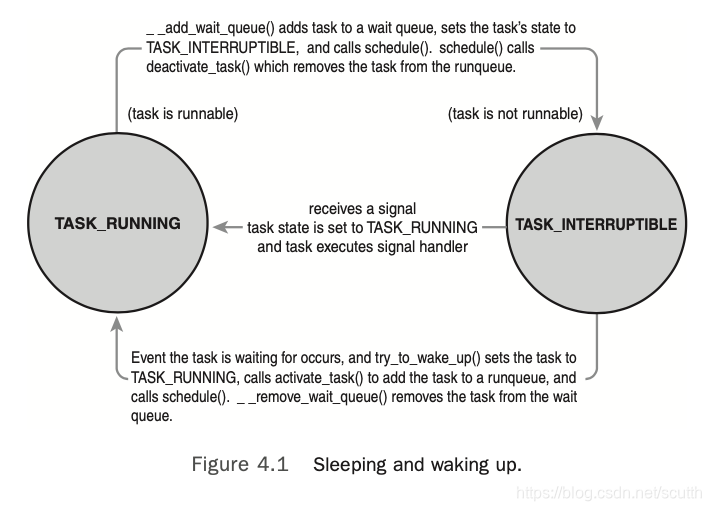
上面这张图,说明了task在running和interruptble两个状态切换的过程。
Preemption and Context Switching
所謂的context switch,就是指当前运行的process切换到另一个,context switch是通过函数context_switch来实现,这个函数是在schedule()被调用的,当挑选出下一个要执行的task,就会开始做context_switch。context_switch主要完成两个工作:
1. 调用switch_mm,把当前的mm切换成下一个要执行的task的mm。
2. 调用switch_to,把processor的state从当前的task切换成下一个要执行的task。其中又会涉及到保存/恢复 kernel stack的信息,CPU寄存器信息,以及一些其他架构相关的状态信息。
kernel必须知道什么时候需要调用schedule,它不能等到code里明确调用schedule才去做schedule,如果这样的话,user space的code可能一直会执行。因此,kernel引入了一个flag,need_resched,当需要重新调度时,就设置这个flag,scheduler看到这个flag就会出发重新调度。这个flag可能会在两个时间点被设置:1. 在scheduler_tick中,如果当前的process应该被抢占,这个flag就会被设置;2. 在try_to_wake_up函数中,如果被唤醒的task优先级比唤醒它的task更高,那么就会设置这个flag。kernel如果看到这个flag被设置,就会调用schedule()来出发一次调度。
在系统调用返回到user space,或者interrupt handler处理完成,都会检查一次这个flag,如果被设置,就会触发schedule。
这个flag存储在thread_info结构体中,也就是per process的,因此CPU访问per process的变量比全局变量更快。
User Preemption
当正在执行的task准备返回到user space继续执行时,如果need_resched被设置,scheduler就会开始调度。因为从kernel返回,也就意味着继续执行task是安全的,既然如此,那选择另外的task执行也是安全的,所以就会在此时来检查reschedule flag。注意,kernel返回到user space可能发生在系统调用结束返回,也可能发生在中断处理完成返回(比如page fault),这两种情况都会检查。总结来说,发生在user mode的抢占有两个时机:
1. 从系统调用返回到user space
2. 从中断返回到user space
Kernel Preemption
kernel 2.6以后,kernel的code在执行时也可以被抢占,只要当前允许执行抢占。那么时候执行抢占是安全的呢?通常来说,如果此时没有持有锁,那么task可以被抢占,有锁就意味着当前正在执行critical section的代码,此时抢占,可能出现race condition。
为了支持抢占,kernel引入了preempt_count的概念,这个变量记录在thread info中,因此也是per process的。这个变量初始值为0,如果当前process获取了lock,值就会加1,如果process释放了锁,值就会减1。当这个值为0时,说明process没有持有任何锁,是可以被抢占的。举个例子,比如此时interrupt handle处理完成需要返回,如果是返回到kernel space,此时kernel code检查need_resched这个flag和process的preempt_count,如果need_sched被设置,并且preemt_count为0,此时schedule会被触发;如果preemt_count不为0,就不会触发schedule,而是正常返回,继续执行原来的code。此外,在unlock的时候也会检查need_resched是否被设置,如果是,并且preemt_count变为0,也会触发schedule。
除了上面列出来的抢占的时机意外,抢占也可以显示的触发,比如task因为wait某些资源而被block,或者自己显示调用了schedule函数,都会触发一次抢占。
总结一下,kernel的抢占发生在:
1. 当interrupt handler执行完退出,在返回到kernel space之前;
2. 当kernel code变得可以抢占的时候;(preempt_count为0?)
3. task主动调用了schedule;
4. task被block;(隐式调用了schedule)
Real-Time Scheduling Policies
Linux kernel提供了两种实时调度算法:SCHED_FIFO和SCHED_RR。normal的调度算法是SCHED_NORMAL,也就是对应schedule class是CFS,并不是RT调度算法。下面分别介绍SCHED_FIFO和SCHED_RR。
SCHED_FIFO是简单的先进先出的实时调度算法,没有时间片的概念。一个可以运行的SCHED_FIFO的process,将在SCHED_NORMAL之前被调度,只要它没有被block,或者显示放弃自己的CPU,它将会一直执行;因为没有时间片,所以它会永远执行下去。只有更高优先级的SCHED_FIFO,或者SCHED_RR才可以抢占这个正在运行的SCHED_FIFO process。两个或者更多同样优先级的SCHED_FIFO采用round-robin算法运行,当然,前提是每个人都会主要释放自己的CPU。总之,只要SCHED_FIFO的process是可运行的状态,低优先级的process都不会被执行。
SCHED_RR和SCHED_FIFO一样,除了一点,RR是有timeslice的。在同一个优先级下,如果某个process的时间片用完,就会采用round-robin调度下一个process。RR也会立即抢占低优先级的process,而且即便RR的某个process时间片用完,低优先级也无法抢占。
RT的process,他们的优先级是静态分配的,不会在执行时,动态计算。这样能够保证RT process始终具有很高的优先级。
另外,注意一点,虽然Linux kernel支持实时调度,但是这种实时是软实时,也就说kernel尽量去完成实时的目标,但是不一定达到。
RT process的优先级是从0到MAX_RT_PRIO - 1, MAX_RT_PRIO默认值是100,所以它的优先级范围就是0-99. SCHED_NORMAL process的nice值和RT的优先级是同样的space,只不过nice是MAX_RT_PRIO到MAX_RT_PRIO +40.之前说过,nice值是-20到+19,所以对应的range就是100到139.
Scheduler-Related System Calls
这里介绍了一些user space可以使用的系统调用,主要用来控制process的优先级,调度策略,CPU亲和度等属性。
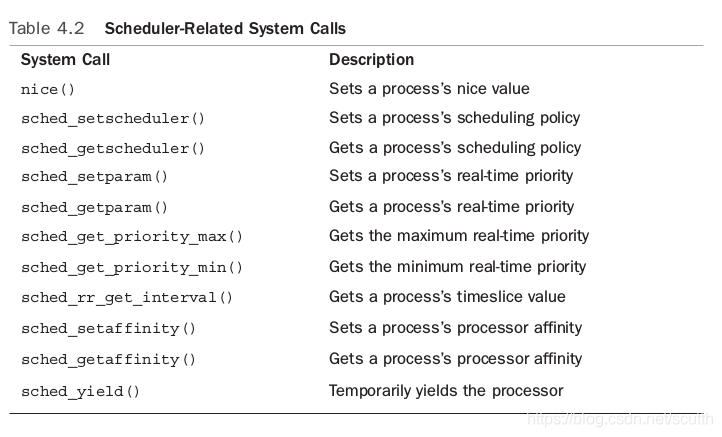
这里不再详细介绍。


 浙公网安备 33010602011771号