


Android -- Camera--part4
“单个生产者-多个消费者”摄像头缓冲区传输
该功能引入了一组方法,当拍摄会话处于活动状态且摄像头流式传输正在进行时,摄像头客户端可通过该功能动态添加和移除输出 Surface。新的输出可以映射到用户选择的特定共享摄像头信息流。Surface 添加后,您可以随时将其移除。
总的想法是,在多个输出 Surface 中共享与特定摄像头信息流关联的缓冲区。当缓冲区准备好在消费者端进行进一步处理时,内部引用计数器便开始跟踪缓冲区。当所有消费者完成各自的任务后,缓冲区便会离开队列,并可供摄像头使用。
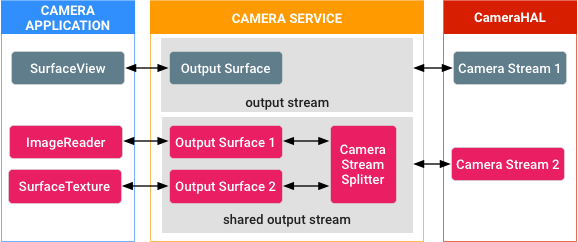
图 1. 缓冲区共享
图 1 描绘了一个示例场景:系统采用动态方式连接和分离由摄像头信息流 2 处理的缓冲区,并由摄像头服务内的专用共享输出流内部的信息流分流器组件对引用进行计数和管理。
示例和源代码
可在 Camera3StreamSplitter 模块中找到该功能的核心实现,并可在面向开发者的参考资料中找到关于该功能的文档:
实现
摄像头 HAL 端不需要任何实现,因为该功能在框架端实现。
验证
您的实现必须通过 MultiViewTest 模块中以及本机 API 的本机 JNI 库中涵盖该功能的 CTS 测试。
Camera HAL3 Buffer Management APIs
Android 10 introduces optional camera HAL3 buffer management APIs that allow you to implement buffer management logic to achieve different memory and capture latency tradeoffs in camera HAL implementations.
The camera HAL requires N requests (where N is equal to the pipeline depth) queued in its pipeline, but it often doesn't require all N sets of output buffers at the same time.
For example, the HAL might have eight requests queued in the pipeline, but it only requires output buffers for the two requests in the last stages of the pipeline. On devices running Android 9 and lower, the camera framework allocates buffers when the request is queued in the HAL so there could be six sets of buffers in the HAL that aren't in use. In Android 10, the camera HAL3 buffer management APIs allow for the decoupling of the output buffers to free up the six sets of buffers. This can lead to hundreds of megabytes of memory savings on high-end devices and can also be beneficial for low-memory devices.
Figure 1 shows a diagram of the camera HAL interface for devices running Android 9 and lower. Figure 2 shows the camera HAL interface in Android 10 with the camera HAL3 buffer management APIs implemented.
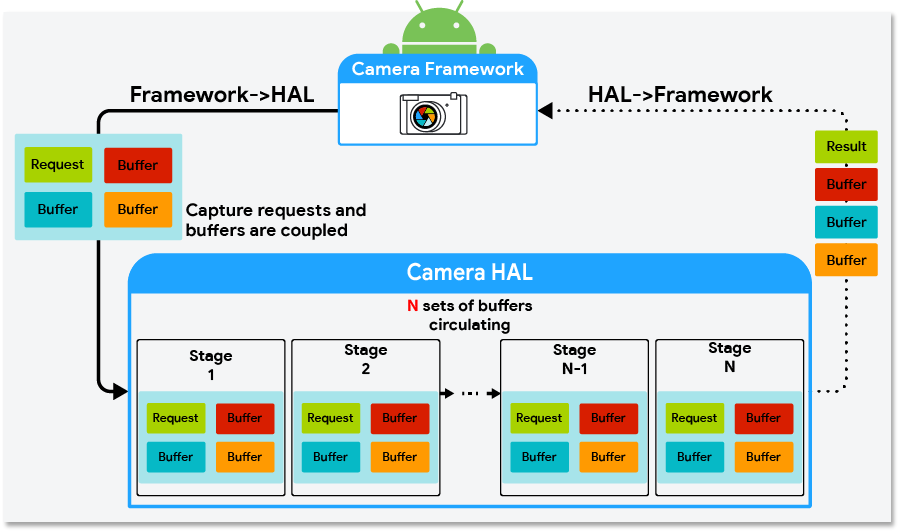
Figure 1. Camera HAL interface in Android 9 and lower
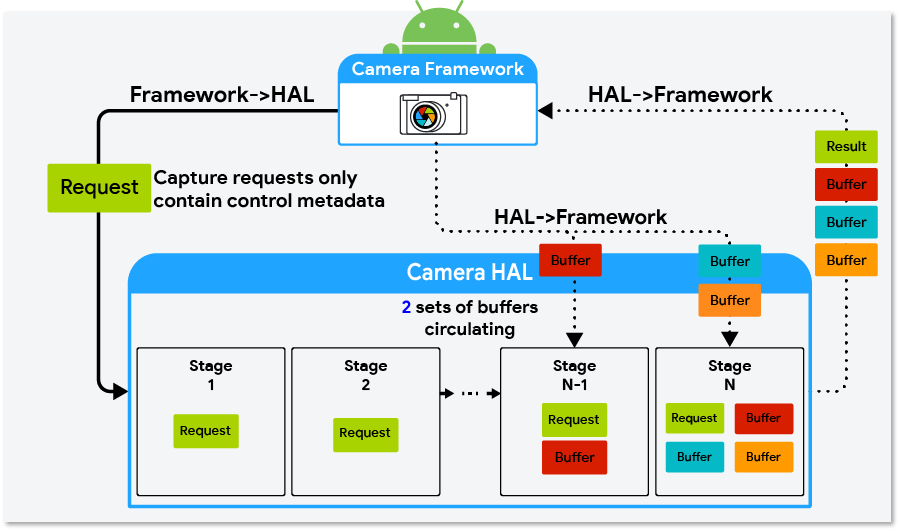
Figure 2. Camera HAL interface in Android 10 using the buffer management APIs
Implementing the buffer management APIs
To implement the buffer management APIs, the camera HAL must:
- Implement HIDL
ICameraDevice@3.5. - Set the camera characteristics key
android.info.supportedBufferManagementVersiontoHIDL_DEVICE_3_5.
The camera HAL uses the requestStreamBuffers and returnStreamBuffers methods inICameraDeviceCallback.hal to request and return buffers. The HAL must also implement thesignalStreamFlush method in ICameraDeviceSession.hal to signal the camera HAL to return buffers.
Note: If the camera HAL implements these buffer management APIs on a device running Android 9 and lower, the HAL is required to support the API contract illustrated in Figure 1.
requestStreamBuffers
Use the requestStreamBuffers method to request buffers from the camera framework. When using the camera HAL3 buffer management APIs, capture requests from the camera framework don't contain output buffers, that is, the bufferId field in StreamBuffer is 0. Therefore, the camera HAL must use requestStreamBuffers to request buffers from the camera framework.
The requestStreamBuffers method allows the caller to request multiple buffers from multiple output streams in a single call, allowing for fewer HIDL IPC calls. However, calls take more time when more buffers are requested at the same time and this might negatively affect the total request-to-result latency. Also, because calls into requestStreamBuffers are serialized in the camera service, it's recommended that the camera HAL use a dedicated high-priority thread to request buffers.
If a buffer request fails, the camera HAL must be able to properly handle nonfatal errors. The following list describes common reasons that buffer requests fail and how they should be handled by the camera HAL.
- App disconnects from the output stream: This is a nonfatal error. The camera HAL should send
ERROR_REQUESTfor any capture request targeting a disconnected stream and be ready to process subsequent requests normally. - Timeout: This can occur when an app is busy doing intensive processing while holding onto some buffers. The camera HAL should send
ERROR_REQUESTfor capture requests that can't be fulfilled due to a timeout error and be ready to process subsequent requests normally. - Camera framework is preparing a new stream configuration: The camera HAL should wait until the next
configureStreamscall is complete before callingrequestStreamBuffersagain. - The camera HAL has reached its buffer limit (the
maxBuffersfield): The camera HAL should wait until it returns at least one buffer of the stream before callingrequestStreamBuffersagain.
returnStreamBuffers
Use the returnStreamBuffers method to return extra buffers to the camera framework. The camera HAL normally returns buffers to the camera framework through the processCaptureResult method, but it can only account for capture requests that have been sent to the camera HAL. With the requestStreamBuffersmethod, it's possible for the camera HAL implementation to retain more buffers than what has been requested by the camera framework. This is when the returnStreamBuffers method should be used. If the HAL implementation never holds more buffers than requested, the camera HAL implementation doesn't need to call the returnStreamBuffers method.
signalStreamFlush
The signalStreamFlush method is called by the camera framework to notify the camera HAL to return all buffers at hand. This is normally called when the camera framework is about to call configureStreams and must drain the camera capture pipeline. Similar to the returnStreamBuffers method, if a camera HAL implementation doesn't hold more buffers than requested, it's possible to have an empty implementation of this method.
After the camera framework calls signalStreamFlush, the framework stops sending new capture requests to the camera HAL until all buffers have been returned to the camera framework. When all buffers are returned, the requestStreamBuffers method calls fail, and the camera framework can continue its work in a clean state. The camera framework then calls either the configureStreams or processCaptureRequest method. If the camera framework calls the configureStreams method, the camera HAL can start requesting buffers again after the configureStreams call returns successfully. If the camera framework calls the processCaptureRequest method, the camera HAL can start requesting buffers during the processCaptureRequest call.
The semantics are different for the signalStreamFlush method and the flush method. When the flushmethod is called, the HAL can abort pending capture requests with ERROR_REQUEST to drain the pipeline as soon as possible. When the signalStreamFlush method is called, the HAL must finish all pending capture requests normally and return all buffers to the camera framework.
Another difference between the signalStreamFlush method and other methods is that signalStreamFlush is a one-way HIDL method, which means that the camera framework might call into other blocking APIs before the HAL receives the signalStreamFlush call. This means that the signalStreamFlush method and other methods (specifically the configureStreams method) might arrive at the camera HAL in a different order than the order they were called in the camera framework. To address this asynchrony issue, the streamConfigCounter field was added to StreamConfiguration and added as an argument to the signalStreamFlush method. The camera HAL implementation should use the streamConfigCounterargument to determine whether a signalStreamFlush call arrives later than its corresponding configureStreams call. See Figure 3 for an example.
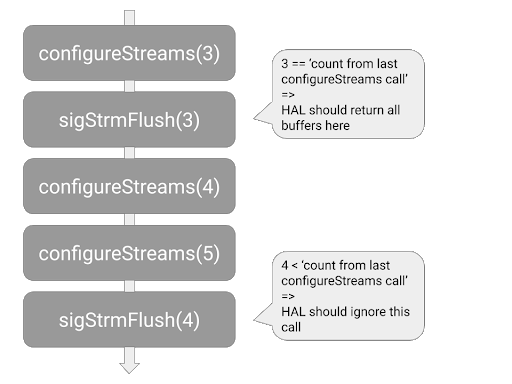
Figure 3. How the camera HAL should detect and handle signalStreamFlush calls that arrive late
Behavior changes when implementing the buffer management APIs
When using the buffer management APIs to implement the buffer management logic, consider the following possible behavior changes to the camera and camera HAL implementation:
-
Capture requests arrive at the camera HAL faster and more frequently: Without buffer management APIs, the camera framework requests output buffers for each capture request before sending a capture request to the camera HAL. When using the buffer management APIs, the camera framework no longer needs to wait for buffers and can therefore send capture requests to the camera HAL earlier.
Also, without buffer management APIs, the camera framework stops sending capture requests if one of the output streams of the capture request has reached the maximum number of buffers that the HAL can hold at one time (this value is designated by the camera HAL in the
HalStream::maxBuffersfield in the return value of aconfigureStreamscall). With the buffer management APIs, this throttling behavior no longer exists and the camera HAL implementation must not acceptprocessCaptureRequestcalls when the HAL has too many capture requests queued. -
requestStreamBufferscall latency varies significantly: There are many reasons arequestStreamBufferscall might take a longer time than average. For example:- For the first few buffers of a newly created stream, calls can take longer because the device needs to allocate memory.
- The expected latency increases in proportion to the number of buffers requested in each call.
- The app is holding buffers and is busy processing. This can cause buffer requests to slow down or hit a timeout because of a lack of buffers or a busy CPU.
Buffer management strategies
The buffer management APIs allow for different kinds of buffer management strategies to be implemented. Some examples are:
- Backward compatible: The HAL requests buffers for a capture request during the
processCaptureRequestcall. This strategy doesn't provide any memory savings, but can serve as the first implementation of the buffer management APIs, requiring very few code changes to the existing camera HAL. - Maximized memory savings: The camera HAL only requests output buffers immediately before one is needed to be filled. This strategy allows for maximized memory savings. The potential downside is more camera pipeline jank when buffer requests take an unusually long time to finish.
- Cached: The camera HAL caches a few buffers so that it's less likely to be affected by an occasional slow buffer request.
The camera HAL can adopt different strategies for particular use cases, for example, using the maximized memory saving strategy for use cases that use a lot of memory and using the backward-compatible strategy for other use cases.
Sample implementation in the external camera HAL
The external camera HAL was introduced in Android 9 and can be found in the source tree athardware/interfaces/camera/device/3.5/. In Android 10, it has been updated to includeExternalCameraDeviceSession.cpp, an implementation of the buffer management API. This external camera HAL implements the maximized memory savings strategy mentioned in Buffer management strategies in a few hundred lines of C++ code.
HEIF 图片处理
搭载 Android 10 的设备支持 HEIC 压缩图片格式,它是 ISO/IEC 23008-12 中规定的高效图片文件格式 (HEIF) 的高效视频编码 (HEVC) 特定品牌。与 JPEG 文件相比,HEIC 编码的图片质量更好且文件更小。
HEIC 图片由摄像头传输框架生成,请求来自相机 HAL 的未压缩图片并将其发送到媒体子系统,以便由 HEIC 或 HEVC 编码器进行编码。
要求
要支持 HEIC 图片格式,您的设备必须拥有支持 MIMETYPE_IMAGE_ANDROID_HEIC 或 MIMETYPE_VIDEO_HEVC(具有恒定质量模式)的硬件编码器。
实现
要在您的设备上支持 HEIC 图片格式,请实现 HEIC/HEVC 编解码器,并为所需的流配置(即 IMPLEMENTATION_DEFINED/YUV 流和 JPEG 应用细分流)提供支持。
媒体
对于相应的硬件,以恒定质量 (CQ) 模式实现 HEIC/HEVC 编解码器,如下所示:
- HEVC 类型编解码器使用具有
GRALLOC_USAGE_HW_VIDEO_ENCODER用法的IMPLEMENTATION_DEFINED格式或HAL_PIXEL_FORMAT_YCBCR_420_888格式,具体取决于图片大小。 - HEIC 类型编解码器使用具有
GRALLOC_USAGE_HW_IMAGE_ENCODER用法的IMPLEMENTATION_DEFINED格式。
摄像头
在静态元数据中,将 ANDROID_HEIC_INFO_SUPPORTED 设置为 true,并将 ANDROID_HEIC_INFO_MAX_JPEG_APP_SEGMENTS_COUNT 设置为介于 [1, 16] 之间的值,以表明 JPEG 应用细分的数量。
对于每个必要的流组合,您的摄像头设备必须支持使用相同大小的 HEIC 流替换 JPEG 流。
对于公共 API 上的 HEIC 输出流,摄像头服务会创建两个 HAL 内部流:
- 具有
JPEG_APPS_SEGMENT使用标记的 BLOB 流,可存储应用细分(包括 EXIF 和缩略图细分) IMPLEMENTATION_DEFINED和YCBCR_420_888会根据目标编解码器和 HEIC 流的大小流式传输 HEIC 流的大小
摄像头传输框架根据 ANDROID_HEIC_INFO_MAX_JPEG_APP_SEGMENTS_COUNT 为相机 HAL 分配足够大的缓冲区,以便填充 JPEG 应用细分。APP1 细分为必填项,但 APP1 之后(APP2 及以上)的细分为可选项。摄像头传输框架可以覆盖 APP1 细分中的 EXIF 标记(这些标记可以派生自捕获结果元数据或者与主图片比特流相关),并将它们发送至 MediaMuxer。
由于媒体编码器将屏幕方向嵌入到了输出图片的元数据中,以确保主图片和缩略图的屏幕方向一致,因此相机 HAL 不得根据 android.jpeg.orientation. 旋转缩略图。 该框架将屏幕方向写入到 EXIF 元数据和 HEIC 容器中。
与 JPEG 格式相关的静态、控制和动态元数据标记也适用于 HEIC 格式。例如,捕获请求中的 android.jpeg.orientation 和 android.jpeg.quality 元数据标记用于控制 HEIC 图片的屏幕方向和质量。
注意:无法同时配置 JPEG 和 HEIC 流。
要在应用中使用 HEIC 格式,请使用 HEIC 公共 API。
如需了解详情,请参阅以下来源。
相机 HAL
docs.htmlCameraBlobANDROID_HEIC_INFO_SUPPORTEDANDROID_HEIC_INFO_MAX_JPEG_APP_SEGMENTS_COUNT
图形缓冲区数据空间
JPEG_APP_SEGMENTSHEIF
图形缓冲区使用空间
HW_IMAGE_ENCODER
验证
要验证您的实现是否支持 HEIC 图片,请使用 TestingCamera2 测试应用,并运行以下摄像头 CTS 和 VTS 测试。
摄像头 CTS 测试
NativeImageReaderTest#testHeicImageReaderTest#testHeicImageReaderTest#testRepeatingHeicReprocessCaptureTest#testBasicYuvToHeicReprocessingReprocessCaptureTest#testBasicOpaqueToHeicReprocessingRobustnessTest#testMandatoryOutputCombinationsStillCaptureTest#testHeicExif
摄像头 VTS 测试
运动跟踪
在 Android 9 中,摄像头设备可以支持运动跟踪功能。支持此功能的摄像头本身不会生成运动跟踪数据,而是供 ARCore 或图像稳定算法以及其他传感器用于进行场景分析。要支持此功能,设备必须支持 CONTROL_CAPTURE_INTENT_MOTION_TRACKING。如果该 intent 是捕获请求的一部分,则摄像头必须将曝光时间限制为不超过 20 毫秒,以减少运动模糊。
示例和源代码
HAL 端的参考运动跟踪实现是摄像头 HAL 的一部分。
实现
要在摄像头设备上启用运动跟踪功能,请确保:
ANDROID_REQUEST_AVAILABLE_CAPABILITIES_MOTION_TRACKING功能处于启用状态。ANDROID_CONTROL_CAPTURE_INTENT_MOTION_TRACKINGintent 受支持,并且当该 intent 包含在捕获请求中时,将摄像头曝光时间限制为不超过 20 毫秒。-
在静态信息和动态元数据字段中准确报告以下列表中的镜头校准数据:
验证
支持运动跟踪功能的摄像头设备必须通过摄像头 CTS 测试。
单色摄像头
搭载 Android 9 或更高版本的设备可以支持单色摄像头。Android 10 为 Y8 流格式、单色和近红外 (NIR) 色彩滤镜数组静态元数据提供了额外的支持,并为单色摄像头提供了 DngCreator 函数。
借助此功能,设备制造商可以实现单色或近红外线摄像头设备,并通过使用 Y8 流格式减少内存使用量。单色摄像头可以用作逻辑多摄像头设备的底层物理摄像头以获取更出色的低光噪音特性。
实现
硬件要求
要实现此功能,您的设备必须拥有单色摄像头传感器和图像信号处理器 (ISP) 以处理传感器输出。
实现单色摄像头
要将摄像头设备播发为单色摄像头,相机 HAL 必须满足以下要求:
android.sensor.info.colorFilterArray设置为MONO或NIR。- 支持
BACKWARD_COMPATIBLE必需键,不支持MANUAL_POST_PROCESSING。 android.control.awbAvailableModes只包含AUTO,且android.control.awbState为CONVERTED或LOCKED(具体取决于android.control.awbLock)。android.colorCorrection.mode、android.colorCorrection.transform和android.colorCorrection.gains不在可用的请求和结果键中。因此,摄像头设备是LIMITED。-
不存在以下与颜色相关的静态元数据键:
android.sensor.referenceIlluminant*android.sensor.calibrationTransform*android.sensor.colorTransform*android.sensor.forwardMatrix*android.sensor.neutralColorPointandroid.sensor.greenSplit
-
对于以下元数据键,所有颜色通道的值都相同:
android.sensor.blackLevelPatternandroid.sensor.dynamicBlackLevelandroid.statistics.lensShadingMapandroid.tonemap.curve
-
android.sensor.noiseProfile只有一个颜色通道。
对于支持 Y8 流格式的单色设备,相机 HAL 必须支持将强制性信息流组合中的 YUV_420_888 格式替换(包括重新处理)为 Y8 格式。
该功能中会使用以下公共 API:
- Y8 映像格式
- SENSOR_INFO_COLOR_FILTER_ARRANGEMENT_MONO
- SENSOR_INFO_COLOR_FILTER_ARRANGEMENT_NIR
- MONOCHROME 摄像头功能(在 Android 9 中引入)
要详细了解相机 HAL,请参阅 docs.html。要详细了解相关公共 API,请参阅 ImageFormat、CameraCharacteristics、CaptureRequest 和 CaptureResult。
验证
要验证单色摄像头的实现情况,请运行以下 CTS 和 VTS 测试。
CTS 测试
testMonochromeCharacteristicsCaptureRequestTestCaptureResultTestStillCaptureTestDngCreatorTest
VTS 测试
getCameraCharacteristicsprocessMultiCaptureRequestPreview
多摄像头支持
Android 9 通过一个新的逻辑摄像头设备(该设备由两个或两个以上指向同一方向的物理摄像头设备组成)引入了对多摄像头设备的 API 支持。该逻辑摄像头设备作为单个 CameraDevice/CaptureSession 提供给应用,从而允许与集成了 HAL 的多摄像头功能互动。应用可以选择访问和控制底层物理摄像头信息流、元数据和控件。
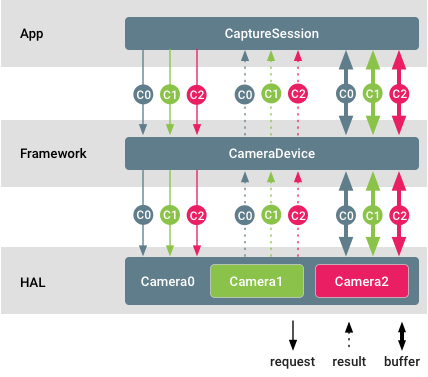
图 1. 多摄像头支持
在此图中,不同的摄像头 ID 用不同颜色标识。应用可以同时流式传输来自每个物理摄像头的原始缓冲区。您也可以设置单独的控件并从不同的物理摄像头单独接收元数据。
示例和来源
必须通过逻辑多摄像头功能播发多摄像头设备。
摄像头客户端可以通过调用 getPhysicalCameraIds(),查询构成特定逻辑摄像头的物理设备的摄像头 ID。随结果返回的 ID 之后会用于通过 setPhysicalCameraId() 单独控制各个物理设备。可以通过调用 getPhysicalCameraResults() 从完整结果中查询这类单个请求的结果。
单个物理摄像头请求可能仅支持有限的部分参数。为了接收受支持参数的列表,开发者可以调用 getAvailablePhysicalCameraRequestKeys()。
只有非重新处理请求以及单色和 Bayer 传感器支持物理摄像头信息流。
实现
支持核对清单
要在 HAL 端添加逻辑多摄像头设备,请执行以下操作:
- 为由两个或两个以上物理摄像头(这些摄像头也会提供给应用)提供支持的任何逻辑摄像头设备添加
ANDROID_REQUEST_AVAILABLE_CAPABILITIES_LOGICAL_MULTI_CAMERA功能。 - 使用物理摄像头 ID 列表填充静态
ANDROID_LOGICAL_MULTI_CAMERA_PHYSICAL_IDS元数据字段。 - 填充在物理摄像头信息流的像素之间建立关联所需的深度相关静态元数据:
ANDROID_LENS_POSE_ROTATION、ANDROID_LENS_POSE_TRANSLATION、ANDROID_LENS_INTRINSIC_CALIBRATION、ANDROID_LENS_DISTORTION、ANDROID_LENS_POSE_REFERENCE。 -
将静态
ANDROID_LOGICAL_MULTI_CAMERA_SENSOR_SYNC_TYPE元数据字段设置为:ANDROID_LOGICAL_MULTI_CAMERA_SENSOR_SYNC_TYPE_APPROXIMATE:对于主主模式下的传感器,不执行硬件快门/曝光同步。ANDROID_LOGICAL_MULTI_CAMERA_SENSOR_SYNC_TYPE_CALIBRATED:对于主从模式下的传感器,执行硬件快门/曝光同步。
-
使用各个物理摄像头支持的参数列表填充
ANDROID_REQUEST_AVAILABLE_PHYSICAL_CAMERA_REQUEST_KEYS。如果逻辑设备不支持单个请求,则列表可以为空。 -
如果支持单个请求,则处理并应用可以在捕获请求中到达的各个
physicalCameraSettings,并相应地附加单个physicalCameraMetadata。 -
对于相机 HAL 设备版本 3.5(在 Android 10 中引入)或更高版本,请使用支持逻辑摄像头的当前有效物理摄像头的 ID 填充
ANDROID_LOGICAL_MULTI_CAMERA_ACTIVE_PHYSICAL_ID结果密钥。
对于搭载 Android 9 的设备,摄像头设备必须支持将一个逻辑 YUV/RAW 信息流替换为来自两个物理摄像头的大小(不适用于 RAW 信息流)和格式相同的物理信息流。这并不适用于搭载 Android 10 的设备。
对于搭载 Android 10(其中相机 HAL 设备版本为 3.5)或更高版本的设备,摄像头设备必须支持 isStreamCombinationSupported,以便应用查询包含物理信息流的特定信息流组合是否受支持。
信息流配置映射
对于逻辑摄像头,特定硬件级别的摄像头设备的强制性信息流组合与 CameraDevice.createCaptureSession中所需的信息流组合相同。信息流配置映射中的所有信息流都必须是逻辑信息流。
对于支持 RAW 功能、物理子摄像头大小不同的逻辑摄像头设备,如果应用配置逻辑 RAW 信息流,则逻辑摄像头设备不得切换到具有不同传感器尺寸的物理子摄像头。这样可以确保现有 RAW 捕获应用不会中断。
要在 RAW 捕获期间通过在物理子摄像头之间进行切换来利用 HAL 实现的光学变焦,应用必须配置物理子摄像头信息流(而不是逻辑 RAW 信息流)。
有保证的信息流组合
逻辑摄像头及其底层物理摄像头都必须保证其设备级别所需的强制性信息流组合。
逻辑摄像头设备的运行方式应该与物理摄像头设备相同,具体取决于其硬件级别和功能。建议将其特征集设为单个物理摄像头的特征集的超集。
在搭载 Android 9 的设备上,对于每个有保证的信息流组合,逻辑摄像头必须支持:
-
将一个逻辑 YUV_420_888 或原始信息流替换为两个相同大小和格式的物理信息流(每个信息流来自不同的物理摄像头),只要物理摄像头支持这种大小和格式就可以。
-
添加两个原始信息流(在每个物理摄像头中各添加一个),条件是逻辑摄像头不播发 RAW 功能,但底层物理摄像头播发该功能。当两个物理摄像头具有不同的传感器尺寸时,通常会出现这种情况。
-
使用物理信息流代替大小和格式相同的逻辑信息流。当物理信息流和逻辑信息流的最小帧时长相同时,这么做必须不能减慢捕获的帧速率。
性能和功率考虑因素
-
性能:
- 由于资源限制,配置和流式传输物理信息流可能会降低逻辑摄像头的捕获速率。
- 如果将底层摄像头设为不同的帧速率,则应用物理摄像头设置可能会降低捕获速率。
-
功率:
- HAL 的功率优化在默认情况下继续有效。
- 配置或请求物理信息流可能会替换 HAL 的内部功率优化并消耗更多电量。
自定义
您可以通过以下方式自定义设备实现。
- 逻辑摄像头设备的融合输出完全取决于 HAL 实现。关于如何从物理摄像头派生融合逻辑信息流的决定对于应用和 Android 摄像头框架来说都是透明的。
- 可以选择支持单个物理请求和结果。此类请求中的可用参数集也完全取决于特定的 HAL 实现。
- 从 Android 10 开始,HAL 可以选择不在
getCameraIdList中播发部分或所有 PHYSICAL_ID,从而减少应用可以直接打开的摄像头数量。然后,调用getPhysicalCameraCharacteristics必须返回物理摄像头的特征。
验证
逻辑多摄像头设备必须像任何其他普通摄像头一样通过摄像头 CTS。可以在 LogicalCameraDeviceTest 模块中找到针对此类设备的测试用例。
以下三个 ITS 测试针对多摄像头系统,以便于正确融合图像:
scene1/test_multi_camera_match.pyscene4/test_multi_camera_alignment.pysensor_fusion/test_multi_camera_frame_sync.py
scene1 和 scene4 测试使用盒装 ITS 测试装置运行。当两个摄像头都启用时,test_multi_camera_match 测试会声明图像中心的亮度匹配。test_multi_camera_alignment 测试会声明摄像头间距、方向和失真参数已正确加载。如果多摄像头系统包含广视野摄像头(大于 90o),则需要 rev2 版 ITS 包装盒。
Sensor_fusion 是另一个测试装置,它可以实现规定的重复手机动作,并声明陀螺仪和图像传感器时间戳匹配以及多摄像头帧保持同步。
所有测试盒均由 AcuSpec, Inc.(www.acuspecinc.com,fred@acuspecinc.com)和 MYWAY Manufacturing(www.myway.tw,sales@myway.tw)提供。此外,rev1 ITS 测试盒可从 West-Mark(www.west-mark.com,dgoodman@west-mark.com)购买。
外接 USB 摄像头
Android 平台支持使用即插即用的 USB 摄像头(即网络摄像头),但前提是这些摄像头采用标准的 Android Camera2 API 和摄像头 HIDL 接口。网络摄像头通常支持 USB 视频类 (UVC) 驱动程序,并且在 Linux 上,系统采用标准的 Video4Linux (V4L) 驱动程序控制 UVC 摄像头。
如果系统支持网络摄像头,设备便可用于视频聊天和照片冲印机等轻量级用例。此功能不能替代 Android 手机上典型的内部相机 HAL,也不是为了协助执行涉及高分辨率和高速流式传输、AR 以及手动 ISP/传感器/摄像头控制且对性能要求很高的复杂任务。
USB 相机 HAL 进程是外接摄像头提供程序的一部分,该提供程序会监听 USB 设备可用性,并相应地枚举外接摄像头设备。该进程具有与内置相机 HAL 进程类似的权限和 SE 策略。直接与 USB 设备通信的第三方网络相机应用访问 UVC 设备时所需的相机权限与所有常规相机应用所需的权限相同。
示例和来源
如需详细了解如何实现 USB 摄像头,请参阅 ExternalCameraProvider 中的外接摄像头提供程序参考实现。外接摄像头设备和会话实现包含在 ExternalCameraDevice 和 ExternalCameraDeviceSession 中。从 API 级别 28 开始,Java 客户端 API 包含 EXTERNAL 硬件级别。
实现
实现必须支持 android.hardware.usb.host 系统功能。
此外,还必须启用对 UVC 设备的内核支持。您可以通过将以下内容添加到相应的内核 deconfig 文件来启用该支持。
+CONFIG_USB_VIDEO_CLASS=y
+CONFIG_MEDIA_USB_SUPPORT=y
要在相应的设备细分版本中启用外接摄像头提供程序,以便添加必要的 SELinux 权限、外接摄像头配置以及外接摄像头提供程序依赖项,请完成以下步骤:
-
将外接摄像头配置文件和外接摄像头库添加到
device.mk。+PRODUCT_PACKAGES += android.hardware.camera.provider@2.4-impl
+PRODUCT_PACKAGES += android.hardware.camera.provider@2.4-external-service
+PRODUCT_COPY_FILES += \
+device/manufacturerX/productY/external_camera_config.xml:$(TARGET_COPY_OUT_VENDOR)/etc/external_camera_config.xml -
将外接摄像头提供程序名称添加到设备 Treble HAL 清单。
<hal format="hidl">
   <name>android.hardware.camera.provider</name>
   <transport arch="32+64">passthrough</transport>
   <impl level="generic"></impl>
   <version>2.4</version>
   <interface>
       <name>ICameraProvider</name>
       <instance>legacy/0</instance>
+       <instance>external/0</instance>
   </interface>
</hal> -
(选做)如果设备在 Treble 直通模式下运行,请更新
sepolicy,以便cameraserver可以访问 UVC 摄像头。+# for external camera
+allow cameraserver device:dir r_dir_perms;
+allow cameraserver video_device:dir r_dir_perms;
+allow cameraserver video_device:chr_file rw_file_perms;
下面的示例展示了 external_camera_config.xml(省略了版权行)。
<ExternalCamera>
    <Provider>
         <!-- Internal video devices to be ignored by external camera HAL -->
            <id>0</id> <!-- No leading/trailing spaces -->
            <id>1</id>

    </Provider>
    <!-- See ExternalCameraUtils.cpp for default values of Device configurations below -->
    <Device>
        <!-- Max JPEG buffer size in bytes-->
        <MaxJpegBufferSize bytes="3145728"/> <!-- 3MB (~= 1080p YUV420) -->
        <!-- Size of v4l2 buffer queue when streaming >= 30fps -->
        <!-- Larger value: more request can be cached pipeline (less janky)  -->
        <!-- Smaller value: use less memory -->
        <NumVideoBuffers count="4"/>
        <!-- Size of v4l2 buffer queue when streaming < 30fps -->
        <NumStillBuffers count="2"/>

        <!-- List of maximum fps for various output sizes -->
        <!-- Any image size smaller than the size listed in Limit row will report
            fps (as minimum frame duration) up to the fpsBound value. -->
        <FpsList>
            <!-- width/height must be increasing, fpsBound must be decreasing-->
            <Limit width="640" height="480" fpsBound="30.0"/>
            <Limit width="1280" height="720" fpsBound="15.0"/>
            <Limit width="1920" height="1080" fpsBound="10.0"/>
            <!-- image size larger than the last entry will not be supported-->
        </FpsList>
    </Device>
</ExternalCamera>
自定义
您可以通过常规自定义选项或设备专用的优化来提升 Android 摄像头的性能。
常规自定义
您可以通过修改 external_camera_config.xml 文件来自定义外接摄像头提供程序。具体而言,客户可以自定义以下参数:
- 内部摄像头的排除视频节点
- 支持的图片大小和帧速率上限
- Inflight 缓冲区数量(在卡顿与内存之间进行权衡)
除了这些参数之外,您还可以添加自己的参数或开发自己的配置。
设备专用的优化
您还可以通过添加设备专用的优化来提升性能。
缓冲区复制/调整大小和 JPEG 解码/编码
通用实现使用的是 CPU (libyuv/libjpeg),但您可以将其替换为设备专用的优化。
HAL 输出格式
通用实现采用以下输出格式:
YUV_420_888:适用于视频IMPLEMENTATION_DEFINED缓冲区YUV12:适用于所有其他IMPLEMENTATION_DEFINED缓冲区
为了提升性能,您可以将输出格式替换为设备专用的高效格式。此外,您还可以在自定义的实现中支持其他格式
验证
支持外接摄像头的设备必须通过摄像头 CTS 测试。在整个测试运行期间,外接 USB 网络摄像头必须始终插入到特定设备,否则某些测试用例会失败。
注意:media_profiles 条目不适用于外接 USB 网络摄像头,因此没有 camcorder 配置文件。
 浙公网安备 33010602011771号