
FFmpeg入门详解之123:代码封装:摄像头h264/5编码并存储
7.代码封装:摄像头h264/5编码并存储
源码工程:S26_Test3
H264/5编码案例实战
AVPacket, AVFrame
解码:
While(av_read_frame(..))
avcodec_send_packet
avcodec_receive_frame
编码:
While(read_camera(..))
avcodec_send_frame
avcodec_receive_packet
源码参考:
extern "C"
{
#include "libavutil/opt.h"
#include "libavcodec/avcodec.h"
#include "libavformat/avformat.h"
#include "libavutil/imgutils.h"
};
//encode one frame
static int encode(AVCodecContext *pCodecCtx, AVFrame *pFrame, AVPacket *pPkt, FILE *out_file) {
int got_packet = 0;
int ret = avcodec_send_frame(pCodecCtx, pFrame);
if (ret < 0) {
//failed to send frame for encoding
return -1;
}
while (!ret) {
ret = avcodec_receive_packet(pCodecCtx, pPkt);
if (ret == AVERROR(EAGAIN) || ret == AVERROR_EOF) {
return 0;
}else if (ret < 0) {
//error during encoding
return -1;
}
printf("Write frame %d, size=%d\n", pPkt->pts, pPkt->size);
fwrite(pPkt->data, 1, pPkt->size, out_file);
av_packet_unref(pPkt);
}
return 0;
}
int main (int argc, char* argv[])
{
AVFormatContext *pFormatCtx;
AVOutputFormat *pOutputFmt;
AVStream *pStream;
AVCodecContext *pCodecCtx;
AVCodec *pCodec;
AVPacket *pkt;
AVFrame *pFrame;
FILE *in_file = NULL, *out_file = NULL;
in_file = fopen("yuvtest1-352x288-yuv420p.yuv", "rb");
if (in_file == NULL){
printf("cannot open in file\n");
return -1;
}
int in_w = 352, in_h = 288;
int nFrameNum = 100;
out_file = fopen("out.h265", "wb");
if (out_file == NULL) {
printf("cannot create out file\n");
return -1;
}
uint8_t* pFrameBuf = NULL;
int frame_buf_size = 0;
int y_size = 0;
int nEncodedFrameCount = 0;
uint8_t endcode[] = { 0, 0, 1, 0xb7 };
/////av_register_all();
pFormatCtx = avformat_alloc_context();
pOutputFmt = av_guess_format(NULL, "test.h265", NULL);
pFormatCtx->oformat = pOutputFmt;
//除了以下方法,另外还可以使用avcodec_find_encoder_by_name()来获取AVCodec
pCodec = avcodec_find_encoder(pOutputFmt->video_codec);
if (!pCodec) {
//cannot find encoder
return -1;
}
pCodecCtx = avcodec_alloc_context3(pCodec);
if (!pCodecCtx) {
//failed get AVCodecContext
return -1;
}
pkt = av_packet_alloc();
if (!pkt){
return -1;
}
//pCodecCtx = pStream->codec;
pCodecCtx->codec_id = pOutputFmt->video_codec;
pCodecCtx->codec_type = AVMEDIA_TYPE_VIDEO;
pCodecCtx->pix_fmt = AV_PIX_FMT_YUV420P;
pCodecCtx->width = in_w;
pCodecCtx->height = in_h;
pCodecCtx->time_base.num = 1;
pCodecCtx->time_base.den = 25;
//pCodecCtx->time_base = (AVRational){ 1, 25 };
pCodecCtx->bit_rate = 400000; //
pCodecCtx->gop_size = 250; //
//pCodecCtx->framerate = (AVRational){ 25, 1 };
//H264
//pCodecCtx->me_range = 16; //
//pCodecCtx->max_qdiff = 4; //
//pCodecCtx->qcompress = 0.6; //
pCodecCtx->qmin = 10; //
pCodecCtx->qmax = 51; //
//Optional Param
pCodecCtx->max_b_frames = 3;
//Set Option
AVDictionary *param = NULL;
//H.264
if (pCodecCtx->codec_id == AV_CODEC_ID_H264) {
///av_dict_set(¶m, "profile", "main", 0);
av_dict_set(¶m, "preset", "slow", 0);
av_dict_set(¶m, "tune", "zerolatency", 0);
}
//H.265
if (pCodecCtx->codec_id == AV_CODEC_ID_HEVC) {//AV_CODEC_ID_HEVC,AV_CODEC_ID_H265
av_dict_set(¶m, "profile", "main", 0);
av_dict_set(¶m, "preset", "ultrafast", 0);
///// note uncompatilable://av_dict_set(¶m, "tune", "zero-latency", 0);
}
if (avcodec_open2(pCodecCtx, pCodec, ¶m) < 0) {
//failed to open codec
return -1;
}
pFrame = av_frame_alloc();
if (!pFrame) {
fprintf(stderr, "Could not allocate the video frame data\n");
return -1;
}
pFrame->format = pCodecCtx->pix_fmt;
pFrame->width = pCodecCtx->width;
pFrame->height = pCodecCtx->height;
int ret = av_frame_get_buffer(pFrame, 32);
if (ret < 0) {
fprintf(stderr, "Could not allocate the video frame data\n");
return -1;
}
frame_buf_size = av_image_get_buffer_size(pCodecCtx->pix_fmt, pCodecCtx->width, pCodecCtx->height, 1);
pFrameBuf = (uint8_t*)av_malloc(frame_buf_size);
av_image_fill_arrays(pFrame->data, pFrame->linesize,
pFrameBuf, pCodecCtx->pix_fmt, pCodecCtx->width, pCodecCtx->height, 1);
y_size = pCodecCtx->width * pCodecCtx->height;
for (int i = 0; i < nFrameNum; i++) {
//Read raw YUV data
if (fread(pFrameBuf, 1, y_size * 3 / 2, in_file) <= 0) {
//failed to read raw YUV data
return -1;
}
else if (feof(in_file)) {
break;
}
ret = av_frame_make_writable(pFrame);
if (ret < 0) {
return -1;
}
pFrame->data[0] = pFrameBuf; //Y
pFrame->data[1] = pFrameBuf + y_size; //U
pFrame->data[2] = pFrameBuf + y_size*5/4; //V
//PTS
pFrame->pts = i;
//encode
encode(pCodecCtx, pFrame, pkt, out_file);
}
//flush the encoder
encode(pCodecCtx, NULL, pkt, out_file);
//add sequence end code to have a real MPEG file
fwrite(endcode, 1, sizeof(endcode), out_file);
avcodec_free_context(&pCodecCtx);
avformat_free_context(pFormatCtx);
av_frame_free(&pFrame);
av_packet_free(&pkt);
av_free(pFrameBuf);
if (out_file)
fclose(out_file);
if (in_file)
fclose(in_file);
system("pause");
return 0;
}
视音频pts计算
Pts,dts
1、概述
计算pts的时候都是转换一下时间基AV_TIMEBASE,
如果这个pts没有原来的pts做参考如何计算其值?
咋办?
time base : 时间基,也即是时间单位,举个栗子, ctx->time_base = {1, 1000}, 即,把一秒分为 1000个单位,每个单位 1/1000 秒。
fps : 帧每秒,即 每秒显示多少帧,举个栗子,25fps,每秒显示25帧,每帧持续显示 1/25 = 0.04 秒 = 40 毫秒。
sample_rate : 这个是对于 音频来讲的,即采样率,常见的比如 44.1 KHz, 即 每秒采样 44100 次。
我们知道,对于视频,我们可以根据 fps得到 每一帧的pts,即:
根据时间基,一秒钟 1000 个单位,这1000个单位分给 25 帧去使用,所以每个帧占用了 1000/25的时间,
所以,如果第一帧的pts 应该是 1000/25 * 1/1000 = 40 毫秒,即 占用的时间单位个数 * 每个时间单位的时间
同理,第二帧就是 : 40 + (1000/25 * 1/1000) = 80 毫秒,第N帧就是 :N * 40 毫秒 。
2、视频pts
视频比较好理解,就是每帧递增。
假如fps是25帧的,时间基为fps的倒数1/25,那么pts递增即可。
如下:
第一帧:pts=0
第二帧:pts=1
第三帧:pts=2
.
.
.
第n帧:pts = n - 1;
。。。以此类推
计算公式为:第n帧的pts = n * ((1 / timbase)/ fps);
3、音频pts
音频相对来说更难理解一些,因为音频的一个packet不止一帧,所以一秒到底有多少个packet就不知道,就别说如何计算pts了。
假设音频一秒有num_pkt个packet,那么这个num_pkt到底是多少?
这就需要从音频基础开始说起,我们知道音频有个采样率,就是一秒钟采用多少次,很多音频都是44100的采样率,也有8k的,那么这个采样率和num_pkt有什么关系呢?
分析发现在AVFrame中有一个比较重要的字段叫做nb_samples,这个字段名为采样数,此字段可以结合音频数据格式计算这个frame->data有多大,其实这个字段联合采样率还可以计算音频一秒有多少个packet。
计算公式如下:
num_pkt = 采样率 / nb_samples;
这样我们就知道了音频每秒的包数目(可以见到理解为音频帧),有了此数据计算pts就和视频一模一样了,
计算公式如下:
第n个包的pts = n * ((1 / timbase)/ num_pkt);
很多(不是所有的)音频时间基和采样率成倒数,那么根据公式(一般情况下)我们的音频pts就可以很简单的以nb_samples递增了,如下:
第一个包:pts = 0 * nb_samples;
第二个包:pts = 1 * nb_samples;
第三个包:pts = 2 * nb_samples;
.
.
.
第n个包:pts = (n - 1) * nb_samples;
注:以上说的timebase为AVStream里的timebase。
界面设计
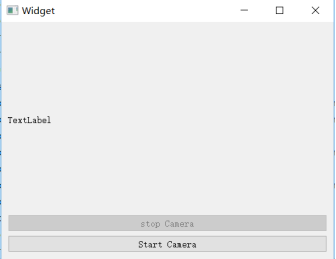

摄像头封装
QtFFmpegCamera
把SDL的部分去掉
边采集边预览边录制的代码封装
T3FFmpegH2645Encoder
T3FFmpegH2645Encoder2:课程录制
独立线程
QtCameraThread
大家好,我的第一本书正式出版了,可以在京东各大店铺抢购哦。

 编辑
编辑 
出书过程非常艰辛,来回校正了好几遍,后续还有FFmpeg系列的其它图书。
第一本:FFmpeg入门详解--音视频原理及应用--梅会东--清华大学出版社
第二本:FFmpeg入门详解--流媒体直播原理及应用--梅会东--清华大学出版社
第三本:FFmpeg入门详解--命令行及音视频特效原理及应用--梅会东--清华大学出版社
第四本:FFmpeg入门详解--SDK二次开发及直播美颜原理及应用--梅会东--清华大学出版社

 浙公网安备 33010602011771号