报错:module 'tensorflow._api.v2.distribute' has no attribute 'tpustrategy'的解决方法
在学机器学习,使用search()函数时
报错:module 'tensorflow._api.v2.distribute' has no attribute 'tpustrategy'
啊这个报错困扰了我一天,百度了一圈发现 问题可能是之前下载的tensoflow版本是2.2.0,但是要升级到最新的版本才可以。
于是我兴冲冲地用命令行去更新,安装完成之后,本地的确实更新到2.4.1版本了,但是虚拟环境里完全没有!!运行的时候还是报错
踩坑了一圈,我终于,找到了解决方法
如果你和我一样,用的Anaconda,那么就
打开Anaconda Prompt!!!!
简而言之,一定要进到虚拟环境中更新版本
win10如何查看安装的tensorflow是CPU还是GPU版本
首先输入pyhton
再输入以下代码
import tensorflow as tf
a = tf.constant([1.0, 2.0, 3.0, 4.0, 5.0, 6.0], shape=[2, 3], name='a')
b = tf.constant([1.0, 2.0, 3.0, 4.0, 5.0, 6.0], shape=[3, 2], name='b')
c = tf.matmul(a, b)
sess = tf.Session(config=tf.ConfigProto(log_device_placement=True))
print (sess.run(c))
运行结果就会显示是CPU还是GPU
如果之前是CPU版本的用
pip install --upgrade --ignore-installed tensorflow
GPU版本的用
pip install --upgrade --ignore-installed tensorflow-gpu
安装成功运行后会自动卸载前一个版本留下最新的版本
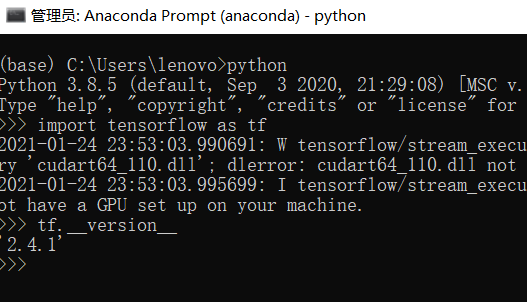
如何查看tensorflow版本号
还是在Anaconda Prompt里打开python环境,即输入python
再输入
import tensorflow as tf
tf.__version__#查看版本号
更新完最好再查看一下版本,免得自以为更新好了
希望我一天的踩坑对你有一些帮助丫:D

 浙公网安备 33010602011771号