
k8s集群监控实践
简介
本文介绍了自建k8s集群的监控实践,采用Prometheus、Node Exporter、Grafana等组件实现对集群的监控。
Prometheus安装
一开始我在Prometheus的安装方案上产生了纠结。
- 方案一:采用Prometheus Operator部署
- 优点:可以通过yaml资源来操作Prometheus,自动化、简化Prometheus配置
- 缺点:学习成本高,需要学习Operator相关的资源配置;设计中没有NodeMonitor,对Kurbernets cAdvisor进行监控实现困难
- 方案二:采用Deployment+ConfigMap部署
- 优点:配置直观,没有黑魔法
- 缺点:资源文件全都需要自己写,更新配置需要额外的组件,需要引入config reloader来更新Prometheus配置。
最终采用了方案二的安装方式,但未实现配置更新后自动重启Prometheus。使用的是Agent+中心存储的方式,即集群中使用Prometheus Agent模式,它本身并不存储数据,但会抓取数据并推送到远程服务器存储。
资源文件
apiVersion: v1
kind: ServiceAccount
metadata:
  name: prometheus
  namespace: prometheus

---
apiVersion: rbac.authorization.k8s.io/v1
kind: ClusterRole
metadata:
  name: prometheus
  namespace: prometheus
rules:
- apiGroups: [""]
  resources:
  - nodes
  - nodes/metrics
  - services
  - endpoints
  - pods
  verbs: ["get", "list", "watch"]
- apiGroups: [""]
  resources:
  - configmaps
  verbs: ["get"]
- apiGroups:
  - discovery.k8s.io
  resources:
  - endpointslices
  verbs: ["get", "list", "watch"]
- apiGroups:
  - networking.k8s.io
  resources:
  - ingresses
  verbs: ["get", "list", "watch"]
- nonResourceURLs: ["/metrics"]
  verbs: ["get"]

---
apiVersion: rbac.authorization.k8s.io/v1
kind: ClusterRoleBinding
metadata:
  name: prometheus
  namespace: prometheus
  labels:
    app: prometheus
roleRef:
  apiGroup: rbac.authorization.k8s.io
  kind: ClusterRole
  name: prometheus
subjects:
- kind: ServiceAccount
  name: prometheus
  namespace: prometheus

---
apiVersion: apps/v1
kind: Deployment
metadata:
  name: prometheus-write
  namespace: prometheus
spec:
  selector:
    matchLabels:
      app: prometheus-write
  replicas: 1
  template:
    metadata:
      labels:
        app: prometheus-write
    spec:
      containers:
      - name: prometheus
        image: xxx/premetheus:latest #镜像源
        ports:
        - containerPort: 9090
          name: web-port
        volumeMounts:
        - name: config-volume
          mountPath: /etc/prometheus
        - name: cache-volume
          mountPath: /prometheus
        args:
          - "--config.file=/etc/prometheus/prometheus.yml"
          - "--agent"
        resources:
          requests:
            memory: "125Mi"
            cpu: "60m"
          limits:
            memory: "200Mi"
            cpu: "2000m"
        livenessProbe: #存活探针,判断容器是否健康
          httpGet:
            path: /-/healthy
            port: web-port
        readinessProbe: #就绪探针,判断容器是否已准备好接收流量
          httpGet:
            path: /-/ready
            port: web-port
      volumes:
        - name: config-volume
          configMap:
            name: prometheus-config
        - name: cache-volume
          emptyDir:
            sizeLimit: 500Mi
      serviceAccountName: prometheus
---
apiVersion: v1
kind: Service
metadata:
  name: prometheus-write-svc
spec:
  clusterIP: None
  selector:
    app: prometheus-write
  ports:
  - port: 9090
    targetPort: 9090
prometheus.yaml文件配置
# my global config
global:
  scrape_interval: 15s # Set the scrape interval to every 15 seconds. Default is every 1 minute.
  evaluation_interval: 15s # Evaluate rules every 15 seconds. The default is every 1 minute.
  # scrape_timeout is set to the global default (10s).

# Alertmanager configuration

# Load rules once and periodically evaluate them according to the global 'evaluation_interval'.
rule_files:
  # - "first_rules.yml"
  # - "second_rules.yml"

# A scrape configuration containing exactly one endpoint to scrape:
# Here it's Prometheus itself.
scrape_configs:
  # The job name is added as a label `job=<job_name>` to any timeseries scraped from this config.
  - job_name: "kubernetes-cadvisor"

    # Default to scraping over https. If required, just disable this or change to
    # `http`.
    scheme: https

    # Starting Kubernetes 1.7.3 the cAdvisor metrics are under /metrics/cadvisor.
    # Kubernetes CIS Benchmark recommends against enabling the insecure HTTP
    # servers of Kubernetes, therefore the cAdvisor metrics on the secure handler
    # are used.
    metrics_path: /metrics/cadvisor

    # This TLS & authorization config is used to connect to the actual scrape
    # endpoints for cluster components. This is separate to discovery auth
    # configuration because discovery & scraping are two separate concerns in
    # Prometheus. The discovery auth config is automatic if Prometheus runs inside
    # the cluster. Otherwise, more config options have to be provided within the
    # <kubernetes_sd_config>.
    tls_config:
      ca_file: /var/run/secrets/kubernetes.io/serviceaccount/ca.crt
      # If your node certificates are self-signed or use a different CA to the
      # master CA, then disable certificate verification below. Note that
      # certificate verification is an integral part of a secure infrastructure
      # so this should only be disabled in a controlled environment. You can
      # disable certificate verification by uncommenting the line below.
      #
      # insecure_skip_verify: true
    authorization:
      credentials_file: /var/run/secrets/kubernetes.io/serviceaccount/token

    kubernetes_sd_configs:
      - role: node
    honor_timestamps: false
    relabel_configs:
      - action: labelmap
        regex: __meta_kubernetes_node_label_(.+)

  - job_name: "java-app"
    # Default to scraping over https. If required, just disable this or change to
    # `http`.
    scheme: http
    metrics_path: /assesManageApi/actuator/prometheus
    kubernetes_sd_configs:
      - role: pod
    basic_auth:
      username: admin
      password: Hzqisheng123.
    relabel_configs:
      - source_labels: [__meta_kubernetes_pod_label_app]
        action: keep
        regex: asset-management
      - source_labels: [__meta_kubernetes_namespace]
        action: replace
        target_label: namespace
  - job_name: "node-exporter"
    # Default to scraping over https. If required, just disable this or change to
    # `http`.
    scheme: https
    metrics_path: /metrics
    kubernetes_sd_configs:
      - role: pod
    relabel_configs:
      - source_labels: [__meta_kubernetes_pod_label_app_kubernetes_io_name,__meta_kubernetes_pod_container_port_number]
        action: keep
        regex: node-exporter;9100
    tls_config:
      insecure_skip_verify: true
    authorization:
      credentials_file: /var/run/secrets/kubernetes.io/serviceaccount/token
#配置远程服务
remote_write:
- url: https://prometheus.zhihuipk.com/api/v1/write
  name: center-prometheus
  basic_auth:
    username: xxx
    password: xxx
Node Exporter安装
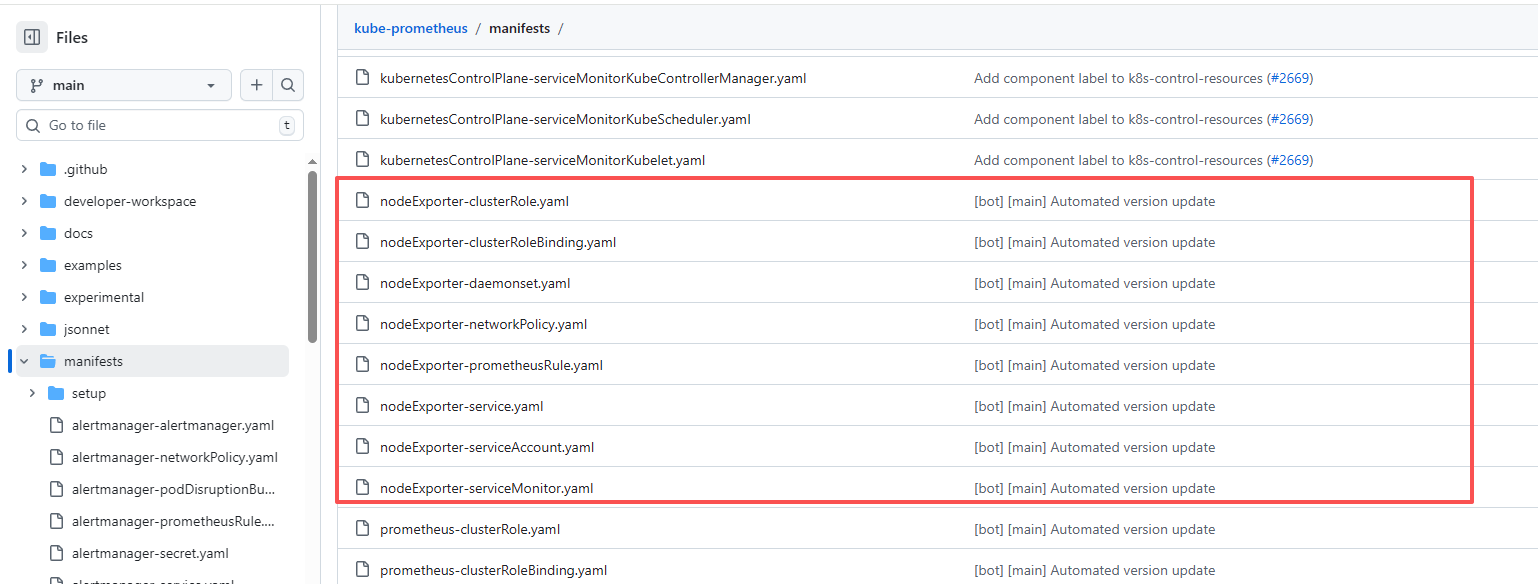
Node Exporter的安装参考kube-prometheus中的关于Node Exporter部分的配置文件
Grafana
安装参考的是官网安装
使用的面板:

 浙公网安备 33010602011771号