
苍穹外卖-day11
Apache ECharts 介绍
主要功能:数据可视化显示
Apache ECharts 是一款由百度开源并捐赠给 Apache 基金会的前端数据可视化库,专注于基于 JavaScript 的交互式图表和地图的构建。它凭借丰富的图表类型、高效的渲染能力以及灵活的配置项,成为开发者中广泛使用的工具之一。
在现在的项目当中:主要研究图表所需的数据格式。通常是需要后端提供符合格式要求的动态数据,然后响应给前端显示
营业额统计
业务分析与设计
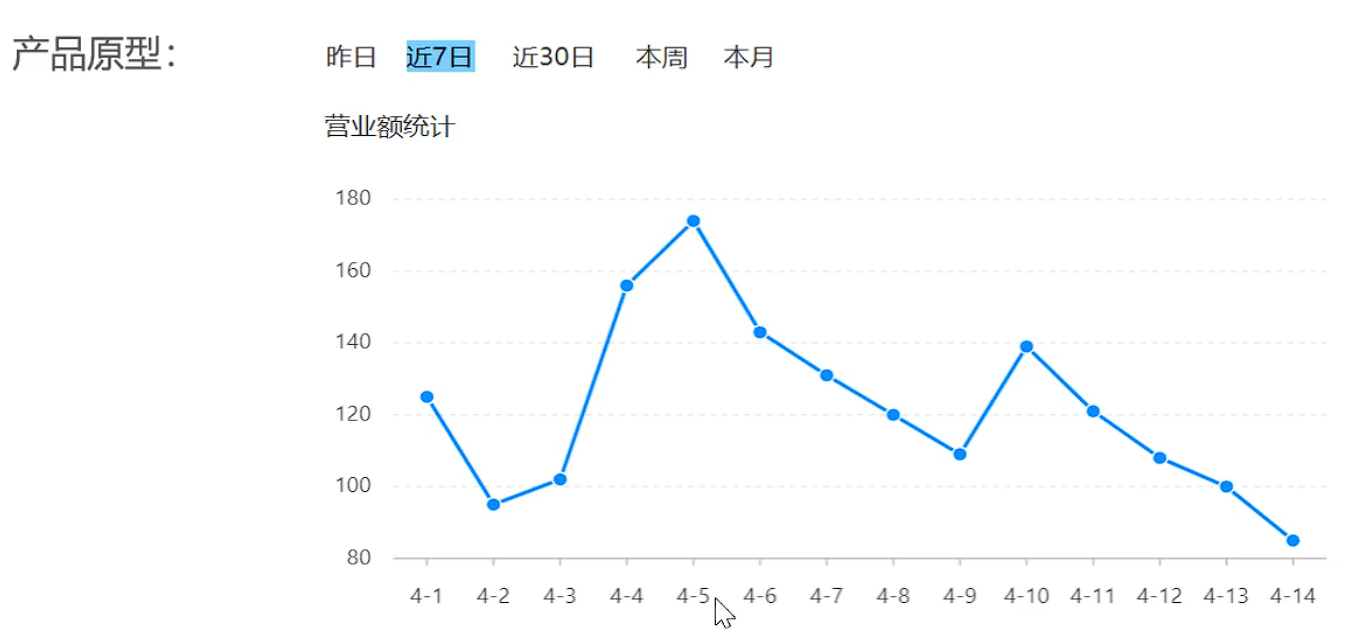
- 产品原型
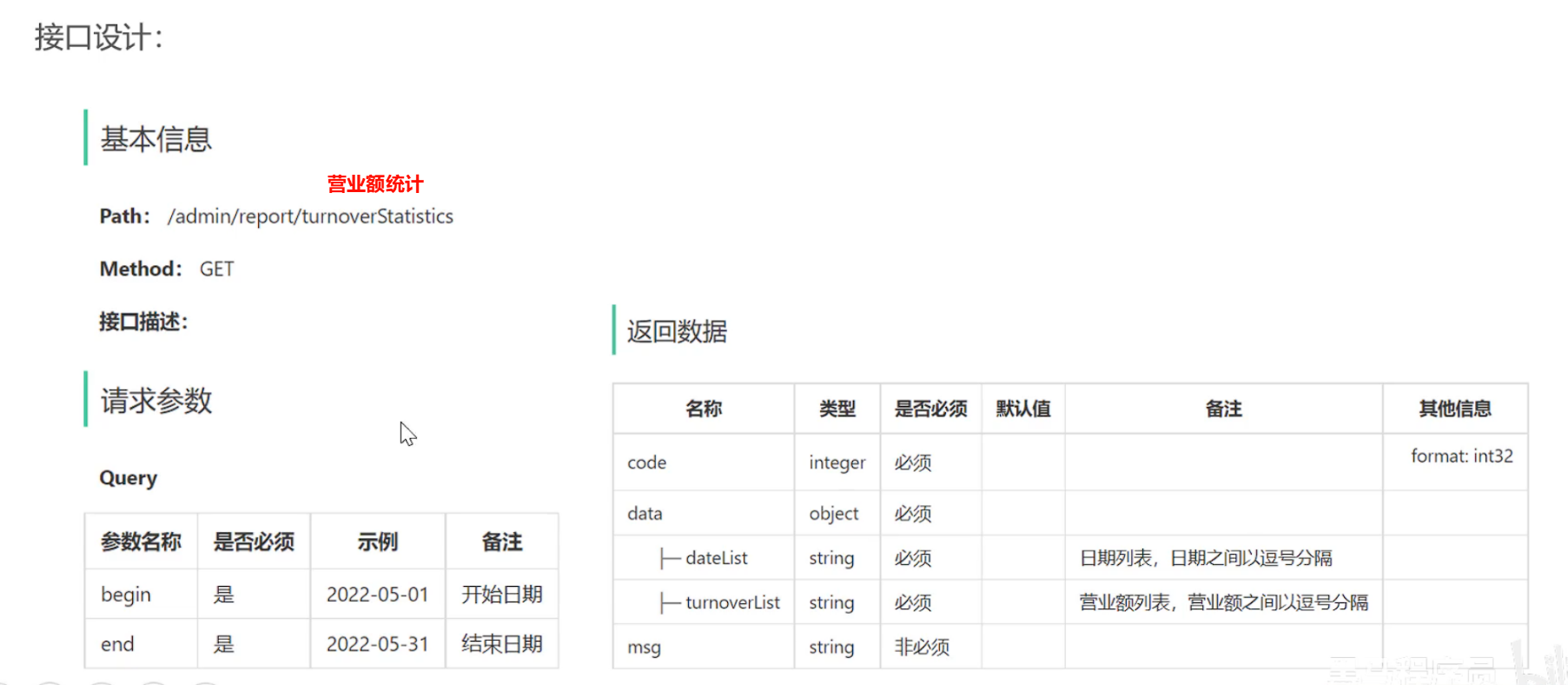
- 接口设计
- 业务规则
- 营业额 = 每天已完成订单金额的总和
- 基于可视化报表折线展示营业额数据,X轴为日期,Y轴为营业额
- 根据时间选择区间,展示每天的营业额数据
代码开发
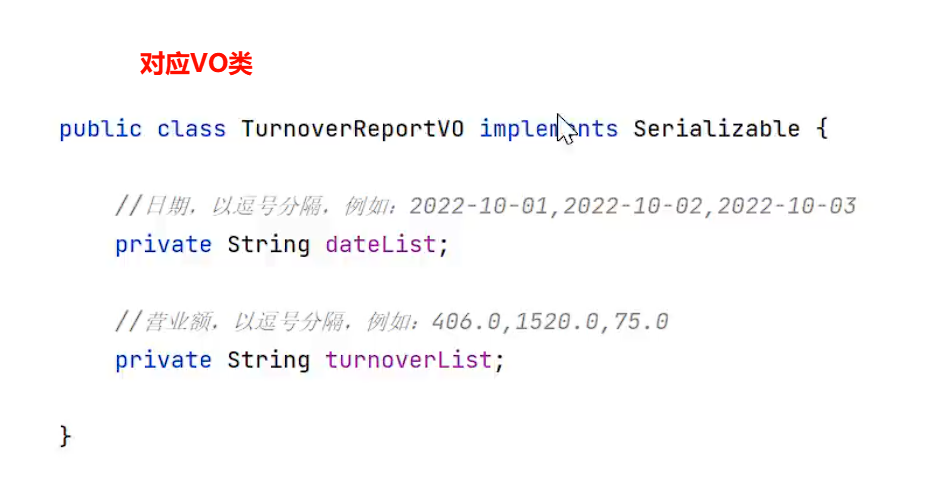
ReportController
@RestController
@RequestMapping("/admin/report")
@Slf4j
@Api(tags = "数据统计相关接口")
public class ReportController {

    @Autowired
    private ReportService reportService;


    /**
     * 营业额统计
     *
     * @param begin
     * @param end
     * @return
     */
    @GetMapping("/turnoverStatistics") //格式化日期,为年月日 yyyy-MM-dd
    public Result<TurnoverReportVO> turnoverStatistics(
            @DateTimeFormat(pattern = "yyyy-MM-dd")
            LocalDate begin,
            @DateTimeFormat(pattern = "yyyy-MM-dd")
            LocalDate end) {
        log.info("ReportController.turnoverStatistics()日期区间:{},{}", begin, end);

        //营业额统计
        return Result.success(reportService.getTurnoverStatistics(begin, end));
    }
}
service
@Service
@Slf4j
public class ReportServiceImpl implements ReportService {

    @Autowired
    private OrderMapper orderMapper;

    public ReportServiceImpl(OrderMapper orderMapper) {
        this.orderMapper = orderMapper;
    }

    /**
     * 统计给定时间区内的营业额数据
     *
     * @param begin
     * @param end
     * @return
     */
    public TurnoverReportVO getTurnoverStatistics(LocalDate begin, LocalDate end) {

        /*1.统计从开始到结束每天的时间范围*/

      /*  List<LocalDate> dateList = new ArrayList<>();
        dateList.add(begin);

        //如果当天时间不等于最后一天,那么就给开始时间增加一天并且累计到 集合当中
        while (!begin.equals(end)){
            begin = begin.plusDays(1);
            dateList.add(begin);
        }*/

        //这里可以替换为流式编程,可以避免堆溢出
        List<LocalDate> dateList = begin.datesUntil(end.plusDays(1))
                .collect(Collectors.toList());


        /*2.根据时间以及已完成的状态统计每日营业金额,然后存放入List集合当中*/
        List<Double> turnoverList = new ArrayList();
        //遍历出每天的日期
        for (LocalDate date : dateList) {
            //获取每天的开始日期和结束日期,精确到0.0分秒 和 23.59.999....
            LocalDateTime beginTime = LocalDateTime.of(date, LocalTime.MIN);
            LocalDateTime endTime = LocalDateTime.of(date, LocalTime.MAX);

            //查询指定区间营业额
            //将这三个查询条件封装到map集合中
            Map map = new HashMap();
            map.put("beginTime",beginTime);
            map.put("endTime",endTime);
            map.put("status", Orders.COMPLETED);//状态为已完成

            Double turnover = orderMapper.sumByMap(map);
            turnover = turnover == null ? 0.0: turnover;//如果营业额为开,那么置0

            turnoverList.add(turnover);
        }


        /*3. 封装 TurnoverReportVO*/
        return TurnoverReportVO.builder()
                //StringUtils.join 将集合中的元素用指定的分隔符(这里是逗号 ,)连接成一个字符串
                .dateList(StringUtils.join(dateList,","))
                .turnoverList(StringUtils.join(turnoverList,","))
                .build();
    }
}
mapper
/**
* 根据map(begin,end,status)查询当天订单的总和
* @return
*/
Double sumByMap(Map map);
<!--查询当日销售金额-->
<select id="sumByMap" resultType="java.lang.Double">
<!--
select sum(amount) from orders where order_time > #{beginTime} and order_time < #{endTime} and status = #{status}
-->
select sum(orders.amount) turnover from orders
<where>
<if test="beginTime != null">
<!--代表大于号 > 小于号:<-->
and order_time >= #{beginTime}
</if>
<if test="endTime != null">
and order_time <= #{endTime}
</if>
<if test="status != null">
and status = #{status}
</if>
</where>
</select>
功能测试&提交
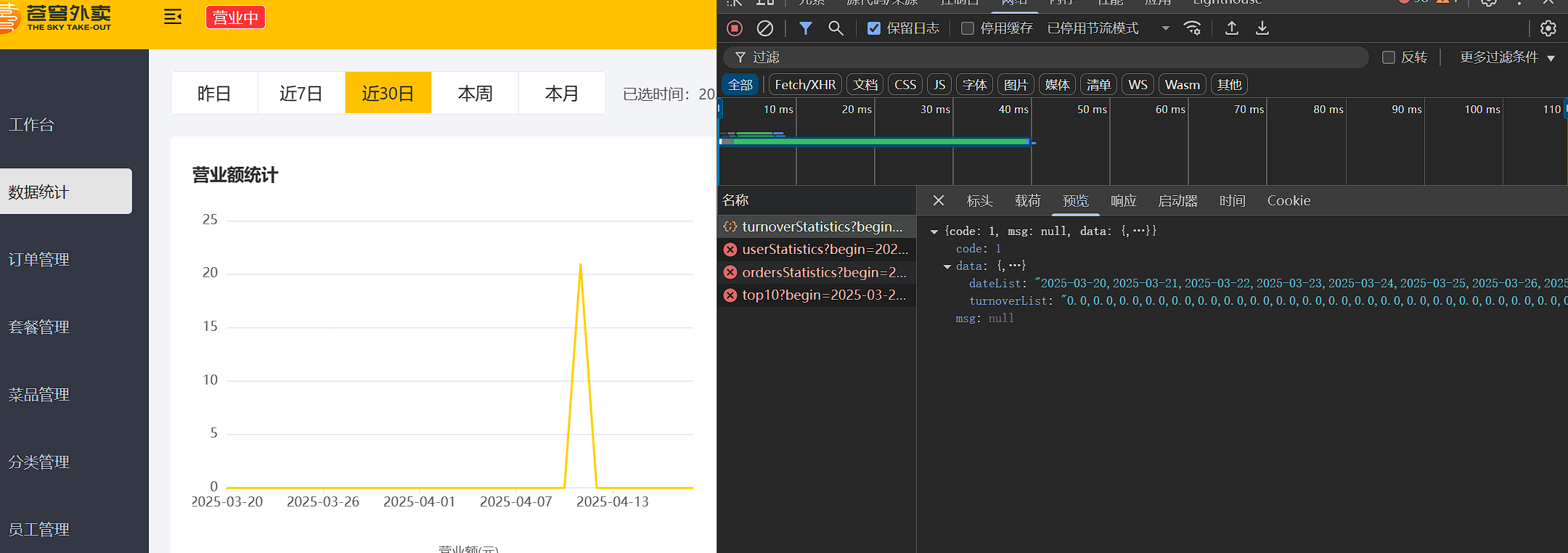
测试成功提交!!!
用户统计
业务分析与设计
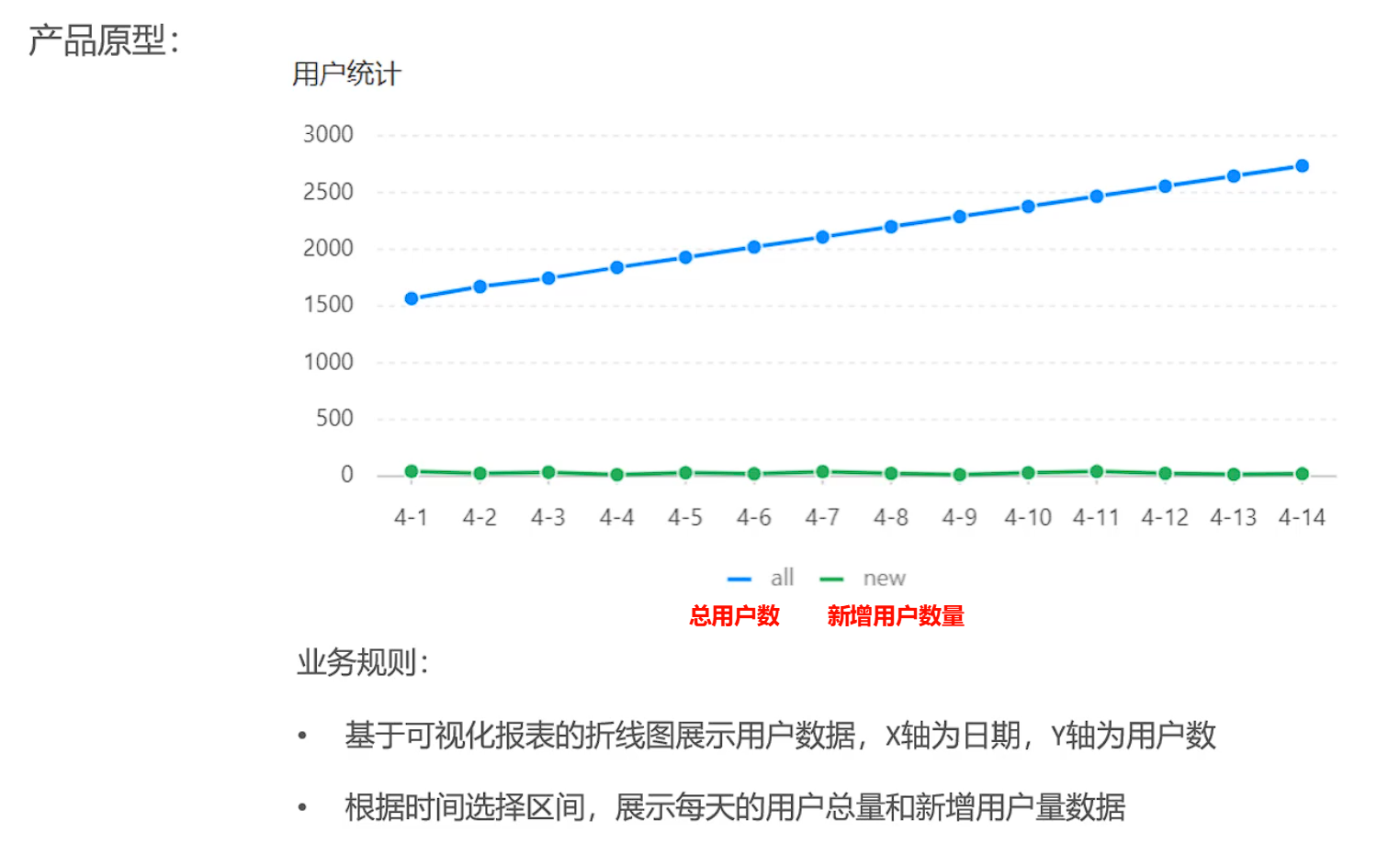
- 产品原型
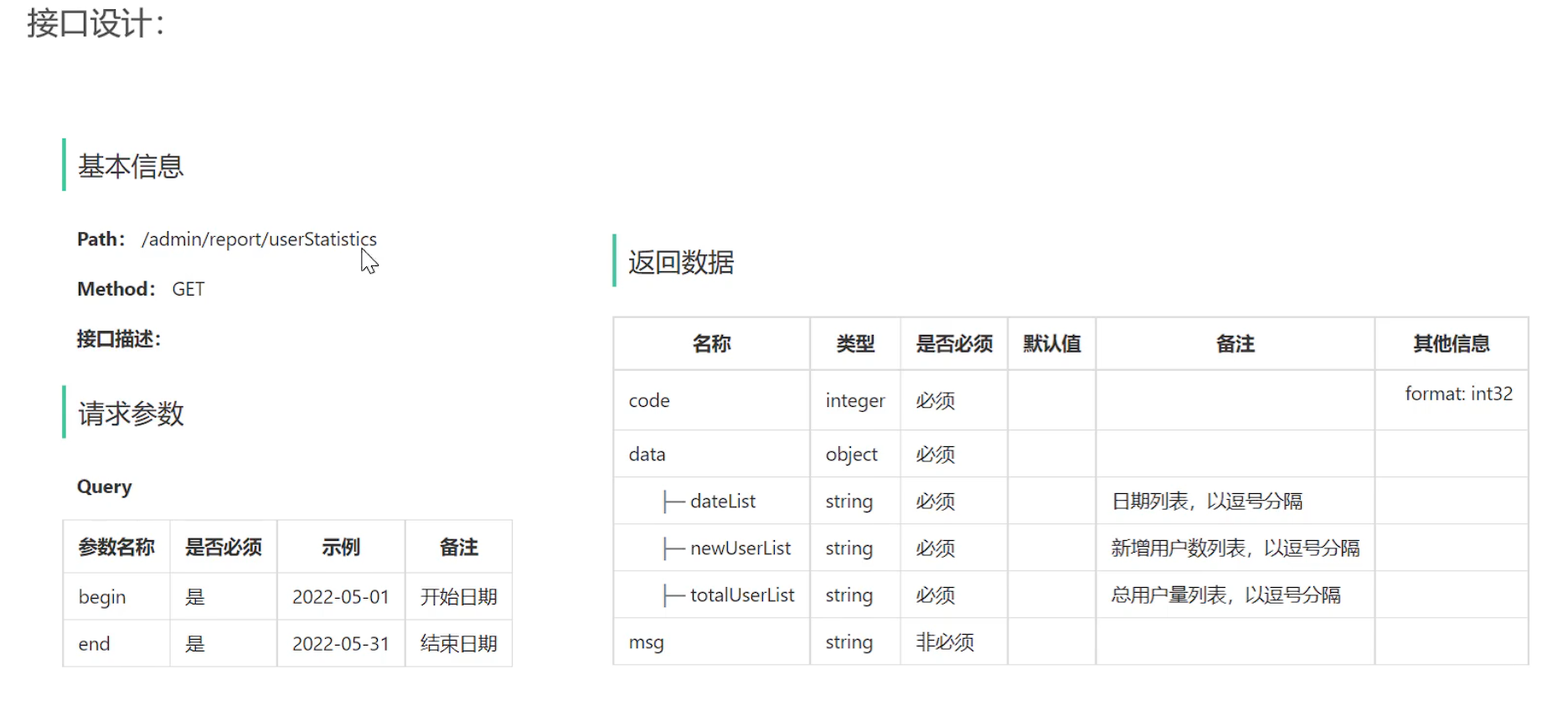
- 接口设计
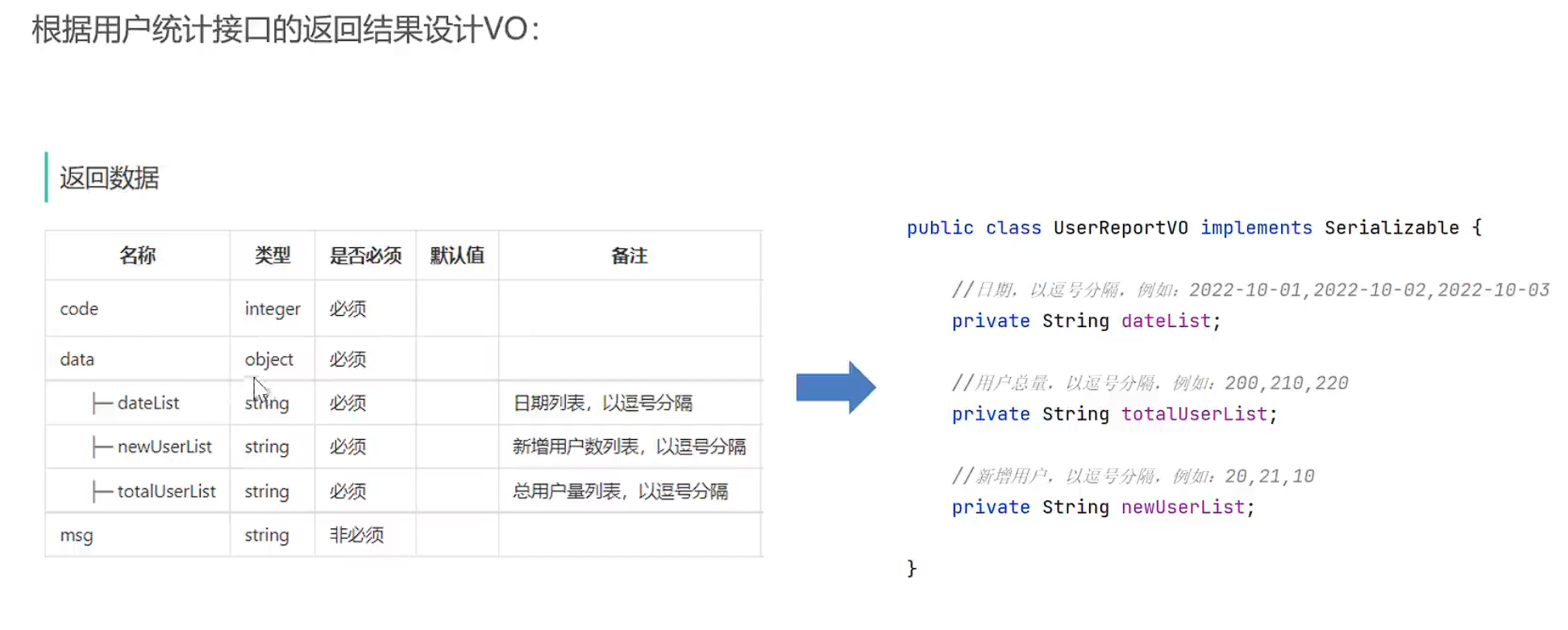
- VO设计
业务规则:
- 根据前端传入的日期区间,在集合中存入每一天的日期
- 返回 每一天的总用户数量,和新增用户数量
代码开发
controller
	/**
     * 统计指定时间区间内的用户
     * @param begin
     * @param end
     * @return
     */
    @GetMapping("/userStatistics")
    public Result<UserReportVO> userStatistics(
            @DateTimeFormat(pattern = "yyyy-MM-dd") LocalDate begin,
            @DateTimeFormat(pattern = "yyyy-MM-dd") LocalDate end){
        log.info("ReportController.userStatistics()日期区间:{},{}", begin, end);
        //统计指定时间区间内的用户
        return Result.success(reportService.getUserStatistics(begin,end));
    }
service
    /**
     * 统计指定时间区间内的用户
     *
     * @param begin
     * @param end
     * @return
     */
    public UserReportVO getUserStatistics(LocalDate begin, LocalDate end) {
        /*1.获取当前区间的所有日期*/
        List<LocalDate> dateList = getDateList(begin, end);
        log.info("getUserStatistics()日期区间:{}",dateList.toString());

        /*2.通过查用户表获取每天用户总数,以及每天新增用户总数,封装到List集合中*/
        List<Integer> totalUserList = new ArrayList();
        List<Integer> newUserList = new ArrayList();

        for (LocalDate date : dateList) {
            //获取  格式化每天日期的开始以及结束,精确到秒
            LocalDateTime beginTime = LocalDateTime.of(date, LocalTime.MIN);//每天开始0.0
            LocalDateTime endTime = LocalDateTime.of(date, LocalTime.MAX);//每天结束23.59.99999

            //根据时间区间在用户表中查询累计数量 根据map查询,这里可以只用一条sql语句实现查两个数据
            Map map = new HashMap();
            map.put("endTime", endTime);
            Integer totalUserCount = userMapper.countByMap(map);

            map.put("beginTime", beginTime);
            Integer newUserCount = userMapper.countByMap(map);
            //判断每日用户量是否为空,如果为空说明没有则返回0
            totalUserCount = totalUserCount == null ? 0 : totalUserCount;
            newUserCount = newUserCount == null ? 0 : newUserCount;

            totalUserList.add(totalUserCount);
            newUserList.add(newUserCount);

        }

        log.info("新增用户列表:{}",newUserList);

        /*3.封装VO数据返回*/
        return UserReportVO.builder()
                .dateList(StringUtils.join(dateList, ","))
                .totalUserList(StringUtils.join(totalUserList,","))
                .newUserList(StringUtils.join(newUserList,","))
                .build();
    }
mapper
/**
* 根据时间区间查询累计用户注册数量
* @return
*/
Integer countByMap(Map map);
<select id="countByMap" resultType="java.lang.Integer">
select count(id)
from user
<where>
<if test="endTime != null">
and create_time < #{endTime}
</if>
<if test="beginTime != null">
and create_time > #{beginTime}
</if>
</where>
</select>
功能测试&提交
测试成功
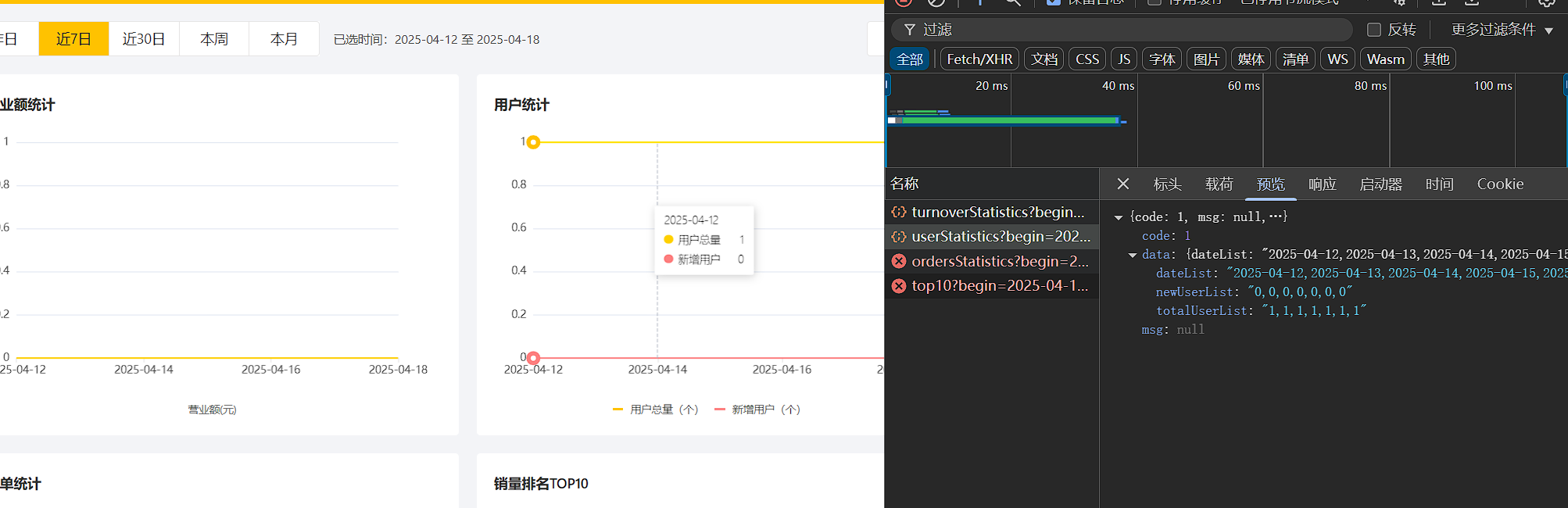
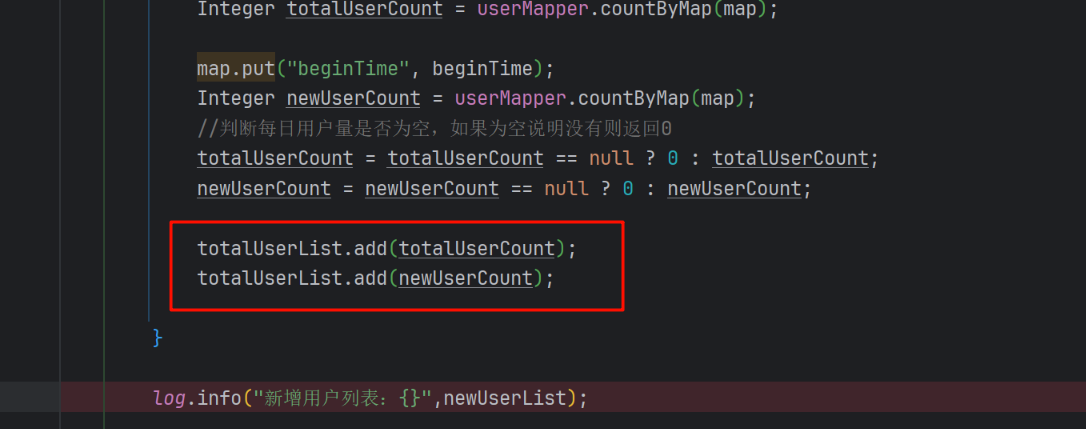
这里由于使用了复制粘贴,忘记修改newUserList,导致没有返回新增数据,并且总用户数据也反复10101010
订单统计
业务分析与设计
- 产品原型
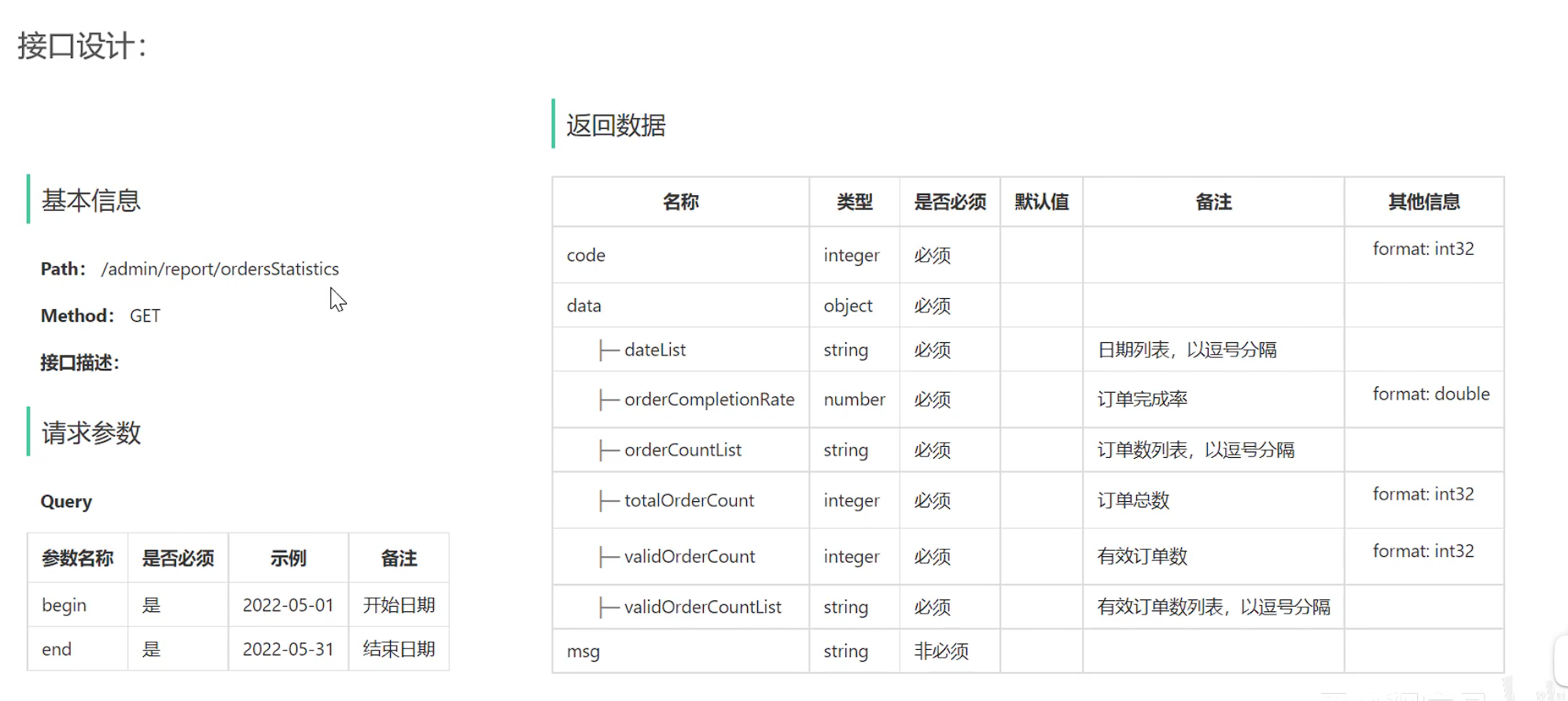
- 接口设计
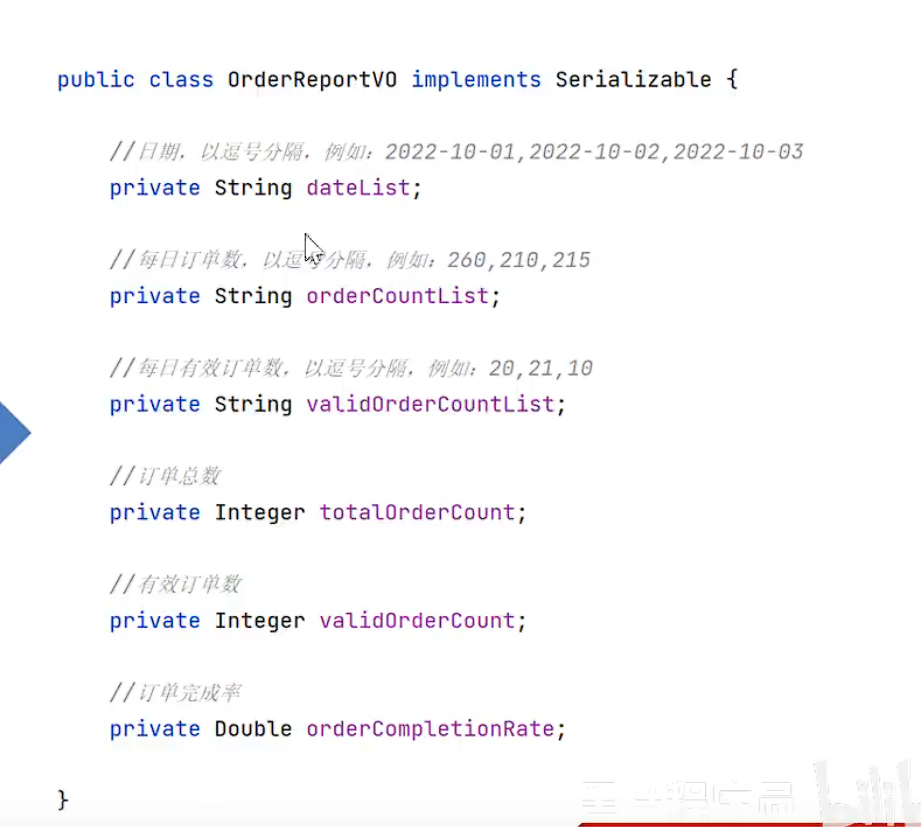
- vo
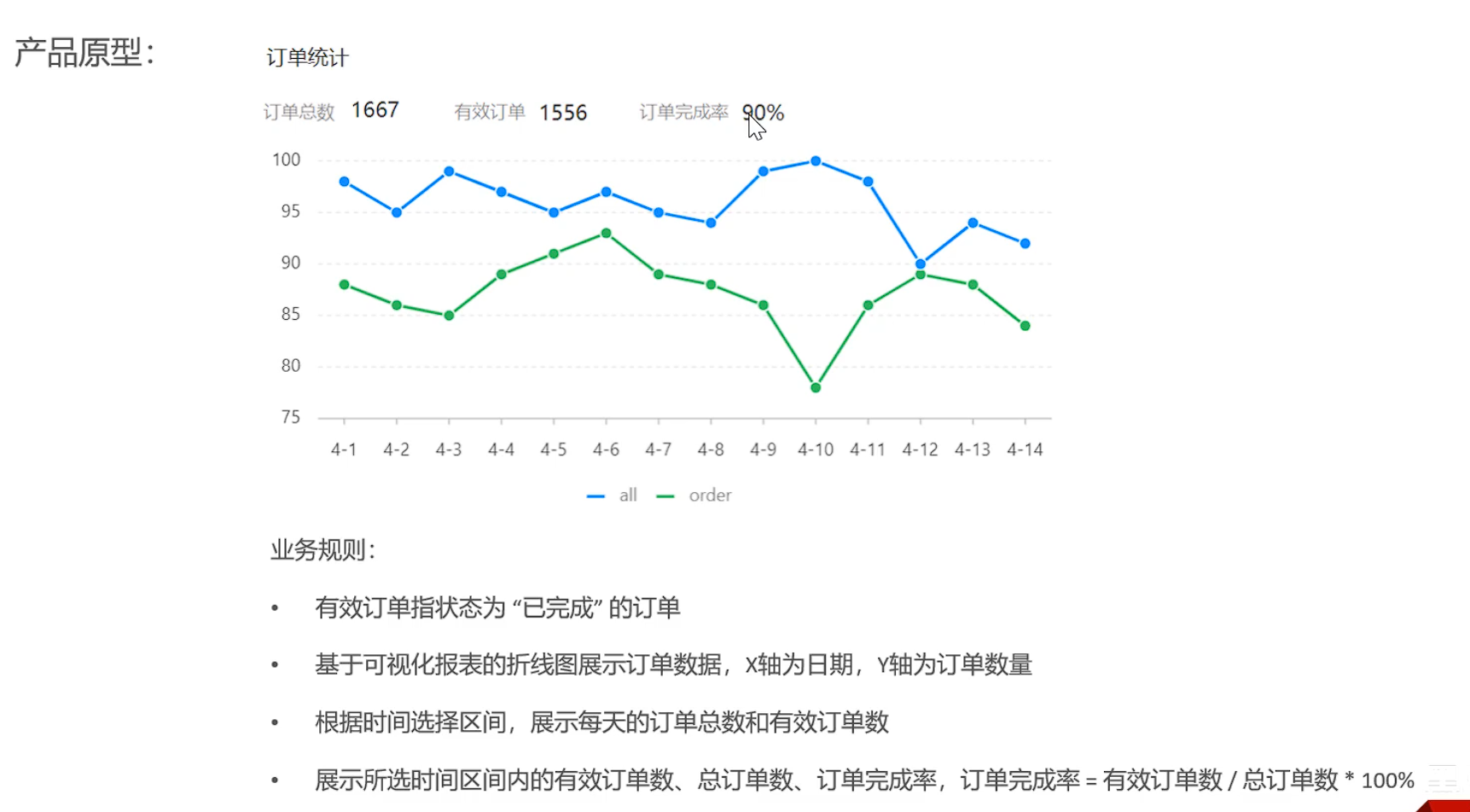
- 业务规则
-
有效订单:状态为
已完成的订单 -
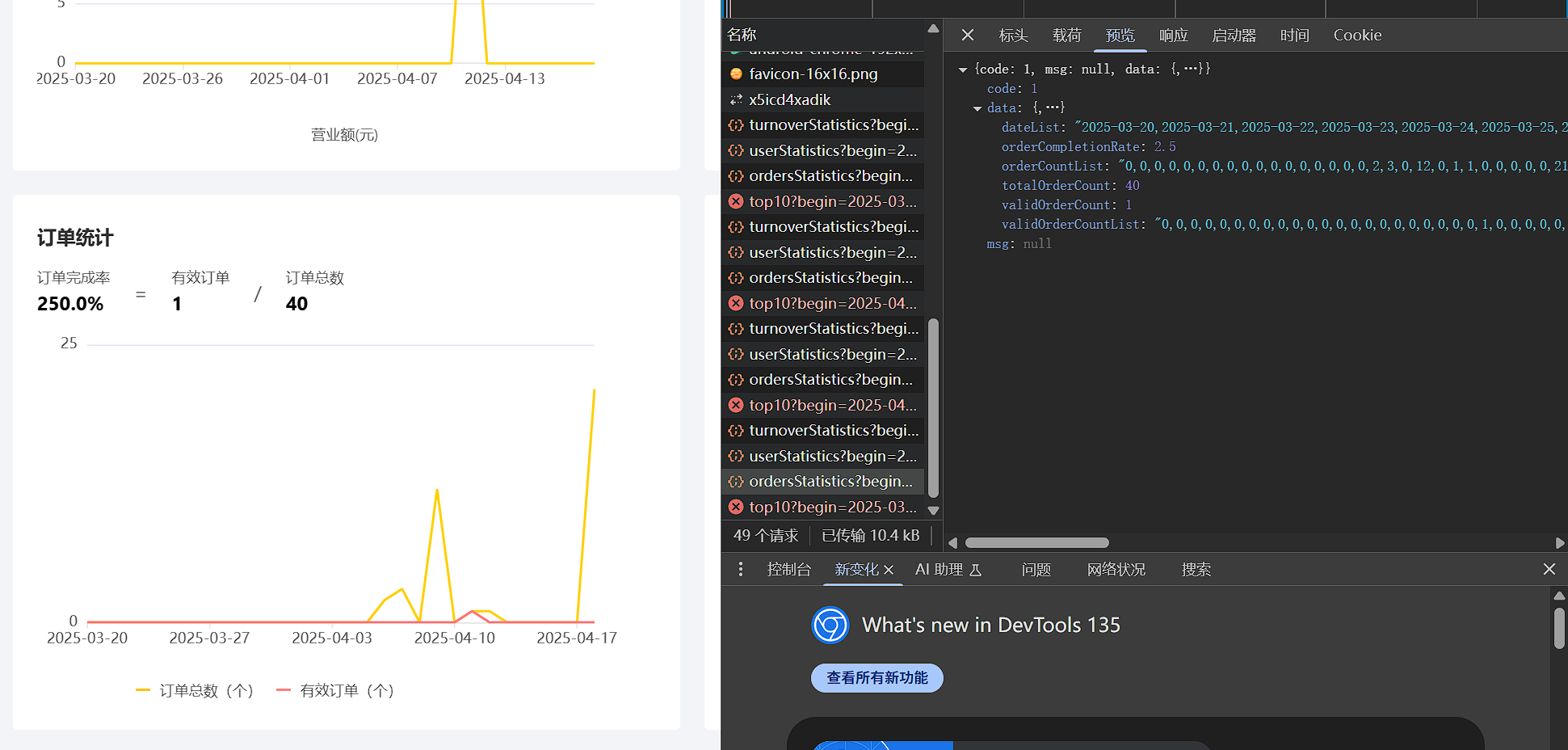
x轴 为日期 y轴 为订单数量
-
根据时间区间,展示每天的订单总数和有效订单
-
展示所选时间区间内,
总订单数,有效订单数,订单完成率=有效订单数/总订单数*100%
代码开发
controller
    /**
     * 统计指定时间区间的订单
     *
     * @return
     */
    @GetMapping("/ordersStatistics")
    @ApiOperation("统计指定时间区间的订单")
    public Result<OrderReportVO> ordersStatistics(
            @DateTimeFormat(pattern = "yyyy-MM-dd") LocalDate begin,
            @DateTimeFormat(pattern = "yyyy-MM-dd") LocalDate end) {
        log.info("统计指定时间区间的订单:---------");
        return Result.success(reportService.getOrdersStatistics(begin, end));
    }
service
    /**
     * 统计指定时间区间的订单
     *
     * @param begin
     * @param end
     * @return
     */
    public OrderReportVO getOrdersStatistics(LocalDate begin, LocalDate end) {
        //获取区间内所有时间
        List<LocalDate> dateList = getDateList(begin, end);

        //1.根据时间区间 以及 订单状态  查询 总订单数量 有效订单数,计算订单完成率,然查询订单数列表,以及有效订单数列表

        //订单数列表
        ArrayList<Integer> orderCountList = new ArrayList();
        //有效订单数列表
        ArrayList<Integer> validOrderCountList = new ArrayList();


        //总订单数量
        for (LocalDate date : dateList) {
            //获取日期开始结束具体时间
            LocalDateTime beginTime = LocalDateTime.of(date, LocalTime.MIN);
            LocalDateTime endTime = LocalDateTime.of(date, LocalTime.MAX);

            //查询每天的订单总数
            Integer orderCount = getOrderCount(beginTime,endTime,null);

            //查询每天的有效订单总数
            Integer validOrderCount = getOrderCount(beginTime,endTime,Orders.COMPLETED);

            //存放每天总订单量
            orderCountList.add(orderCount);
            //存放每天有效订单量
            validOrderCountList.add(validOrderCount);
        }

        //订单总数
        /*将集合转成并行流,意味着接下来的操作可能会并发执行,利用多核 CPU 提高性能(适用于大数据量)。*/
        Integer totalOrderCount = orderCountList.parallelStream().mapToInt(i -> i).sum();

        //有效订单数
        Integer validOrderCount = validOrderCountList.parallelStream().mapToInt(i -> i).sum();

        //订单完成率 = 有效订单数 / 总订单数 * 100%
        Double orderCompletionRate = totalOrderCount == 0 ? 0.0 : (validOrderCount.doubleValue() / totalOrderCount) * 1;


        //返回VO
        return OrderReportVO.builder().
                dateList(StringUtils.join(dateList, ","))
                .orderCountList(StringUtils.join(orderCountList, ","))
                .validOrderCountList(StringUtils.join(validOrderCountList, ","))
                .totalOrderCount(totalOrderCount)
                .validOrderCount(validOrderCount)
                .orderCompletionRate(orderCompletionRate)
                .build();
    }


    /**
     * 根据动态条件查询订单数
     * @param beginTime
     * @param endTime
     * @param status
     * @return
     */
    private Integer getOrderCount(LocalDateTime beginTime, LocalDateTime endTime, Integer status) {
        Map map = new HashMap();
        map.put("beginTime",beginTime);
        map.put("endTime",endTime);
        map.put("status",status);
        return orderMapper.getOrderCount(map);
    }
mapper
/**
* 根据map查询指定时间区间内的订单数量
* @param map
* @return
*/
Integer getOrderCount(Map map);
<select id="getOrderCount" resultType="java.lang.Integer">
select count(id) from orders
<where>
<if test="beginTime != null">
and order_time > #{beginTime}
</if>
<if test="endTime != null">
and order_time < #{endTime}
</if>
<if test="status != null">
and status = #{status}
</if>
</where>
</select>
来自碌碌鱼的博客:
❓ 为什么不直接在第一个循环里面顺便把订单总量和有效订单总量计算出来
-> b站弹幕说一个循环最好只负责一件事情,分成多个循环其实并不会让性能有什么提升,反而会增加代码的耦合度,不方便后期单独修改某一个功能
可以看到使用流式编程计算得到订单总量,代码简洁优雅易懂,应多多借鉴
- 将集合转成并行流,意味着接下来的操作可能会并发执行,利用多核 CPU 提高性能(适用于大数据量)。
功能测试&提交
测试成功 提交了!!!
销量排名
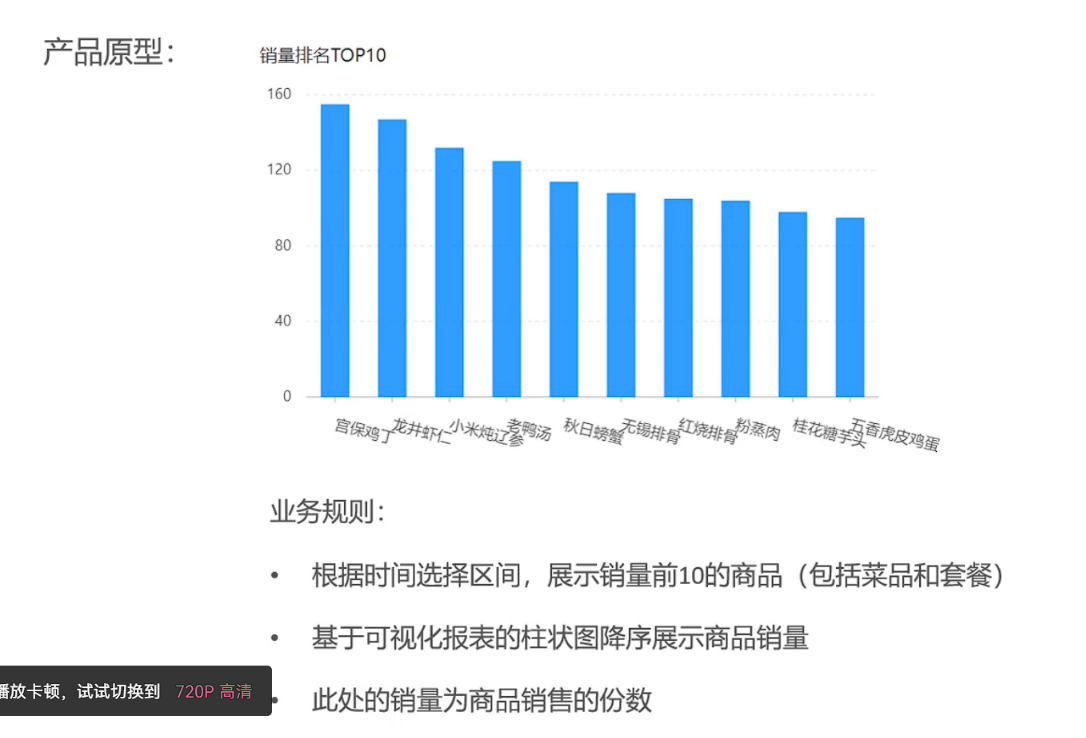
业务分析与设计
- 产品原型
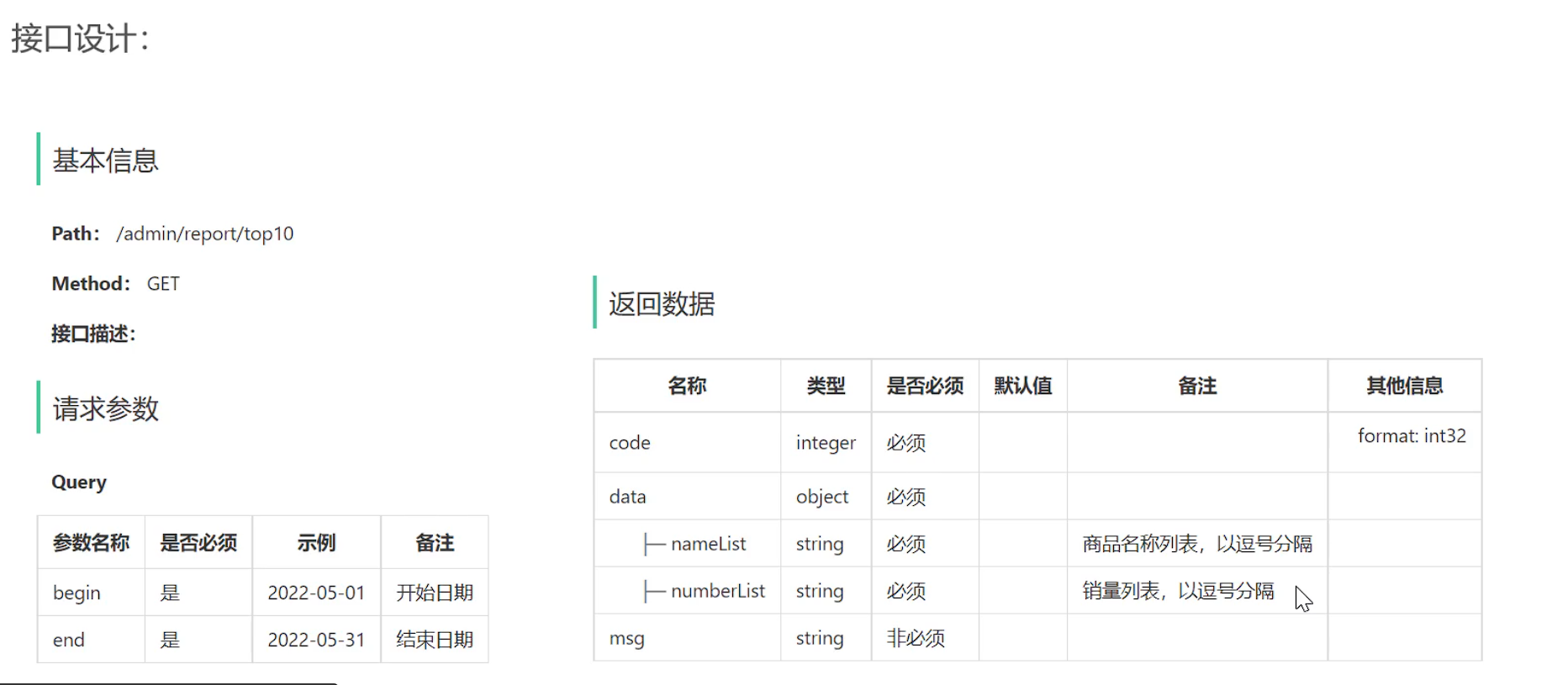
- 接口设计
代码开发
controller
    /**
     * 销量排名前十
     *
     * @return
     */
    @GetMapping("/top10")
    @ApiOperation("统计指定时间区间的订单")
    public Result<SalesTop10ReportVO> top10(
            @DateTimeFormat(pattern = "yyyy-MM-dd") LocalDate begin,
            @DateTimeFormat(pattern = "yyyy-MM-dd") LocalDate end) {
        log.info("前十销量排名");
        return Result.success(reportService.getSalesTop10(begin, end));
    }
service
预先写sql:
select od.name , sum(od.number)
from
    order_detail od,orders o
where
    od.order_id = o.id
and
    o.status = 5
and
    o.order_time > #{begin}
and
    o.order_time < #{end}
group by
    od.name
order by
    sum(od.number) desc;
    /**
     * 统计销量排名前十
     * @param begin
     * @param end
     * @return
     */
    SalesTop10ReportVO getSalesTop10(LocalDate begin, LocalDate end);


     /**
     * 统计销量排名前十
     * @param begin
     * @param end
     * @return
     */
    public SalesTop10ReportVO getSalesTop10(LocalDate begin, LocalDate end) {
        /*获取区间内所有时间*/
        List<LocalDate> dateList = getDateList(begin, end);

        /*格式化开始与结束的时间*/
        LocalDateTime beginTime = LocalDateTime.of(begin, LocalTime.MIN);
        LocalDateTime endTime = LocalDateTime.of(end, LocalTime.MAX);

        /*预写sql:select od.name , sum(od.number) from order_detail od,orders o where od.order_id = o.id and o.status = 5 and o.order_time > #{begin} and o.order_time < #{end} group by od.name order by sum(od.number) desc;*/
        List<GoodsSalesDTO> goodsSalesDTOList = orderMapper.getSalesTop10(beginTime, endTime);

        /*将查出的集合分别存入名字列表和数量列表*/
        List<String> nameList = new ArrayList();
        ArrayList<Integer> numberList = new ArrayList();
        for (GoodsSalesDTO goods : goodsSalesDTOList) {
            nameList.add(goods.getName());
            numberList.add(goods.getNumber());
        }
        /*封装VO返回结果*/
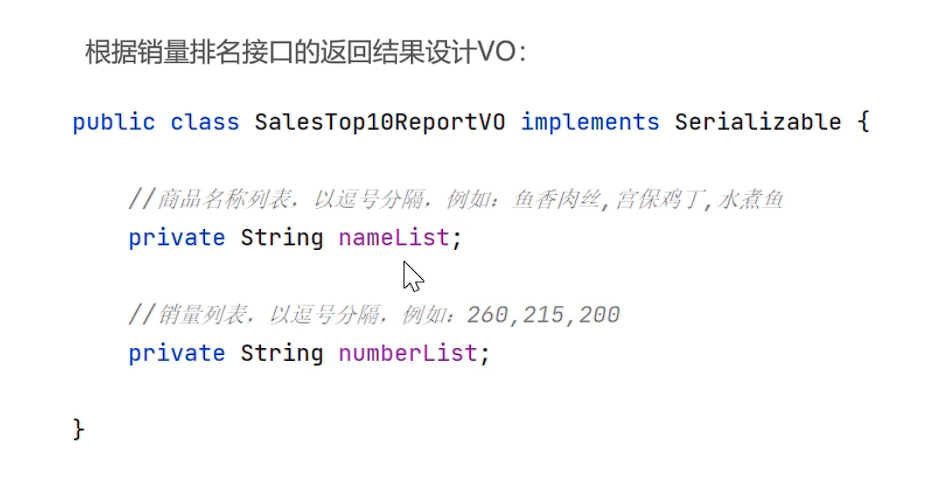
        return SalesTop10ReportVO.builder()
                .nameList(StringUtils.join(nameList,","))
                .numberList(StringUtils.join(numberList,","))
                .build();
    }
mapper
/**
* 查询区间内销售量前十的商品
* @param beginTime
* @param endTime
* @return
*/
List<GoodsSalesDTO> getSalesTop10(LocalDateTime beginTime,LocalDateTime endTime);
<select id="getSalesTop10" resultType="com.sky.dto.GoodsSalesDTO">
select od.name , sum(od.number) as number
from
order_detail od,orders o
<where>
od.order_id = o.id
and
o.status = 5
<if test="beginTime != null">
and o.order_time > #{beginTime}
</if>
<if test="endTime != null">
and o.order_time < #{endTime}
</if>
</where>
group by
od.name
order by
sum(od.number) desc
limit 0,10;
</select>
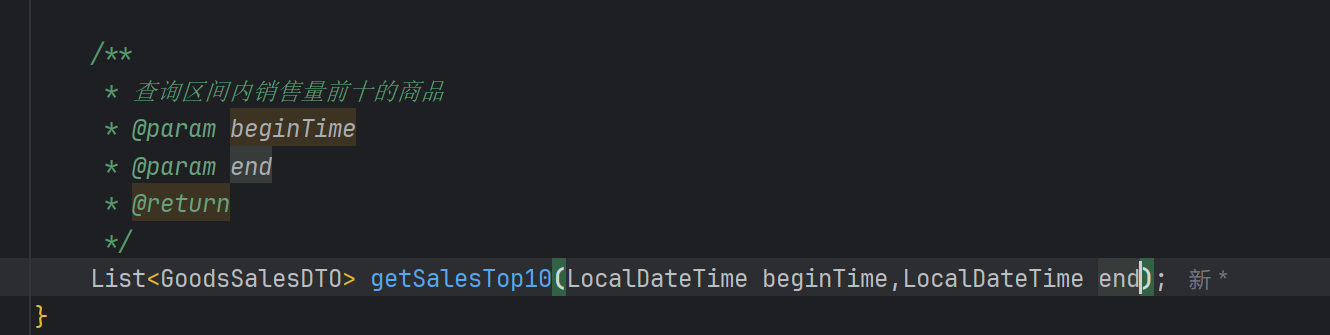
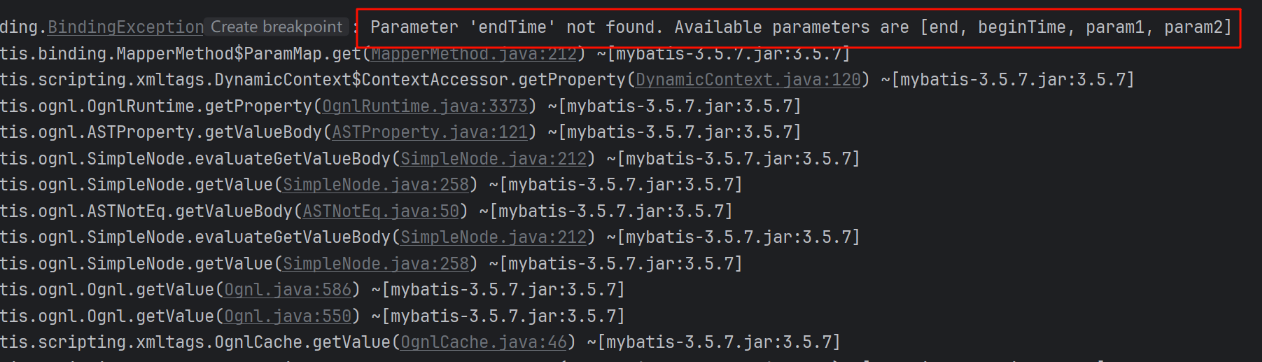
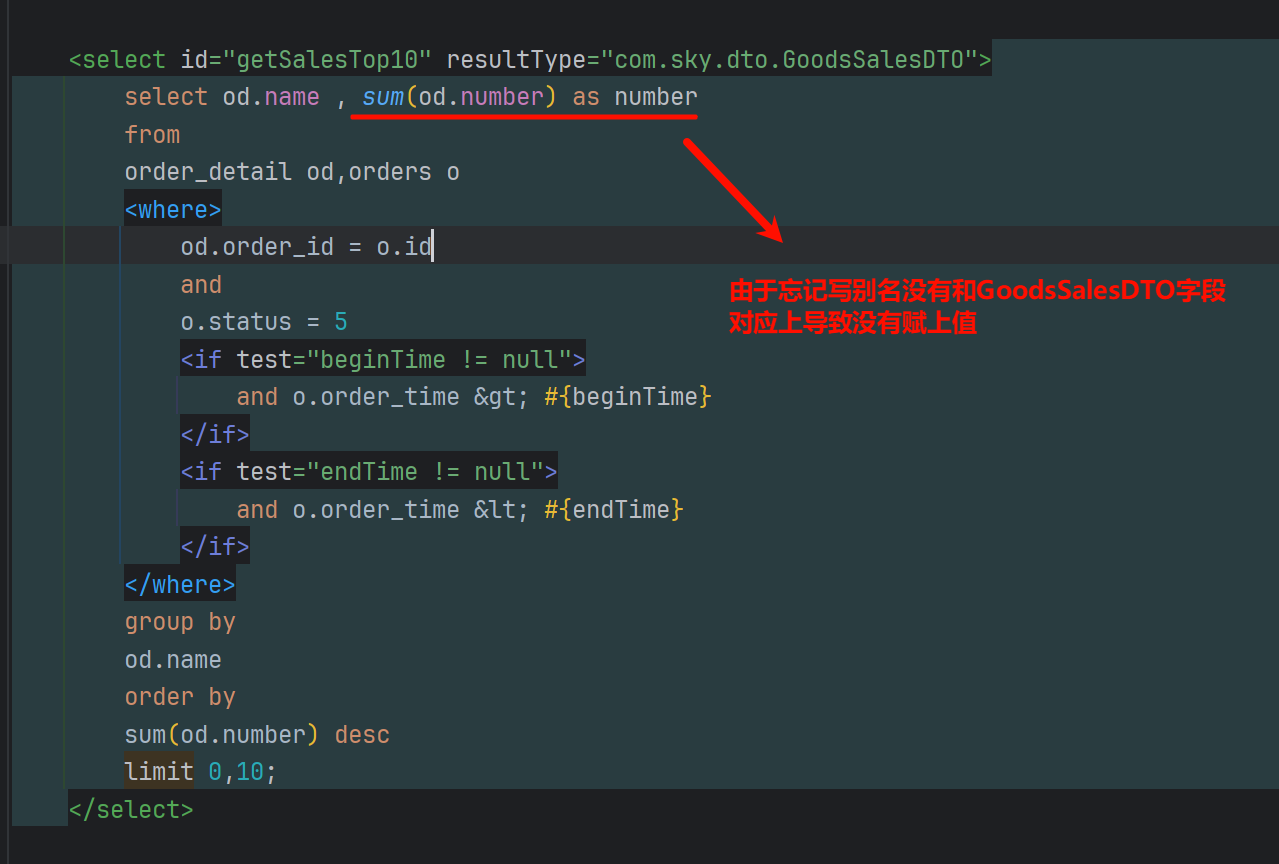
⚠️:由于在写mapper接口的时候参数写为了end,但是xml配置文件使用的是endTime导致找不到参数
功能测试&提交
测试成功


 浙公网安备 33010602011771号