


学习笔记513—安装Freesurfer【centOS系统-hcc用户】
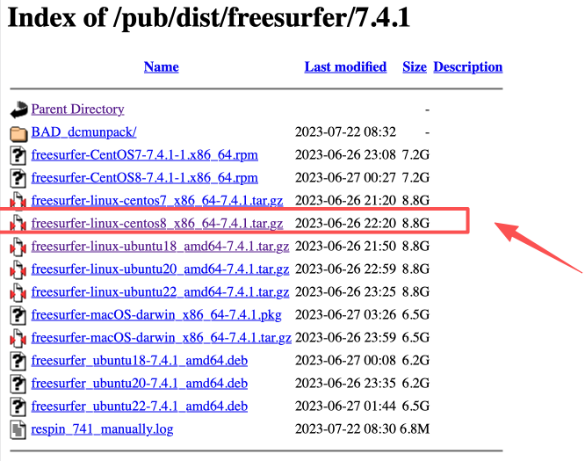
一、 下载Freesurfer软件(需要下载对应系统的软件版本)
https://surfer.nmr.mgh.harvard.edu/pub/dist/freesurfer/7.4.1/
二. 在 /home/hcc下安装 FreeSurfer(root 或 hcc 都行)
1️⃣ 创建软件目录
mkdir -p /home/hcc/software
2️⃣ 解压(推荐用普通用户 hcc)
su - hcc
cd ~/download
tar -zxvf freesurfer-linux-centos8_x86_64-7.4.1.tar.gz -C /home/hcc/software
解压后应得到:
/home/hcc/software/freesurfer
三、配置环境变量(hcc 用户)
touch ~/.bashrc
vim ~/.bashrc
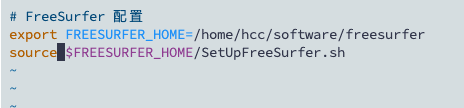
加入(:wq+回车键--> 保存并退出):
export FREESURFER_HOME=/home/hcc/software/freesurfer
source $FREESURFER_HOME/SetUpFreeSurfer.sh
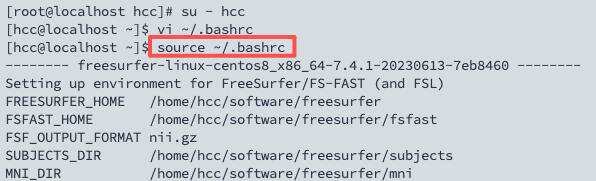
生效:
source ~/.bashrc
四、放置 license
- 在官网申请注册后([[https://surfer.nmr.mgh.harvard.edu/registration.html ]]),会收到一封邮件,里面就有license.txt
![image]()
- 将license.txt复制到安装路径下,
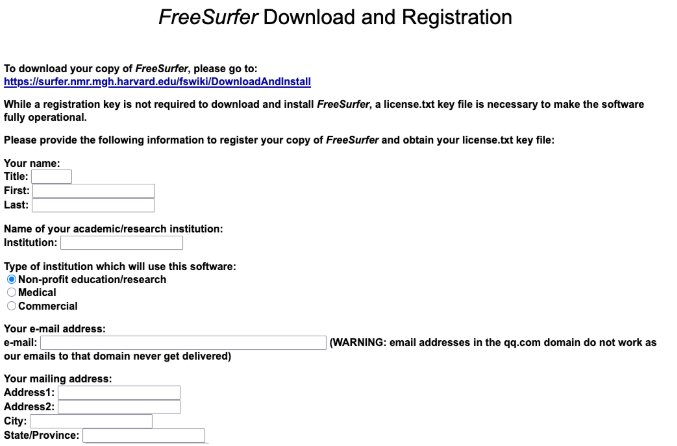
cp ~/download/license.txt $FREESURFER_HOME/
五、验证 license 是否生效
执行:
recon-all -version
如果 license 正确,你应该看到:
FreeSurfer v7.4.1

六、通过T1数据(.nii格式文件),验证软件是否安装成功并可以使用
- 数据目录是:
/home/hcc/test/a290012/29008.nii       → DICOM 文件
/home/hcc/test/result          → 你希望存放 FreeSurfer 输出
- 单被试处理示例命令
export SUBJECTS_DIR=/home/hcc/test/result
mkdir -p $SUBJECTS_DIR

recon-all -i /home/hcc/test/a290012/29008.nii -s sub001 -all
- 解释:
-
-i → 指定 单个 NIfTI 文件
-
-s → 被试 ID
-
-all → 执行完整 pipeline
七、在本地电脑Termius运行的终端,防止关闭本地电脑或者关闭Termius软件,造成服务器终端运行程序中断,采用nohup方法:
- 处理命令:
nohup recon-all -i /home/hcc/test/a290012/29008.nii -s sub001 -all > $SUBJECTS_DIR/sub001.log 2>&1 &
- 解释:
-
nohup → 忽略挂起信号,即使你退出 SSH,程序继续运行
-
sub001.log 2>&1 → 保存 stdout 和 stderr 到日志文件
-
& → 放到后台运行
- 查看进程:
ps -u hcc | grep recon-all
- 查看运行日志:
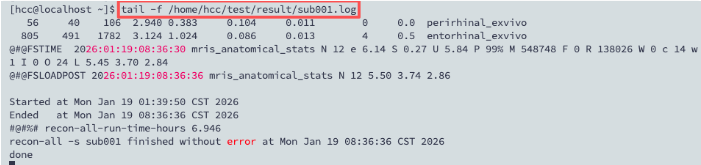
tail -f /home/hcc/test/result/sub001.log
八、注意事项:
-
如果software文件没有读取权限,需要切换到root权限,
-
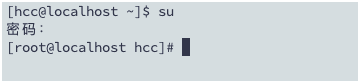
切换到root: su
![image]()
-
执行:chown -R hcc:hcc /home/hcc/software
-
检查:ls -ld /home/hcc/software
![image]()
-
-
如果有残留的文件,需要删除:
- 执行:rm -rf /home/hcc/software/freesurfer
-
如果没收到包含license.txt的邮件,可以将注册后的这句话保存至新建license.txt文件中,
If you do not receive the email -- common to many destinations in China -- then save the lines below to a file named **license.txt** in the directory pointed to by the **$FREESURFER_HOME** environment variable set during the software install. Be careful to save the lines in a Linux text format file and not a Windows or Mac format. 13***9@qq.com 3**12 *COT0NDZofHvc FS***EiyL2 MXTR/k3pJm*****pQ9D/0HJIg7VrxI=
解决办法: 创建 license 文件
a. 用你当前 hcc 用户执行:
vim $FREESURFER_HOME/license.txt
b. 然后把这句话的内容 全部粘贴进去
c.保存退出后,可以检查:
cat $FREESURFER_HOME/license.txt


 浙公网安备 33010602011771号