

nginx 配置正向代理
配置 Nginx 作为正向代理
我们需要修改 Nginx 配置文件来实现正向代理。在 nginx.conf 或新建的配置文件中添加以下内容
# 正向代理配置
server {
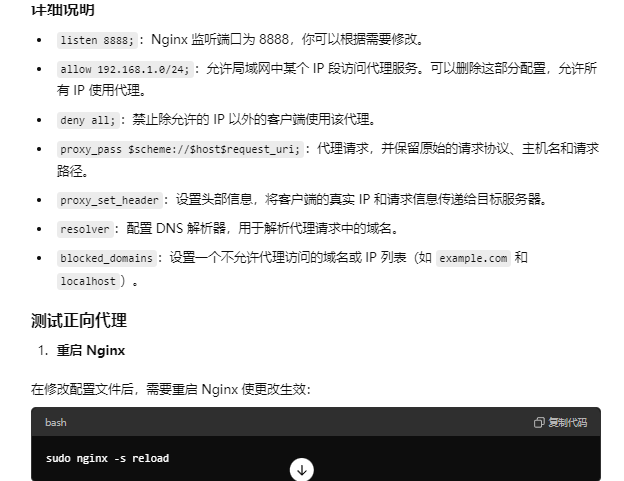
listen 8888; # Nginx 监听的端口,可以自定义
server_name localhost; # 本地或代理服务器的 IP 地址
# 正向代理允许的客户端 IP 段(可选)
allow 192.168.1.0/24; # 允许局域网的某个 IP 段访问代理
deny all; # 拒绝其他 IP 段访问
location / {
# 配置代理设置
proxy_pass $scheme://$host$request_uri;
proxy_set_header Host $host;
proxy_set_header X-Real-IP $remote_addr;
proxy_set_header X-Forwarded-For $proxy_add_x_forwarded_for;
proxy_set_header X-Forwarded-Proto $scheme;
# 超时配置
proxy_connect_timeout 10s;
proxy_send_timeout 10s;
proxy_read_timeout 10s;
# 拒绝代理访问本地网络资源
resolver 8.8.8.8 8.8.4.4; # DNS 解析
set $blocked_domains "example.com|localhost|127.0.0.1";
if ($host ~* ($blocked_domains)) {
return 403; # 阻止访问本地地址或指定的域名
}
}
# 支持代理 HTTPS 连接
location /proxy_connect {
proxy_connect;
proxy_set_header Host $host;
proxy_set_header X-Real-IP $remote_addr;
proxy_set_header X-Forwarded-For $proxy_add_x_forwarded_for;
}
}
v-p-n
正向代理配置-通过这种方式可以访问waiwang
#user nobody;
worker_processes 1;
#error_log logs/error.log;
#error_log logs/error.log notice;
#error_log logs/error.log info;
#pid logs/nginx.pid;
events {
worker_connections 1024;
}
http {
include mime.types;
default_type application/octet-stream;
#log_format main '$remote_addr - $remote_user [$time_local] "$request" '
# '$status $body_bytes_sent "$http_referer" '
# '"$http_user_agent" "$http_x_forwarded_for"';
#access_log logs/access.log main;
sendfile on;
#tcp_nopush on;
#keepalive_timeout 0;
keepalive_timeout 65;
#gzip on;
server {
listen 80;
server_name hw-vpn.com; # 替换为你的实际域名或外网IP
location / {
proxy_pass http://192.168.10.143:5210; # 指向你的VPN或代理的IP和端口
proxy_set_header Host $host;
proxy_set_header X-Real-IP $remote_addr;
proxy_set_header X-Forwarded-For $proxy_add_x_forwarded_for;
proxy_set_header X-Forwarded-Proto $scheme;
}
#charset koi8-r;
#access_log logs/host.access.log main;
#location / {
# root html;
# index index.html index.htm;
#}
#error_page 404 /404.html;
# redirect server error pages to the static page /50x.html
#
error_page 500 502 503 504 /50x.html;
location = /50x.html {
root html;
}
# proxy the PHP scripts to Apache listening on 127.0.0.1:80
#
#location ~ \.php$ {
# proxy_pass http://127.0.0.1;
#}
# pass the PHP scripts to FastCGI server listening on 127.0.0.1:9000
#
#location ~ \.php$ {
# root html;
# fastcgi_pass 127.0.0.1:9000;
# fastcgi_index index.php;
# fastcgi_param SCRIPT_FILENAME /scripts$fastcgi_script_name;
# include fastcgi_params;
#}
# deny access to .htaccess files, if Apache's document root
# concurs with nginx's one
#
#location ~ /\.ht {
# deny all;
#}
}
# another virtual host using mix of IP-, name-, and port-based configuration
#
#server {
# listen 8000;
# listen somename:8080;
# server_name somename alias another.alias;
# location / {
# root html;
# index index.html index.htm;
# }
#}
# HTTPS server
#
#server {
# listen 443 ssl;
# server_name localhost;
# ssl_certificate cert.pem;
# ssl_certificate_key cert.key;
# ssl_session_cache shared:SSL:1m;
# ssl_session_timeout 5m;
# ssl_ciphers HIGH:!aNULL:!MD5;
# ssl_prefer_server_ciphers on;
# location / {
# root html;
# index index.html index.htm;
# }
#}
}
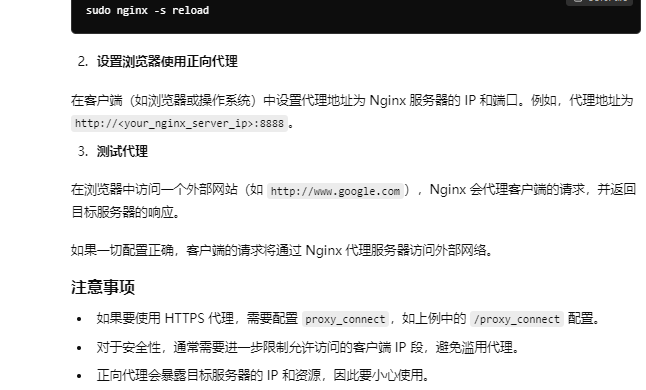
windows下启动nginx
start nginx
关闭nginx
nginx -s stop 强制关闭
nginx -s quit 正常退出
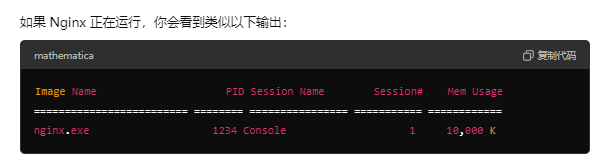
tasklist 命令来查看 Nginx 是否正在运行:tasklist /fi "imagename eq nginx.exe"

 浙公网安备 33010602011771号