
centos7修改ssh端口及添加ssh监听端口
ssh 修改默认端口
[root@node-1 ~]# vi /etc/ssh/sshd_config

修改port 为 5522
重启
[root@node-1 ~]# systemctl restart sshd
查看
[root@node-1 ~]# netstat -ntlp | grep sshd

ssh 添加监听端口
[root@node-1 ~]# vi /etc/ssh/sshd_config
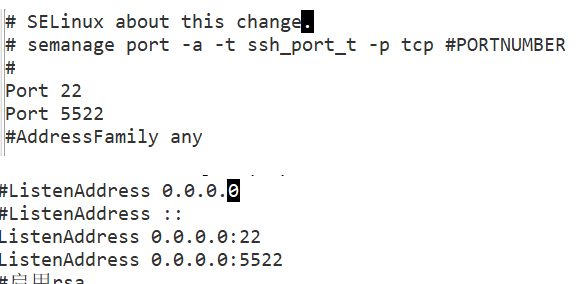
关闭SELinux
# 临时关闭
[root@node-1 ~]# setenforce 0
# 永久关闭
[root@node-1 ~]# vim /etc/selinux/config
--------------------修改配置------------------------
SELINUX=disabled
重启
[root@node-1 ~]# systemctl restart sshd
查看
[root@node-1 ~]# netstat -ntlp | grep sshd

登录
ssh root@192.168.0.101 -p 5522

 浙公网安备 33010602011771号