

springmvc入门
一、创建工程
1、创建一个maven工程
2、右键工程目录,添加web4.0框架支持
3、最终文件目录结构
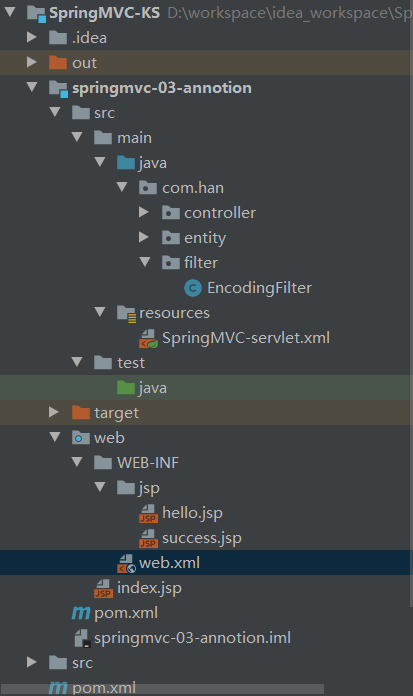
二、编写配置文件
1、pom.xml
注意:<optional>true</optional> 添加这一行之后子项目将不会添加这个依赖
 1 <?xml version="1.0" encoding="UTF-8"?>
 2 <project xmlns="http://maven.apache.org/POM/4.0.0"
 3          xmlns:xsi="http://www.w3.org/2001/XMLSchema-instance"
 4          xsi:schemaLocation="http://maven.apache.org/POM/4.0.0 http://maven.apache.org/xsd/maven-4.0.0.xsd">
 5     <parent>
 6         <artifactId>SpringMVC-KS</artifactId>
 7         <groupId>org.example</groupId>
 8         <version>1.0-SNAPSHOT</version>
 9     </parent>
10     <modelVersion>4.0.0</modelVersion>
11
12     <artifactId>springmvc-03-annotion</artifactId>
13
14     <!-- 依赖 -->
15     <dependencies>
16         <dependency>
17             <groupId>junit</groupId>
18             <artifactId>junit</artifactId>
19             <version>4.12</version>
20         </dependency>
21         <!--spring-webmvc依赖-->
22         <dependency>
23             <groupId>org.springframework</groupId>
24             <artifactId>spring-webmvc</artifactId>
25             <version>5.2.13.RELEASE</version>
26         </dependency>
27         <!--springmvc底层还是servlet,所以必须添加serlvet依赖-->
28         <dependency>
29             <groupId>javax.servlet</groupId>
30             <artifactId>javax.servlet-api</artifactId>
31             <version>4.0.1</version>
32             <!-- 作用在打包时确保servlet不会打包进去 -->
33             <scope>provided</scope><!--因为tomcat插件的有提供servlet,所以如果打包进去插件就会启动会失败-->
34         </dependency>
35         <dependency>
36             <groupId>javax.servlet.jsp</groupId>
37             <artifactId>jsp-api</artifactId>
38             <version>2.2</version>
39         </dependency>
40         <dependency>
41             <groupId>javax.servlet</groupId>
42             <artifactId>jstl</artifactId>
43             <version>1.2</version>
44         </dependency>
45     </dependencies>
46
47     <build>
48         <resources>
49             <resource>
50                 <directory>src/main/java</directory>
51                 <includes>
52                     <include>**/*.properties</include>
53                     <include>**/*.xml</include>
54                 </includes>
55                 <filtering>false</filtering>
56             </resource>
57             <resource>
58                 <directory>src/main/resources</directory>
59                 <includes>
60                     <include>**/*.properties</include>
61                     <include>**/*.xml</include>
62                 </includes>
63                 <filtering>false</filtering>
64             </resource>
65         </resources>
66     </build>
67 </project>
2、web.xml
 1 <?xml version="1.0" encoding="UTF-8"?>
 2 <web-app xmlns="http://xmlns.jcp.org/xml/ns/javaee"
 3          xmlns:xsi="http://www.w3.org/2001/XMLSchema-instance"
 4          xsi:schemaLocation="http://xmlns.jcp.org/xml/ns/javaee http://xmlns.jcp.org/xml/ns/javaee/web-app_4_0.xsd"
 5          version="4.0">
 6
 7 <servlet>
 8     <servlet-name>SpringMVC</servlet-name>
 9     <servlet-class>org.springframework.web.servlet.DispatcherServlet</servlet-class>
10     <init-param>
11         <param-name>contextConfigLocation</param-name>
12         <!--注意classpath后文件名根据历史约定,一般为servlet-name+-servlet这种命名方式-->
13         <param-value>classpath:SpringMVC-servlet.xml</param-value>
14     </init-param>
15     <load-on-startup>1</load-on-startup>
16 </servlet>
17
18 <servlet-mapping>
19     <servlet-name>SpringMVC</servlet-name>
20     <url-pattern>/</url-pattern>
21 </servlet-mapping>
22
23 <!--    自己手写一个过滤器-->
24 <!--    <filter>-->
25 <!--        <filter-name>encoding</filter-name>-->
26 <!--        <filter-class>com.han.filter.EncodingFilter</filter-class>-->
27 <!--    </filter>-->
28 <!--    <filter-mapping>-->
29 <!--        <filter-name>encoding</filter-name>-->
30 <!--        <url-pattern>/*</url-pattern>-->
31 <!--    </filter-mapping>-->
32
33 <!--    springmvc自带的过滤器-->
34 <filter>
35     <filter-name>encoding</filter-name>
36     <filter-class>org.springframework.web.filter.CharacterEncodingFilter</filter-class>
37     <init-param>
38         <param-name>encoding</param-name>
39         <param-value>utf-8</param-value>
40     </init-param>
41 </filter>
42 <filter-mapping>
43     <filter-name>encoding</filter-name>
44     <url-pattern>/*</url-pattern> <!-- 这里如果时/,就会把jsp文件过滤掉-->
45 </filter-mapping>
46 </web-app>
3、编写SpringMVC-servlet.xml
 1 <?xml version="1.0" encoding="UTF-8"?>
 2 <beans xmlns="http://www.springframework.org/schema/beans"
 3        xmlns:xsi="http://www.w3.org/2001/XMLSchema-instance"
 4        xmlns:context="http://www.springframework.org/schema/context"
 5        xmlns:mvc="http://www.springframework.org/schema/mvc"
 6        xsi:schemaLocation="http://www.springframework.org/schema/beans http://www.springframework.org/schema/beans/spring-beans.xsd http://www.springframework.org/schema/context http://www.springframework.org/schema/context/spring-context.xsd http://www.springframework.org/schema/mvc https://www.springframework.org/schema/mvc/spring-mvc.xsd">
 7
 8     <!-- 扫描controller下的组件 -->
 9     <context:component-scan base-package="com.han.controller"/>
10     <!-- spring mvc不处理静态资源-->
11     <mvc:default-servlet-handler/>
12     <!--    mvc注解驱动-->
13     <mvc:annotation-driven/>
14     <!--    视图解析器-->
15     <bean id="internalResoiurceViewResolver"
16           class="org.springframework.web.servlet.view.InternalResourceViewResolver">
17         <property name="prefix" value="/WEB-INF/jsp/" />
18         <property name="suffix" value=".jsp" />
19     </bean>
20 </beans>
三、手动编写过滤器,过滤乱码
注意:如果使用get发送请求即使不加过滤器也不会乱码,只有使用post才需要加过滤器
1、新建一个过滤器
public class EncodingFilter implements Filter {
    public void init(FilterConfig filterConfig) throws ServletException {
    }

    public void doFilter(ServletRequest servletRequest, ServletResponse servletResponse, FilterChain filterChain) throws IOException, ServletException {
        servletRequest.setCharacterEncoding("utf-8");
        servletResponse.setCharacterEncoding("utf-8");
        filterChain.doFilter(servletRequest,servletResponse);
    }

    public void destroy() {
    }
}
2、在web.xml中添加如下代码,注意url-pattern必须时“/*”,因为“/"会过滤掉jsp
    <filter>
        <filter-name>encoding</filter-name>
        <filter-class>com.han.filter.EncodingFilter</filter-class>
    </filter>
    <filter-mapping>
        <filter-name>encoding</filter-name>
        <url-pattern>/*</url-pattern>
    </filter-mapping>
3、直接使用springmvc自带的过滤器
    <filter>
        <filter-name>encoding</filter-name>
        <filter-class>org.springframework.web.filter.CharacterEncodingFilter</filter-class>
        <init-param>
            <param-name>encoding</param-name>
            <param-value>utf-8</param-value>
        </init-param>
    </filter>
    <filter-mapping>
        <filter-name>encoding</filter-name>
        <url-pattern>/*</url-pattern>
    </filter-mapping>
四、编写代码
1、创建user类
 1 package com.han.entity;
 2
 3 public class User {
 4     public String getName() {
 5         return name;
 6     }
 7
 8     public void setName(String name) {
 9         this.name = name;
10     }
11
12     public int getAge() {
13         return age;
14     }
15
16     public void setAge(int age) {
17         this.age = age;
18     }
19
20     public String name;
21     public int age;
22 }
2、创建HelloController
 1 package com.han.controller;
 2
 3 import com.han.entity.User;
 4 import org.springframework.stereotype.Controller;
 5 import org.springframework.ui.Model;
 6 import org.springframework.web.bind.annotation.RequestMapping;
 7
 8 @Controller
 9 @RequestMapping("h1")
10 public class HelloController {
11
12     @RequestMapping("/hello")
13     public String hello(Model model){
14
15         model.addAttribute("msg","hello,spring");
16
17         return "hello";//会被视图解析器处理,找到 hello.jsp
18     }
19
20     @RequestMapping("/getEntity")
21     public String getEntity(User user,Model model){
22         System.out.println(user.name);
23         model.addAttribute("msg",user.name+":"+user.age);
24         return "hello";
25     }
26 }
3、编写index.jsp
 1 <%--
 2   Created by IntelliJ IDEA.
 3   User: han
 4   Date: 2022/4/15
 5   Time: 22:41
 6   To change this template use File | Settings | File Templates.
 7 --%>
 8 <%@ page contentType="text/html;charset=UTF-8" language="java" %>
 9 <html>
10   <head>
11     <title>$Title$</title>
12   </head>
13   <body>
14   <form action="${pageContext.request.contextPath}/h1/getEntity" method="post">
15     姓名:<input type="text" name="name"><br/>
16     年龄:<input type="text" name="age"><br/>
17     <input type="submit" value="提  交">
18   </form>
19   </body>
20 </html>
4、编写hello.jsp
<%@ page contentType="text/html;charset=UTF-8" language="java" %>
<html>
<head>
    <title>Title</title>
</head>
<body>
${msg}
</body>
</html>

 浙公网安备 33010602011771号