
第八周作业
一、创建私有CA并进行证书申请。
创建私有CA
[root@centos8 hc]# mkdir /etc/pki/CA/certs  /etc/pki/CA/crl  /etc/pki/CA/newcerts /etc/pki/CA/private -pv
[root@centos8 CA]# ls
certs  crl  newcerts  private
生成CA私钥:
[root@centos8 CA]# openssl genrsa -out private/cakey.pem
Generating RSA private key, 2048 bit long modulus (2 primes)
.......................+++++
..................+++++
e is 65537 (0x010001)
生成CA自签名证书:
[root@centos8 CA]# openssl req -new -x509 -key /etc/pki/CA/private/cakey.pem -days 3650 -out /etc/pki/CA/cacert.pem
You are about to be asked to enter information that will be incorporated
into your certificate request.
What you are about to enter is what is called a Distinguished Name or a DN.
There are quite a few fields but you can leave some blank
For some fields there will be a default value,
If you enter '.', the field will be left blank.
-----
Country Name (2 letter code) [XX]:CN
State or Province Name (full name) []:jiangsu
Locality Name (eg, city) [Default City]:nanjing
Organization Name (eg, company) [Default Company Ltd]:magedu
Organizational Unit Name (eg, section) []:it
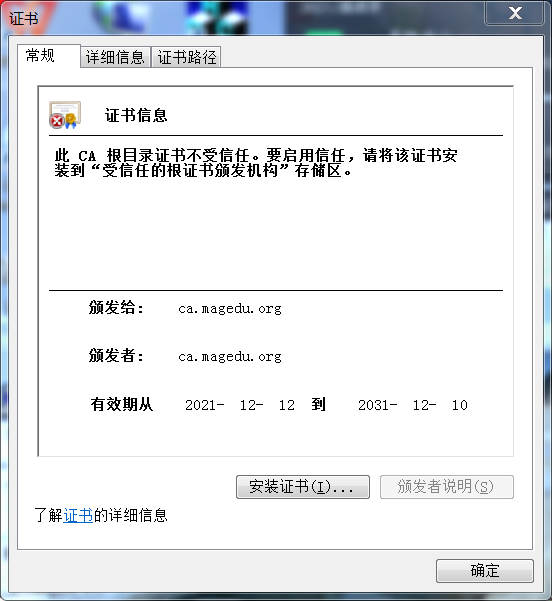
Common Name (eg, your name or your server's hostname) []:ca.magedu.org
Email Address []:
[root@centos8 CA]# tree
.
├── cacert.pem
├── certs
├── crl
├── newcerts
└── private
    └── cakey.pem

4 directories, 2 files
[root@centos8 CA]# cat c
cacert.pem  certs/      crl/
[root@centos8 CA]# cat cacert.pem
-----BEGIN CERTIFICATE-----
MIIDrzCCApegAwIBAgIUTTxIn/Sm1VH0jD9MUNnIbWBLplkwDQYJKoZIhvcNAQEL
BQAwZzELMAkGA1UEBhMCQ04xEDAOBgNVBAgMB2ppYW5nc3UxEDAOBgNVBAcMB25h
bmppbmcxDzANBgNVBAoMBm1hZ2VkdTELMAkGA1UECwwCaXQxFjAUBgNVBAMMDWNh
Lm1hZ2VkdS5vcmcwHhcNMjExMjEyMTM0NTMyWhcNMzExMjEwMTM0NTMyWjBnMQsw
CQYDVQQGEwJDTjEQMA4GA1UECAwHamlhbmdzdTEQMA4GA1UEBwwHbmFuamluZzEP
MA0GA1UECgwGbWFnZWR1MQswCQYDVQQLDAJpdDEWMBQGA1UEAwwNY2EubWFnZWR1
Lm9yZzCCASIwDQYJKoZIhvcNAQEBBQADggEPADCCAQoCggEBAJvXX+TKm86r8x1c
Sb3P8zu3lgrQlyQXnWADxT6bTCI8MiSfsTcD101eUaZJ2jqzOStX1SFVs7uKdUQI
niQkQXL12wxgqpUgIBtaDaMPQPDM6oHPpw6XQ5cqlVlbfzEASPto2cbKpYJ7Q9EM
YAqs8DKEBoAlmD5TMauzCMd6Ke+vGlZCE2ORcb3mfTmO44bmJ51vqwftDn41yC/8
t+5iDKobE+rDoMNEB3QKKO0WDegy96RMpO7I8YFqhELWgsEwVrmAdzibLzT6FRfk
JPXwkVxrPhXBtsmHeBdiBvAraoaMNy9iPqIEnBIsSJMYhj+Zu8QGVnD9/1/cyGeO
0gkLUesCAwEAAaNTMFEwHQYDVR0OBBYEFPBwMdZyCOYfQK3m6tIZtyssUPqbMB8G
A1UdIwQYMBaAFPBwMdZyCOYfQK3m6tIZtyssUPqbMA8GA1UdEwEB/wQFMAMBAf8w
DQYJKoZIhvcNAQELBQADggEBAEaKOVFCFD77mQCV3z3nveGxpBJ7YTKDpP16bBGn
gfFVLE+xVYfVhAGNnqu6cX7wK9pqqJo0+9OoPe5SgJatsBPOm+C028qedv6Jx3Kf
swiU5+mN51mwM8cX9fQK5uu9xZ22AfN57/v/L5NjY9s3Yd/2JN+JHMXZOQc67kfv
vLnIjVBbWL0D5MTqmuDDDYJp5MX57D0oiC6eOoIM6QokX6+hcRj0/P6vHBdxgW8C
rmw99JZ6ie7/PLOty9uexFpoRy+iMCIIMZIS1wQ45Fh/zTGGcbBQqw6ena8wLvTk
x5SmI0JfjI5plr+lcthoJCXOB00MV/CC2Hi2we2X3vV/vU4=
-----END CERTIFICATE-----
[root@centos8 CA]#
生成自签名证书:
[root@centos8 CA]# openssl req -utf8 -newkey rsa:1024 -subj "/CN=www.magedu.org" -keyout app.key -nodes -x509 -out app.crt
Generating a RSA private key
.........................+++++
..................+++++
writing new private key to 'app.key'
-----
申请证书并颁发证书:
[root@centos8 CA]# tree
.
├── certs
├── crl
├── index.txt
├── newcerts
└── private
    └── cakey.pem

4 directories, 2 files
[root@centos8 CA]# ll
总用量 0
drwxr-xr-x. 2 root root  6 12月 12 21:18 certs
drwxr-xr-x. 2 root root  6 12月 12 21:18 crl
-rw-r--r--. 1 root root  0 12月 12 21:38 index.txt
drwxr-xr-x. 2 root root  6 12月 12 21:18 newcerts
drwxr-xr-x. 2 root root 23 12月 12 21:20 private
[root@centos8 CA]# ll private/cakey.pem
certs/    crl/      newcerts/ private/
[root@centos8 CA]# ll private/cakey.pem
-rw-------. 1 root root 1679 12月 12 21:20 private/cakey.pem
[root@centos8 CA]# openssl req -new -x509 -key /etc/pki/CA/private/cakey.pem -days 3650 -out /etc/pki/CA/cacert.pem
You are about to be asked to enter information that will be incorporated
into your certificate request.
What you are about to enter is what is called a Distinguished Name or a DN.
There are quite a few fields but you can leave some blank
For some fields there will be a default value,
If you enter '.', the field will be left blank.
-----
Country Name (2 letter code) [XX]:CN
State or Province Name (full name) []:jiangsu
Locality Name (eg, city) [Default City]:nanjing
Organization Name (eg, company) [Default Company Ltd]:magedu
Organizational Unit Name (eg, section) []:it
Common Name (eg, your name or your server's hostname) []:ca.magedu.org
Email Address []:
[root@centos8 CA]# tree
.
├── cacert.pem
├── certs
├── crl
├── newcerts
└── private
    └── cakey.pem

4 directories, 2 files
[root@centos8 CA]# cat c
cacert.pem  certs/      crl/
[root@centos8 CA]# cat cacert.pem
-----BEGIN CERTIFICATE-----
MIIDrzCCApegAwIBAgIUTTxIn/Sm1VH0jD9MUNnIbWBLplkwDQYJKoZIhvcNAQEL
BQAwZzELMAkGA1UEBhMCQ04xEDAOBgNVBAgMB2ppYW5nc3UxEDAOBgNVBAcMB25h
bmppbmcxDzANBgNVBAoMBm1hZ2VkdTELMAkGA1UECwwCaXQxFjAUBgNVBAMMDWNh
Lm1hZ2VkdS5vcmcwHhcNMjExMjEyMTM0NTMyWhcNMzExMjEwMTM0NTMyWjBnMQsw
CQYDVQQGEwJDTjEQMA4GA1UECAwHamlhbmdzdTEQMA4GA1UEBwwHbmFuamluZzEP
MA0GA1UECgwGbWFnZWR1MQswCQYDVQQLDAJpdDEWMBQGA1UEAwwNY2EubWFnZWR1
Lm9yZzCCASIwDQYJKoZIhvcNAQEBBQADggEPADCCAQoCggEBAJvXX+TKm86r8x1c
Sb3P8zu3lgrQlyQXnWADxT6bTCI8MiSfsTcD101eUaZJ2jqzOStX1SFVs7uKdUQI
niQkQXL12wxgqpUgIBtaDaMPQPDM6oHPpw6XQ5cqlVlbfzEASPto2cbKpYJ7Q9EM
YAqs8DKEBoAlmD5TMauzCMd6Ke+vGlZCE2ORcb3mfTmO44bmJ51vqwftDn41yC/8
t+5iDKobE+rDoMNEB3QKKO0WDegy96RMpO7I8YFqhELWgsEwVrmAdzibLzT6FRfk
JPXwkVxrPhXBtsmHeBdiBvAraoaMNy9iPqIEnBIsSJMYhj+Zu8QGVnD9/1/cyGeO
0gkLUesCAwEAAaNTMFEwHQYDVR0OBBYEFPBwMdZyCOYfQK3m6tIZtyssUPqbMB8G
A1UdIwQYMBaAFPBwMdZyCOYfQK3m6tIZtyssUPqbMA8GA1UdEwEB/wQFMAMBAf8w
DQYJKoZIhvcNAQELBQADggEBAEaKOVFCFD77mQCV3z3nveGxpBJ7YTKDpP16bBGn
gfFVLE+xVYfVhAGNnqu6cX7wK9pqqJo0+9OoPe5SgJatsBPOm+C028qedv6Jx3Kf
swiU5+mN51mwM8cX9fQK5uu9xZ22AfN57/v/L5NjY9s3Yd/2JN+JHMXZOQc67kfv
vLnIjVBbWL0D5MTqmuDDDYJp5MX57D0oiC6eOoIM6QokX6+hcRj0/P6vHBdxgW8C
rmw99JZ6ie7/PLOty9uexFpoRy+iMCIIMZIS1wQ45Fh/zTGGcbBQqw6ena8wLvTk
x5SmI0JfjI5plr+lcthoJCXOB00MV/CC2Hi2we2X3vV/vU4=
-----END CERTIFICATE-----
[root@centos8 CA]# openssl x509 -in cacert.pem -noout -text
Certificate:
    Data:
        Version: 3 (0x2)
        Serial Number:
            4d:3c:48:9f:f4:a6:d5:51:f4:8c:3f:4c:50:d9:c8:6d:60:4b:a6:59
        Signature Algorithm: sha256WithRSAEncryption
        Issuer: C = CN, ST = jiangsu, L = nanjing, O = magedu, OU = it, CN = ca.magedu.org
        Validity
            Not Before: Dec 12 13:45:32 2021 GMT
            Not After : Dec 10 13:45:32 2031 GMT
        Subject: C = CN, ST = jiangsu, L = nanjing, O = magedu, OU = it, CN = ca.magedu.or                   g
        Subject Public Key Info:
            Public Key Algorithm: rsaEncryption
                RSA Public-Key: (2048 bit)
                Modulus:
                    00:9b:d7:5f:e4:ca:9b:ce:ab:f3:1d:5c:49:bd:cf:
                    f3:3b:b7:96:0a:d0:97:24:17:9d:60:03:c5:3e:9b:
                    4c:22:3c:32:24:9f:b1:37:03:d7:4d:5e:51:a6:49:
                    da:3a:b3:39:2b:57:d5:21:55:b3:bb:8a:75:44:08:
                    9e:24:24:41:72:f5:db:0c:60:aa:95:20:20:1b:5a:
                    0d:a3:0f:40:f0:cc:ea:81:cf:a7:0e:97:43:97:2a:
                    95:59:5b:7f:31:00:48:fb:68:d9:c6:ca:a5:82:7b:
                    43:d1:0c:60:0a:ac:f0:32:84:06:80:25:98:3e:53:
                    31:ab:b3:08:c7:7a:29:ef:af:1a:56:42:13:63:91:
                    71:bd:e6:7d:39:8e:e3:86:e6:27:9d:6f:ab:07:ed:
                    0e:7e:35:c8:2f:fc:b7:ee:62:0c:aa:1b:13:ea:c3:
                    a0:c3:44:07:74:0a:28:ed:16:0d:e8:32:f7:a4:4c:
                    a4:ee:c8:f1:81:6a:84:42:d6:82:c1:30:56:b9:80:
                    77:38:9b:2f:34:fa:15:17:e4:24:f5:f0:91:5c:6b:
                    3e:15:c1:b6:c9:87:78:17:62:06:f0:2b:6a:86:8c:
                    37:2f:62:3e:a2:04:9c:12:2c:48:93:18:86:3f:99:
                    bb:c4:06:56:70:fd:ff:5f:dc:c8:67:8e:d2:09:0b:
                    51:eb
                Exponent: 65537 (0x10001)
        X509v3 extensions:
            X509v3 Subject Key Identifier:
                F0:70:31:D6:72:08:E6:1F:40:AD:E6:EA:D2:19:B7:2B:2C:50:FA:9B
            X509v3 Authority Key Identifier:
                keyid:F0:70:31:D6:72:08:E6:1F:40:AD:E6:EA:D2:19:B7:2B:2C:50:FA:9B

            X509v3 Basic Constraints: critical
                CA:TRUE
    Signature Algorithm: sha256WithRSAEncryption
         46:8a:39:51:42:14:3e:fb:99:00:95:df:3d:e7:bd:e1:b1:a4:
         12:7b:61:32:83:a4:fd:7a:6c:11:a7:81:f1:55:2c:4f:b1:55:
         87:d5:84:01:8d:9e:ab:ba:71:7e:f0:2b:da:6a:a8:9a:34:fb:
         d3:a8:3d:ee:52:80:96:ad:b0:13:ce:9b:e0:b4:db:ca:9e:76:
         fe:89:c7:72:9f:b3:08:94:e7:e9:8d:e7:59:b0:33:c7:17:f5:
         f4:0a:e6:eb:bd:c5:9d:b6:01:f3:79:ef:fb:ff:2f:93:63:63:
         db:37:61:df:f6:24:df:89:1c:c5:d9:39:07:3a:ee:47:ef:bc:
         b9:c8:8d:50:5b:58:bd:03:e4:c4:ea:9a:e0:c3:0d:82:69:e4:
         c5:f9:ec:3d:28:88:2e:9e:3a:82:0c:e9:0a:24:5f:af:a1:71:
         18:f4:fc:fe:af:1c:17:71:81:6f:02:ae:6c:3d:f4:96:7a:89:
         ee:ff:3c:b3:ad:cb:db:9e:c4:5a:68:47:2f:a2:30:22:08:31:
         92:12:d7:04:38:e4:58:7f:cd:31:86:71:b0:50:ab:0e:9e:9d:
         af:30:2e:f4:e4:c7:94:a6:23:42:5f:8c:8e:69:96:bf:a5:72:
         d8:68:24:25:ce:07:4d:0c:57:f0:82:d8:78:b6:c1:ed:97:de:
         f5:7f:bd:4e
[root@centos8 CA]# ls
cacert.pem  certs  crl  newcerts  private
[root@centos8 CA]# openssl req -utf8 -newkey rsa:1024 -subj "/CN=www.magedu.org" -keyout app.key -nodes -x509 -out app.crt
Generating a RSA private key
.........................+++++
..................+++++
writing new private key to 'app.key'
-----
[root@centos8 CA]# mkdir /data/app/certs -p
[root@centos8 CA]# ls
app.crt  app.key  cacert.pem  certs  crl  newcerts  private
[root@centos8 CA]# cd certs/
[root@centos8 certs]# (umask 066; openssl genrsa -out /data/test.key 2048)
Generating RSA private key, 2048 bit long modulus (2 primes)
...............+++++
....+++++
e is 65537 (0x010001)
[root@centos8 certs]# openssl genrsa -out app.key
Generating RSA private key, 2048 bit long modulus (2 primes)
........+++++
...........................+++++
e is 65537 (0x010001)
[root@centos8 certs]# openssl req -new -key app.key -out app.csr
You are about to be asked to enter information that will be incorporated
into your certificate request.
What you are about to enter is what is called a Distinguished Name or a DN.
There are quite a few fields but you can leave some blank
For some fields there will be a default value,
If you enter '.', the field will be left blank.
-----
Country Name (2 letter code) [XX]:CN
State or Province Name (full name) []:jiangsu
Locality Name (eg, city) [Default City]:nanjing
Organization Name (eg, company) [Default Company Ltd]:magedu
Organizational Unit Name (eg, section) []:it
Common Name (eg, your name or your server's hostname) []:ca.magedu.org
Email Address []:

Please enter the following 'extra' attributes
to be sent with your certificate request
A challenge password []:hc
string is too short, it needs to be at least 4 bytes long
A challenge password []:3778
An optional company name []:magedu
二、总结ssh常用参数、用法
1.常用参数
-p port:远程服务器监听的端口
-b 指定连接的源IP
-v 调试模式
-C 压缩方式
-X 支持x11转发
-t 强制伪tty分配,如:ssh -t remoteserver1 ssh -t remoteserver2 ssh
remoteserver3 这个可以实现多跳中的逐级登陆,最后达到可以登录最后一个服务器的目的
-o option 如:-o StrictHostKeyChecking=no
-i <file> 指定私钥文件路径,实现基于key验证,默认使用文件: ~/.ssh/id_dsa,
~/.ssh/id_ecdsa, ~/.ssh/id_ed25519,~/.ssh/id_rsa等
2.用法
1、连接到远程主机:
命令格式 :
ssh name@remoteserver 或者
ssh remoteserver -l name
说明:以上两种方式都可以远程登录到远程主机,server代表远程主机,name为登录远程主机的用户名。
2、连接到远程主机指定的端口:
命令格式:
ssh name@remoteserver -p 2222 或者
ssh remoteserver -l name -p 2222
说明:p 参数指定端口号,通常在路由里做端口映射时,我们不会把22端口直接映射出去,而是转换成其他端口号,这时就需要使用-p端口号命令格式。
3、通过远程主机1跳到远程主机2:
命令格式:
ssh -t remoteserver1 ssh remoteserver2
说明:当远程主机remoteserver2无法直接到达时,可以使用-t参数,然后由remoteserver1跳转到remoteserver2。在此过程中要先输入remoteserver1的密码,然后再输入remoteserver2的密码,然后就可以操作remoteserver2了。
4、通过SSH运行远程shell命令:
命令格式:
ssh -l name remoteserver ‘command’
说明:连接到远程主机,并执行远程主机的command命令。例如:查看远程主机的内存使用情况。
$ ssh -l root 192.168.3.233 svmon -G
除了ssh的本身的命令,还有基于ssh扩展的命令就是scp,这个命令在平时复制文件时非常有用。
命令使用格式:scp -p root@192.168.3.233:/tmp/test /bak
三、总结sshd服务常用参数。
常用参数:
-4 强制使用IPv4地址
-6 强制使用IPv6地址
-D 以非后台守护进程的方式运行服务器
-d 调试模式
-e 将错误发送到标准错误设备,而不是将其发送到系统日志
-f <配置文件>指定服务器的配置文件
-g <登录过期时间>指定客户端登录的过期时间(默认时间为120秒),如果在此期限内,用户没有正确认证,则服务器断开此客户端的连接
-h <主机key文件>指定读取主机key文件
-i sshd以inetd方式运行
-o <选项>指定sshd的配置选项
-p <端口>指定使用的端口号
-q 静默模式,没有任何信息写入系统日志
-t 测试模式
查看sshd服务状态:
[root@centos8 hc]#service sshd status
启动sshd服务:
[root@centos8 hc]#service sshd start
四、搭建dhcp服务,实现ip地址申请分发
安装dhcp
[root@Centos7 yum.repos.d]# yum install dhcp
[root@Centos7 network-scripts]# vi ifcfg-ens33
PE="Ethernet"

PROXY_METHOD="none"

BROWSER_ONLY="no"

#BOOTPROTO="dhcp"

BOOTPROTO=static

IPADDR=192.168.1.20

PREFIX=24

GATEWAY=192.168.1.1

DNS1=8.8.8.8

DEFROUTE="yes"

IPV4_FAILURE_FATAL="no"

IPV6INIT="yes"

IPV6_AUTOCONF="yes"

IPV6_DEFROUTE="yes"

IPV6_FAILURE_FATAL="no"

IPV6_ADDR_GEN_MODE="stable-privacy"

NAME="ens33"

UUID="2d964577-0fc7-4997-9cbb-ec26dd2b805b"

DEVICE="ens33"

ONBOOT="yes"
配置DHCP的配置文件
[root@Centos7 network-scripts]# cat /etc/dhcp/dhcpd.conf
# dhcpd.conf
#
# Sample configuration file for ISC dhcpd
#

# option definitions common to all supported networks...
option domain-name "example.org";
option domain-name-servers ns1.example.org, ns2.example.org;

default-lease-time 600;
max-lease-time 7200;

# Use this to enble / disable dynamic dns updates globally.
#ddns-update-style none;

# If this DHCP server is the official DHCP server for the local
# network, the authoritative directive should be uncommented.
#authoritative;

# Use this to send dhcp log messages to a different log file (you also
# have to hack syslog.conf to complete the redirection).
log-facility local7;

# No service will be given on this subnet, but declaring it helps the
# DHCP server to understand the network topology.

subnet 10.152.187.0 netmask 255.255.255.0 {
}

# This is a very basic subnet declaration.

subnet 10.254.239.0 netmask 255.255.255.224 {
  range 10.254.239.10 10.254.239.20;
  option routers rtr-239-0-1.example.org, rtr-239-0-2.example.org;
}

# This declaration allows BOOTP clients to get dynamic addresses,
# which we don't really recommend.

subnet 10.254.239.32 netmask 255.255.255.224 {
  range dynamic-bootp 10.254.239.40 10.254.239.60;
  option broadcast-address 10.254.239.31;
  option routers rtr-239-32-1.example.org;
}

# A slightly different configuration for an internal subnet.
subnet 10.5.5.0 netmask 255.255.255.224 {
  range 10.5.5.26 10.5.5.30;
  option domain-name-servers ns1.internal.example.org;
  option domain-name "internal.example.org";
  option routers 10.5.5.1;
  option broadcast-address 10.5.5.31;
  default-lease-time 600;
  max-lease-time 7200;
}

# Hosts which require special configuration options can be listed in
# host statements.   If no address is specified, the address will be
# allocated dynamically (if possible), but the host-specific information
# will still come from the host declaration.

host passacaglia {
  hardware ethernet 0:0:c0:5d:bd:95;
  filename "vmunix.passacaglia";
  server-name "toccata.fugue.com";
}

# Fixed IP addresses can also be specified for hosts.   These addresses
# should not also be listed as being available for dynamic assignment.
# Hosts for which fixed IP addresses have been specified can boot using
# BOOTP or DHCP.   Hosts for which no fixed address is specified can only
# be booted with DHCP, unless there is an address range on the subnet
# to which a BOOTP client is connected which has the dynamic-bootp flag
# set.
host fantasia {
  hardware ethernet 08:00:07:26:c0:a5;
  fixed-address fantasia.fugue.com;
}

# You can declare a class of clients and then do address allocation
# based on that.   The example below shows a case where all clients
# in a certain class get addresses on the 10.17.224/24 subnet, and all
# other clients get addresses on the 10.0.29/24 subnet.

class "foo" {
  match if substring (option vendor-class-identifier, 0, 4) = "SUNW";
}

shared-network 224-29 {
  subnet 10.17.224.0 netmask 255.255.255.0 {
    option routers rtr-224.example.org;
  }
  subnet 10.0.29.0 netmask 255.255.255.0 {
    option routers rtr-29.example.org;
  }
  pool {
    allow members of "foo";
    range 10.17.224.10 10.17.224.250;
  }
  pool {
    deny members of "foo";
    range 10.0.29.10 10.0.29.230;
  }
}
[root@Centos7 network-scripts]#
然后在Client 上 修改网卡配置文件,BOOTPROTO=dhcp 删除静态地址后保存 重启网卡(也重启电脑),同样在Client 上安装DHCP服务
验证如下:
ifconfig 查看获取情况
route -n //查看路由信息
也可以在Ser上执行status 命令
#systemctl status dhcpd
#以下可以限制可登录用户的办法: AllowUsers user1 user2 user3 DenyUsers AllowGroups DenyGroups

 浙公网安备 33010602011771号