
第六周作业
一、编写脚本实现登陆远程主机。(使用expect和shell脚本两种形式)。
1.expect脚本
[root@centos7 ~]# cat ./expects/expect.sh
#!/usr/bin/expect
spawn ssh 192.168.181.137
expect {
            "yes/no" { send "yes\n";exp_continue }
            "password" { send "1\n" }
}
interact
执行结果
[root@centos7 ~]# ./expects/expect.sh
spawn ssh 192.168.181.137
root@192.168.181.137's password:
Last login: Sun Nov 28 16:34:25 2021
[root@centos7 ~]#
2.shell脚本
准备环境
[root@centos7 expects]# yum install -y sshpass
Loaded plugins: fastestmirror, langpacks
Loading mirror speeds from cached hostfile
file:///mnt/cdrom/repodata/repomd.xml: [Errno 14] curl#37 - "Couldn't open file /mnt/cdrom/repodata/repomd.xml"
Trying other mirror.
epel                                                     | 4.7 kB     00:00
Resolving Dependencies
--> Running transaction check
---> Package sshpass.x86_64 0:1.06-1.el7 will be installed
--> Finished Dependency Resolution

Dependencies Resolved

================================================================================
 Package           Arch             Version                Repository      Size
================================================================================
Installing:
 sshpass           x86_64           1.06-1.el7             epel            21 k

Transaction Summary
================================================================================
Install  1 Package

Total download size: 21 k
Installed size: 38 k
Downloading packages:
sshpass-1.06-1.el7.x86_64.rpm                              |  21 kB   00:00
Running transaction check
Running transaction test
Transaction test succeeded
Running transaction
  Installing : sshpass-1.06-1.el7.x86_64                                    1/1
  Verifying  : sshpass-1.06-1.el7.x86_64                                    1/1

Installed:
  sshpass.x86_64 0:1.06-1.el7

Complete!
执行脚本
[root@centos7 expects]# cat shell1.sh
#!/bin/bash
PASSWORD="1"
sshpass -p "$PASSWORD" ssh root@192.168.181.137
[root@centos7 expects]# chmod 777 shell1.sh
[root@centos7 expects]# ./shell1.sh
Last login: Sun Nov 28 22:02:41 2021
[root@centos7 ~]#
二、生成10个随机数保存于数组中,并找出其最大值和最小值
[root@centos7 expects]# vi max_min.sh
[root@centos7 expects]# cat max_min.sh
#!/bin/bash
declare -i min max
declare -a nums
for ((i=0;i<10;i++));do
    nums[$i]=$RANDOM
    [ $i -eq 0 ] && min=${nums[$i]} && max=${nums[$i]}&& continue
    [ ${nums[$i]} -gt $max ] && max=${nums[$i]}
    [ ${nums[$i]} -lt $min ] && min=${nums[$i]}
done
echo “Numbers are ${nums[*]}”
echo Max is $max
echo Min is $min
[root@centos7 expects]# chmod 777 max_min.sh
[root@centos7 expects]# ./max_min.sh
“Numbers are 29914 21507 13798 15550 5451 8132 11577 9773 1315 17704”
Max is 29914
Min is 1315
[root@centos7 expects]#
三、输入若干个数值存入数组中,采用冒泡算法进行升序或降序排序
[root@centos7 expects]# cat arry.sh
read -p "请输入数值个数:" COUNT
declare -a nums
for ((i=0;i<$COUNT;i++));do
    num[$i]=$RANDOM
done
echo "原始数组:${num[@]}"

declare -i n=$COUNT
for (( i=0; i<n-1; i++ ));do
    for (( j=0; j<n-1-i; j++ ));do
        let x=$j+1
        if (( ${num[$j]} < ${num[$x]} ));then
 #从大到小排列
           tmp=${num[$x]}
            num[$x]=${num[$j]}
            num[$j]=$tmp
        fi
    done
done
echo "排列之后:${num[*]}"
echo "the max integer is $num,the min integer is ${num[$((n-1))]}"
[root@centos7 expects]# ./arry.sh
请输入数值个数:10
原始数组:25138 26980 11797 4296 25516 25625 20062 15422 18409 25784
排列之后:26980 25784 25625 25516 25138 20062 18409 15422 11797 4296
the max integer is 26980,the min integer is 4296
[root@centos7 expects]# vim arry.sh
[root@centos7 expects]# ./arry.sh
请输入数值个数:10
原始数组:10799 2623 13598 26123 4088 32235 22436 290 30159 32077
排列之后:32235 32077 30159 26123 22436 13598 10799 4088 2623 290
the max integer is 32235,the min integer is 290
[root@centos7 expects]#
四、总结查看系统负载的几种命令,总结top命令的指标大概什么含义(不要求全部写出来)
uptime:查看系统平均负载
mpstat:百分比显示CPU利用率的各项指标
top和htop:查看进程的实时状态
free:查看内存空间的使用状态
pmap:查看进程对应的内存映射,可以看到进程依赖的子模块占用的内存数量,可以以此判断OOM
vmstat:查看虚拟内存的信息,可以以用户定义的间隔不断刷新状态,能够看到内存与SWAP、磁盘之间的IO情况;
iostat:能够看到更丰富的IO性能状态,可以自定义刷新间隔判断哪块硬盘的IO比较繁忙;-x参数可以看到磁盘基于扇区的IO,队列长度,处理时间等
iotop:以top方式监控磁盘的I/O,实时监控,而且可以只显示正在执行读写的进程,提供很多非交互式参数;
iftop:显示网络带宽的使用情况,查看访问当前主机的流量的实时信息,实时连接等;
nload:只能以接口为单位查看实时吞吐量,看不到连接信息,只有速率信息;
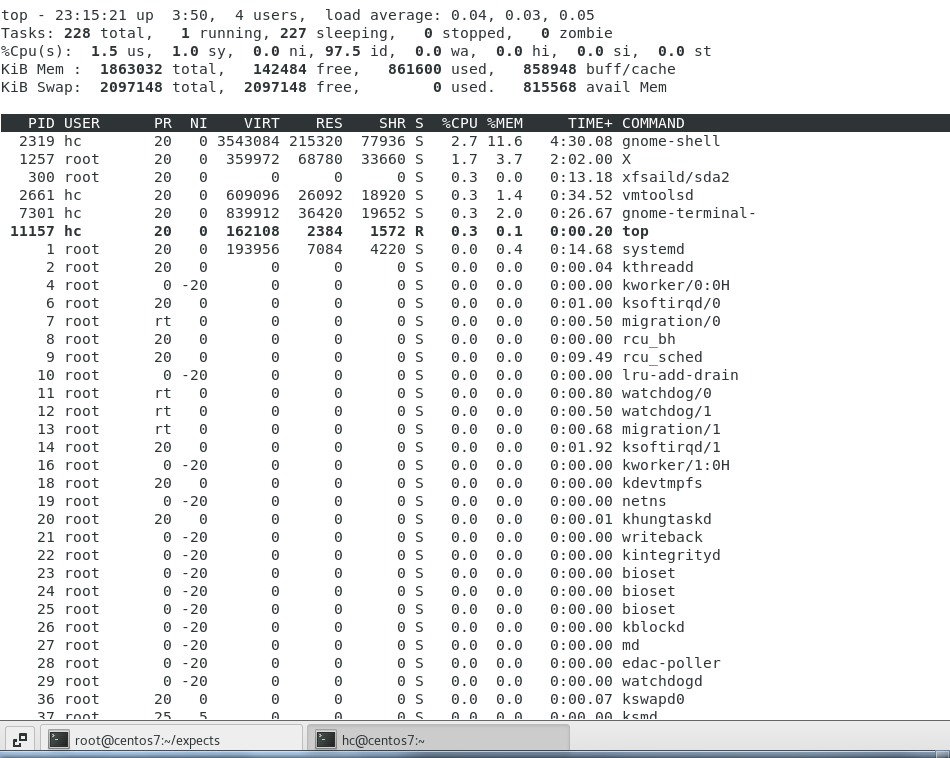
含义:
top - 23:22:06 up  3:57,  4 users, load average: 0.00, 0.01, 0.05

这一行代表:当前时间 -- 开机时间--当前登录用户数 -- 平均负载 -- 5分钟、10分钟、15分钟
Tasks: 228 total,   2 running, 226 sleeping,   0 stopped,   0 zombie

这一行代表:总任务数 -- 当前正在运行的任务数 -- 处于休眠的任务数 -- 停止状态的任务数 -- 僵尸态的进程数
%Cpu(s):  3.6 us,  4.1 sy,  0.0 ni, 92.4 id,  0.0 wa,  0.0 hi,  0.0 si,  0.0 st

上一次刷新后间隔内CPU状态的百分比情况;是多核CPU的平均值,可以按1切换显示为独立的CPU统计;
us:用户空间内没有nice调整过优先级的进程运行的时间
sy:内核空间进程运行的时间
ni:调整过nice的用户空间进程运行时间
id:空闲时间
wa:等待IO的时间
hi,硬中断时间
si,软中断(模式切换)
st,虚拟机偷走的时间(虚拟机内进程执行的时间)
KiB Mem :  1863032 total,   142340 free,   861596 used,   859096 buff/cache
KiB Swap:  2097148 total,  2097148 free,        0 used.   815512 avail Mem

内存和交换分区的使用情况:
total:总大小
free:空闲大小,加上buff/cache后是真正可以使用的总空闲空间
used:已使用的大小
buff/cache:数据缓存占用的大小
PID USER      PR  NI    VIRT    RES    SHR S  %CPU %MEM     TIME+ COMMAND

PID:进程ID
%MEM:内存使用百分比
VIRT:使用的虚拟内存大小,包括已经被映射但还未被使用的页表
RES:使用的物理内存大小
CODE:可用于执行代码的物理内存数量
DATA:进程保留的私有内存空间,可能还未被映射到物理内存,但已经被算到虚拟内存空间中
SHR:共享内存空间,可以被其他进程共享
PR:top命令显示的优先级0-39之间,越小
NI:nice优先级
%CPU:CPU利用率
TIME+:进程启动之后占用的CPU时间,是时间片的累计
COMMAND:进程关联程序的名称,或启动进程的命令
五、编写脚本,使用for和while分别实现192.168.0.0/24网段内,地址是否能够ping通,若ping通则输出"success!",若ping不通则输出"fail!"
for循环实现
[root@centos7 expects]# vi for.sh
[root@centos7 expects]# cat for.sh
#!/bin/bash
for ip in `seq 254`;do
    echo -n "ping 192.168.0.$ip ...."
    ping 192.168.0.$ip -c 1 -w 1 &> /dev/null
    if [ $? == 0 ]; then
        echo "success!"
    else
        echo "fail!"
    fi
done
[root@centos7 expects]# chmod 777 for.sh
[root@centos7 expects]# ./for.sh
ping 192.168.0.1 ....fail!
ping 192.168.0.2 ....fail!
ping 192.168.0.3 ....fail!
ping 192.168.0.4 ....fail!
ping 192.168.0.5 ....fail!
ping 192.168.0.6 ....fail!
ping 192.168.0.7 ....fail!
ping 192.168.0.8 ....fail!
ping 192.168.0.9 ....fail!
ping 192.168.0.10 ....fail!
ping 192.168.0.11 ....fail!
ping 192.168.0.12 ....fail!
ping 192.168.0.13 ....fail!
ping 192.168.0.14 ....fail!
ping 192.168.0.15 ....fail!
ping 192.168.0.16 ....fail!
while实现:
[root@centos7 expects]# chmod 777 while.sh
[root@centos7 expects]# ./while.sh
ping 192.168.0.1 ....fail!
ping 192.168.0.2 ....fail!
ping 192.168.0.3 ....fail!
ping 192.168.0.4 ....fail!
ping 192.168.0.5 ....fail!
ping 192.168.0.6 ....fail!
ping 192.168.0.7 ....fail!
ping 192.168.0.8 ....fail!
ping 192.168.0.9 ....fail!
ping 192.168.0.10 ....fail!
ping 192.168.0.11 ....fail!
ping 192.168.0.12 ....fail!
六、每周的工作日1:30,将/etc备份至/backup目录中,保存的文件名称格式 为“etcbak-yyyy-mm-dd-HH.tar.xz”,其中日期是前一天的时间
[root@centos7 expects]# vim etcbak.sh
[root@centos7 expects]# cat etcbak.sh
#!/bin/bash
#将/etc备份至/backup目录中,保存的文件名称格式 为“etcbak-yyyy-mm-dd-HH.tar.xz”,其中日期是前一天的时间
#如果/backup路径不存在,则创建backup文件夹
[ -d /backup ] || mkdir /backup
30 1 * * 1-5 /usr/bin/tar -zcf etcbak-date -d "-1 day" +%Y-%m-%d-%H.tar.xz /etc &> /dev/null
[root@centos7 expects]# chmod 777 etcbak.sh
[root@centos7 expects]# ./etcbak.sh
[root@centos7 expects]# ll /backup/
total 0
[root@centos7 expects]#

 浙公网安备 33010602011771号