

因为据说某server开着就很贵,所以我们跑完测试的job后就要赶紧关机才行,但是测试的job要跑很久,过程中又不需要干什么,所以就得有个守家的,有时候会走很晚。如果有一个自动化关机的工具就好了,当指定的进程结束了以后系统就会自动关机。这件事我在上一篇中已经做好了。这一次领导又有新需求,说要监控多个进程而不单单是一个了,需要有一个配置文件来配置所需要监控的进程名,而且想要可以自主选择检查的间隔,于是就有了下文。
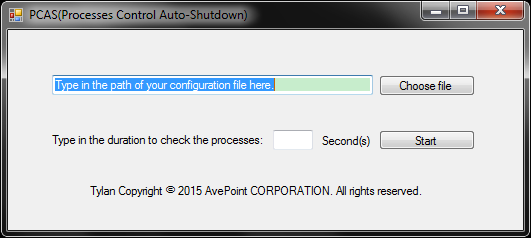
代码如下:

using System;
using System.Collections.Generic;
using System.ComponentModel;
using System.Data;
using System.Drawing;
using System.Linq;
using System.Text;
using System.Threading.Tasks;
using System.Windows.Forms;
using System.Diagnostics;
using System.Text.RegularExpressions;
using System.IO;

namespace AutoShutDown2
{
    public partial class MainForm : Form
    {
        public MainForm()
        {
            InitializeComponent();
        }

        private void chooseFileButton_Click(object sender, EventArgs e)
        {
            OpenFileDialog fileName = new OpenFileDialog();
            fileName.Filter = "文本文件|*.*|C#文件|*.cs|所有文件|*.*";
            if (fileName.ShowDialog() == DialogResult.OK)
            {
                filePath.Text = fileName.FileName;
            }
        }

        private void filePath_Click(object sender, EventArgs e)
        {
            filePath.Text = "";
        }

        private void startButton_Click(object sender, EventArgs e)
        {
            if (filePath.Text.ToString().Substring(filePath.Text.Length - 3, 3) == "txt")
            {
                if (Regex.IsMatch(duration.Text, "^([0-9]{1,})$"))
                {
                    if (int.Parse(duration.Text) >= 10)
                    {
                        MessageBox.Show("PCAS will check with a duration of " + duration.Text + "s.");
                        this.Hide();
                        //Check the processes with the duration.
                        DurationStart();
                    }
                    else
                    {
                        MessageBox.Show("The integer number should be greater than 10 seconds.");
                    }
                }
                else
                {
                    MessageBox.Show("You can only type in an integer for duration.");
                    duration.Text = "";
                }
            }
            else
            {
                MessageBox.Show("You can only choose a txt to be a configuration file.");
                filePath.Text = "";
            }
        }

        private void DurationStart()
        {
            //Check the process's status with the duration.
            System.Timers.Timer tmr = new System.Timers.Timer(int.Parse(duration.Text)*1000);
            tmr.Elapsed += new System.Timers.ElapsedEventHandler(CheckProcess);
            tmr.AutoReset = true;
            tmr.Enabled = true;
        }

        private void CheckProcess(object source, System.Timers.ElapsedEventArgs e)
        {
            //Check the processes's status in the config file.
            FileStream fs = new FileStream(filePath.Text, FileMode.Open);
            StreamReader sr = new StreamReader(fs);
            string line;
            int numOfTheProcesses = 0;
            while ((line = sr.ReadLine()) != null)
            {
                var processes = System.Diagnostics.Process.GetProcesses();
                foreach (var process in processes)
                {
                    if (process.ProcessName == line)
                    {
                        //Find the objective process.
                        //MessageBox.Show(line);
                        numOfTheProcesses++;
                    }
                }
            }
            if (numOfTheProcesses == 0)
            {
                //No such process, shut down the computer.
                //MessageBox.Show("The computer is ready to be shut down.");
                //Shut down the computer
                ShutDown();
            }
            sr.Close();
            fs.Close();
        }

        private void ShutDown()
        {
            //Shut down the computer.
            System.Diagnostics.Process myProcess = new System.Diagnostics.Process();
            myProcess.StartInfo.FileName = "cmd.exe";
            myProcess.StartInfo.UseShellExecute = false;
            myProcess.StartInfo.RedirectStandardInput = true;
            myProcess.StartInfo.RedirectStandardOutput = true;
            myProcess.StartInfo.RedirectStandardError = true;
            myProcess.StartInfo.CreateNoWindow = true;
            myProcess.Start();
            myProcess.StandardInput.WriteLine("shutdown -s -t 0");
        }
    }
}
你需要输入一个大于10的整数,并且填写的路径一定要是一个txt文本。否则会给予提示。
配置文件中的配置是这样的,每一行填写一个要监控的进程名:
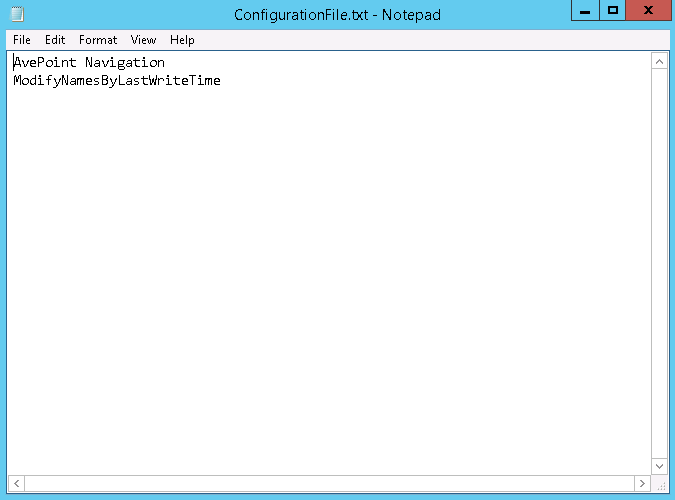
路径和时间间隔填写正确以后点击Start就会开始按你设定的时间间隔自动监控配置文件中的所有进程,等到所有进程都停止后系统就会自动关机。


 浙公网安备 33010602011771号