

获取鼠标的盒子内部坐标及拖动模态框
鼠标在盒子内的坐标=鼠标在页面的坐标-盒子在页面的坐标
css:
<style>
div {
width: 300px;
height: 300px;
margin: 200px;
}
</style>
html:
<body>
<div></div>
<script>
var div = document.querySelector('div')
div.addEventListener('mousemove', function (e) {
console.log(e.pageX); //鼠标在页面中的坐标
console.log(e.pageY);
console.log(this.offsetLeft); //盒子在页面中的坐标
console.log(this.offsetTop);
var x = e.pageX - this.offsetLeft
var y = e.pageY - this.offsetTop
this.innerHTML = '鼠标的x坐标是:' + x + '; y坐标是:' + y
})
</script>
</body>
拖动模态框:
效果图
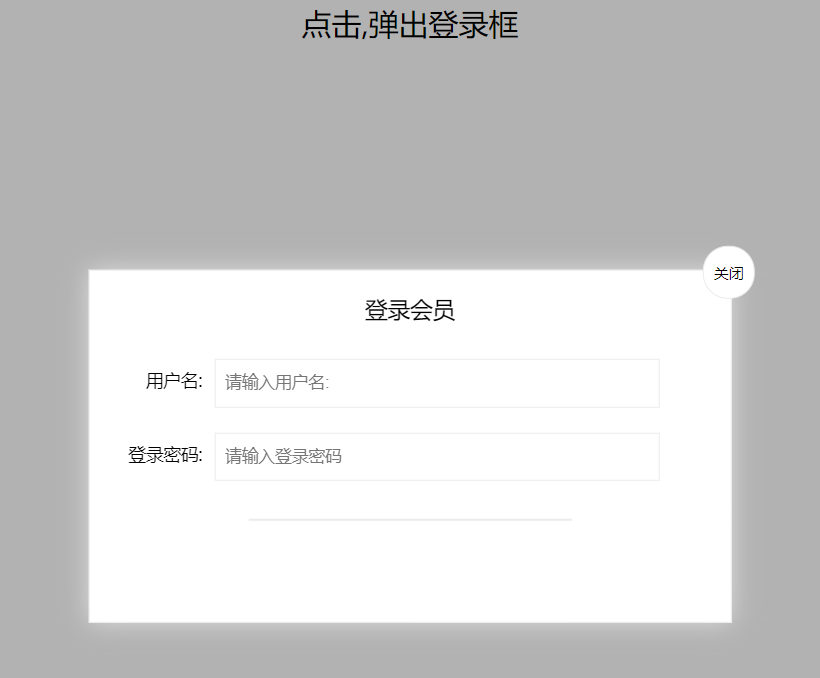
代码:
<head>
<style>
.login-header {
width: 100%;
text-align: center;
height: 30px;
font-size: 24px;
line-height: 30px;
}
ul,
li,
ol,
dl,
dt,
dd,
div,
p,
span,
h1,
h2,
h3,
h4,
h5,
h6,
a {
padding: 0px;
margin: 0px;
}
.login {
display: none;
width: 512px;
height: 280px;
position: fixed;
border: #ebebeb solid 1px;
left: 50%;
top: 50%;
background: #ffffff;
box-shadow: 0px 0px 20px #ddd;
z-index: 9999;
transform: translate(-50%, -50%);
}
.login-title {
width: 100%;
margin: 10px 0px 0px 0px;
text-align: center;
line-height: 40px;
height: 40px;
font-size: 18px;
position: relative;
cursor: move;
}
.login-input-content {
margin-top: 20px;
}
.login-button {
width: 50%;
margin: 30px auto 0px auto;
line-height: 40px;
font-size: 14px;
border: #ebebeb 1px solid;
text-align: center;
}
.login-bg {
display: none;
width: 100%;
height: 100%;
position: fixed;
top: 0px;
left: 0px;
background: rgba(0, 0, 0, .3);
}
a {
text-decoration: none;
color: #000000;
}
.login-button a {
display: block;
}
.login-input input.list-input {
float: left;
line-height: 35px;
height: 35px;
width: 350px;
border: #ebebeb 1px solid;
text-indent: 5px;
}
.login-input {
overflow: hidden;
margin: 0px 0px 20px 0px;
}
.login-input label {
float: left;
width: 90px;
padding-right: 10px;
text-align: right;
line-height: 35px;
height: 35px;
font-size: 14px;
}
.login-title span {
position: absolute;
font-size: 12px;
right: -20px;
top: -30px;
background: #ffffff;
border: #ebebeb solid 1px;
width: 40px;
height: 40px;
border-radius: 20px;
}
</style>
</head>
<body>
<div class="login-header"> <a id="link" href="javascript:;">点击,弹出登录框</a></div>
<div class="login" id="login">
<div class="login-title" id="title">登录会员
<span> <a href="javascript:void(0);" id="closeBtn" class="close-login">关闭</a></span>
</div>
<div class="login-input-content">
<div class="login-input">
<label>用户名:</label>
<input type="text" placeholder="请输入用户名:" name="info[username]" id="username" class="list-input">
</div>
<div class="login-input">
<label for="">登录密码:</label>
<input type="password" placeholder="请输入登录密码" name="info[password]" id="password" class="list-input">
</div>
</div>
<div id="loginBtn" class="login-button"><a href="javascript:void(0)" id="login-button-submit"></a></div>
</div>
<!-- 遮盖层 -->
<div class="login-bg" id="bg"></div>
<script>
var login = document.querySelector('.login');
var mask = document.querySelector('.login-bg');
var link = document.querySelector('#link')
var closeBtn = document.querySelector('#closeBtn')
var title = document.querySelector('#title')
//点击打开模态框
link.addEventListener('click', function () {
mask.style.display = 'block';
login.style.display = 'block';
})
//点击隐藏模态框
closeBtn.addEventListener('click', function () {
mask.style.display = 'none';
login.style.display = 'none';
})
//拖拽效果 :鼠标按下mousedown 鼠标移动mousemove 鼠标抬起mouseup
//鼠标的坐标 减去 鼠标在盒子内的坐标, 就是模态框真正的坐标位置
//1.鼠标按下 获得鼠标在盒子内的坐标(鼠标在页面的坐标减去盒子在页面的坐标)
title.addEventListener('mousedown', function (e) {
var x = e.pageX - login.offsetLeft;
var y = e.pageY - login.offsetTop;
//2.鼠标移动的时候,把鼠标在页面中的(变化的)坐标,减去,鼠标在盒子内的(不变的)坐标
document.addEventListener('mousemove', move)
function move(e) {//给login模块的坐标赋值,必须使用style属性而不是offsetleft
login.style.left = e.pageX - x + 'px';
login.style.top = e.pageY - y + 'px';
}
//鼠标弹起,就让鼠标移动事件移除
title.addEventListener('mouseup', function () {
document.removeEventListener('mousemove', move)
})
})
</script>
</body>

 浙公网安备 33010602011771号