3.WPF资源字典和模板
目的:定义样式、模板等可复用的资源
1. 定义与引用资源(元素级 / 窗口级 / 应用级)
窗口级示例:只有本窗口可以使用
<Window x:Class="WpfApp.MainWindow"
        xmlns="http://schemas.microsoft.com/winfx/2006/xaml/presentation"
        xmlns:x="http://schemas.microsoft.com/winfx/2006/xaml"
        Title="Resource Demo">
    <!-- 窗口级资源 -->
    <Window.Resources>
        <!-- 定义画笔资源 -->
        <SolidColorBrush x:Key="RedBrush" Color="Red"/>
        <!-- 定义样式资源 -->
        <Style x:Key="ButtonStyle" TargetType="Button">
            <Setter Property="Background" Value="{StaticResource RedBrush}"/>
            <Setter Property="Foreground" Value="White"/>
        </Style>
    </Window.Resources>

    <!-- 引用资源 -->
    <Button Style="{StaticResource ButtonStyle}" Content="Click Me"/>
</Window>
应用级资源(在App.xaml中定义,全应用可调用)下面这个示例
<Application x:Class="WpfApp.App"
             xmlns="http://schemas.microsoft.com/winfx/2006/xaml/presentation"
             xmlns:x="http://schemas.microsoft.com/winfx/2006/xaml"
             StartupUri="MainWindow.xaml">
    <Application.Resources>
        <SolidColorBrush x:Key="AppLevelBrush" Color="Blue"/>
    </Application.Resources>
</Application>
外部资源字典(独立 XAML 文件)将资源放在单独的.xaml文件中,通过MergedDictionaries合并,实现资源复用和解耦。
这个是外部文件资源字典
<ResourceDictionary xmlns="http://schemas.microsoft.com/winfx/2006/xaml/presentation"
                    xmlns:x="http://schemas.microsoft.com/winfx/2006/xaml">
    <Style x:Key="TextBlockStyle" TargetType="TextBlock">
        <Setter Property="FontSize" Value="14"/>
        <Setter Property="Margin" Value="5"/>
    </Style>
</ResourceDictionary>
定义了外部资源必须要使用,就要合并资源
<Window.Resources>
    <ResourceDictionary>
        <ResourceDictionary.MergedDictionaries>
            <!-- 合并外部资源字典 -->
            <ResourceDictionary Source="Styles.xaml"/>
        </ResourceDictionary.MergedDictionaries>
        <!-- 可添加当前级别的资源 -->
        <SolidColorBrush x:Key="LocalBrush" Color="Green"/>
    </ResourceDictionary>
</Window.Resources>

<!-- 引用外部资源 -->
<TextBlock Style="{StaticResource TextBlockStyle}" Text="Hello"/>
下面动态资源示例,利用MVVM方式的,MVVM代码就不展示了,所谓动态资源就是,能够在后代代码中随时改变的值,可以是动态绑定的属性值,也可以是动态绑定的字典比如xxx.xaml
<Window.Resources>
    <!-- 背景色资源 绑定的值,在后台代码中会改变-->
    <SolidColorBrush x:Key="BgBrush" Color="{Binding BackgroundColor}"/>
    <!-- 文本颜色资源 -->
    <SolidColorBrush x:Key="TextBrush" Color="{Binding TextColor}"/>
    <!-- 字体大小资源,这里double没法绑定 -->

    <sys:Double x:Key="DefaultFontSize" >14</sys:Double>
</Window.Resources>

<StackPanel Background="{DynamicResource BgBrush}" Margin="10">
    <TextBlock Text="MVVM动态资源示例"
               Foreground="{DynamicResource TextBrush}"
               Margin="5"/>

    <Button Content="切换到深色主题"
            Command="{Binding SwitchToDarkThemeCommand}"
            Margin="5"
            Padding="10,5"/>

    <Button Content="切换到浅色主题"
            Command="{Binding SwitchToLightThemeCommand}"
            Margin="5"
            Padding="10,5"/>
    <Button Content="恢复默认设置"
            Command="{Binding ResetDefaultsCommand}"
            Margin="5"
            Padding="10,5"/>
</StackPanel>
资源的本地化(多语言支持)
也是属性动态资源,需要在后台代码中调整App资源加载的文件名称,下面是一个例子
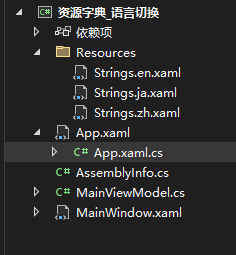 3个语言文件
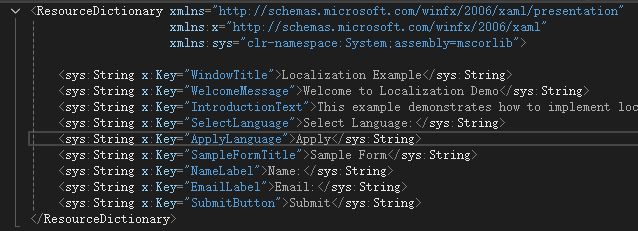 这个就展示一个英语的,其它的不展示
<Application x:Class="资源字典_语言切换.App"
             xmlns="http://schemas.microsoft.com/winfx/2006/xaml/presentation"
             xmlns:x="http://schemas.microsoft.com/winfx/2006/xaml"
             xmlns:local="clr-namespace:资源字典_语言切换"
             StartupUri="MainWindow.xaml">
    <Application.Resources>
        <!-- 默认加载(合并)英文资源 -->
        <ResourceDictionary>
            <ResourceDictionary.MergedDictionaries>
                <ResourceDictionary Source="Resources/Strings.en.xaml"/>
            </ResourceDictionary.MergedDictionaries>
        </ResourceDictionary>
    </Application.Resources>
</Application>
在APPxaml中默认加载英文的,在APP的cs文件中这个方法,可以改变加载的文件名,面板就可以任意切换语言了
using System.Windows;

namespace 资源字典_语言切换
{
    /// <summary>
    /// Interaction logic for App.xaml
    /// </summary>
    public partial class App : Application
    {
        public static void ChangeLanguage(string languageCode)
        {
            // 清除现有资源
            Current.Resources.MergedDictionaries.Clear();

            // 根据语言代码加载对应的资源字典
            string resourcePath = $"Resources/Strings.{languageCode}.xaml";
            var resourceDict = new ResourceDictionary
            {
                Source = new Uri(resourcePath, UriKind.Relative)
            };

            Current.Resources.MergedDictionaries.Add(resourceDict);
        }
    }

}
我们的主界面代码绑定的话,如下只是其中一个,可多个控件绑定多个资源属性。
<TextBlock Text="{DynamicResource WelcomeMessage}" FontSize="24" FontWeight="Bold"/>
资源也可以在代码中添加删除操作,如下
// 获取应用级资源字典
var appResources = Application.Current.Resources;

// 添加资源
appResources.Add("DynamicBrush", new SolidColorBrush(Colors.Orange));

// 修改资源
if (appResources.Contains("RedBrush"))
{
    appResources["RedBrush"] = new SolidColorBrush(Colors.DarkRed);
}

// 删除资源
appResources.Remove("OldBrush");

// 读取资源
var brush = appResources["DynamicBrush"] as SolidColorBrush;
3. 资源查找顺序
下面这个XAML 下表示所有的按钮只要没指定key,默认都会是这个样式,因为窗口资源已定义好


<Window x:Class="HeBianGuTest.MainWindow"
        xmlns="http://schemas.microsoft.com/winfx/2006/xaml/presentation"
        xmlns:x="http://schemas.microsoft.com/winfx/2006/xaml"
        xmlns:d="http://schemas.microsoft.com/expression/blend/2008"
        xmlns:mc="http://schemas.openxmlformats.org/markup-compatibility/2006"
        xmlns:local="clr-namespace:HeBianGuTest"
        mc:Ignorable="d"
        Title="MainWindow" Height="450" Width="800">
    <Window.Resources>
        <Style TargetType="Button">
            <Setter Property="HorizontalAlignment" Value="Center" />
            <Setter Property="VerticalAlignment" Value="Center" />
            <Setter Property="Padding" Value="10,6" />
            <Setter Property="Background" Value="Blue"/>
        </Style>
    </Window.Resources>
    <Grid>
        <Grid.RowDefinitions >
            <RowDefinition/>
            <RowDefinition/>
            <RowDefinition/>
            <RowDefinition/>
        </Grid.RowDefinitions>
        <Button Content="A" Grid.Row="0"/>
        <Button Content="B" Grid.Row="1"/>
        <Button Content="C" Grid.Row="2"/>
        <Button Content="D" Grid.Row="3"/>
    </Grid>
</Window>
资源与触发器结合
<ResourceDictionary>
    <SolidColorBrush x:Key="NormalBrush" Color="Gray"/>
    <SolidColorBrush x:Key="HoverBrush" Color="Blue"/>

    <Style TargetType="Button">
        <Setter Property="Background" Value="{StaticResource NormalBrush}"/>
        <Style.Triggers>
            <!-- 鼠标悬停时切换资源 -->
            <Trigger Property="IsMouseOver" Value="True">
                <Setter Property="Background" Value="{StaticResource HoverBrush}"/>
            </Trigger>
        </Style.Triggers>
    </Style>
</ResourceDictionary>
共享大型资源(如图片、字体)
对于占用内存较大的资源(如BitmapImage、FontFamily),通过资源字典共享可避免重复创建,优化性能。
<ResourceDictionary>
    <!-- 共享图片资源 -->
    <BitmapImage x:Key="LogoImage" UriSource="Images/logo.png" CacheOption="OnLoad"/>
    <!-- 共享字体资源 -->
    <FontFamily x:Key="CustomFont" Source="Fonts/#Roboto"/>
</ResourceDictionary>
一下是简单的数据模板示例
cs
using System.Collections.Generic;
using System.Windows;

namespace SimpleDataTemplateDemo
{
    public partial class MainWindow : Window
    {
        public MainWindow()
        {
            InitializeComponent();
            DataContext = this; // 设置窗口自身为数据上下文
            People = new List<Person>
            {
                new Person { Name = "张三", Age = 25 },
                new Person { Name = "李四", Age = 30 },
                new Person { Name = "王五", Age = 35 }
            };
        }

        public List<Person> People { get; set; }
    }

    public class Person
    {
        public string Name { get; set; }
        public int Age { get; set; }
    }
}
xaml
<Window x:Class="SimpleDataTemplateDemo.MainWindow"
        xmlns="http://schemas.microsoft.com/winfx/2006/xaml/presentation"
        xmlns:x="http://schemas.microsoft.com/winfx/2006/xaml"
        xmlns:d="http://schemas.microsoft.com/expression/blend/2008"
        xmlns:mc="http://schemas.openxmlformats.org/markup-compatibility/2006"
        xmlns:local="clr-namespace:SimpleDataTemplateDemo"
        mc:Ignorable="d"
        Title="简单 DataTemplate 示例" Height="200" Width="300">
    <Window.Resources>
        <!-- 定义基础数据模板 -->
        <DataTemplate x:Key="PersonTemplate">
            <StackPanel Orientation="Horizontal" Margin="5">
                <Ellipse Width="40" Height="40" Fill="LightBlue" Margin="0 0 10 0" />
                <StackPanel>
                    <TextBlock Text="{Binding Name}" FontWeight="Bold" />
                    <TextBlock Text="{Binding Age, StringFormat='年龄: {0}'}" Foreground="Gray" />
                </StackPanel>
            </StackPanel>
        </DataTemplate>
    </Window.Resources>
    <!--数据源是People属性,数据模板是PersonTemplate-->
    <ListBox ItemsSource="{Binding People}" ItemTemplate="{StaticResource PersonTemplate}"/>
</Window>

 浙公网安备 33010602011771号