聊聊filezilla 3.7.2 传输文件逻辑
之前接触filezilla是公司有一个定制filezilla的需求。需要filezilla基础上增加一些功能。也了解过filezilla的建立连接,和传输文件。传输文件一直是比较复杂的逻辑。有一个大概的了解。近期有点时间,不甘心捡起来,经过反复调试,现在理解的比较清晰了。特写此文档,记录一下。
本人系统是英文的,通常上传时通过本地视图,选中文件(夹)上传,来传输文件。上传是一般用英文单词uload。在项目中查找upload,有很多记录。集中在LocalListView.cpp中有如下代码
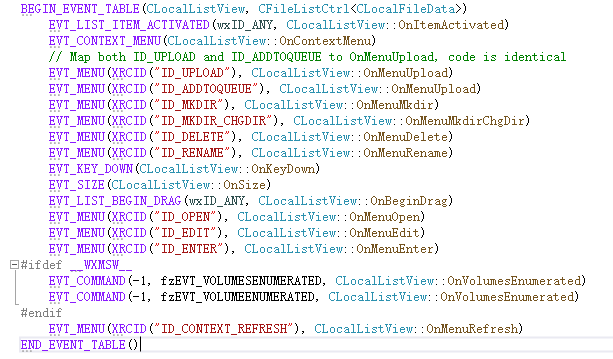
可以看到 ID_UPLOAD 对应的处理函数CLocalListView::OnMenuUpload是我们关心的。
在 void CLocalListView::OnMenuUpload(wxCommandEvent& event) 函数中。关键代码为
m_pQueue->QueueFile(queue_only, false, data->name, wxEmptyString, m_dir, remotePath, site, data->size);
m_pQueue->QueueFile_Finish(!queue_only);
m_pQueue定义是CQueueView *m_pQueue。
QueueFile是将传输任务放到队列中 ,关键代码是 InsertItem(pServerItem, fileItem);
QueueFile_Finish处理传输的逻辑。关键函数是 AdvanceQueue(false);
AdvanceQueue中关键的函数时 TryStartNextTransfer。如下:省去不相关的代码。
void CQueueView::AdvanceQueue(bool refresh)
{
	while (TryStartNextTransfer()) {
	}
}
在函数bool CQueueView::TryStartNextTransfer()实现中,重要代码如下。
bool CQueueView::TryStartNextTransfer()
{
	// Find idle engine
	t_EngineData* pEngineData;
	if (bestMatch.pEngineData) {
		pEngineData = bestMatch.pEngineData;
	}
	else {
		pEngineData = GetIdleEngine(bestMatch.serverItem->GetSite());
		if (!pEngineData) {
			return false;
		}
	}

	SendNextCommand(*pEngineData);

	return true;
}
继续跟踪SendNextCommand函数,关键代码如下
 1 void CQueueView::SendNextCommand(t_EngineData& engineData)
 2 {
 3     for (;;) {
 4         if (engineData.state == t_EngineData::transfer) {
 5             CFileItem* fileItem = engineData.pItem;
 6
 7             fileItem->SetStatusMessage(CFileItem::Status::transferring);
 8             RefreshItem(engineData.pItem);
 9
10             int res;
11             if (!fileItem->Download()) {
12                 auto cmd = CFileTransferCommand(file_reader_factory(fileItem->GetLocalPath().GetPath() + fileItem->GetLocalFile()),
13                     fileItem->GetRemotePath(), fileItem->GetRemoteFile(), fileItem->flags());
14                 res = engineData.pEngine->Execute(cmd);
15             }
16             else {
17                 auto cmd = CFileTransferCommand(file_writer_factory(fileItem->GetLocalPath().GetPath() + fileItem->GetLocalFile()),
18                     fileItem->GetRemotePath(), fileItem->GetRemoteFile(), fileItem->flags());
19                 res = engineData.pEngine->Execute(cmd);
20             }
21         }
22     }
23 }
fileItem->Download()如果返回true,那就是下载。返回false就是上传。现在要关注命令CFileTransferCommand。
engineData.pEngine->Execute(cmd)执行的是int CFileZillaEnginePrivate::Execute(CCommand const& command)。实现如下
 1 int CFileZillaEnginePrivate::Execute(CCommand const& command)
 2 {
 3     if (!command.valid()) {
 4         logger_->log(logmsg::debug_warning, L"Command not valid");
 5         return FZ_REPLY_SYNTAXERROR;
 6     }
 7
 8     fz::scoped_lock lock(mutex_);
 9
10     int res = CheckCommandPreconditions(command, true);
11     if (res != FZ_REPLY_OK) {
12         return res;
13     }
14
15     currentCommand_.reset(command.Clone());
16     send_event<CCommandEvent>();
17
18     return FZ_REPLY_WOULDBLOCK;
19 }
CFileZillaEnginePrivate::Execute 将CFileTransferCommand 保存到当前currentCommand_。然后调用send_event。filezilla的事件引擎,会
调用CFileZillaEnginePrivate::operator()函数。来处理CCommandEvent事件。CFileZillaEnginePrivate::operator()实现如下:
void CFileZillaEnginePrivate::operator()(fz::event_base const& ev)
{
    fz::scoped_lock lock(mutex_);

    fz::dispatch<CFileZillaEngineEvent, CCommandEvent, CAsyncRequestReplyEvent, fz::timer_event, CInvalidateCurrentWorkingDirEvent, options_changed_event>(ev, this,
        &CFileZillaEnginePrivate::OnEngineEvent,
        &CFileZillaEnginePrivate::OnCommandEvent,
        &CFileZillaEnginePrivate::OnSetAsyncRequestReplyEvent,
        &CFileZillaEnginePrivate::OnTimer,
        &CFileZillaEnginePrivate::OnInvalidateCurrentWorkingDir,
        &CFileZillaEnginePrivate::OnOptionsChanged
        );
}
调用CFileZillaEnginePrivate::operator()是参数是CCommandEvent类。fz::dispatch 找到CCommandEvent处理函数
CFileZillaEnginePrivate::OnCommandEvent。OnCommandEvent 中只关注Command::transfer的处理。代码如下:
 1 void CFileZillaEnginePrivate::OnCommandEvent()
 2 {
 3     if (currentCommand_) {
 4         CCommand & command = *currentCommand_;
 5         Command id = command.GetId();
 6
 7         int res = CheckCommandPreconditions(command, false);
 8         if (res == FZ_REPLY_OK) {
 9             switch (command.GetId())
10             {
11             case Command::connect:
12                 res = Connect(static_cast<CConnectCommand const&>(command));
13                 break;
14             case Command::transfer:
15                 res = FileTransfer(static_cast<CFileTransferCommand const&>(command));
16                 break;
17             default:
18                 res = FZ_REPLY_SYNTAXERROR;
19             }
20         }
21         if (res == FZ_REPLY_CONTINUE) {
22             if (controlSocket_) {
23                 controlSocket_->SendNextCommand();
24             }
25             else {
26                 ResetOperation(FZ_REPLY_INTERNALERROR);
27             }
28         }
29         else if (res != FZ_REPLY_WOULDBLOCK) {
30             ResetOperation(res);
31         }
32     }
33 }
  这里有几个函数都比较重要。一个一个的说。首先 controlSocket_ 值来自于调用Connect()函数。Connect()中调用了ContinueConnect()
函数,主要代码如下。
 1 int CFileZillaEnginePrivate::ContinueConnect()
 2 {
 3     const CConnectCommand *pConnectCommand = static_cast<CConnectCommand *>(currentCommand_.get());
 4     const CServer& server = pConnectCommand->GetServer();
 5
 6     switch (server.GetProtocol())
 7     {
 8     case FTP:
 9     case FTPS:
10     case FTPES:
11     case INSECURE_FTP:
12         controlSocket_ = std::make_unique<CFtpControlSocket>(*this);
13         break;
14     case SFTP:
15         controlSocket_ = std::make_unique<CSftpControlSocket>(*this);
16         break;
17     case HTTP:
18     case HTTPS:
19         controlSocket_ = std::make_unique<CHttpControlSocket>(*this);
20         break;
21 #if ENABLE_STORJ
22     case STORJ:
23     case STORJ_GRANT:
24         controlSocket_ = std::make_unique<CStorjControlSocket>(*this);
25         break;
26 #endif
27     default:
28         logger_->log(logmsg::error, _("'%s' is not a supported protocol."), CServer::GetProtocolName(server.GetProtocol()));
29         return FZ_REPLY_SYNTAXERROR|FZ_REPLY_DISCONNECTED;
30     }
31
32     controlSocket_->SetHandle(pConnectCommand->GetHandle());
33     controlSocket_->Connect(server, pConnectCommand->GetCredentials());
34     return FZ_REPLY_CONTINUE;
35 }
因为我是用FTP连接的。所以controlSocket_ = std::make_unique<CFtpControlSocket>(*this);走的这条路。
返回来再看看 CFileZillaEnginePrivate::OnCommandEvent()中关于Command::transfer的处理。可以看见调用了一个FileTransfer的函数。CFileZillaEnginePrivate::FileTransfer()实现如下:
1 int CFileZillaEnginePrivate::FileTransfer(CFileTransferCommand const& command)
2 {
3     controlSocket_->FileTransfer(command);
4     return FZ_REPLY_CONTINUE;
5 }
CFileZillaEnginePrivate::FileTransfer()中调用了controlSocket_->FileTransfer()函数。随后返回了
FZ_REPLY_CONTINUE,返回到OnCommandEvent后,根据逻辑处理,要接着调用controlSocket_->SendNextCommand()函数。先看
controlSocket_->FileTransfer()。controlSocket_是CFtpControlSocket类的智能指针。所以controlSocket_->FileTransfer()
调用的是CFtpControlSocket::FileTransfer()函数。

  CFtpControlSocket::FileTransfer()实现如下:
void CFtpControlSocket::FileTransfer(CFileTransferCommand const& cmd)
{
    log(logmsg::debug_verbose, L"CFtpControlSocket::FileTransfer()");

    auto pData = std::make_unique<CFtpFileTransferOpData>(*this, cmd);
    Push(std::move(pData));
}
  Push函数最终放到一个vector容器operations_中。然后FileTransfer函数就执行完了。不过这里要记得放入容器的CFtpFileTransferOpData类的智能指针。
后面会用到。随后调用了controlSocket_->SendNextCommand()中。CFtpControlSocket 中没有实现SendNextCommand()函数。所以调用的是
CFtpControlSocket的基类CControlSocket的实现。主要代码如下:
 1 int CControlSocket::SendNextCommand()
 2 {
 3     while (!operations_.empty()) {
 4         auto & data = *operations_.back();
 5         if (data.waitForAsyncRequest) {
 6             log(logmsg::debug_info, L"Waiting for async request, ignoring SendNextCommand...");
 7             return FZ_REPLY_WOULDBLOCK;
 8         }
 9
10         if (!CanSendNextCommand()) {
11             SetWait(true);
12             return FZ_REPLY_WOULDBLOCK;
13         }
14
15         log(data.sendLogLevel_, L"%s::Send() in state %d", data.name_, data.opState);
16         int res = data.Send();
17         if (res != FZ_REPLY_CONTINUE) {
18             if (res == FZ_REPLY_OK) {
19                 return ResetOperation(res);
20             }
21             else if (res & FZ_REPLY_DISCONNECTED) {
22                 return DoClose(res);
23             }
24             else if (res & FZ_REPLY_ERROR) {
25                 return ResetOperation(res);
26             }
27             else if (res == FZ_REPLY_WOULDBLOCK) {
28                 return FZ_REPLY_WOULDBLOCK;
29             }
30             else if (res != FZ_REPLY_CONTINUE) {
31                 log(logmsg::debug_warning, L"Unknown result %d returned by COpData::Send()", res);
32                 return ResetOperation(FZ_REPLY_INTERNALERROR);
33             }
34         }
35     }
36
37     return FZ_REPLY_OK;
38 }
CControlSocket::SendNextCommand() 的主要逻辑就是从容器中取出来一个数据来消费。调用取出来类的Send函数。
根据CFtpControlSocket::FileTransfer存放到vector的数据类型是CFtpFileTransferOpData。所以调用的是
CFtpFileTransferOpData::send()函数。CFtpFileTransferOpData::send()实现如下:
  1 int CFtpFileTransferOpData::Send()
  2 {
  3     std::wstring cmd;
  4     switch (opState)
  5     {
  6     case filetransfer_init:
  7         if (download()) {
  8             std::wstring filename = remotePath_.FormatFilename(remoteFile_);
  9             log(logmsg::status, _("Starting download of %s"), filename);
 10         }
 11         else {
 12             log(logmsg::status, _("Starting upload of %s"), localName_);
 13         }
 14
 15         localFileSize_ = download() ? writer_factory_.size() : reader_factory_.size();
 16
 17         opState = filetransfer_waitcwd;
 18
 19         if (remotePath_.GetType() == DEFAULT) {
 20             remotePath_.SetType(currentServer_.GetType());
 21         }
 22
 23         controlSocket_.ChangeDir(remotePath_);
 24         return FZ_REPLY_CONTINUE;
 25     case filetransfer_resumetest:
 26     case filetransfer_transfer:
 27         if (controlSocket_.m_pTransferSocket) {
 28             log(logmsg::debug_verbose, L"m_pTransferSocket != 0");
 29             controlSocket_.m_pTransferSocket.reset();
 30         }
 31
 32         {
 33             resumeOffset = 0;
 34             if (download()) {
 35                 // Potentially racy
 36                 localFileSize_ = writer_factory_.size();
 37                 fileDidExist_ = localFileSize_ != aio_base::nosize;
 38
 39                 if (resume_) {
 40                     resumeOffset = fileDidExist_ ? static_cast<int64_t>(localFileSize_) : 0;
 41
 42                     // Check resume capabilities
 43                     if (opState == filetransfer_resumetest) {
 44                         int res = TestResumeCapability();
 45                         if (res != FZ_REPLY_CONTINUE || opState != filetransfer_resumetest) {
 46                             return res;
 47                         }
 48                     }
 49                 }
 50                 else {
 51                     localFileSize_ = 0;
 52                 }
 53
 54                 engine_.transfer_status_.Init(remoteFileSize_, resumeOffset, false);
 55             }
 56             else {
 57                 if (resume_) {
 58                     if (remoteFileSize_ > 0) {
 59                         resumeOffset = remoteFileSize_;
 60
 61                         if (localFileSize_ != aio_base::nosize && resumeOffset >= static_cast<int64_t>(localFileSize_) && binary) {
 62                             log(logmsg::debug_info, L"No need to resume, remote file size matches local file size.");
 63
 64                             if (engine_.GetOptions().get_int(OPTION_PRESERVE_TIMESTAMPS) &&
 65                                 CServerCapabilities::GetCapability(currentServer_, mfmt_command) == yes)
 66                             {
 67                                 localFileTime_ = reader_factory_.mtime();
 68                                 if (!localFileTime_.empty()) {
 69                                     opState = filetransfer_mfmt;
 70                                     return FZ_REPLY_CONTINUE;
 71                                 }
 72                             }
 73                             return FZ_REPLY_OK;
 74                         }
 75                     }
 76                 }
 77
 78                 engine_.transfer_status_.Init(reader_factory_.size(), resumeOffset, false);
 79             }
 80
 81             controlSocket_.m_pTransferSocket = std::make_unique<CTransferSocket>(engine_, controlSocket_, download() ? TransferMode::download : TransferMode::upload);
 82             controlSocket_.m_pTransferSocket->m_binaryMode = binary;
 83             if (download()) {
 84                 auto writer = writer_factory_.open(resumeOffset, engine_, controlSocket_.m_pTransferSocket.get(), aio_base::shm_flag_none);
 85                 if (!writer) {
 86                     return FZ_REPLY_CRITICALERROR;
 87                 }
 88                 if (engine_.GetOptions().get_int(OPTION_PREALLOCATE_SPACE)) {
 89                     if (remoteFileSize_ != aio_base::nosize && remoteFileSize_ > resumeOffset) {
 90                         if (writer->preallocate(static_cast<uint64_t>(remoteFileSize_ - resumeOffset)) != aio_result::ok) {
 91                             return FZ_REPLY_ERROR;
 92                         }
 93                     }
 94                 }
 95                 controlSocket_.m_pTransferSocket->set_writer(std::move(writer), flags_ & ftp_transfer_flags::ascii);
 96             }
 97             else {
 98                 auto reader = reader_factory_.open(resumeOffset, engine_, nullptr, aio_base::shm_flag_none);
 99                 if (!reader) {
100                     return FZ_REPLY_CRITICALERROR;
101                 }
102                 controlSocket_.m_pTransferSocket->set_reader(std::move(reader), flags_ & ftp_transfer_flags::ascii);
103             }
104         }
105
106         if (download()) {
107             cmd = L"RETR ";
108         }
109         else if (resume_ && resumeOffset != 0) {
110             if (CServerCapabilities::GetCapability(currentServer_, rest_stream) == yes) {
111                 cmd = L"STOR "; // In this case REST gets sent since resume offset was set earlier
112             }
113             else {
114                 cmd = L"APPE ";
115             }
116         }
117         else {
118             cmd = L"STOR ";
119         }
120         cmd += remotePath_.FormatFilename(remoteFile_, !tryAbsolutePath_);
121
122         opState = filetransfer_waittransfer;
123         controlSocket_.Transfer(cmd, this);
124         return FZ_REPLY_CONTINUE;
125     default:
126         log(logmsg::debug_warning, L"Unhandled opState: %d", opState);
127         return FZ_REPLY_ERROR;
128     }
129
130     if (!cmd.empty()) {
131         return controlSocket_.SendCommand(cmd);
132     }
133
134     return FZ_REPLY_WOULDBLOCK;
135 }
第一次调用CFtpFileTransferOpData::Send()时,opState是初始值。也就是会走filetransfer_init分支。opState状态会被切换为filetransfer_waitcwd。然后调用 controlSocket_.ChangeDir(remotePath_); 执行的是CFtpControlSocket::ChangeDir()函数。执行逻辑如下:
 1 void CFtpControlSocket::ChangeDir(CServerPath const& path, std::wstring const& subDir, bool link_discovery)
 2 {
 3     auto pData = std::make_unique<CFtpChangeDirOpData>(*this);
 4     pData->path_ = path;
 5     pData->subDir_ = subDir;
 6     pData->link_discovery_ = link_discovery;
 7
 8     if (!operations_.empty() && operations_.back()->opId == Command::transfer &&
 9         !static_cast<CFtpFileTransferOpData &>(*operations_.back()).download())
10     {
11         pData->tryMkdOnFail_ = true;
12         assert(subDir.empty());
13     }
14
15     Push(std::move(pData));
16 }
可以看到CFtpControlSocket::ChangeDir()函数将CFtpChangeDirOpData类对象智能指针放入到容器中。CFtpFileTransferOpData::Send()执行完filetransfer_init,返回到CControlSocket::SendNextCommand()中。因为现在容器不是空的。继续取出下一个。然后调用send()函数,也就是CFtpChangeDirOpData::Send()函数。 实现如下:
 1 int CFtpChangeDirOpData::Send()
 2 {
 3     std::wstring cmd;
 4     switch (opState)
 5     {
 6     case cwd_init:
 7         if (path_.GetType() == DEFAULT) {
 8             path_.SetType(currentServer_.GetType());
 9         }
10
11         if (path_.empty()) {
12             if (currentPath_.empty()) {
13                 opState = cwd_pwd;
14             }
15             else {
16                 return FZ_REPLY_OK;
17             }
18         }
19         else {
20             if (!subDir_.empty()) {
21                 // Check if the target is in cache already
22                 target_ = engine_.GetPathCache().Lookup(currentServer_, path_, subDir_);
23                 if (!target_.empty()) {
24                     if (currentPath_ == target_) {
25                         return FZ_REPLY_OK;
26                     }
27
28                     path_ = target_;
29                     subDir_.clear();
30                     opState = cwd_cwd;
31                 }
32                 else {
33                     // Target unknown, check for the parent's target
34                     target_ = engine_.GetPathCache().Lookup(currentServer_, path_, L"");
35                     if (currentPath_ == path_ || (!target_.empty() && target_ == currentPath_)) {
36                         target_.clear();
37                         opState = cwd_cwd_subdir;
38                     }
39                     else {
40                         opState = cwd_cwd;
41                     }
42                 }
43             }
44             else {
45                 target_ = engine_.GetPathCache().Lookup(currentServer_, path_, L"");
46                 if (currentPath_ == path_ || (!target_.empty() && target_ == currentPath_)) {
47                     return FZ_REPLY_OK;
48                 }
49                 opState = cwd_cwd;
50             }
51         }
52         return FZ_REPLY_CONTINUE;
53     case cwd_cwd:
54         if (tryMkdOnFail_ && !opLock_) {
55             opLock_ = controlSocket_.Lock(locking_reason::mkdir, path_);
56         }
57         if (opLock_.waiting()) {
58             // Some other engine is already creating this directory or
59             // performing an action that will lead to its creation
60             tryMkdOnFail_ = false;
61             return FZ_REPLY_WOULDBLOCK;
62         }
63         cmd = L"CWD " + path_.GetPath();
64         currentPath_.clear();
65         break;
66
67     if (!cmd.empty()) {
68         return controlSocket_.SendCommand(cmd);
69     }
70
71     return FZ_REPLY_WOULDBLOCK;
72 }
照例先执行cwd_init分支。然后opState 会被修改为 cwd_cwd。返回 FZ_REPLY_CONTINUE。返回到CControlSocket::SendNextCommand()。会再一次循环,调用data.send()也就是CFtpChangeDirOpData::Send()函数,只不过这依次执行的分支是cwd_cwd分支。cmd 有了内容不再为空,所以会执行controlSocket_.SendCommand(cmd);跟踪CFtpControlSocket::SendCommand()函数。CFtpControlSocket::SendCommand()会执行关键代码 CRealControlSocket::Send(buffer.c_str(), buffer.size());
先保存下,未完待续。

 浙公网安备 33010602011771号