

< > 7-6 CSS3选择器 :read-write选择器
CSS3选择器 :read-write选择器
“:read-write”选择器刚好与“:read-only”选择器相反,主要用来指定当元素处于非只读状态时的样式。
示例演示
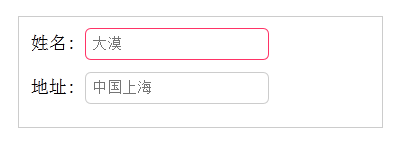
使用“:read-write”选择器来设置不是只读控件的文本框样式。
HTML代码:
<form action="#">
  <div>
    <label for="name">姓名:</label>
    <input type="text" name="name" id="name" placeholder="大漠" />
  </div>
  <div>
    <label for="address">地址:</label>
    <input type="text" name="address" id="address" placeholder="中国上海" readonly="readonly" />
  </div>
</form>
CSS代码:
form {
  width: 300px;
  padding: 10px;
  border: 1px solid #ccc;
  margin: 50px auto;
}
form > div {
  margin-bottom: 10px;
}

input[type="text"]{
  border: 1px solid orange;
  padding: 5px;
  background: #fff;
  border-radius: 5px;
}

input[type="text"]:-moz-read-only{
  border-color: #ccc;
}
input[type="text"]:read-only{
  border-color: #ccc;
}

input[type="text"]:-moz-read-write{
  border-color: #f36;
}
input[type="text"]:read-write{
  border-color: #f36;
}
结果演示:
任务
在CSS编辑的第25行设置不是只读控件的文本框边框为2px solid red。
<!DOCTYPE html>
<html>
<head>
<meta charset="utf-8">
<title>属性选择器</title>
<link href="style.css" rel="stylesheet" type="text/css">
</head>
<body>
<form action="#">
  <div>
    <label for="name">姓名:</label>
    <input type="text" name="name" id="name" placeholder="大漠" />
  </div>
  <div>
    <label for="address">地址:</label>
    <input type="text" name="address" id="address" placeholder="中国上海" readonly="readonly" />
  </div>
</form>
</body>
</html>
form {
  width: 300px;
  padding: 10px;
  border: 1px solid #ccc;
  margin: 50px auto;
}
form > div {
  margin-bottom: 10px;
}
input[type="text"]{
  border: 1px solid orange;
  padding: 5px;
  background: #fff;
  border-radius: 5px;
}
input[type="text"]:-moz-read-only{
  border-color: #ccc;
}
input[type="text"]:read-only{
  border-color: #ccc;
}
input[type="text"]:-moz-read-write{
  border:2px solid red;
}
input[type="text"]:read-write{
  border:2px solid red;
}

 浙公网安备 33010602011771号