

< > 6-12 CSS3 last-of-type选择器
CSS3 last-of-type选择器
“:last-of-type”选择器和“:first-of-type”选择器功能是一样的,不同的是他选择是父元素下的某个类型的最后一个子元素。
示例演示
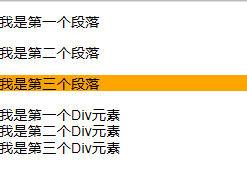
通过“:last-of-type”选择器,将容器“div.wrapper”中最后一个段落元素背景设置为橙色
(提示:这个段落不是“div.wrapper”容器的最后一个子元素)。
HTML代码:
<div class="wrapper">
  <p>我是第一个段落</p>
  <p>我是第二个段落</p>
  <p>我是第三个段落</p>
  <div>我是第一个Div元素</div>
  <div>我是第二个Div元素</div>
  <div>我是第三个Div元素</div>
</div>
CSS代码:
 .wrapper > p:last-of-type{
  background: orange;
}
演示结果:
任务
在右边CSS编辑器中的第1行输入正确的代码,将容器“div.wrapper”中最后一个Div元素背景设置为橙色。
<!DOCTYPE html>
<html>
<head>
<meta charset="utf-8">
<title>属性选择器</title>
<link href="style.css" rel="stylesheet" type="text/css">
</head>
<body>
<div class="wrapper">
  <div>我是第一个Div元素</div>
  <div>我是第二个Div元素</div>
  <div>我是第三个Div元素</div>
  <p>我是第一个段落</p>
  <p>我是第二个段落</p>
  <p>我是第三个段落</p>
</div>
</body>
</html>
.wrapper > div:last-of-type{
  background: orange;
}

 浙公网安备 33010602011771号