

< > 6-7 CSS3 结构性伪类选择器—last-child
CSS3 结构性伪类选择器—last-child
“:last-child”选择器与“:first-child”选择器作用类似,不同的是“:last-child”选择器选择的是元素的最后一个子元素。例如,需要改变的是列表中的最后一个“li”的背景色,就可以使用这个选择器,
ul>li:last-child{background:blue;}
示例演示
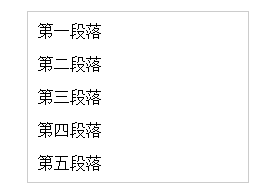
在博客的排版中,每个段落都有15px的margin-bottom,假设不想让博客“post”中最后一个段落不需要底部的margin值,可以使用“:last-child”选择器。
HTML代码:
<div class="post"> <p>第一段落</p> <p>第二段落</p> <p>第三段落</p> <p>第四段落</p> <p>第五段落</p> </div>
CSS代码:
.post {
  padding: 10px;
  border: 1px solid #ccc;
  width: 200px;
  margin: 20px auto;
}
.post p {
  margin:0 0 15px 0;
}

.post p:last-child {
  margin-bottom:0;
}
演示结果:
任务
在CSS编辑器的第十四行输入正确的代码,删除列表中最后一个列表项的底部边框。
<!DOCTYPE html>
<html>
<head>
<meta charset="utf-8">
<title>结构伪类选择器——last-child</title>
<link href="style.css" rel="stylesheet" type="text/css">
</head>
<body>
<ul>
  <li>Item1</li>
  <li>Item2</li>
  <li>Item3</li>
  <li>Item5</li>
  <li>Item6</li>
</ul>
</body>
</html>
ul {
  border: 1px solid #ccc;
  list-style: none outside none;
  width: 220px;
  margin: 20px auto;
  padding: 0;
}
ul > li {
  list-style: none outside none;
  margin:0;
  padding: 10px;
  border-bottom: 3px solid #ccc;
}
ul > li:last-child {
  border-bottom: none;
}

 浙公网安备 33010602011771号