

< > 5-4 使用单选框、复选框,让用户选择
在使用表单设计调查表时,为了减少用户的操作,使用选择框是一个好主意,html中有两种选择框,即单选框和复选框,两者的区别是单选框中的选项用户只能选择一项,而复选框中用户可以任意选择多项,甚至全选。请看下面的例子:
语法:
<input type="radio/checkbox" value="值" name="名称" checked="checked"/>
1、type:
当 type="radio" 时,控件为单选框
当 type="checkbox" 时,控件为复选框
2、value:提交数据到服务器的值(后台程序PHP使用)
3、name:为控件命名,以备后台程序 ASP、PHP 使用
4、checked:当设置 checked="checked" 时,该选项被默认选中
如下面代码:
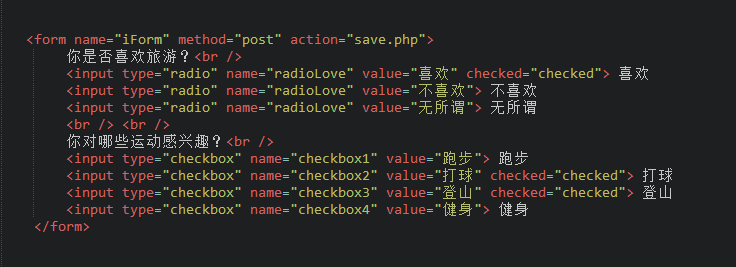
注意:代码中的<label>标签在本章 5-9 中有讲解。
在浏览器中显示的结果:
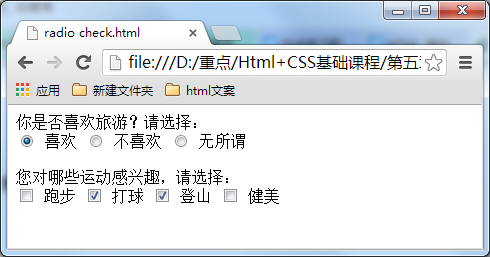
注意:同一组的单选按钮,name 取值一定要一致,比如上面例子为同一个名称“radioLove”,这样同一组的单选按钮才可以起到单选的作用。
<!DOCTYPE HTML>
<html>
<head>
<meta http-equiv="Content-Type" content="text/html; charset=utf-8">
<title>单选框、复选框</title>
</head>
<body>
<form action="save.php" method="post" >
    <label>性别:</label>
    <label>男</label>
    <input type="radio" value="1"  name="gender" checked="checked" />
    <label>女</label>
    <input type="radio" value="2"  name="gender" />
</form>
</body>
</html>
结果:

 浙公网安备 33010602011771号