
SpringBoot-Thymeleaf模板引擎
模板引擎,我们其实大家听到很多,其实jsp就是一个模板引擎,还有用的比较多的freemarker,包括SpringBoot给我们推荐的Thymeleaf,模板引擎有非常多,但再多的模板引擎,他们的思想都是一样的,什么样一个思想呢我们来看一下这张图
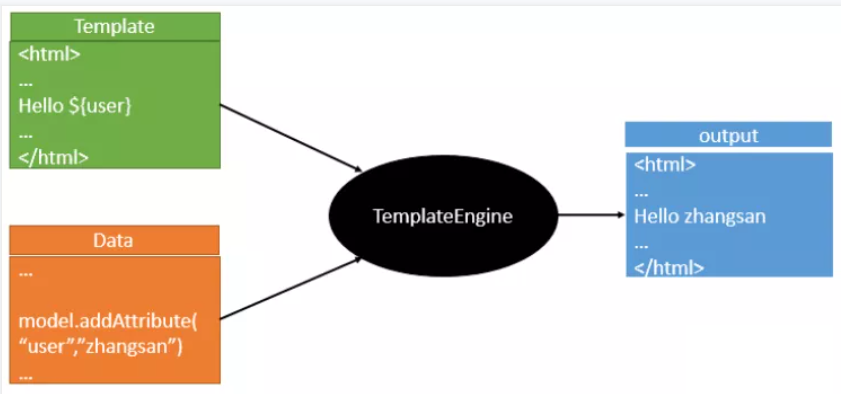
也就是说模板引擎是一个将数据和模板对应结合起来生成浏览器可显示的静态页面的组件。
不管是jsp还是其他模板引擎,都是这个思想。只不过呢,就是说不同模板引擎之间,他们可能这个语法有点不一样。其他的我就不介绍了,我主要来介绍一下SpringBoot给我们推荐的Thymeleaf模板引擎,这模板引擎呢,是一个高级语言的模板引擎,他的这个语法更简单。而且呢,功能更强大。
引入Thymeleaf
Thymeleaf 官网:https://www.thymeleaf.org/
Thymeleaf 在Github 的主页:https://github.com/thymeleaf/thymeleaf
Spring官方文档:找到对应的版本
https://docs.spring.io/spring-boot/docs/2.2.5.RELEASE/reference/htmlsingle/#using-boot-starter
找到对应的pom依赖:可以适当点进源码看下本来的包!
<!--thymeleaf-->
<dependency>
    <groupId>org.springframework.boot</groupId>
    <artifactId>spring-boot-starter-thymeleaf</artifactId>
</dependency>
Thymeleaf分析
要怎么使用呢,按照SpringBoot的自动配置原理看一下我们这个Thymeleaf的自动配置规则,再按照那个规则,我们进行使用。
我们去找一下Thymeleaf的自动配置类:ThymeleafProperties
@ConfigurationProperties(
    prefix = "spring.thymeleaf"
)
public class ThymeleafProperties {
    private static final Charset DEFAULT_ENCODING;
    public static final String DEFAULT_PREFIX = "classpath:/templates/";
    public static final String DEFAULT_SUFFIX = ".html";
    private boolean checkTemplate = true;
    private boolean checkTemplateLocation = true;
    private String prefix = "classpath:/templates/";
    private String suffix = ".html";
    private String mode = "HTML";
    private Charset encoding;
}
我们可以在其中看到默认的前缀和后缀!
我们只需要把我们的html页面放在类路径下的templates下,thymeleaf就可以帮我们自动渲染了。
使用thymeleaf什么都不需要配置,只需要将他放在指定的文件夹下即可!
测试
1、编写一个Controller
@Controller
public class ThmlfController {
    @RequestMapping("/t1")
    public String test1(){
        //classpath:/templates/test.html
        return "test";
    }
}
页面:
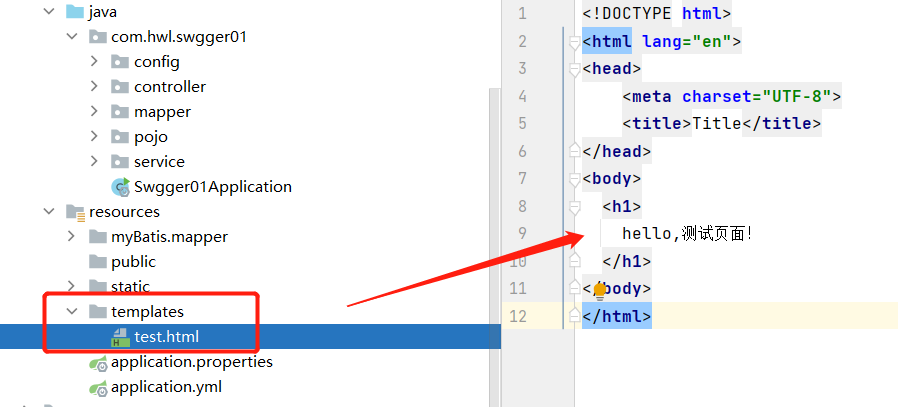
访问

Thymeleaf 语法学习
参考官网文档,Thymeleaf 官网:https://www.thymeleaf.org/
我们要使用thymeleaf,需要在html文件中导入命名空间的约束,方便提示。
xmlns:th="http://www.thymeleaf.org"
<!DOCTYPE html>
<html lang="en" xmlns:th="http://www.thymeleaf.org">
<head>
    <meta charset="UTF-8">
    <title>Title</title>
</head>
<body>
  <h1>
    hello,测试页面!
  </h1>
</body>
</html>
接受后台返回的消息:
在Controller中原来的方法添加一个Model后添加信息带回:
@Controller
public class ThmlfController {
    @RequestMapping("/t1")
    public String test1( Model model ){
        model.addAttribute("mes","后台消息");
        //classpath:/templates/test.html
        return "test";
    }
}
页面:
  <!--th:text就是将div中的内容设置为它指定的值-->
  <div th:text="${msg}"></div>
${...}:获取变量值
th:each 遍历

 浙公网安备 33010602011771号