
【IO编程】3.字节流和字符流
1. FileInputStream介绍
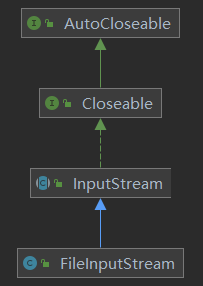
- 构造方法
- FileInputStream(String name)
- name: 文件名
- FileInputStream(File file)
- file: 文件
- FileInputStream(String name)
- 成员方法
- int read(byte[] buf)
- 批量读取字节到数组中,返回读取到的字节数,如果到文件末尾返回-1
- int read()
- 读取一个字节
- void close()
- 关闭流,需要捕获IO异常
- int read(byte[] buf)
使用FileInputStream读取文件,注意流关闭时也需要捕获IOException
@Test
public void readFile1() {
    FileInputStream fis = null;
    int readData = -1;
    try {
        // FileNotFoundException 如果找不到该文件就抛出异常
        fis = new FileInputStream("E:\\test.txt");
        // read() 方法会抛出IO异常
        while ((readData = fis.read()) != -1) {
            System.out.print((char)readData);
        }
    } catch (FileNotFoundException e) {
        e.printStackTrace();
    } catch (IOException e) {
        e.printStackTrace();
    } finally {
        if (fis != null) {
            try {
                // 流关闭时需要捕获IOException
                fis.close();
            } catch (IOException e) {
                e.printStackTrace();
            }
        }
    }
}
以上方式没有加缓存,读取效率低。可以增加一个byte数组作为缓存来提高效率,并且需要一个值去记录读取数据的长度。代码如下:
@Test
public void readFile2() {
    FileInputStream fis = null;
    // 字节数组,当作缓存来提高读取效率
    byte[] buffer = new byte[4];
    // 读取数据的长度
    int readLength = 0;
    try {
        // FileNotFoundException 如果找不到该文件就抛出异常
        fis = new FileInputStream("E:\\test.txt");
        // read() 方法会抛出IO异常
        while ((readLength = fis.read(buffer)) != -1) {
            System.out.print(new String(buffer, 0, readLength));
        }
    } catch (FileNotFoundException e) {
        e.printStackTrace();
    } catch (IOException e) {
        e.printStackTrace();
    } finally {
        if (fis != null) {
            try {
                fis.close();
            } catch (IOException e) {
                e.printStackTrace();
            }
        }
    }
}
2. FileOutputStream介绍
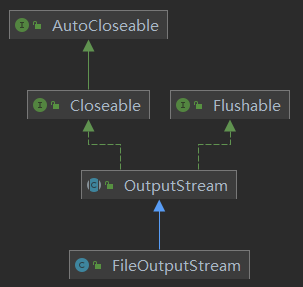
-
构造方法
- FileOutputStream(String name)
- name为文件名,调用此方法创建的对象将以覆盖的方式写文件
- FileOutputStream(File file)
- FileOutputStream(String name, boolean append)
- name为文件名,append为是否为追加方式
- append为false是以覆盖的方式写文件,为true是以追加的方式写文件
- FileOutputStream(File file, boolean append)
- FileOutputStream(String name)
-
成员方法
- write(int b)
- 写入一个字节b
- write(byte[] b)
- 写入一个字节数组b
- write(byte[] b, int off, int len)
- 写入一个字节数组b,且从索引off开始,长度为len
- void close()
- 关闭流,需要捕获IO异常
- write(int b)
将字符串内容写入到文件中,代码如下:
@Test
public void writeFile1() {
    FileOutputStream fos = null;
    try {
        fos = new FileOutputStream("e:\\test.txt");
        String str = "hello, world";
        fos.write(str.getBytes());
    } catch (FileNotFoundException e) {
        e.printStackTrace();
    } catch (IOException e) {
        e.printStackTrace();
    } finally {
        if (fos != null) {
            try {
                fos.close();
            } catch (IOException e) {
                e.printStackTrace();
            }
        }
    }
}
3. 使用FileInputStream和FileOutputStream实现文件拷贝
实现思路为每次用FileInputStream读取数据后立即使用FileOutputStream将这部分数据写入到一个新文件中。代码如下:
public boolean copyFile(String sourceFilePath, String destFilePath) {
    FileInputStream fis = null;
    FileOutputStream fos = null;
    byte[] buffer = new byte[1024];
    int readLength = 0;
    boolean success = false;

    try {
        fis = new FileInputStream(sourceFilePath);
        fos = new FileOutputStream(destFilePath);
        while ((readLength = fis.read(buffer)) != -1) {
            fos.write(buffer, 0, readLength);
        }
        success = true;
    } catch (FileNotFoundException e) {
        e.printStackTrace();
    } catch (IOException e) {
        e.printStackTrace();
    } finally {
        try {
            if (fis != null) {
                fis.close();
            }
            if (fos != null) {
                fos.close();
            }
        } catch (IOException e) {
            e.printStackTrace();
        }
    }
    return success;
}
4. FileReader介绍
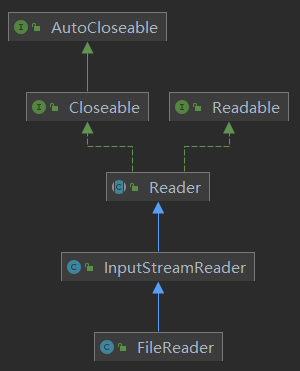
- 构造方法
- FileReader(String filename)
- FileReader(File file)
- 成员方法
- int read()
- 读取单个字符,如果到文件末尾返回-1
- int read(char[] cbuf)
- 批量读取字符到数组中,返回读取到的字符数,如果到文件末尾返回-1
- void close()
- 关闭流,需要捕获IO异常
- int read()
使用FileReader读取文件
@Test
public void readFile() {
    FileReader fr = null;
    char[] buffer = new char[4];
    int readLength = 0;
    try {
        fr = new FileReader("e:\\test.txt");
        while ((readLength = fr.read(buffer)) != -1) {
            System.out.print(new String(buffer, 0, readLength));
        }
    } catch (FileNotFoundException e) {
        e.printStackTrace();
    } catch (IOException e) {
        e.printStackTrace();
    } finally {
        if (fr != null) {
            try {
                fr.close();
            } catch (IOException e) {
                e.printStackTrace();
            }
        }
    }
}
5. FileWriter介绍
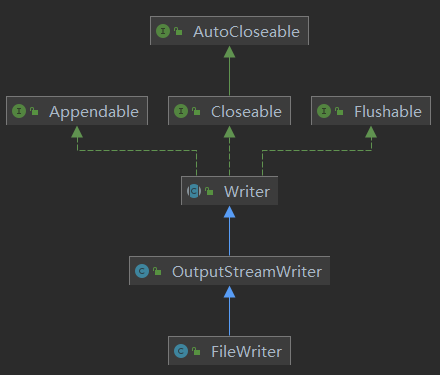
- 构造方法
- FileWriter(String filename)
- FileWriter(File file)
- FileWriter(String file, boolean append)
- FileWriter(File file, boolean append)
- 使用FileWriter(String filename)或FileWriter(File file)创建的对象是以覆盖的方式写文件。对于FileWriter(String file, boolean append)和FileWriter(File file, boolean append)而言,当append为true是为追加的方式写文件,为false是以覆盖的方式写文件。
- 成员方法
- write(int c)
- 写入单个字符
- write(char[] cbuf)
- 写入指定数组
- write(char[] cbuf, int off, int len)
- 写入指定数组的指定部分,以索引off开始,长度为len
- write(String str)
- 写入指定字符串
- write(String str, int off, int len)
- 写入指定字符串的指定部分,以索引off开始,长度为len
- void close()
- 关闭流,需要捕获IO异常
- write(int c)
- 注意:使用FileWriter后,必须调用close()方法或者flush()方法,否则无法写入内容。
使用FileWriter写入文件,代码如下:
@Test
public void writeFile() {
    FileWriter fw = null;
    try {
        fw = new FileWriter("e:\\test.txt");
        fw.write("hello, world!");
    } catch (IOException e) {
        e.printStackTrace();
    } finally {
        try {
            fw.close();
        } catch (IOException e) {
            e.printStackTrace();
        }
    }
}

 浙公网安备 33010602011771号