
17.进程管理-服务(service)管理
介绍
-
服务(service)本质就是进程,但是是运行在后台的,通常会监听某个端口,等待其他程序的请求,比如:mysqld,sshd,防火墙等。因此我们又称为守护进程。
-
service管理指令
- service 服务名 [start|stop|restart|reload|status]
- 在CentOS7.0后,很多服务不再使用service,而是systemctl
- service指令管理的服务在/etc/init.d/查看
-
# 使用service指令,查看、关闭、启动network service network status service network stop service network start -
查看服务名
- 方式1:使用setup -> 系统服务 就可以看到全部
- 方式2:/etc/init.d看到service指令管理的服务
- ls -l /etc/init.d
- 方式1:使用setup -> 系统服务 就可以看到全部
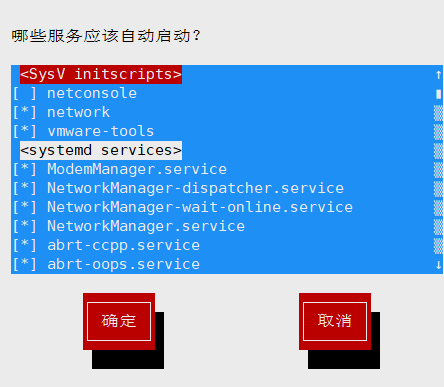
chkconfig指令
-
介绍
- 通过chkconfig命令可以给服务的各个运行级别设置自 启动/关闭
- chkconfig指令管理的服务在/etc/init.d查看
- 在CentOS7.0后,很多服务使用systemctl管理
-
语法
- chkconfig --list [| grep xxx] 【查看服务】
- chkconfig 服务名 --list
- chkconfig --level 5 服务名 on/off
-
# 对network服务 进行各种操作,把network在3运行级别关闭自启动,再打开自启动 chkconfig --level 3 network off chkconfig --level 3 network on -
使用细节:chkconfig重新设置服务后自启动或关闭,需要reboot重启机器生效
systemctl管理指令
systemctl指令管理的服务在/usr/lib/systemd/system查看
-
语法:systemctl [start|stop|restart|status] 服务名
-
systemctl设置服务的自启动状态
-
systemctl list-unit-files [|grep 服务名] 【查看服务开机启动状态,grep可以进行过滤】
-
systemctl enable 服务名 【设置服务开机启动】
-
systemctl disable 服务名 【关闭服务开机启动】
-
systemctl is-enabled 服务名 【查询某个服务是否是自启动的】
-
-
# 查看当前防火墙的状况,关闭防火墙和重启防火墙 systemctl status firewalld systemctl stop firewalld systemctl start firewalld- 细节讨论:
- 关闭或者启用防火墙后,立即生效。【telnet 测试某个端口】
- 这种方式只是临时生效,当重启系统后,还是回归以前对服务的设置。
- 如果希望设置某个服务自启动或关闭永久生效,要使用systemctl [enable|disable] 服务名 。
- 细节讨论:

 浙公网安备 33010602011771号