

python 相似度匹配重命名工具
点击查看代码
import os
import pandas as pd
from Levenshtein import ratio
import tkinter as tk
from tkinter import filedialog, messagebox, ttk
import errno


class ImageRenameTool:
    def __init__(self, root):
        self.root = root
        self.root.title("物料图片匹配重命名工具")
        # 调整窗口高度以容纳新增的注意事项区域
        self.root.geometry("650x600")

        # 初始化变量
        self.excel_path = ""
        self.image_folder = ""
        self.df = None
        self.material_map = {}

        # 创建UI组件
        self.create_widgets()

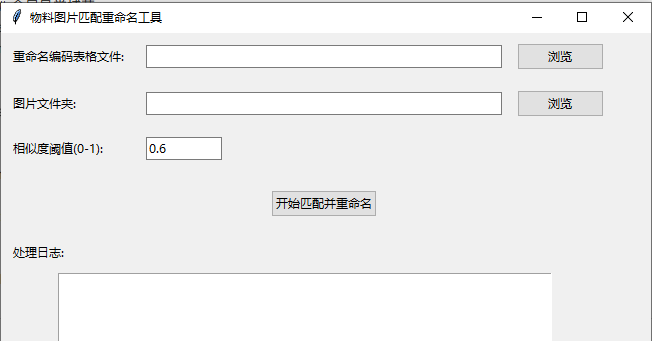
    def create_widgets(self):
        # 选择Excel文件
        ttk.Label(self.root, text="重命名编码表格文件:").grid(row=0, column=0, padx=10, pady=10, sticky="w")
        self.excel_entry = ttk.Entry(self.root, width=50)
        self.excel_entry.grid(row=0, column=1, padx=10, pady=10)
        ttk.Button(self.root, text="浏览", command=self.select_excel).grid(row=0, column=2, padx=5, pady=10)

        # 选择图片文件夹
        ttk.Label(self.root, text="图片文件夹:").grid(row=1, column=0, padx=10, pady=10, sticky="w")
        self.image_entry = ttk.Entry(self.root, width=50)
        self.image_entry.grid(row=1, column=1, padx=10, pady=10)
        ttk.Button(self.root, text="浏览", command=self.select_image_folder).grid(row=1, column=2, padx=5, pady=10)

        # 相似度阈值设置
        ttk.Label(self.root, text="相似度阈值(0-1):").grid(row=2, column=0, padx=10, pady=10, sticky="w")
        self.threshold_var = tk.DoubleVar(value=0.6)
        self.threshold_entry = ttk.Entry(self.root, textvariable=self.threshold_var, width=10)
        self.threshold_entry.grid(row=2, column=1, padx=10, pady=10, sticky="w")

        # 执行按钮
        self.run_btn = ttk.Button(self.root, text="开始匹配并重命名", command=self.run_process)
        self.run_btn.grid(row=3, column=1, pady=20)

        # 日志输出
        ttk.Label(self.root, text="处理日志:").grid(row=4, column=0, padx=10, pady=5, sticky="nw")
        self.log_text = tk.Text(self.root, width=70, height=10)
        self.log_text.grid(row=5, column=0, columnspan=3, padx=10, pady=5)

        # ========== 新增:注意事项板块 ==========
        # 创建注意事项的框架,让布局更整洁
        note_frame = ttk.LabelFrame(self.root, text="📋 注意事项")
        note_frame.grid(row=6, column=0, columnspan=3, padx=10, pady=10, sticky="nsew")

        # 准备注意事项内容
        note_content = """
【Excel表格列说明】
A列:SAP编码/商品编码(必填)
   - 物料的唯一标识编码,工具会用该编码作为图片重命名后的文件名
   - 不能为空,否则无法完成图片重命名

B列:物料名称(必填)
   - 用于和图片文件名进行相似度匹配的核心字段
   - 建议名称准确、无特殊字符,提升匹配准确率

【Excel表格无法打开的常见原因】
1. Excel文件正在被打开(未关闭),导致文件被系统占用
2. 文件路径包含特殊字符(如*、?、/等)或中文路径过长
3. 文件格式错误(仅支持.xlsx/.xls格式,不支持.csv等其他格式)
4. 文件损坏或被加密,无法正常读取
5. 无文件读取权限(如文件存放在系统盘/受保护文件夹)
        """

        # 创建注意事项文本框(只读)
        note_text = tk.Text(note_frame, width=75, height=12, wrap=tk.WORD)
        note_text.pack(padx=5, pady=5, fill=tk.BOTH, expand=True)
        note_text.insert(tk.END, note_content)
        # 设置为只读模式,防止用户修改
        note_text.config(state=tk.DISABLED)

    def is_file_locked(self, file_path):
        """检测文件是否被占用(如Excel未关闭)"""
        if not os.path.exists(file_path):
            return False
        try:
            # 尝试以写入模式打开文件,若失败则说明被占用
            with open(file_path, 'a'):
                pass
            return False
        except IOError as e:
            # 判断是否是文件被占用的错误码
            if e.errno in (errno.EACCES, errno.EPERM, 13):
                return True
            return False

    def select_excel(self):
        path = filedialog.askopenfilename(filetypes=[("Excel文件", "*.xlsx;*.xls")])
        if path:
            # 先检查文件是否被占用
            if self.is_file_locked(path):
                messagebox.warning("提示", "该Excel文件已被打开!请先关闭Excel后再选择。")
                return

            self.excel_path = path
            self.excel_entry.delete(0, tk.END)
            self.excel_entry.insert(0, path)
            # 读取表格(保留所有列,不做任何删除/修改)
            self.df = pd.read_excel(self.excel_path)

            # 仅初始化C/D/E列(图片名称/处理结果/结果详情),完全不碰A/B列
            target_cols = {
                "图片名称": "",  # C列
                "处理结果": "",  # D列
                "结果详情": ""  # E列
            }
            for col_name, default_val in target_cols.items():
                if col_name not in self.df.columns:
                    self.df[col_name] = default_val

            # 预构建物料映射字典(仅读取A/B列数据,不修改)
            self.material_map = {}
            for idx, row in self.df.iterrows():
                # 仅读取B列(物料名称)和A列(ERP编码),不修改
                material_name = str(row["物料名称"]).strip() if "物料名称" in self.df.columns else ""
                erp_code = row["ERP编码"] if "ERP编码" in self.df.columns else ""
                if material_name and erp_code:
                    if material_name not in self.material_map:
                        self.material_map[material_name] = []
                    self.material_map[material_name].append({
                        "index": idx,
                        "erp": erp_code
                    })
            self.log(f"已加载ERP表格: {os.path.basename(path)},共{len(self.df)}条物料")
            self.log("✅ 已确认:A/B列(ERP编码/物料名称)将完全保留,仅更新C/D/E列")

    def select_image_folder(self):
        folder = filedialog.askdirectory()
        if folder:
            # 修复路径重复问题:自动去重嵌套的"套件图片"
            while "套件图片\\套件图片" in folder:
                folder = folder.replace("套件图片\\套件图片", "套件图片")
            self.image_folder = folder
            self.image_entry.delete(0, tk.END)
            self.image_entry.insert(0, folder)
            self.log(f"已选择图片文件夹: {folder}")

    def log(self, msg):
        self.log_text.insert(tk.END, f"{msg}\n")
        self.log_text.see(tk.END)
        self.root.update_idletasks()

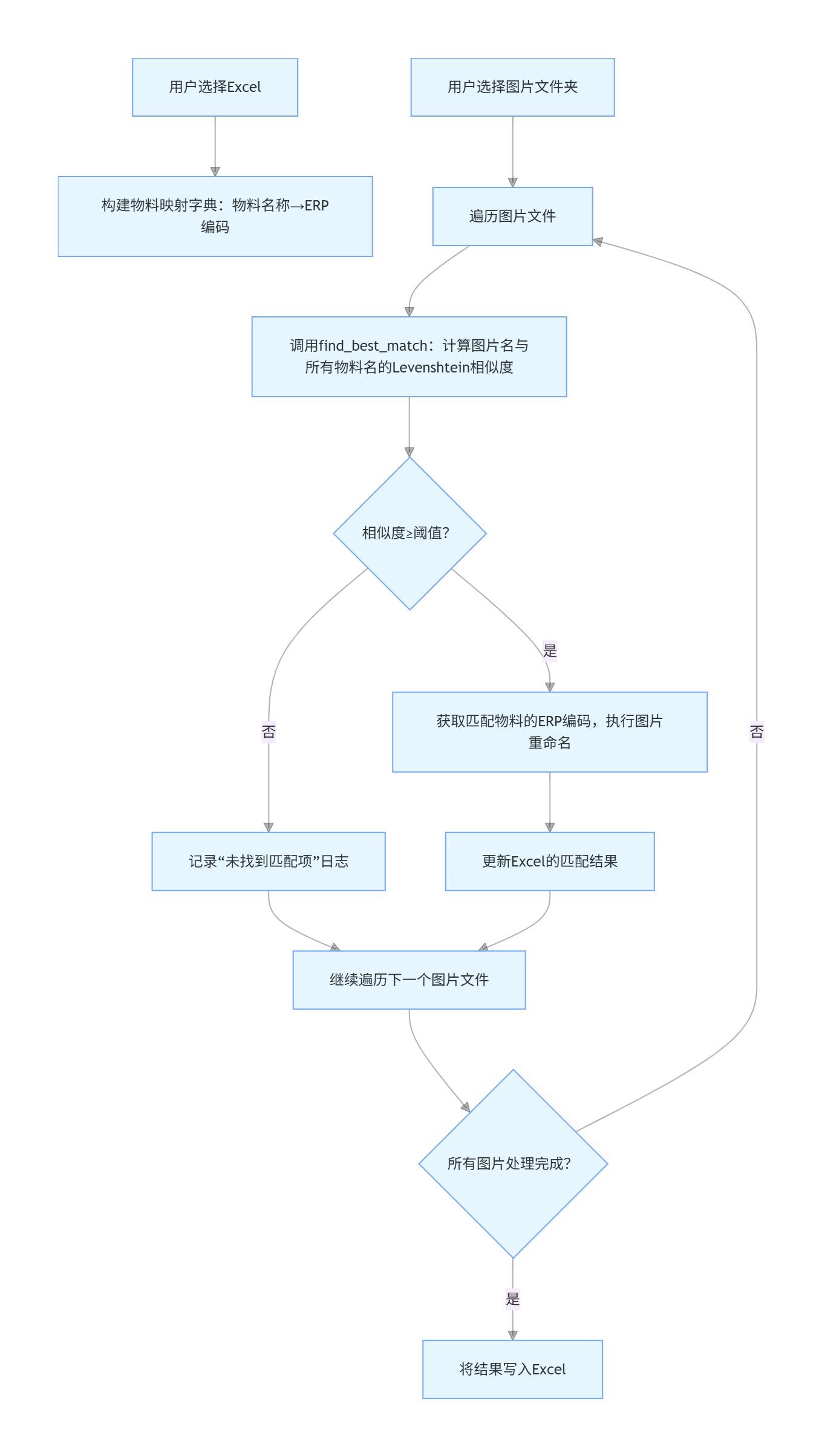
    def find_best_match(self, image_name):
        image_base = os.path.splitext(image_name)[0].strip()
        best_score = 0
        best_material = None
        for material_name in self.material_map.keys():
            score = ratio(image_base, material_name)
            if score > best_score:
                best_score = score
                best_material = material_name
        if best_score >= self.threshold_var.get():
            return best_material, best_score
        return None, 0

    def run_process(self):
        if not self.excel_path or not self.image_folder or self.df is None:
            messagebox.showwarning("提示", "请先选择ERP表格和图片文件夹!")
            return

        # 核心新增:处理前再次检查Excel是否被关闭
        if self.is_file_locked(self.excel_path):
            messagebox.showerror("错误", "检测到Excel文件仍处于打开状态!\n请先关闭该Excel文件,再点击开始处理。")
            self.log("❌ 处理终止:Excel文件未关闭")
            return

        try:
            self.log("开始处理...")
            # 仅初始化D列(处理结果)为"未找到",不改动其他列
            self.df["处理结果"] = "未找到"

            # 遍历图片文件夹
            for image_file in os.listdir(self.image_folder):
                if image_file.lower().endswith(('.jpg', '.png', '.jpeg')):
                    image_base = os.path.splitext(image_file)[0]
                    best_material, score = self.find_best_match(image_file)

                    if best_material:
                        for item in self.material_map[best_material]:
                            row_index = item["index"]
                            erp_code = item["erp"]
                            ext = os.path.splitext(image_file)[1]
                            new_name = f"{erp_code}{ext}"
                            old_path = os.path.normpath(os.path.join(self.image_folder, image_file))
                            new_path = os.path.normpath(os.path.join(self.image_folder, new_name))

                            # 先检查原文件是否存在
                            if os.path.exists(old_path):
                                try:
                                    if os.path.exists(new_path):
                                        # 仅更新C/D/E列,不碰A/B列
                                        self.df.loc[row_index, "图片名称"] = image_file  # C列:原图片名
                                        self.df.loc[row_index, "处理结果"] = "失败"  # D列:处理结果
                                        self.df.loc[row_index, "结果详情"] = "目标文件已存在,未重命名"  # E列:结果详情
                                        self.log(f"⚠️  目标文件已存在: {new_name} (原文件: {image_file})")
                                    else:
                                        # 执行重命名,仅更新C/D/E列
                                        os.rename(old_path, new_path)
                                        self.df.loc[row_index, "图片名称"] = image_file  # C列:原图片名
                                        self.df.loc[row_index, "处理结果"] = "成功"  # D列:处理结果
                                        self.df.loc[row_index, "结果详情"] = new_name  # E列:重命名后的文件名
                                        self.log(f"✅ 已重命名: {image_file} → {new_name} (相似度: {score:.2f})")
                                except Exception as e:
                                    # 仅更新C/D/E列记录错误
                                    self.df.loc[row_index, "图片名称"] = image_file
                                    self.df.loc[row_index, "处理结果"] = "失败"
                                    self.df.loc[row_index, "结果详情"] = f"错误: {str(e)}"
                                    self.log(f"❌ 重命名失败: {image_file} → {new_name},错误: {str(e)}")
                            else:
                                # 仅更新C/D/E列记录错误
                                self.df.loc[row_index, "图片名称"] = image_file
                                self.df.loc[row_index, "处理结果"] = "失败"
                                self.df.loc[row_index, "结果详情"] = "原文件不存在"
                                self.log(f"⚠️  原文件不存在: {image_file}")
                    else:
                        self.log(f"❌ 未找到匹配项: {image_file}")

            # 核心逻辑:写入原Excel文件,仅更新C/D/E列,A/B列完全保留
            try:
                # 写入前最后一次检查文件是否被占用
                if self.is_file_locked(self.excel_path):
                    raise PermissionError("Excel文件已被打开,无法写入")

                # 写入时保留所有列,仅C/D/E列被更新,A/B列数据不变
                self.df.to_excel(self.excel_path, index=False)
                self.log(f"✅ 处理完成!结果已写入原Excel文件: {self.excel_path}")
                self.log("✅ 确认:A/B列(ERP编码/物料名称)未做任何修改,仅更新C/D/E列")
                messagebox.showinfo("完成", "所有图片已处理完毕!\n✅ A/B列数据完全保留\n✅ 结果已写入C/D/E列")
            except PermissionError:
                self.log(f"❌ 无法写入Excel文件:文件可能已被打开,请先关闭Excel后重试!")
                messagebox.showerror("错误", "无法写入Excel文件!\n请先关闭已打开的该Excel文件,再重新运行。")
            except Exception as e:
                self.log(f"❌ 写入Excel失败: {str(e)}")
                messagebox.showerror("错误", f"写入Excel文件出错: {str(e)}")

        except Exception as e:
            # 全局异常捕获
            self.log(f"❌ 全局错误: {str(e)}")
            messagebox.showerror("错误", f"处理过程中出错: {str(e)}")


if __name__ == "__main__":
    root = tk.Tk()
    app = ImageRenameTool(root)
    root.mainloop()

 浙公网安备 33010602011771号