

2021-2022年寒假学习进度21
今天完成spark实验六
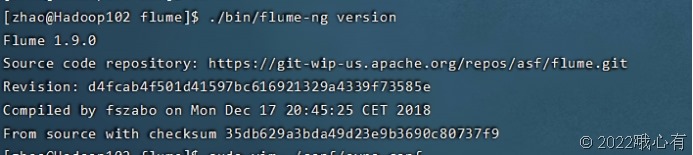
1. 安装 Flume
Flume 是 Cloudera 提供的一个分布式、可靠、可用的系统,它能够将不同数据源的海量日志数据进行高效收集、聚合、移动,最后存储到一个中心化数据存储系统中。Flume 的核心是把数据从数据源收集过来,再送到目的地。请到 Flume 官网下载 Flume1.7.0 安装文件,下载地址如下:
http://www.apache.org/dyn/closer.lua/flume/1.7.0/apache-flume-1.7.0-bin.tar.gz
或者也可以直接到本教程官网的“ 下载专区” 中的“ 软件” 目录中下载
apache-flume-1.7.0-bin.tar.gz。
下载后,把 Flume1.7.0 安装到 Linux 系统的“/usr/local/flume”目录下,具体安装和使用方法可以参考教程官网的“实验指南”栏目中的“日志采集工具 Flume 的安装与使用方
法”。

2. 使用 Avro数据源测试 Flume
Avro 可以发送一个给定的文件给 Flume,Avro 源使用 AVRO RPC 机制。请对 Flume 的相关配置文件进行设置, 从而可以实现如下功能: 在一个终端中新建一个文件helloworld.txt(里面包含一行文本“Hello World”),在另外一个终端中启动 Flume 以后,可以把 helloworld.txt 中的文本内容显示出来。
配置信息
|
sudo vim ./conf/avro.conf |
配置内容:
|
# Name the components on this agent a1.sources = r1 a1.sinks = k1 a1.channels = c1 # Describe/configure the source a1.sources.r1.type = avro a1.sources.r1.bind = 0.0.0.0 a1.sources.r1.port = 4141 # Describe the sink a1.sinks.k1.type = logger # Use a channel which buffers events in memory a1.channels.c1.type = memory a1.channels.c1.capacity = 1000 a1.channels.c1.transactionCapacity = 100 # Bind the source and sink to the channel a1.sources.r1.channels = c1 a1.sinks.k1.channel = c1 |
启动flume agent:
|
/opt/module/flume/bin/flume-ng agent -c . -f /opt/module/flume/conf/avro.conf -n a1 -Dflume.root.logger=INFO,console |

打开另一个终端,创建一个文件:
|
sudo sh -c 'echo "hello world" > /opt/module/flume/helloworld.txt' |

运行:
|
bin/flume-ng avro-client --conf conf -H localhost -p 4141 -F /opt/module/flume/helloworld.txt |
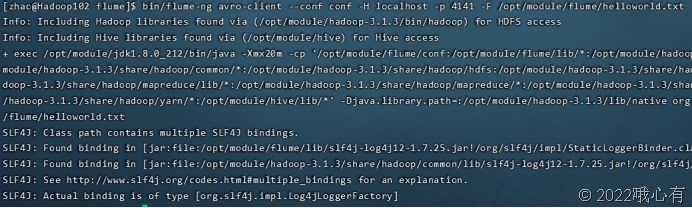
另一端:

3. 使用 netcat数据源测试 Flume
请对 Flume 的相关配置文件进行设置,从而可以实现如下功能:在一个 Linux 终端(这里称为“Flume 终端”)中,启动 Flume,在另一个终端(这里称为“Telnet 终端”)中, 输入命令“telnet localhost 44444”,然后,在 Telnet 终端中输入任何字符,让这些字符可以顺利地在 Flume 终端中显示出来。
配置信息:
|
sudo vim ./conf/example.conf |
配置内容:
|
# Name the components on this agent a1.sources = r1 a1.sinks = k1 a1.channels = c1 # Describe/configure the source a1.sources.r1.type = netcat a1.sources.r1.bind = localhost a1.sources.r1.port = 44444 #同上,记住该端口名 # Describe the sink a1.sinks.k1.type = logger # Use a channel which buffers events in memory a1.channels.c1.type = memory a1.channels.c1.capacity = 1000 a1.channels.c1.transactionCapacity = 100 # Bind the source and sink to the channel a1.sources.r1.channels = c1 a1.sinks.k1.channel = c1 |
启动:
|
/opt/module/flume/bin/flume-ng agent --conf ./conf --conf-file ./conf/example.conf --name a1 -Dflume.root.logger=INFO,console |
再打开一个终端:
使用telnet命令可能需要安装telnet:
|
yum list telnet* 列出telnet相关的安装包 yum install telnet-server 安装telnet服务 yum install telnet.* 安装telnet客户端 |
|
telnet localhost 44444 |
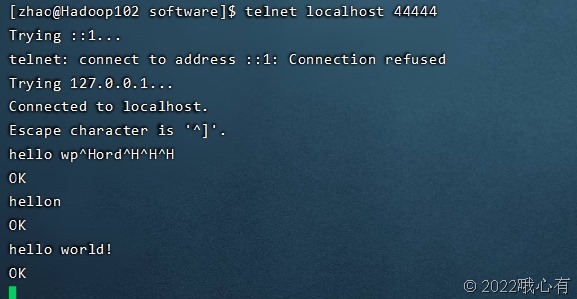
另一个终端:

4. 使用 Flume 作为 SparkStreaming数据源
Flume 是非常流行的日志采集系统,可以作为 Spark Streaming 的高级数据源。请把 Flume Source 设置为 netcat 类型,从终端上不断给 Flume Source 发送各种消息,Flume 把消息汇集到 Sink,这里把Sink 类型设置为avro,由 Sink 把消息推送给Spark Streaming,由自己编写的 Spark Streaming 应用程序对消息进行处理。
在flume的conf下创建一个flume-to-spark.conf的配置文件:
|
vim example.conf |
配置内容:
|
#flume-to-spark.conf: A single-node Flume configuration # Name the components on this agent a1.sources = r1 a1.sinks = k1 a1.channels = c1 # Describe/configure the source a1.sources.r1.type = netcat a1.sources.r1.bind = localhost a1.sources.r1.port = 33333 # Describe the sink a1.sinks.k1.type = avro a1.sinks.k1.hostname = localhost a1.sinks.k1.port =44444 # Use a channel which buffers events in memory a1.channels.c1.type = memory a1.channels.c1.capacity = 1000000 a1.channels.c1.transactionCapacity = 1000000 # Bind the source and sink to the channel a1.sources.r1.channels = c1 a1.sinks.k1.channel = c1 |
之后需要下载一个必要的包:下载地址https://mvnrepository.com/artifact/org.apache.spark/spark-streaming-flume_2.12/2.4.8
在spark文件夹下jars文件下创建一个flume文件夹
|
Cd /opt/module/spark-local/jars mkdir flume |
将包上传到虚拟机上,复制到flume文件下
|
cp /opt/software/spark-streaming-flume_2.12-2.4.8.jar /opt/module/spark-local/jars/flume/ |
再将Flume的安装路径下lib中的所有包导入这个flume文件夹下
|
cd /opt/module/flume/lib cp ./* /opt/module/spark-local/jars/flume/ |
创建一个mycode文件夹和flume文件夹编写spark程序:
|
mkdir mycode cd mycode mkdir flume cd flume mkdir -p src/main/scala cd src/main/scala vi FlumeEventCount.scala |
FlumeEventCount.scala:
|
import org.apache.spark.storage.StorageLevel import org.apache.spark.streaming._ import org.apache.spark.streaming.flume._ import org.apache.spark.util.IntParam object FlumeEventCount { def main(args: Array[String]) { if (args.length < 2) { System.err.println( "Usage: FlumeEventCount <host> <port>") System.exit(1) } StreamingExamples.setStreamingLogLevels() val Array(host, IntParam(port)) = args val batchInterval = Milliseconds(2000) // Create the context and set the batch size val sparkConf = new SparkConf().setAppName("FlumeEventCount").setMaster("local[2]") val ssc = new StreamingContext(sparkConf, batchInterval) // Create a flume stream val stream = FlumeUtils.createStream(ssc, host, port, StorageLevel.MEMORY_ONLY_SER_2) // Print out the count of events received from this server in each batch stream.count().map(cnt => "Received " + cnt + " flume events." ).print() ssc.start() ssc.awaitTermination() } } |
创建第二个Scala文件StreamingExamples.scala:
|
vim StreamingExamples.scala 内容: package org.apache.spark.examples.streaming import org.apache.log4j.{Level, Logger} import org.apache.spark.internal.Logging object StreamingExamples extends Logging { /** Set reasonable logging levels for streaming if the user has not configured log4j. */ def setStreamingLogLevels() { val log4jInitialized = Logger.getRootLogger.getAllAppenders.hasMoreElements if (!log4jInitialized) { // We first log something to initialize Spark's default logging, then we override the // logging level. logInfo("Setting log level to [WARN] for streaming example." + " To override add a custom log4j.properties to the classpath.") Logger.getRootLogger.setLevel(Level.WARN) } } } |
创建sbt:vim simple.sbt
|
name := "Simple Project" version := "1.0" scalaVersion := "2.12.10" libraryDependencies += "org.apache.spark" %% "spark-core" % "3.0.0" libraryDependencies += "org.apache.spark" % "spark-streaming_2.12" % "2.4.8" libraryDependencies += "org.apache.spark" %% "spark-streaming-flume" % "2.4.8" |
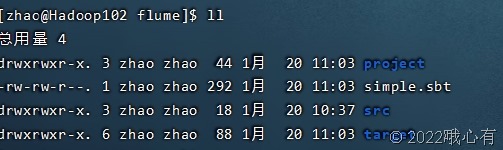
打包:
|
/opt/module/sbt/sbt package |
测试代码:
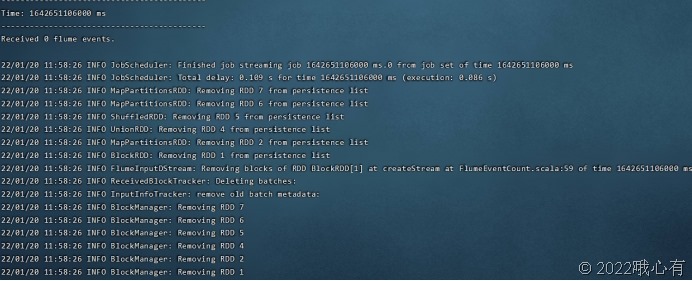
开启三个终端
第一个终端启动代码:
|
./bin/spark-submit --driver-class-path /opt/module/spark-local/jars/*:/opt/module/spark-local/jars/flume/* --class "org.apache.spark.examples.streaming.FlumeEventCount" /opt/module/mycode/flume/target/scala-2.12/simple-project_2.12-1.0.jar localhost 44444 |
第二个终端:
|
bin/flume-ng agent --conf ./conf --conf-file ./conf/flume-to-spark.conf --name a1 -Dflume.root.logger=INFO,console |

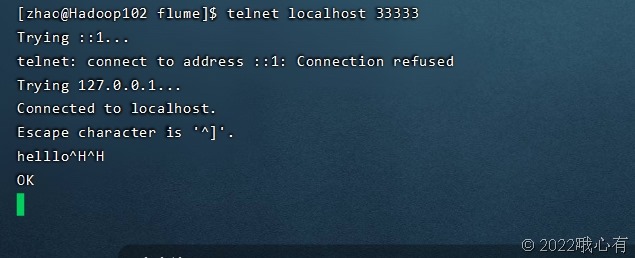
第三个终端:
|
telnet localhost 33333 |
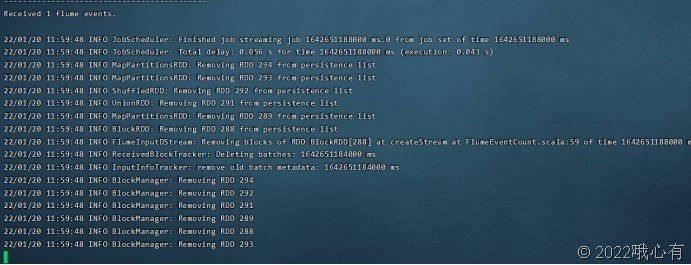
输入内容后:
接受到数据

 浙公网安备 33010602011771号