
Html盒子(相对定位、绝对定位)和用鼠标悬停把层叠的盒子显示下层的
效果图
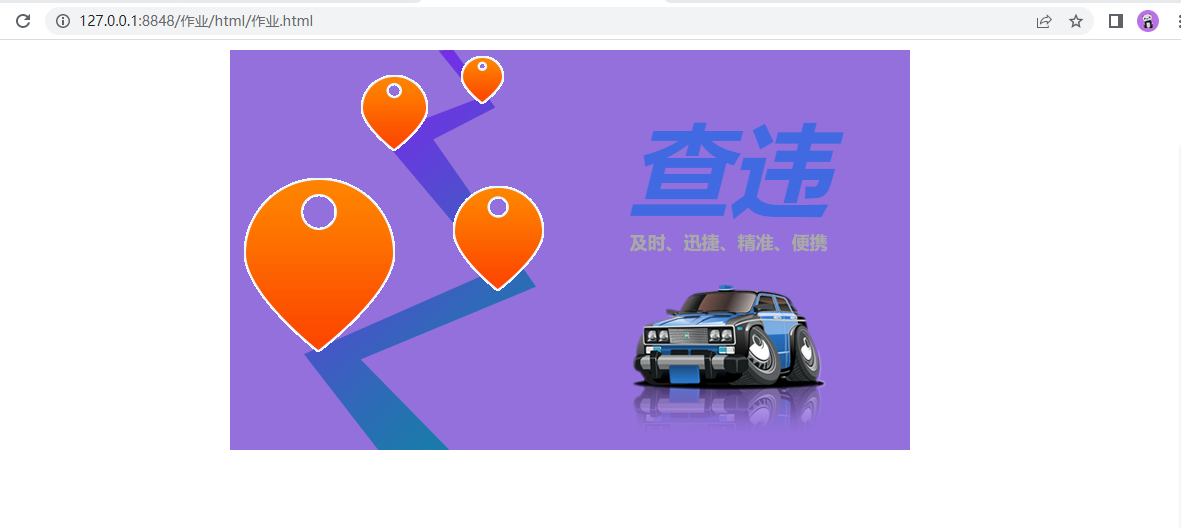
代码如下:
<!DOCTYPE html>
<html>
    <head>
        <meta charset="utf-8">
        <title></title>
        <style type="text/css">
            #box{
                width: 680px;
                height: 400px;
                margin: 10px auto;
                background-color: mediumpurple;
                position: relative;
            }

            #box #car{
                position:absolute;
                top: 220px;
                left: 390px;
            }

            #box #cartop1{
                position: absolute;
                top:50px;
                left: 400px;
                font-weight:bold;
                font-size: 100px;
                color: royalblue;
                font-style: italic
            }

            #box #cartop2{
                position: absolute;
                color: #A9A9A9;
                font-weight:bold;
                top: 180px;
                left: 400px;
                font-size: 18px;
            }

            #box #line{
                position: absolute;
                left: 70px;
            }

            #box1{
                position:relative;
                left: 230px;
                top: 5px;
                width: 100px;
            }

            #box11{
                position: absolute;
                top: 0;
                opacity:0;
            }

            #box1:hover > #box11{
                opacity: 1;
            }

            #box2{
                position:relative;
                bottom: 1.875rem;
                left: 130px;
                width: 100px;
            }

            #box22{
                position: absolute;
                top: 0;
                opacity:0;
            }

            #box2:hover > #box22{
                opacity: 1;
            }

            #box3{
                position:relative;
                width: 100px;
                left: 220px;
            }

            #box33{
                position: absolute;
                top: 0;
                opacity:0;
            }

            #box3:hover > #box33{
                opacity: 1;
            }

            #box4{
                position:relative;
                width: 100px;
                bottom: 120px;
                left: 10px;
            }

            #box44{
                position: absolute;
                top: 0;
                opacity:0;
            }

            #box4:hover > #box44{
                opacity: 1;
            }

        </style>
    </head>
    <body>
        <div id="box">

            <div id="car">
                <img src="../img/car.png" >
            </div>

            <div id="cartop1">
                <span>查违</span>
            </div>

            <div id="cartop2">
                <span>及时、迅捷、精准、便携</span>
            </div>

            <div id="line">
                <img src="../img/road.png" >
            </div>

            <div id="box1">
                <img src="../img/icon7.png" >
                <div id="box11">
                    <img src="../img/icon8.png" >
                </div>
            </div>

            <div id="box2">
                <img src="../img/icon5.png" >
                <div id="box22">
                    <img src="../img/icon6.png" >
                </div>
            </div>

            <div id="box3">
                <img src="../img/icon3.png" >
                <div id="box33">
                    <img src="../img/icon4.png" >
                </div>
            </div>

            <div id="box4">
                <img src="../img/icon1.png" >
                <div id="box44">
                    <img src="../img/icon2.png" >
                </div>
            </div>
        </div>
    </body>
</html>

 浙公网安备 33010602011771号