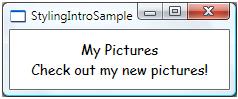
一、Style的基本用法,设置两个TextBlock居中对齐,字体和大小

 Code
Code
<Window
xmlns="http://schemas.microsoft.com/winfx/2006/xaml/presentation"
xmlns:sys="clr-namespace:System;assembly=mscorlib"
xmlns:x="http://schemas.microsoft.com/winfx/2006/xaml"
SizeToContent="WidthAndHeight">
<Window.Resources>
<!--A Style that affects all TextBlocks-->
<Style TargetType="{x:Type TextBlock}">
<Setter Property="HorizontalAlignment" Value="Center" />
<Setter Property="FontFamily" Value="Comic Sans MS"/>
<Setter Property="FontSize" Value="14"/>
</Style>
</Window.Resources>
<StackPanel>
<TextBlock>My Pictures</TextBlock>
<TextBlock>Check out my new pictures!</TextBlock>
</StackPanel>
</Window>


 浙公网安备 33010602011771号