
JavaScript+DOM+jQuery
本节内容:
- JavaScript基础
- Dom编程
- jQeury
JavaScript基础
1、存在形式
- 文件,如:
<script src="js/oldboy.js"></script> - 当前页
<script type='text/javascript'>alert('page');</script>
2、代码块的位置
<body>标签内的代码底部
3、变量和函数的声明
- 全局变量,局部变量
- 函数分为两种:基本函数、自执行函数
注意:js中函数的默认参数需要用 arguments[index] 实现
4、字符串常用方法和属性
- obj.trim()
- obj.charAt(index)
- obj.substring(start,end)
- obj.indexOf(char)
- obj.length
5、数组
- 声明,如:
var array = Array() 或 var array = [] - 添加,如:
obj.push(ele),追加
obj.unshift(ele),最前插入
obj.splice(index,0,'content') - 删除,如:
obj.pop()
obj.shift()
obj.splice(index,count) - 截取,如:
obj.slice(start,end) - 合并,如:
obj1.concat(obj2) - 翻转,如:
obj.reverse() - 字符串化,如:
obj.join('_') - 数组长度,如:
obj.length
注意:字典是一种特殊的数组
6、循环
1 var a = '123456789';
2 for(var i=0;i<10;i++){
3      console.log(a[i]);
4 }<br>
5 for(var item in a){
6      console.log(a[item]);
7 }
问:字段是否可以使用 for(var i=1;i<10;i++) 形式去循环?
DOM编程
文件对象模型(Document Object Model,简称DOM),是W3C组织推荐的处理可扩展标志语言的标准编程接口。
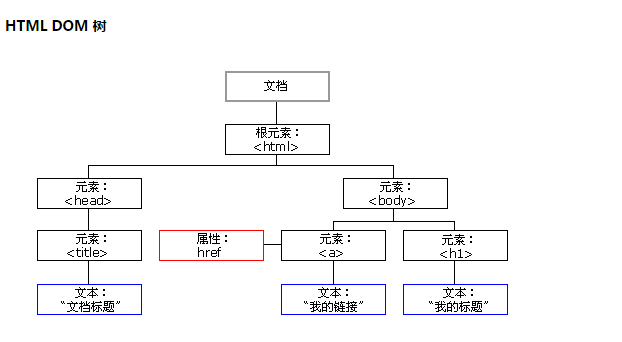
选择器:
- document.getElementById('id')
- document.getElementsByName('name')
- document.getElementsByTagName('tagname')
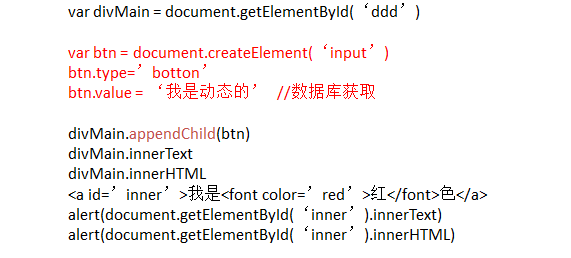
常用函数:
- 创建标签,document.createElement('a')
![]()
![]()
- 获取或者修改样式
obj.className - 获取或设置属性
setattribute(key,val) getattribute(key) - 获取或修改样式中的属性
obj.style.属性
![]()
- 提交表单
document.geElementById(‘form’).submit()


常用事件:
- onclick
- onblur
- onfocus
- on...
其他函数:
- console.log()
- alert()
- setInterval("alert()",2000); clearInterval(obj)
- setTimeout(); clearTimeout(obj)


<!DOCTYPE html>
<html>
<head>
<meta charset='utf-8' >
<title>欢迎blue shit莅临指导 </title>
<script type='text/javascript'>
function Go(){
var content = document.title;
var firstChar = content.charAt(0)
var sub = content.substring(1,content.length)
document.title = sub + firstChar;
}
setInterval('Go()',1000);
</script>
</head>
<body>
</body>
</html>
跑马灯
<!DOCTYPE html>
<html>
    <head>
        <meta charset='utf-8' />
        <title></title>

        <style>
            .gray{
                color:gray;
            }
            .black{
                color:black;
            }
        </style>
        <script type="text/javascript">
            function Enter(){
               var id= document.getElementById("tip")
               id.className = 'black';
               if(id.value=='请输入关键字'||id.value.trim()==''){
                    id.value = ''
               }
            }
            function Leave(){
                var id= document.getElementById("tip")
                var val = id.value;
                if(val.length==0||id.value.trim()==''){
                    id.value = '请输入关键字'
                    id.className = 'gray';
                }else{
                    id.className = 'black';
                }
            }
        </script>
    </head>
    <body>
        <input type='text' class='gray' id='tip' value='请输入关键字' onfocus='Enter();'  onblur='Leave();'/>
    </body>
</html>

搜索框
jQuery
jQuery是一个兼容多浏览器的javascript库,核心理念是write less,do more(写得更少,做得更多),对javascript进行了封装,是的更加便捷的开发,并且在兼容性方面十分优秀。
更多见:http://www.php100.com/manual/jquery/
返回顶部:
$(window).scrollTop()
多选框:
<!DOCTYPE html>
<html>
    <head>
        <meta charset='utf-8' />
        <title></title>
        <script type="text/javascript" src='jquery-1.8.2.js'></script>
        <script type="text/javascript">
            $(function(){
                $('#selectAll').click(function(){
                    $('#checklist :checkbox').attr('checked',true);
                })
                $('#unselectAll').click(function(){
                    $('#checklist :checkbox').attr('checked',false);
                })
                $('#reverseAll').click(function(){
                    $('#checklist :checkbox').each(function(){
                        $(this).attr('checked',!$(this).attr('checked'))
                    })
                })

            })
        </script>
    </head>
    <body>
        <div id='checklist'>
            <input type='checkbox' value='1'/>篮球
            <input type='checkbox' value='2'/>足球
            <input type='checkbox' value='3'/>羽毛球
        </div>
        <input type='button' value='全选' id='selectAll' />
        <input type='button' value='不选' id='unselectAll' />
        <input type='button' value='反选' id='reverseAll' />
    </body>
</html>

多选
菜单:
.hide{
    display: none;
}

.container{
    width:300px;
    height: 600px;
    background-color: #ddd;
    border: 1px solid #999;
}

.container .title{
    height: 38px;
    font-size: 28px;
    line-height: 38px;
    background-color: orange;
    cursor: pointer;
}

.container .body{
    background-color:white;
}

.container .body a{
    display:block;
    padding: 10px;
}

css
<!DOCTYPE html>
<html>
    <head>
        <meta charset='utf-8' />
        <link rel="stylesheet" type="text/css" href="common.css" />
        <script type="text/javascript" src='jquery-1.8.2.js'></script>

    </head>
    <body>
        <div class='container'>
            <div>
                <div class='title'>Menu1</div>
                <div class='body'>
                    <a href="">content1</a>
                    <a href="">content2</a>
                    <a href="">content3</a>
                </div>
            </div>

            <div>
                <div class='title'>Menu1</div>
                <div class='body hide'>
                    <a href="">content1</a>
                    <a href="">content2</a>
                    <a href="">content3</a>
                </div>
            </div>

            <div>
                <div class='title'>Menu1</div>
                <div class='body hide'>
                    <a href="">content1</a>
                    <a href="">content2</a>
                    <a href="">content3</a>
                </div>
            </div>

            <div>
                <div class='title'>Menu1</div>
                <div class='body hide'>
                    <a href="">content1</a>
                    <a href="">content2</a>
                    <a href="">content3</a>
                </div>
            </div>

            <div>
                <div class='title'>Menu1</div>
                <div class='body hide'>
                    <a href="">content1</a>
                    <a href="">content2</a>
                    <a href="">content3</a>
                </div>
            </div>

        </div>

        <script type="text/javascript">
            $(function(){
                $('.title').click(function(){
                    $(this).parent().siblings().children('.body').addClass('hide');
                    $(this).next().removeClass('hide');
                });
            });
        </script>
    </body>
</html>

Html
Tab:
/*公共开始*/
body {
    margin: 0 auto;
    font-family: Arial;
    _font-family: 宋体,Arial;
    font-size: 12px;
}
body, dl, dt, dd, ul, ol, li, h1, h2, h3, h4, h5, h6, pre, code, form, fieldset, legend, input, button, textarea, p, blockquote, th, td, figure, div {
    margin: 0;
    padding: 0;
}

ol, ul, li {
    list-style: none;
}
a{
    cursor:pointer;
    text-decoration:none;
}
/*a:hover{
    color: #F60 !important;
    text-decoration: underline;
}*/
img{
    border:none;
    border-width:0px;
}
table{
    border-collapse: collapse;
    border-spacing: 0;
}

.red{
    color: #c00!important;
}
.m8{
    margin:8px;
}
.mt10{
    margin-top:10px;
}
.mt20{
    margin-top:20px;
}
.mr5{
    margin-right:5px;
}
.ml5{
    margin-left:5px;
}

.ml10{
    margin-left:10px;
}

.mb10{
    margin-bottom:10px;
}
.pt18{
    padding-top:18px;
}
.pt20{
    padding-top:20px;
}
.pb20{
    padding-bottom:20px;
}
.nbr{
    border-right:0px;
}
.font12{
    font-size:12px;
}
.font14{
    font-size:14px;
}
.font16{
    font-size:16px;
}
.bold{
    font-weight:bold;
}
.left{
    float:left;
}
.right{
    float:right;
}
.hide{
    display:none;
}
.show{
     display:table;
}
.clearfix{
    clear:both;
}
.clearfix:after {
    content: ".";
    display: block;
    height: 0;
    clear: both;
    visibility: hidden;
}
* html .clearfix {zoom: 1;}

.container{
    width:1190px;
    margin-left:auto;
    margin-right:auto;

}

.group-box-1 .title{
    height: 33px;
    line-height: 33px;
    border: 1px solid #DDD;
    background: #f5f5f5;
    padding-top: 0;
    padding-left: 0;

}
.group-box-1 .title .title-font{
    display: inline-block;
    font-size: 14px;
    font-family: 'Microsoft Yahei','SimHei';
    font-weight: bold;
    color: #333;
    padding-left: 10px;
}
.group-box-1 .body {
    border: 1px solid #e4e4e4;
    border-top: none;
}

.tab-menu-box1 {
    border: 1px solid #ddd;
    margin-bottom: 20px;
}

.tab-menu-box1 .menu {
    line-height: 33px;
    height: 33px;
    background-color: #f5f5f5;
}

.tab-menu-box1 .content {
    min-height: 100px;
    border-top: 1px solid #ddd;
    background-color: white;
}

.tab-menu-box1 .menu ul {
    padding: 0;
    margin: 0;
    list-style: none;
    /*position: absolute;*/
}

.tab-menu-box1 .menu ul li {
    position: relative;
    float: left;
    font-size: 14px;
    font-family: 'Microsoft Yahei','SimHei';
    text-align: center;
    font-size: 14px;
    font-weight: bold;
    border-right: 1px solid #ddd;
    padding: 0 18px;
    cursor: pointer;
}

.tab-menu-box1 .menu ul li:hover {
    color: #c9033b;
}

.tab-menu-box1 .menu .more {
    float: right;
    font-size: 12px;
    padding-right: 10px;
    font-family: "宋体";
    color: #666;
    text-decoration: none;
}

.tab-menu-box1 .menu a:hover {
    color: #f60 !important;
    text-decoration: underline;
}

.tab-menu-box1 .menu .current {
    margin-top: -1px;
    color: #c9033b;
    background: #fff;
    height: 33px;
    border-top: 2px solid #c9033b;
    z-index: 10;
}

.tab-menu-box-2 .float-title {
    display: none;
    top: 0px;
    position: fixed;
    z-index: 50;
}

.tab-menu-box-2 .title {
    width: 890px;
    border-bottom: 2px solid #b20101;
    border-left: 1px solid #e1e1e1;
    clear: both;
    height: 32px;
}

.tab-menu-box-2 .title a {
    float: left;
    width: 107px;
    height: 31px;
    line-height: 31px;
    font-size: 14px;
    font-weight: bold;
    text-align: center;
    border-top: 1px solid #e1e1e1;
    border-right: 1px solid #e1e1e1;
    background: url(/Content/images/bg4.png?3) 0 -308px repeat-x;
    text-decoration: none;
    color: #333;
    cursor: pointer;
}

.tab-menu-box-2 .title a:hover {
    background-position: -26px -271px;
    text-decoration: none;
    color: #fff;
}

.tab-menu-box-2 .content {
    min-height: 100px;
    background-color: white;
}


.tab-menu-box3 {
    border: 1px solid #ddd;
}

.tab-menu-box3 .menu {
    line-height: 33px;
    height: 33px;
    background-color: #f5f5f5;
}

.tab-menu-box3 .content {
    height: 214px;
    border-top: 1px solid #ddd;
    background-color: white;
}

.tab-menu-box3 .menu ul {
    padding: 0;
    margin: 0;
    list-style: none;
    /*position: absolute;*/
}

.tab-menu-box3 .menu ul li {
    position: relative;
    float: left;
    font-size: 14px;
    font-family: 'Microsoft Yahei','SimHei';
    text-align: center;
    font-size: 14px;
    width:50%;
    cursor: pointer;
}

.tab-menu-box3 .menu ul li:hover {
    color: #c9033b;
}

.tab-menu-box3 .menu .more {
    float: right;
    font-size: 12px;
    padding-right: 10px;
    font-family: "宋体";
    color: #666;
    text-decoration: none;
}

.tab-menu-box3 .menu a:hover {
    color: #f60 !important;
    text-decoration: underline;
    font-weight: bold;
}

.tab-menu-box3 .menu .current {

    margin-top: -1px;
    color: #c9033b;
    background: #fff;
    height: 33px;
    border-top: 2px solid #c9033b;
    z-index: 10;
    font-weight: bold;

}

/*公共结束*/

css
<!DOCTYPE html>
<html>
<head></head>
<link href="common.css" rel="stylesheet" />
<body>
    <div class='container'>
        <div class='tab-menu-box1'>
            <div class='menu'>
                <ul id='tab-menu-title'>
                    <li class='current' content-to='1'>价格趋势</li>
                    <li content-to='2'>市场分布</li>
                    <li content-to='3'>其他</li>
                </ul>
            </div>

            <div id='tab-menu-body' class='content'>
                <div content='1'>content1</div>
                <div content='2' class='hide'>content2</div>
                <div content='3' class='hide'>content3</div>
            </div>
        </div>
    </div>
    <script src="./jquery-1.8.2.js"></script>
    <script type='text/javascript'>
    $(function(){
        ChangeTab('#tab-menu-title', '#tab-menu-body');
    })
    function ChangeTab(title, body) {
            $(title).children().bind("click", function () {
                $menu = $(this);
                $content = $(body).find('div[content="' + $(this).attr("content-to") + '"]');
                $menu.addClass('current').siblings().removeClass('current');
                $content.removeClass('hide').siblings().addClass('hide');
            });
        }
    </script>
</body>
</html>

html

 浙公网安备 33010602011771号