
winform离线免费TTS
使用 Windows 自带的 SAPI(Speech API)。这是微软提供的系统级语音合成接口,无需联网、完全免费,并且支持多种语言(取决于系统安装的语音包)。支持中文:只要系统安装了中文语音包(Win10/11 默认有)
如何添加更多语音?
设置 → 时间和语言 → 语言 → 中文(简体)→ 选项 → 下载“语音”包
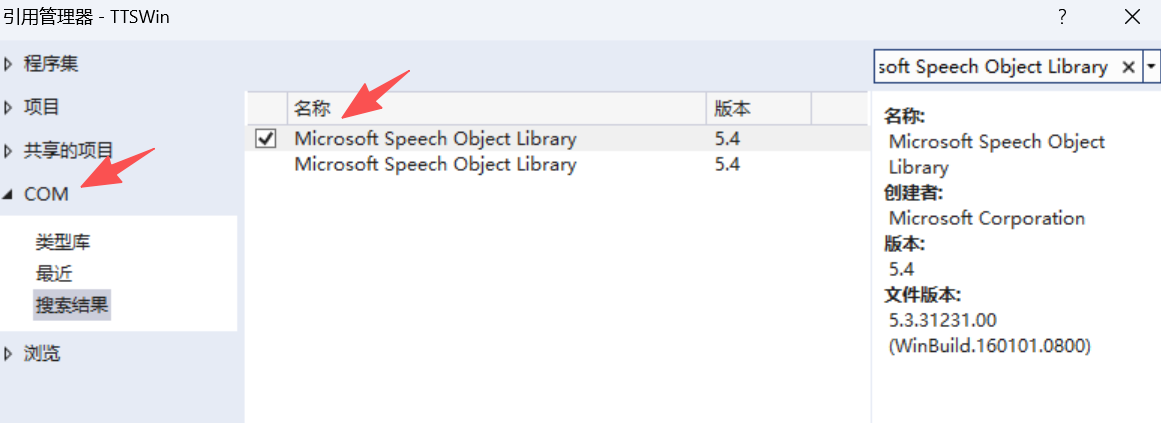
1、右键项目 → “添加引用” → “COM” → 搜索并勾选 “Microsoft Speech Object Library”(通常是 SpeechLib,版本 5.x)
2、代码实现
Form1.cs


using System;
using System.Windows.Forms;
using SpeechLib;

namespace TTSWin
{
    public partial class Form1 : Form
    {
        private SpVoice voice;


        public Form1()
        {
            InitializeComponent();
            voice = new SpVoice();

            LoadAvailableVoices();
            InitSettingsFromVoice();
        }

        private void LoadAvailableVoices()
        {
            ISpeechObjectTokens voices = voice.GetVoices();
            cbVoices.Items.Clear();
            for (int i = 0; i < voices.Count; i++)
            {
                var token = (SpObjectToken)voices.Item(i);
                string desc = token.GetDescription();
                cbVoices.Items.Add(new VoiceItem { Token = token, Description = desc });
            }
            if (cbVoices.Items.Count > 0)
                cbVoices.SelectedIndex = 0;
        }

        private void InitSettingsFromVoice()
        {
            // 默认使用当前 voice 的设置(通常 rate=0, volume=100)
            tbRate.Value = Math.Max(-10, Math.Min(10, (int)voice.Rate));
            tbVolume.Value = Math.Max(0, Math.Min(100, (int)voice.Volume));
            UpdateLabels();
        }

        private void TbRate_Scroll(object sender, EventArgs e)
        {
            voice.Rate = tbRate.Value;
            UpdateLabels();
        }

        private void TbVolume_Scroll(object sender, EventArgs e)
        {
            voice.Volume = tbVolume.Value;
            UpdateLabels();
        }

        private void UpdateLabels()
        {
            lblRate.Text = $"语速: {tbRate.Value}";
            lblVolume.Text = $"音量: {tbVolume.Value}";
        }

        private void BtnSpeak_Click(object sender, EventArgs e)
        {
            string text = textBox1.Text.Trim();
            if (string.IsNullOrEmpty(text))
            {
                MessageBox.Show("请输入文字!", "提示");
                return;
            }

            // 切换语音(如果选择了)
            if (cbVoices.SelectedItem is VoiceItem selectedItem)
            {
                voice.Voice = selectedItem.Token;
            }

            try
            {
                voice.Speak(text, SpeechVoiceSpeakFlags.SVSFlagsAsync);
            }
            catch (Exception ex)
            {
                MessageBox.Show($"朗读失败:{ex.Message}", "错误");
            }
        }

        //protected override void Dispose(bool disposing)
        //{
        //    voice?.Dispose();
        //    base.Dispose(disposing);
        //}

        // 辅助类:用于 ComboBox 绑定
        private class VoiceItem
        {
            public SpObjectToken Token { get; set; }
            public string Description { get; set; }

            public override string ToString() => Description;
        }
    }
}
Form1.Designer.cs
using System.Windows.Forms;

namespace TTSWin
{
    partial class Form1
    {
        /// <summary>
        /// 必需的设计器变量。
        /// </summary>
        private System.ComponentModel.IContainer components = null;

        /// <summary>
        /// 清理所有正在使用的资源。
        /// </summary>
        /// <param name="disposing">如果应释放托管资源,为 true;否则为 false。</param>
        protected override void Dispose(bool disposing)
        {
            if (disposing && (components != null))
            {
                components.Dispose();
            }
            base.Dispose(disposing);
        }


        private void InitializeComponent()
        {
            this.textBox1 = new TextBox();
            this.btnSpeak = new Button();
            this.cbVoices = new ComboBox();
            this.tbRate = new TrackBar();
            this.tbVolume = new TrackBar();
            this.lblRate = new Label();
            this.lblVolume = new Label();

            // TextBox
            this.textBox1.Location = new System.Drawing.Point(12, 12);
            this.textBox1.Multiline = true;
            this.textBox1.Size = new System.Drawing.Size(360, 80);
            this.textBox1.TabIndex = 0;
            this.textBox1.Text = "欢迎使用离线TTS!";

            // Voice ComboBox
            this.cbVoices.DropDownStyle = ComboBoxStyle.DropDownList;
            this.cbVoices.Location = new System.Drawing.Point(12, 100);
            this.cbVoices.Size = new System.Drawing.Size(200, 25);

            // Rate TrackBar
            this.tbRate.Minimum = -10;
            this.tbRate.Maximum = 10;
            this.tbRate.Value = 0;
            this.tbRate.Location = new System.Drawing.Point(12, 140);
            this.tbRate.Size = new System.Drawing.Size(200, 45);
            this.tbRate.Scroll += TbRate_Scroll;

            this.lblRate = new Label();
            this.lblRate.Location = new System.Drawing.Point(220, 140);
            this.lblRate.Size = new System.Drawing.Size(100, 20);
            this.lblRate.Text = "语速: 0";

            // Volume TrackBar
            this.tbVolume.Minimum = 0;
            this.tbVolume.Maximum = 100;
            this.tbVolume.Value = 100;
            this.tbVolume.Location = new System.Drawing.Point(12, 190);
            this.tbVolume.Size = new System.Drawing.Size(200, 45);
            this.tbVolume.Scroll += TbVolume_Scroll;

            this.lblVolume = new Label();
            this.lblVolume.Location = new System.Drawing.Point(220, 190);
            this.lblVolume.Size = new System.Drawing.Size(100, 20);
            this.lblVolume.Text = "音量: 100";

            // Speak Button
            this.btnSpeak.Location = new System.Drawing.Point(12, 240);
            this.btnSpeak.Size = new System.Drawing.Size(100, 30);
            this.btnSpeak.Text = "朗读";
            this.btnSpeak.Click += BtnSpeak_Click;

            // Form
            this.ClientSize = new System.Drawing.Size(384, 280);
            this.Controls.AddRange(new Control[]
            {
                this.textBox1,
                this.cbVoices,
                this.tbRate,
                this.lblRate,
                this.tbVolume,
                this.lblVolume,
                this.btnSpeak
            });
            this.Text = "离线TTS(支持语音/语速/音量)";
        }


        private ComboBox cbVoices;
        private TrackBar tbRate;
        private TrackBar tbVolume;
        private TextBox textBox1;
        private Button btnSpeak;
        private Label lblRate;
        private Label lblVolume;
    }
}
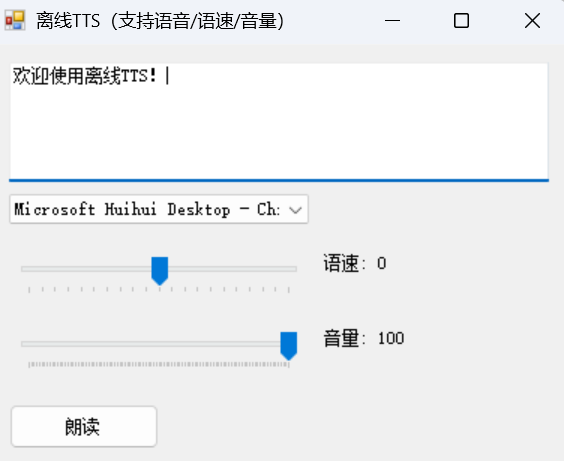
3、效果

 浙公网安备 33010602011771号