
JAVA 单选按钮
运行效果:
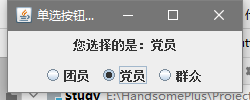
package JAVA.gui;

import javax.swing.*;
import java.awt.*;
import java.awt.event.ActionEvent;
import java.awt.event.ActionListener;

public class JRadioButtonDemo extends JFrame {
    JLabel label;
    JRadioButton radioButton1,radioButton2,radioButton3;
    JPanel jPanel;
    ButtonGroup group;
    public JRadioButtonDemo(){
        super("单选按钮示例");
        Container c=getContentPane();
        label=new JLabel("请选择",JLabel.CENTER);
        c.add(label,BorderLayout.CENTER);
        radioButton1=new JRadioButton("团员");
//        radioButton1.setActionCommand("团员");
        radioButton2=new JRadioButton("党员");
//        radioButton2.setActionCommand("党员");
        radioButton3=new JRadioButton("群众");
//        radioButton3.setActionCommand("群众");

        group=new ButtonGroup();
        group.add(radioButton1);
        group.add(radioButton2);
        group.add(radioButton3);

        jPanel=new JPanel();
        jPanel.add(radioButton1);
        jPanel.add(radioButton2);
        jPanel.add(radioButton3);
        c.add(jPanel,BorderLayout.SOUTH);

        RadioListener myLister = new RadioListener();
        radioButton1.addActionListener(myLister);
        radioButton2.addActionListener(myLister);
        radioButton3.addActionListener(myLister);
    }
    class RadioListener implements ActionListener{
        @Override
        public void actionPerformed(ActionEvent e) {
            JRadioButton rb = (JRadioButton) e.getSource();
            label.setText("您选择的是:"+rb.getText());
        }
    }

    public static void main(String[] args) {
        JFrame frame = new JRadioButtonDemo();
        frame.setDefaultCloseOperation(JFrame.EXIT_ON_CLOSE);
        frame.setSize(250,100);
        frame.setVisible(true);
    }
}
学海无涯,回头是岸

 浙公网安备 33010602011771号