
JAVA Swing 多个单选按钮组
运行效果:
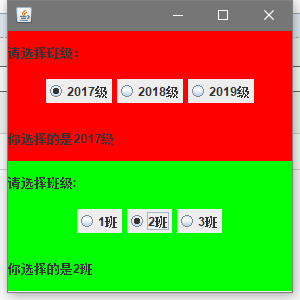
package JAVA.gui;

import javax.swing.*;
import java.awt.*;
import java.awt.event.ActionEvent;
import java.awt.event.ActionListener;

public class demo extends JFrame  {
    //用于显示选择后的信息
    JLabel info1 = new JLabel();
    JLabel info2 = new JLabel();

    JRadioButton rb1,rb2,rb3,rb4,rb5,rb6;

    public demo(){
        super();
        this.setLayout(new GridLayout(2,1));  //设置网格布局,2行1列

        //JFrame第一行内添加一个Panel,网格布局3行1列
        JPanel JP1 = new JPanel(new GridLayout(3,1));
        JP1.setBackground(Color.red);
        //JP1的第一行
        JP1.add(new JLabel("请选择班级:"));
        //JP2的第二行为一个panel,存放按钮
        JPanel jp1 = new JPanel();
        jp1.setBackground(Color.red);
        jp1.add(rb1=new JRadioButton("2017级"));
        jp1.add(rb2=new JRadioButton("2018级"));
        jp1.add(rb3=new JRadioButton("2019级"));
        ButtonGroup bg1 = new ButtonGroup();
        bg1.add(rb1);
        bg1.add(rb2);
        bg1.add(rb3);
        jp1Listener jp1Listener = new jp1Listener();
        rb1.addActionListener(jp1Listener);
        rb2.addActionListener(jp1Listener);
        rb3.addActionListener(jp1Listener);
        JP1.add(jp1);
        //JP1的第三行为显示信息的标签
        JP1.add(info1);

        //第二行也添加一个panel
        JPanel JP2 = new JPanel(new GridLayout(3,1));
        JP2.setBackground(Color.green);

        JP2.add(new JLabel("请选择班级:"));

        JPanel jp2 = new JPanel();
        jp2.setBackground(Color.green);
        jp2.add(rb4=new JRadioButton("1班"));
        jp2.add(rb5=new JRadioButton("2班"));
        jp2.add(rb6=new JRadioButton("3班"));
        ButtonGroup bg2 = new ButtonGroup();
        bg2.add(rb4);
        bg2.add(rb5);
        bg2.add(rb6);

        jp2Listener jp2Listener = new jp2Listener();
        rb4.addActionListener(jp2Listener);
        rb5.addActionListener(jp2Listener);
        rb6.addActionListener(jp2Listener);

        JP2.add(jp2);
        JP2.add(info2);

        this.add(JP1);
        this.add(JP2);

        this.setVisible(true);
        this.setDefaultCloseOperation(EXIT_ON_CLOSE);
        this.setSize(300,300);
    }
    class jp1Listener implements ActionListener{

        @Override
        public void actionPerformed(ActionEvent e) {
            info1.setText("你选择的是"+e.getActionCommand());
        }
    }
    class jp2Listener implements ActionListener{

        @Override
        public void actionPerformed(ActionEvent e) {
            info2.setText("你选择的是"+e.getActionCommand());
        }
    }

    public static void main(String[] args) {

        new demo();

    }


}
学海无涯,回头是岸

 浙公网安备 33010602011771号