C# 利用FFMpeg插件合并视频
- 下载FFMpeg插件
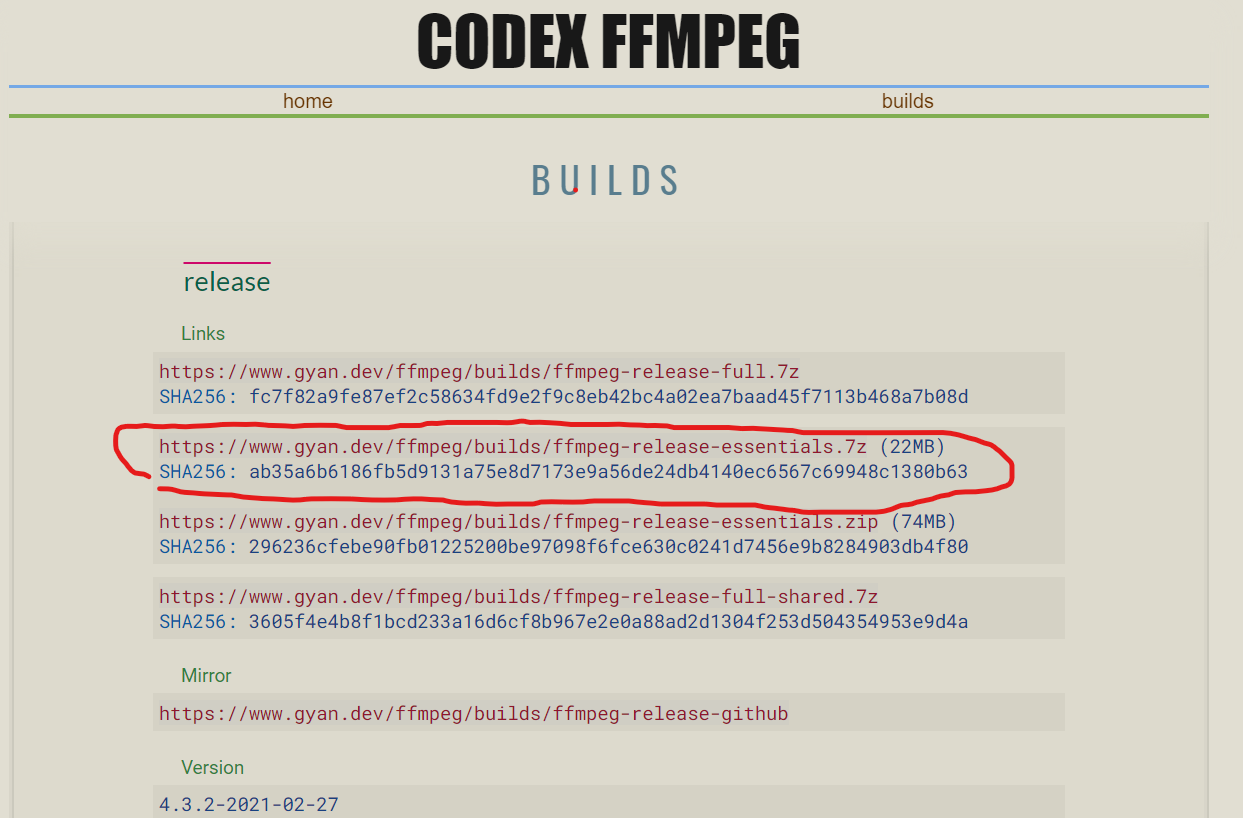
下载地址:https://www.gyan.dev/ffmpeg/builds/![]()
解压后需要用到bin文件夹里面的ffmpeg.exe这个文件![]()
准好好之后就可以开始撸代码,这里我是用winform做的一个小程序作测试用。
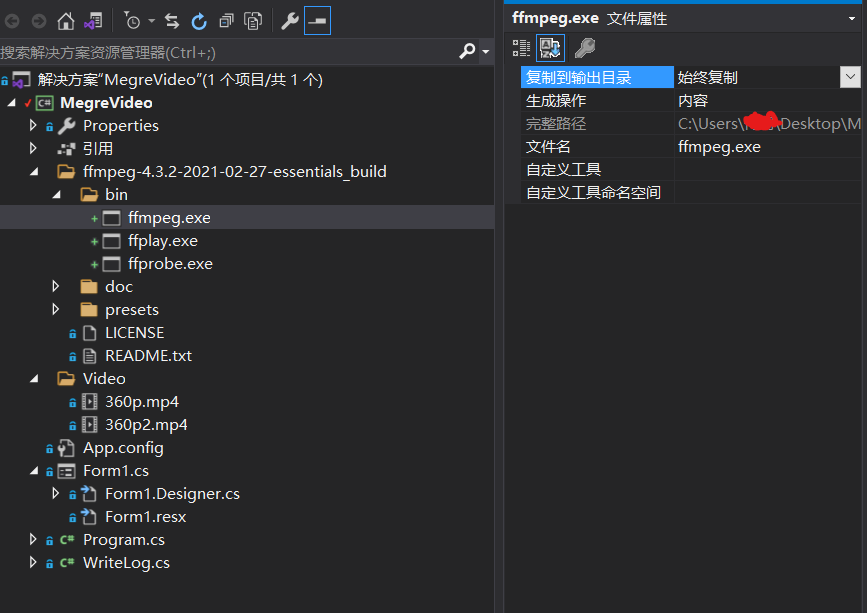
把ffmpeg.exe拷到项目目录下,属性>复制到输出目录 设置成始终复制。
准备两个MP4格式的视频,放到项目目录下 ,属性>复制到输出目录 设置成始终复制。![]()
- 利用C# System.Diagnostics.Process类调用插件,实现合并视频的需求
合并视频的步骤:
先把多个MP4类型的文件转换成.ts格式的文件
ffmpeg命令:-i file1.mp4 -vcodec copy -acodec copy -vbsf h264_mp4toannexb ts1.ts -y
-i file2.mp4 -vcodec copy -acodec copy -vbsf h264_mp4toannexb ts2.ts -y
然后再合并这些.ts文件输出合并后的mp4文件
ffmpeg命令:-i concat:ts1.ts|ts2.ts|tsN.ts -acodec copy -vcodec copy -absf aac_adtstoasc output.mp4 -y
-y的作用是在文件重名的时候,覆盖掉之前的文件,或者像我代码里面写的那样,合并完之后删除之前生成的ts文件。
Output方法是输出插件执行命令产生的的日志
        /// <summary>
        /// 开始
        /// </summary>
        /// <param name="sender"></param>
        /// <param name="e"></param>
        private void btn_start_Click(object sender, EventArgs e)
        {
            var directoryPath = AppDomain.CurrentDomain.BaseDirectory;//程序的根目录
            string tsOne = new Random().Next(0, 1000).ToString() + ".ts";
            string tstwo = new Random().Next(0, 1000).ToString() + ".ts";
            //生成临时文件
            string command = $"-i {Path.Combine(directoryPath, "Video\\360p.mp4")} -vcodec copy -acodec copy -vbsf h264_mp4toannexb  {Path.Combine(directoryPath, tsOne)} -y";

            command += $" -i {Path.Combine(directoryPath, "Video\\360p2.mp4")} -vcodec copy -acodec copy -vbsf h264_mp4toannexb  {Path.Combine(directoryPath, tstwo)} -y";
            this.Execute(command);
            //合并临时文件并输出新的视频
            string outputFile = Guid.NewGuid().ToString() + ".mp4";
            string megreCommand = $"-i concat:{Path.Combine(directoryPath,tsOne)}|{Path.Combine(directoryPath, tstwo)} -acodec copy -vcodec copy -absf aac_adtstoasc {Path.Combine(directoryPath, outputFile)} -y";
            //合并放到后面执行是因为 ts文件转换需要时间,如果三行命令一起执行的话可能会导致ts文件还未转换完毕就开始合并ts文件,这会导致报找不到ts文件的错
            this.Execute(megreCommand);
            //删除生成的ts文件
            Task.Run(() =>
            {
                if (File.Exists(tsOne)) File.Delete(Path.Combine(directoryPath, tsOne));
                if (File.Exists(tstwo)) File.Delete(Path.Combine(directoryPath, tstwo));
            });

        }
private void Execute(string command) { Process p = new Process();//建立外部调用线程 p.StartInfo.FileName =AppDomain.CurrentDomain.BaseDirectory+ "\\ffmpeg-4.3.2-2021-02-27-essentials_build\\bin\\ffmpeg.exe";//要调用外部程序的绝对路径 p.StartInfo.Arguments = command;//程序参数,字符串形式输入 p.StartInfo.UseShellExecute = false;//不使用操作系统外壳程序启动线程(一定为FALSE,详细的请看MSDN) p.StartInfo.RedirectStandardError = true;//把外部程序错误输出写到StandardError流中(这个一定要注意,FFMPEG的所有输出信息,都为错误输出流,用StandardOutput是捕获不到任何消息的.. p.StartInfo.CreateNoWindow = true;//不需要创建窗口 p.ErrorDataReceived += new DataReceivedEventHandler(Output);//外部程序(这里是FFMPEG)输出流时候产生的事件,这里是把流的处理过程转移到下面的方法中 p.Start();//启动线程 p.BeginErrorReadLine();//开始异步读取 p.WaitForExit();//阻塞等待进程结束 p.Close();//关闭进程 p.Dispose(); }
      /// <summary>
        /// 输出消息
        /// </summary>
        /// <param name="sendProcess"></param>
        /// <param name="output"></param>
        private void Output(object sendProcess, DataReceivedEventArgs output)
        {
            if (!string.IsNullOrEmpty(output.Data))
            {
                WriteLog.AddLog(output.Data);
            }
        }
using System;
using System.Collections.Concurrent;
using System.Collections.Generic;
using System.IO;
using System.Linq;
using System.Text;
using System.Threading;
using System.Threading.Tasks;

namespace MegreVideo
{
    public static class WriteLog
    {
        private static BlockingCollection<LogItem> logList = new BlockingCollection<LogItem>();

        static WriteLog()
        {
            new Thread(WriteFunc).Start();
        }

        private static void WriteFunc()
        {
            foreach (var item in logList.GetConsumingEnumerable())
            {
                try
                {
                    string dirPath = Path.Combine(AppDomain.CurrentDomain.BaseDirectory, "LogFiles", item.Type);
                    if (!Directory.Exists(dirPath))
                        Directory.CreateDirectory(dirPath);
                    string logpath = Path.Combine(dirPath, $"{DateTime.Now.ToString("yyyy-MM-dd")}.txt");
                    if (!System.IO.File.Exists(logpath))
                    {
                        var file = System.IO.File.Create(logpath);
                        file.Close();
                    }
                    string content = string.Format("{0} {1} \r\n", item.CreateTime.ToString("yyyy-MM-dd HH:mm:ss"), item.Msg);
                    content += "------------------------------------------------------------\r\n";
                    System.IO.File.AppendAllText(logpath, content);

                }
                catch (Exception ex)
                {
                    System.Threading.Thread.Sleep(1000);
                    logList.Add(item);
                }
            }
        }

        public static void AddLog(string str, string type = "log")
        {
            logList.Add(new LogItem { Msg = str, Type = type });
        }

    }

    public class LogItem
    {
        public LogItem()
        {
            _createTime = DateTime.Now;
        }


        private DateTime _createTime;
        public DateTime CreateTime
        {
            get { return _createTime; }
        }

        private string _Type;
        public string Type
        {
            get { return _Type; }
            set { _Type = value; ; }
        }


        private string _msg;

        public string Msg
        {
            get { return _msg; }
            set { _msg = value; }
        }

    }
}
执行后,输出了拼接的视频![]()
- 目前只尝试了MP4格式的,其他格式的视频暂时未做尝试。但是不同分辨率的视频也是可以完美拼接的,亲测360p与1080p可以拼接到一起,需要注意的是concat 命令 是根据文件的先后顺序进行拼接的,地址在前的,拼接后视频就在前面。
项目地址:https://github.com/Heming666/MegreVideo



 浙公网安备 33010602011771号